> ## Documentation Index
> Fetch the complete documentation index at: https://devdocs.xbox.com/llms.txt
> Use this file to discover all available pages before exploring further.
# 为服务到服务身份验证请求 User Store ID
> 描述获取用于与 Microsoft Store 服务 API 进行服务到服务身份验证的 User Store ID 所需的配置和步骤。
本文介绍获取用于 Microsoft Store 服务到服务身份验证的 User Store ID 的设置和步骤。
User Store ID 代表特定用户对 Microsoft Store API 的服务调用进行身份验证。在 XBOX 主机上,此身份与 `XUser` 对象的账号绑定。在 PC 上,此身份与登录 Microsoft Store 应用并用于购买的账号绑定。
在 PC 上,Microsoft Store 应用的账号身份可能与登录 XBOX Live 并游玩游戏的账号不同。
有关游玩账号与购买账号如何不同的更多信息,请参阅[在 PC 上处理商店账号不匹配的场景](/publishing/xstore-commerce/xstore-mismatched-accounts)。
有两种类型的 User Store ID 密钥:
1. [User Collections ID](#to-create-a-user-collections-id-key-for-the-microsoft-store-collections-service),用于对 Microsoft Store Collections 服务进行身份验证
2. [User Purchase ID](#to-create-a-user-purchase-id-key-for-the-microsoft-store-purchase-service),用于对 Microsoft Store Purchase 服务进行身份验证
以下各节概述了获取用于调用相应服务的 User Store ID 的流程:
1. [配置 Microsoft Entra ID 应用程序](#step-1-configure-a-microsoft-entra-id-application)。
2. [在合作伙伴中心将你的 Microsoft Entra 应用程序 ID 与你的客户端应用关联](#step-2-associate-your-microsoft-entra-application-id-with-your-client-app-in-partner-center)。
3. 在你的服务中,[创建代表你的发行商身份的 Microsoft Entra ID 访问令牌](#step-3-creating-microsoft-entra-id-access-tokens)。
4. 在你的游戏中,[创建代表用户身份的 User Store ID 密钥](#step-4-create-a-user-store-id-key),并将该密钥传回你的服务。
5. [对 Microsoft Store API 的请求进行身份验证](#step-5-authenticate-calls-to-the-microsoft-store-apis)。
6. 在密钥过期时[续订 User Store ID 密钥](/publishing/xstore-commerce/xstore-renew-userstoreid)。
此过程涉及两个软件组件:
* **你的服务:** 用于创建 Microsoft Entra 访问令牌并调用 Store API 的安全后端。
* **你的游戏:** 为已登录用户创建 User Store ID 密钥并将其传递给你的服务的客户端。
## Microsoft.StoreServices .NET 库和示例
若要简化集成,请使用 GitHub 上的 Microsoft.StoreServices。该库处理身份验证和密钥流程,并为 Store 服务调用提供包装器。示例包含消耗品、退款对账和密钥续订的端到端模式。
* [Microsoft.StoreServices 库](https://github.com/microsoft/Microsoft-Store-Services)
* [Microsoft.StoreServices 示例](https://github.com/microsoft/Microsoft-Store-Services-Sample)
## 步骤 1:配置 Microsoft Entra ID 应用程序
在使用 Microsoft Store API 之前,请创建一个 Microsoft Entra Web 应用程序来标识你在调用 API 时的服务。从注册的 Web 应用中获取租户 ID、应用程序 ID 和密钥,以便在后续步骤中生成所需的访问令牌。
你可以在你的发行商下的多个游戏和产品中重用 Web 应用的租户 ID、应用程序 ID 和密钥。不需要为每个游戏创建新的。
1. 如果尚未完成,请按照[快速入门:向 Microsoft 身份平台注册应用程序](https://learn.microsoft.com/en-us/azure/active-directory/develop/active-directory-integrating-applications)中的说明,向 Microsoft Entra ID 注册一个 **Web app / API** 应用程序。
> \[!NOTE] 注册应用程序时,选择 **Web app / API** 作为应用程序类型。此类型允许你为应用程序获取密钥(也称为 *client secret*)。若要调用 Microsoft Store API,在后续步骤中从 Microsoft Entra ID 请求访问令牌时,你必须提供 client secret。
2. 在 [Azure 管理门户](https://portal.azure.com/)中,转到 **Microsoft Entra ID**。在左侧窗格中选择你的目录、**App registrations**,然后选择你的应用程序。
3. 复制 **Application (client) ID** 和 **Directory (tenant) ID** 值以备后用。
4. 在左侧窗格的 **Certificates & Secrets** 下创建并复制新的 client secret。
## 步骤 2:在合作伙伴中心将你的 Microsoft Entra 应用程序 ID 与你的客户端应用关联
1. 登录[合作伙伴中心](https://partner.microsoft.com/dashboard),然后选择你的游戏。
2. 选择 **Services** > **Product collections and purchases**。在其中一个可用的 **Client ID** 字段中输入你的 Microsoft Entra 应用程序 ID。
3. 选择 **Save**。
4. 将游戏及其附加内容重新发布到商店。
附加内容产品从其父游戏的 **Product collections and purchases** 页面继承保存的 Client ID。游戏捆绑包产品有自己的 **Product collections and purchases** 页面,你需要在其中添加 Client ID。
## 步骤 3:创建 Microsoft Entra ID 访问令牌
所有 API 请求都需要在 Authorization 头中包含一个 Bearer 令牌,称为 Service 访问令牌。所需的其他访问令牌取决于你调用的是哪些服务或 API。
仅在你的服务上下文中创建 Microsoft Entra ID 访问令牌,不要在你的应用中创建。如果将 client secret 发送到你的应用,可能会遭到泄露。
### 了解不同的访问令牌与受众 URI
每个访问令牌都与用于创建它的不同受众 URI 关联。
| 访问令牌类型 | 受众 URI | 用途 |
| ---------------- | --------------------------------------------------------------------- | ----------------------------------------------------------------------------------- |
| Service 访问令牌 | `https://onestore.microsoft.com/.default` | 用于向 Store 服务端点发起请求的 Authorization 头中的 Bearer 令牌 |
| Collections 访问令牌 | `https://onestore.microsoft.com/b2b/keys/create/collections/.default` | 创建 User Collections ID (`UserCollectionsId`) 以调用 b2bLicensePreview 或 publisherQuery |
| Purchase 访问令牌 | `https://onestore.microsoft.com/b2b/keys/create/purchase/.default` | 创建 User Purchase ID (`UserPurchaseId`) 以调用 Recurrence 或其他 Purchase 服务 |
切勿将使用 `https://onestore.microsoft.com/.default` 受众的服务访问令牌发送给客户端。请在你的服务内部安全存储。
### 创建访问令牌
若要创建访问令牌,请在你的服务中使用 OAuth 2.0 API。按照 [Microsoft 身份平台和 OAuth 2.0 客户端凭据流程](https://learn.microsoft.com/en-us/azure/active-directory/develop/v2-oauth2-client-creds-grant-flow)中的说明,向 `https://login.microsoftonline.com//oauth2/v2.0/token` 端点发送 HTTP POST。以下示例展示了一个样例请求。
```syntax theme={null}
POST https://login.microsoftonline.com//oauth2/v2.0/token HTTP/1.1
Host: login.microsoftonline.com
Content-Type: application/x-www-form-urlencoded; charset=utf-8
grant_type=client_credentials
&client_id=
&client_secret=
&resource=https://onestore.microsoft.com/.default
```
对于每个令牌请求:
* 将 `client_id` 和 `client_secret` 设置为你在 [Azure 管理门户](https://portal.azure.com/)中的应用注册值。
* 将 `resource` 设置为你所需令牌类型的受众 URI。请参阅[了解不同的访问令牌与受众 URI](#understanding-the-different-access-tokens-and-audience-uris)。
你可以在现有访问令牌过期之前或之后创建新的访问令牌。
有关访问令牌结构的更多信息,请参阅[安全令牌](https://learn.microsoft.com/en-us/azure/active-directory/develop/security-tokens)。
## 步骤 4:创建 User Store ID 密钥
为了在请求中标识用户,你的服务需要获取一个 User Store ID 密钥。**User Store ID** 是 User Collections ID 或 User Purchase ID 的通用术语。这些密钥之间的唯一区别是它们可以对哪个对应的服务进行身份验证。
你可以在客户端使用 GDK API 或在你的服务上生成 User Store ID 密钥。本节重点介绍通过 GDK API 在客户端创建 User Store ID 密钥。有关如何在你的服务上生成 User Store ID 密钥的更多信息,请参阅[使用 X-token 或 OAuth 2.0 从你的服务请求 User Store ID](/publishing/xstore-commerce/xstore-requesting-userstoreid-oauth)。
User Store ID 密钥是代表登录到 Microsoft Store 应用的用户的 JSON Web Token (JWT)。有关此密钥中声明的更多信息,请参阅 [User Store ID 密钥中的声明](#claims-in-a-user-store-id-key)。
每个 User Store ID 密钥有效期为 30 天。你的服务可以在密钥过期前续订它。如果你的服务需要持续访问以查询用户的权益,请续订你的 Microsoft Store ID 密钥,而不是重新创建。有关更多信息,请参阅[续订 User Store ID 密钥](/publishing/xstore-commerce/xstore-renew-userstoreid)。
### 为 Microsoft Store Collections 服务创建 User Collections ID 密钥
User Collections ID 密钥使你能够使用 Collections API 查询用户拥有的产品并管理消耗品。有关消耗品管理的更多信息,请参阅[从你的服务管理消耗品产品](/publishing/xstore-commerce/xstore-managing-consumables)。
1. 将你在[步骤 3](#step-3-creating-microsoft-entra-id-access-tokens) 中创建的 Collections 访问令牌传递给游戏。
2. 在游戏中,调用 [XStoreGetUserCollectionsIdAsync](/reference/system/xstore/xstore_members) 检索 User Collections ID 密钥。将 Collections 访问令牌作为 `serviceTicket` 参数传递。可选地,在 `publisherUserId` 中传入你的内部用户标识符。
3. 在应用成功创建 User Collections ID 密钥后,将该密钥传回你的服务。
### 为 Microsoft Store Purchase 服务创建 User Purchase ID 密钥
User Purchase ID 密钥使你能够使用 Purchase API 查询用户拥有的产品并管理消耗品。有关消耗品管理的更多信息,请参阅[从你的服务管理消耗品产品](/publishing/xstore-commerce/xstore-managing-consumables)。
1. 将你在[步骤 3](#step-3-creating-microsoft-entra-id-access-tokens) 中创建的 Purchase 访问令牌传递给游戏。
2. 在游戏中,调用 [XStoreGetUserPurchaseIdAsync](/reference/system/xstore/xstore_members) 检索 User Purchase ID 密钥。将 Purchase 访问令牌作为 `serviceTicket` 参数传递。可选地,在 `publisherUserId` 中传入你的内部用户标识符。
3. 在应用成功创建 User Purchase ID 密钥后,将该密钥传回你的服务。
## 步骤 5:对 Microsoft Store API 的调用进行身份验证
有关说明,请参阅[使用 Microsoft Entra ID 和 User Store ID 进行身份验证](/publishing/xstore-commerce/xstore-authenticating-service#authenticating-with-microsoft-entra-id-and-user-store-ids)。
## 步骤 6:当 User Store ID 密钥过期时续订它
有关说明,请参阅[续订 User Store ID 密钥](/publishing/xstore-commerce/xstore-renew-userstoreid)。
## 附加信息
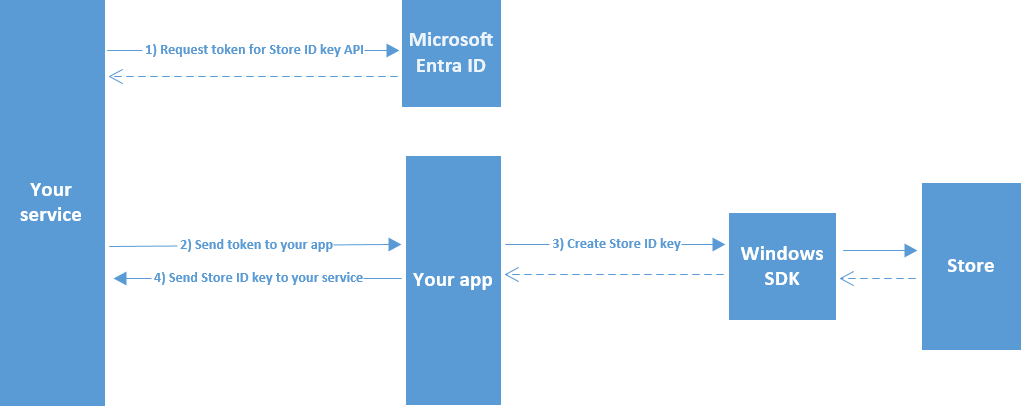
### 创建 User Store ID 密钥的示意图
下图展示了创建 User Store ID 密钥的流程。
 ### User Store ID 密钥中的声明
User Store ID 密钥是一个 JWT,代表你想要访问其产品所有权信息的用户身份。使用 Base64 解码后,User Store ID 密钥包含下表中显示的声明。
| 参数 | 类型 | 说明 |
| ------------------------------------------------------------------------ | -------- | ----------------------------------------------------------------------------------------------------------------------- |
| `iat` | `int` | 密钥颁发的时间,以纪元时间表示。使用此值确定令牌的年龄。 |
| `iss` | `string` | 标识颁发者。与 `aud` 声明的值相同。 |
| `aud` | `string` | 标识受众。必须是以下值之一:`https://collections.mp.microsoft.com/v6.0/keys` 或 `https://purchase.mp.microsoft.com/v6.0/keys`。 |
| `exp` | `int` | 标识密钥不再有效以进行处理的过期时间点或之后(续订密钥除外)。此声明的值以纪元时间表示。 |
| `nbf` | `int` | 标识令牌有效以进行处理的时间。此声明的值以纪元时间表示。 |
| `http://schemas.microsoft.com/marketplace/2015/08/claims/key/clientId` | `string` | 标识开发者的客户端 ID。 |
| `http://schemas.microsoft.com/marketplace/2015/08/claims/key/payload` | `string` | 不透明的负载(加密并采用 Base64 编码),包含仅供 Microsoft Store 服务使用的信息。 |
| `http://schemas.microsoft.com/marketplace/2015/08/claims/key/userId` | `string` | 用户 ID,在你的服务上下文中标识当前用户。与你在[用于创建 User Store ID 密钥的方法](#step-4-create-a-user-store-id-key)的可选 `publisherUserId` 参数中传入的值相同。 |
| `http://schemas.microsoft.com/marketplace/2015/08/claims/key/refreshUri` | `string` | 可用于续订密钥的 URI。 |
以下示例展示了解码后的 User Store ID 头。
```json theme={null}
{
"typ":"JWT",
"alg":"RS256",
"kid": "36D101AF67A9F61B8017FB96F91EDD4B22F05804",
"x5t":"agA_pgJ7Twx_Ex2_rEeQ2o5fZ5g"
}
```
在客户端和游戏服务中将 JWT 签名和 `kid` 声明视为不透明值。Store API 会验证签名。
解码后的 User Store ID 声明集示例。
```json theme={null}
{
"http://schemas.microsoft.com/marketplace/2015/08/claims/key/clientId": "1d577369placeholder7393beef1e13d",
"http://schemas.microsoft.com/marketplace/2015/08/claims/key/payload": "placeholderytCRzCHSqnfczv3f0343wfSydx7hghfu0snWzMqyoAGy5DSJ5rMSsKoQFAccs1iNlwlGrX+/eIwh/VlUhLrncyP8c18mNAzAGK+lTAd2oiMQWRRAZxPwGrJrwiq2fTq5NOVDnQS9Za6/GdRjeiQrv6c0x+WNKxSQ7LV/uH1x+IEhYVtDu53GiXIwekltwaV6EkQGphYy7tbNsW2GqxgcoLLMUVOsQjI+FYBA3MdQpalV/aFN4UrJDkMWJBnmz3vrxBNGEApLWTS4Bd3cMswXsV9m+VhOEfnv+6PrL2jq8OZFoF3FUUpY8Fet2DfFr6xjZs3CBS1095J2yyNFWKBZxAXXNjn+zkvqqiVRjjkjNajhuaNKJk4MGHfk2rZiMy/aosyaEpCyncdisHVSx/S4JwIuxTnfnlY24vS0OXy7mFiZjjB8qL03cLsBXM4utCyXSIggb90GAx0+EFlVoJD7+ZKlm1M90xO/QSMDlrzFyuqcXXDBOnt7rPynPTrOZLVF+ODI5HhWEqArkVnc5MYnrZD06YEwClmTDkHQcxCvU+XUEvTbEk69qR2sfnuXV4cJRRWseUTfYoGyuxkQ2eWAAI1BXGxYECIaAnWF0W6ThweL5ZZDdadW9Ug5U3fZd4WxiDlB/EZ3aTy8kYXTW4Uo0adTkCmdLibw=",
"http://schemas.microsoft.com/marketplace/2015/08/claims/key/userId": "infusQplaceholder/SZWoPB4FqLEwHXgZFuMJ6TuTY=",
"http://schemas.microsoft.com/marketplace/2015/08/claims/key/refreshUri": "https://collections.mp.microsoft.com/v6.0/b2b/keys/renew",
"iat": 1442395542,
"iss": "https://collections.mp.microsoft.com/v6.0/keys",
"aud": "https://collections.mp.microsoft.com/v6.0/keys",
"exp": 1450171541,
"nbf": 1442391941
}
```
## 参考 API 文档
* [XStore(API 内容)](/reference/system/xstore/xstore_members)
* 函数
* [XStoreGetUserCollectionsIdAsync](/reference/system/xstore/xstore_members)
* [XStoreGetUserPurchaseIdAsync](/reference/system/xstore/xstore_members)
## 另请参阅
[从你的服务管理产品](/publishing/xstore-commerce/xstore-authenticating-service)
[使用 Microsoft Store API 对你的服务进行身份验证](/publishing/xstore-commerce/xstore-authenticating-service)
[使用 X-token 或 OAuth 2.0 从你的服务请求 User Store ID](/publishing/xstore-commerce/xstore-requesting-userstoreid-oauth)
[续订 User Store ID 密钥](/publishing/xstore-commerce/xstore-renew-userstoreid)
[Microsoft.StoreServices 库](https://github.com/microsoft/Microsoft-Store-Services)
[Microsoft.StoreServices 示例](https://github.com/microsoft/Microsoft-Store-Services-Sample)
## Related topics
- [使用 Microsoft Store API 对你的服务进行身份验证](/zh-CN/publishing/xstore-commerce/xstore-authenticating-service.md)
- [续订 User Store ID 密钥](/zh-CN/publishing/xstore-commerce/xstore-renew-userstoreid.md)
- [使用 X-token 或 OAuth 2.0 请求 User Store ID](/zh-CN/publishing/xstore-commerce/xstore-requesting-userstoreid-oauth.md)
- [GDK 商务系统概述](/zh-CN/publishing/xstore-commerce/xstore-overview.md)
- [在 PC 上处理商店账号不匹配的场景](/zh-CN/publishing/xstore-commerce/xstore-mismatched-accounts.md)
### User Store ID 密钥中的声明
User Store ID 密钥是一个 JWT,代表你想要访问其产品所有权信息的用户身份。使用 Base64 解码后,User Store ID 密钥包含下表中显示的声明。
| 参数 | 类型 | 说明 |
| ------------------------------------------------------------------------ | -------- | ----------------------------------------------------------------------------------------------------------------------- |
| `iat` | `int` | 密钥颁发的时间,以纪元时间表示。使用此值确定令牌的年龄。 |
| `iss` | `string` | 标识颁发者。与 `aud` 声明的值相同。 |
| `aud` | `string` | 标识受众。必须是以下值之一:`https://collections.mp.microsoft.com/v6.0/keys` 或 `https://purchase.mp.microsoft.com/v6.0/keys`。 |
| `exp` | `int` | 标识密钥不再有效以进行处理的过期时间点或之后(续订密钥除外)。此声明的值以纪元时间表示。 |
| `nbf` | `int` | 标识令牌有效以进行处理的时间。此声明的值以纪元时间表示。 |
| `http://schemas.microsoft.com/marketplace/2015/08/claims/key/clientId` | `string` | 标识开发者的客户端 ID。 |
| `http://schemas.microsoft.com/marketplace/2015/08/claims/key/payload` | `string` | 不透明的负载(加密并采用 Base64 编码),包含仅供 Microsoft Store 服务使用的信息。 |
| `http://schemas.microsoft.com/marketplace/2015/08/claims/key/userId` | `string` | 用户 ID,在你的服务上下文中标识当前用户。与你在[用于创建 User Store ID 密钥的方法](#step-4-create-a-user-store-id-key)的可选 `publisherUserId` 参数中传入的值相同。 |
| `http://schemas.microsoft.com/marketplace/2015/08/claims/key/refreshUri` | `string` | 可用于续订密钥的 URI。 |
以下示例展示了解码后的 User Store ID 头。
```json theme={null}
{
"typ":"JWT",
"alg":"RS256",
"kid": "36D101AF67A9F61B8017FB96F91EDD4B22F05804",
"x5t":"agA_pgJ7Twx_Ex2_rEeQ2o5fZ5g"
}
```
在客户端和游戏服务中将 JWT 签名和 `kid` 声明视为不透明值。Store API 会验证签名。
解码后的 User Store ID 声明集示例。
```json theme={null}
{
"http://schemas.microsoft.com/marketplace/2015/08/claims/key/clientId": "1d577369placeholder7393beef1e13d",
"http://schemas.microsoft.com/marketplace/2015/08/claims/key/payload": "placeholderytCRzCHSqnfczv3f0343wfSydx7hghfu0snWzMqyoAGy5DSJ5rMSsKoQFAccs1iNlwlGrX+/eIwh/VlUhLrncyP8c18mNAzAGK+lTAd2oiMQWRRAZxPwGrJrwiq2fTq5NOVDnQS9Za6/GdRjeiQrv6c0x+WNKxSQ7LV/uH1x+IEhYVtDu53GiXIwekltwaV6EkQGphYy7tbNsW2GqxgcoLLMUVOsQjI+FYBA3MdQpalV/aFN4UrJDkMWJBnmz3vrxBNGEApLWTS4Bd3cMswXsV9m+VhOEfnv+6PrL2jq8OZFoF3FUUpY8Fet2DfFr6xjZs3CBS1095J2yyNFWKBZxAXXNjn+zkvqqiVRjjkjNajhuaNKJk4MGHfk2rZiMy/aosyaEpCyncdisHVSx/S4JwIuxTnfnlY24vS0OXy7mFiZjjB8qL03cLsBXM4utCyXSIggb90GAx0+EFlVoJD7+ZKlm1M90xO/QSMDlrzFyuqcXXDBOnt7rPynPTrOZLVF+ODI5HhWEqArkVnc5MYnrZD06YEwClmTDkHQcxCvU+XUEvTbEk69qR2sfnuXV4cJRRWseUTfYoGyuxkQ2eWAAI1BXGxYECIaAnWF0W6ThweL5ZZDdadW9Ug5U3fZd4WxiDlB/EZ3aTy8kYXTW4Uo0adTkCmdLibw=",
"http://schemas.microsoft.com/marketplace/2015/08/claims/key/userId": "infusQplaceholder/SZWoPB4FqLEwHXgZFuMJ6TuTY=",
"http://schemas.microsoft.com/marketplace/2015/08/claims/key/refreshUri": "https://collections.mp.microsoft.com/v6.0/b2b/keys/renew",
"iat": 1442395542,
"iss": "https://collections.mp.microsoft.com/v6.0/keys",
"aud": "https://collections.mp.microsoft.com/v6.0/keys",
"exp": 1450171541,
"nbf": 1442391941
}
```
## 参考 API 文档
* [XStore(API 内容)](/reference/system/xstore/xstore_members)
* 函数
* [XStoreGetUserCollectionsIdAsync](/reference/system/xstore/xstore_members)
* [XStoreGetUserPurchaseIdAsync](/reference/system/xstore/xstore_members)
## 另请参阅
[从你的服务管理产品](/publishing/xstore-commerce/xstore-authenticating-service)
[使用 Microsoft Store API 对你的服务进行身份验证](/publishing/xstore-commerce/xstore-authenticating-service)
[使用 X-token 或 OAuth 2.0 从你的服务请求 User Store ID](/publishing/xstore-commerce/xstore-requesting-userstoreid-oauth)
[续订 User Store ID 密钥](/publishing/xstore-commerce/xstore-renew-userstoreid)
[Microsoft.StoreServices 库](https://github.com/microsoft/Microsoft-Store-Services)
[Microsoft.StoreServices 示例](https://github.com/microsoft/Microsoft-Store-Services-Sample)
## Related topics
- [使用 Microsoft Store API 对你的服务进行身份验证](/zh-CN/publishing/xstore-commerce/xstore-authenticating-service.md)
- [续订 User Store ID 密钥](/zh-CN/publishing/xstore-commerce/xstore-renew-userstoreid.md)
- [使用 X-token 或 OAuth 2.0 请求 User Store ID](/zh-CN/publishing/xstore-commerce/xstore-requesting-userstoreid-oauth.md)
- [GDK 商务系统概述](/zh-CN/publishing/xstore-commerce/xstore-overview.md)
- [在 PC 上处理商店账号不匹配的场景](/zh-CN/publishing/xstore-commerce/xstore-mismatched-accounts.md)