> ## Documentation Index
> Fetch the complete documentation index at: https://devdocs.xbox.com/llms.txt
> Use this file to discover all available pages before exploring further.
# 启用 XStore 开发与测试
> 为 XStore API 开发和沙盒中的测试设置你的 XBOX 产品,包括权益、授权和测试账号要求。
游戏使用 [XStore API](/reference/system/xstore/xstore_members) 对与你的游戏及相关产品(例如附加内容)关联的许可证和权益执行操作。许多 `XStore` 操作会操纵由 Microsoft Store 服务管理的关于你游戏的信息。
此页面相较于以前版本已进行了大量更新。
自 2023 年 6 月起,大多数[\*](#exceptions) `XStore` API 测试不再需要将构建设置为可授权(例如 contentIdOverride),并且不再需要每个账号都拥有该游戏的权益。
在开发沙盒中测试商务时,单个测试账号上的所有购买都必须在同一个沙盒中完成。将测试账号切换到另一个沙盒并购买更多物品会导致两个沙盒中该账号的查询结果异常。这是因为购买的许可证和信息与单个账号首次购买该物品时所在的沙盒绑定。
在 PC 上的开发沙盒中测试商务时,确保登录 Microsoft Store 应用和 XBOX 应用的账号相同。当处于沙盒中时,Microsoft Store 中物品使用的凭据与 XBOX 账号特定绑定。这对于确保所有操作与专门发布到当前活跃沙盒中的产品交互至关重要。有关更多信息,请参阅[在 PC 上处理商店账号不匹配的场景](/publishing/xstore-commerce/xstore-mismatched-accounts)。
若要测试大多数[\*](#exceptions) `XStore` API,请确保 game config 包含来自合作伙伴中心的正确值。
* **与授权相关的 API,例如 [XStoreQueryGameLicenseAsync](/reference/system/xstore/xstore_members),需要完全授权的上下文才能正常工作。** 有关完整详情,请参阅[启用授权测试](/publishing/xstore-commerce/xstore-licensing-setup)。
## 将游戏 ID 应用到 MicrosoftGameConfig
首先,在[合作伙伴中心](/publishing/xstore-commerce/xstore-initial-configuration)发布你的游戏和附加内容。
然后在游戏的配置文件中确保这些值与你配置的游戏匹配:
```xml theme={null}
9NTL0QDWZ4FS
000000004C2690C8
62ab3c24
```
### Identity
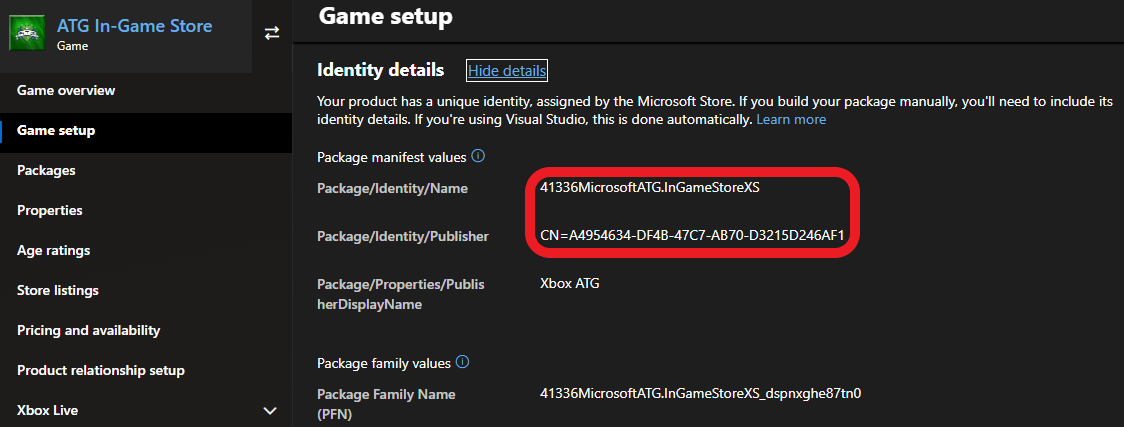
位于合作伙伴中心的 **Game setup > Identity details** 下。
在 PC 上:严格要求与在合作伙伴中心为你的游戏分配的内容匹配。
对主机而言不强制要求,但在创建包以提交到合作伙伴中心时应进行检查。
`Identity` 节点中的 `Name` 需要与 **Package/Identity/Name** 匹配;`Identity` 节点中的 `Publisher` 需要与 **Package/Identity/Publisher** 匹配。
 ### StoreID
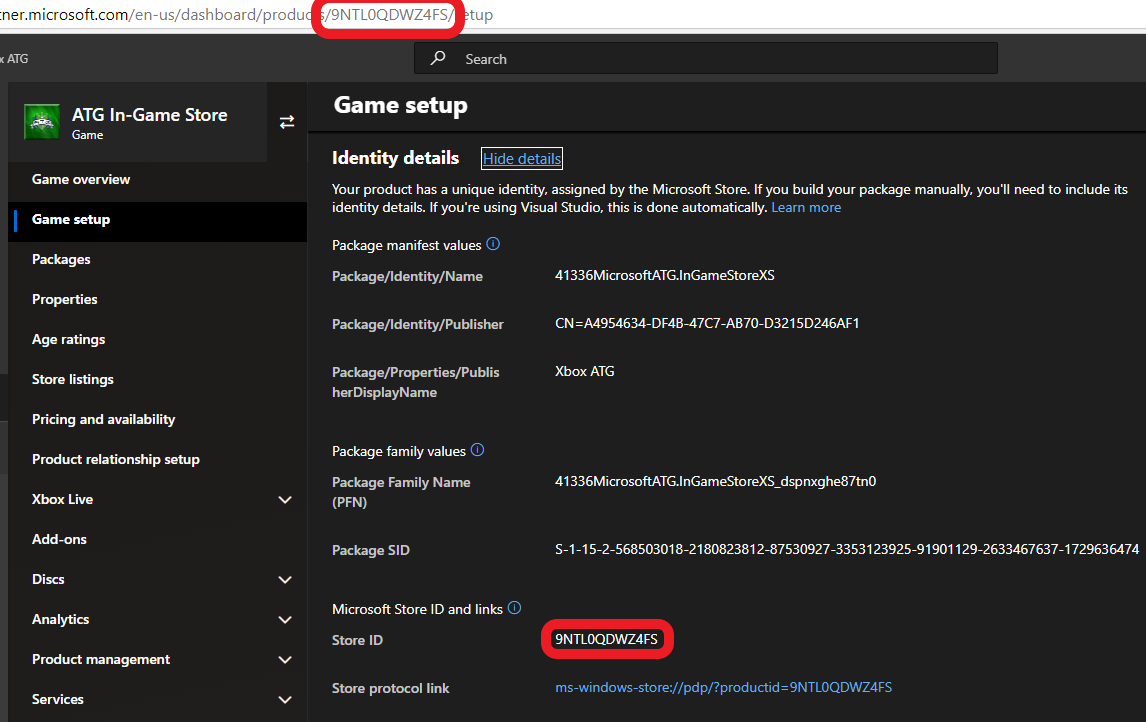
也位于 **Game setup > Identity details** 中。
### StoreID
也位于 **Game setup > Identity details** 中。
 ## 参考 API 文档
* [XStore(API 内容)](/reference/system/xstore/xstore_members)
* 函数
* [XStoreQueryGameLicenseAsync](/reference/system/xstore/xstore_members)
## 另请参阅
[商务概述](/publishing/xstore-commerce/xstore-commerce-overview)
[合作伙伴中心的初始配置](/publishing/xstore-commerce/xstore-initial-configuration)
[启用授权测试](/publishing/xstore-commerce/xstore-licensing-setup)
[正确切换沙盒以进行 Store 操作](/publishing/xstore-commerce/xstore-switching-sandbox)
[XStore API 参考](/reference/system/xstore/xstore_members)
## Related topics
- [启用授权测试](/zh-CN/publishing/xstore-commerce/xstore-licensing-setup.md)
- [排查 XStore 开发问题](/zh-CN/publishing/xstore-commerce/xstore-troubleshooting.md)
- [为游戏实现试玩](/zh-CN/publishing/xstore-commerce/xstore-trials.md)
- [商店基本操作](/zh-CN/publishing/xstore-commerce/xstore-basic-operations.md)
- [检查更新](/zh-CN/publishing/xstore-commerce/xstore-checking-updates.md)
## 参考 API 文档
* [XStore(API 内容)](/reference/system/xstore/xstore_members)
* 函数
* [XStoreQueryGameLicenseAsync](/reference/system/xstore/xstore_members)
## 另请参阅
[商务概述](/publishing/xstore-commerce/xstore-commerce-overview)
[合作伙伴中心的初始配置](/publishing/xstore-commerce/xstore-initial-configuration)
[启用授权测试](/publishing/xstore-commerce/xstore-licensing-setup)
[正确切换沙盒以进行 Store 操作](/publishing/xstore-commerce/xstore-switching-sandbox)
[XStore API 参考](/reference/system/xstore/xstore_members)
## Related topics
- [启用授权测试](/zh-CN/publishing/xstore-commerce/xstore-licensing-setup.md)
- [排查 XStore 开发问题](/zh-CN/publishing/xstore-commerce/xstore-troubleshooting.md)
- [为游戏实现试玩](/zh-CN/publishing/xstore-commerce/xstore-trials.md)
- [商店基本操作](/zh-CN/publishing/xstore-commerce/xstore-basic-operations.md)
- [检查更新](/zh-CN/publishing/xstore-commerce/xstore-checking-updates.md)