> ## Documentation Index
> Fetch the complete documentation index at: https://devdocs.xbox.com/llms.txt
> Use this file to discover all available pages before exploring further.
# 启用授权测试
> 设置可授权的 XBOX 开发版本以测试 XStore 授权 API,包括相关场景和合作伙伴中心必需的配置步骤。
本文介绍如何将开发版本设置为可授权的,以便测试与授权相关的场景。
## 相关场景与 API
若要测试以下 API,需要按本文所述设置你的开发环境:
| API | 用途 |
| --------------------------------------------------------------------------- | ----------------------------------------------------------------------------------- |
| [XStoreQueryGameLicenseAsync](/reference/system/xstore/xstore_members) | 查询试玩许可证或基于光盘的游戏许可证的特性。 |
| [XStoreQueryLicenseTokenAsync](/reference/system/xstore/xstore_members) | 为基于服务的验证生成有效的许可证令牌,请参阅[使用许可证令牌](/publishing/xstore-commerce/xstore-license-tokens)。 |
| [XStoreQueryAddOnLicensesAsync](/reference/system/xstore/xstore_members) | 返回附加在数字游戏许可证上的附加内容许可证(无包的耐用品)。 |
| [XStoreRegisterGameLicenseChanged](/reference/system/xstore/xstore_members) | 注册以检测许可证变更(例如,从试玩许可证升级为完整许可证时)。 |
## 背景
在零售场景中,游戏必须拥有许可证才能游玩。许可证请求会检查已安装的光盘,或向 Microsoft 服务发送请求。如果账号通过直接购买或满足性购买(例如从订阅或捆绑包中)获得该产品的权益,则会授予许可证。也可以在共享场景中授予许可证。有关共享的详细信息,请参阅[游戏的产品共享模式](/publishing/xstore-commerce/xstore-product-sharing)。
开发场景默认不遵循此行为。这些场景包括:
* Loose 构建(Visual Studio F5 部署、xbapp/wdapp register/deploy)
* 本地包构建(makepkg、xbapp/wdapp install)
这些构建启动时没有任何授权检查或相关配置。大多数 `XStore` API 仍然可以工作,但在为游戏或耐用品授权时可能会出现意外结果。
若要将构建配置为可授权行为,请在 MicrosoftGameConfig 中应用正确的标识值(见[启用 XStore 开发与测试](/publishing/xstore-commerce/xstore-product-testing-setup))。
然后必须执行以下步骤:
1. [记录游戏或 DLC 特定的内容 ID](#get-contentid)
2. [根据构建类型将内容 ID 应用到构建](#apply-content-id-to-build)
3. [**仅主机**:记录并将 EKBID 应用到构建](#apply-ekbid-to-build-only-applicable-to-console)
然后,对于运行该构建的每个账号,必须通过在对应平台的商店购买该产品来获取权益。
## 获取 ContentID
选择 **Show details** 后,可以在 **Packages** 页面找到 ContentID:
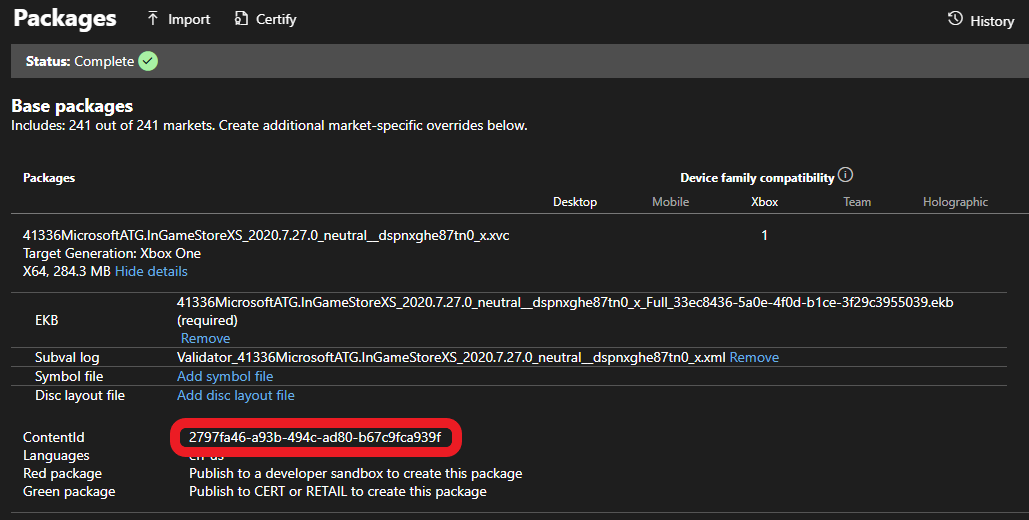 沙盒版本和零售版本的内容 ID 可能不同。如果你安装了游戏的零售版本,该产品将与不同于沙盒所需的内容 ID 关联。如果涉及区域包,内容 ID 也会不同。
### 主机
通过在 Gaming Command Prompt 中运行 `xbapp list /d`(或 DLC 使用 `xbapp listdlc /d`)查找已安装包的内容 ID。
```cmd theme={null}
Registered Applications by Package Full Name:
41336MicrosoftATG.InGameStoreXS_2020.7.27.0_neutral__dspnxghe87tn0
Install
Drive: Development
Size: 0.28 GB.
ContentId: {2797FA46-A93B-494C-AD80-B67C9FCA939F}
ProductId: {4C544E39-5130-3044-C057-5A3446536A00}
EKBID: {37E80840-6BE0-46F8-8EDB-92F877056087}
DisplayName: ATG In-Game Store Sample
41336MicrosoftATG.InGameStoreXS_dspnxghe87tn0!Game
```
### PC
通过在 Gaming Command Prompt 中运行 `wdapp list /d`(或 DLC 使用 `wdapp listdlc /d`)查找已安装包的内容 ID。对于从商店安装的包,使用 `/includeStore` 标志。
## 将内容 ID 应用到构建
对于 loose 构建,在 MicrosoftGameConfig 中添加以下部分:
```xml theme={null}
2797FA46-A93B-494C-AD80-B67C9FCA939F
00000000-0000-0000-0000-000000000001
```
对于包构建,将内容 ID 传递给 `makepkg`。例如:
```cmd theme={null}
makepkg pack /v /f chunks.xml /d Gaming.Xbox.XboxOne.x64\Layout\Image\Loose /pd ./output /contentid 2797FA46-A93B-494C-AD80-B67C9FCA939F
```
如果创建包时未使用 `/contentid` 参数,则当你从本地源安装时,安装过程会应用 MicrosoftGameConfig 中任何可用的 `ContentIdOverride`。
从商店(沙盒或零售)安装的构建始终具有正确的内容 ID(如合作伙伴中心所示)。
## 将 EKBID 应用到构建(仅适用于主机)
设置 EKBID (Escrow Key Blob ID) 以使构建在主机上可授权。在大多数场景中,只需要将其从全零或 33EC8436-5A0E-4F0D-B1CE-3F29C3955039 的默认测试值覆盖即可。
使用以下命令覆盖 EKBID:
```cmd theme={null}
xbapp setekbid {}
```
例如:
```cmd theme={null}
xbapp setekbid 41336MicrosoftATG.InGameStoreXS_2020.7.27.0_neutral__dspnxghe87tn0 {00000000-0000-0000-0000-000000000001}
```
此设置在 PC 上无关(不存在 `wdapp setekbid` 命令)。
### 试玩与 EKBID
对于 **试玩**,必须应用实际的 EKBID。要查找游戏使用的 EKBID,请针对从商店安装的构建运行 `xbapp list /d`。有关更多信息,请参阅[为游戏实现试玩](/publishing/xstore-commerce/xstore-trials)。
## 确保测试账号在沙盒中拥有产品的权益
对于同时发布到沙盒和零售的产品,你可以使用 DevEntitlementTool 查询并为测试账号获取权益。
获取权益的最佳方式是通过协议激活直接跳转到产品的商店页面,因为仅发布到沙盒的产品可能不可搜索。开发主机或 PC 必须设置到游戏发布所在的沙盒。有关更多信息,请参阅 XBOX 服务沙盒概述文档;对于 PC,请参阅[正确切换沙盒以进行商店操作](/publishing/xstore-commerce/xstore-switching-sandbox)。
正确登录后,使用商店协议链接跳转到商店页面:
**在主机上:**
使用 Gaming Command Prompt:
`xbapp launch ms-windows-store://pdp/?productid=`
**在 PC 上:**
在“运行”对话框(⊞Win +R)中或在 Web 浏览器中:
`msxbox://game/?productId=`(在 XBOX 应用中显示产品)
或
`ms-windows-store://pdp/?productid=`(在 Microsoft Store 中显示产品)
进入商店页面后,选择 **购买 (Buy)** 或 **获取 (Get)** 为你的测试账号获取该产品的许可证。游戏和 DLC 的下载与安装应自动开始。如果你计划使用本地构建进行迭代,可以取消该操作。
运行该构建并期望与许可证相关的 XStore API 正常工作的每个账号都必须获取权益。
## DLC
若要使本地 DLC 可授权,必须将内容 ID 应用于 `makepkg` 并将 `xbapp setekbid` 设置为默认值之外的值。仅需为 DLC 配置授权,基础游戏无需配置。
许可证覆盖对使用打包耐用品调用时的以下 API 有效:
* [XStoreAcquireLicenseForDurablesAsync](/reference/system/xstore/xstore_members)
* [XStoreAcquireLicenseForPackageAsync](/reference/system/xstore/xstore_members)
* [XStoreCanAcquireLicenseForPackageAsync](/reference/system/xstore/xstore_members)
* [XStoreCanAcquireLicenseForStoreIdAsync](/reference/system/xstore/xstore_members)
* [XStoreRegisterPackageLicenseLost](/reference/system/xstore/xstore_members)
有关更多详细信息,请参阅:
[管理并授权可下载内容 (DLC)](/publishing/xstore-commerce/xstore-dlc)
[如何使用无包的耐用品](/publishing/xstore-commerce/xstore-dwob)
## 参考 API 文档
* [XStore(API 内容)](/reference/system/xstore/xstore_members)
* 函数
* [XStoreQueryGameLicenseAsync](/reference/system/xstore/xstore_members)
* [XStoreQueryLicenseTokenAsync](/reference/system/xstore/xstore_members)
* [XStoreQueryAddOnLicensesAsync](/reference/system/xstore/xstore_members)
* [XStoreRegisterGameLicenseChanged](/reference/system/xstore/xstore_members)
* [XStoreAcquireLicenseForDurablesAsync](/reference/system/xstore/xstore_members)
* [XStoreAcquireLicenseForPackageAsync](/reference/system/xstore/xstore_members)
* [XStoreCanAcquireLicenseForPackageAsync](/reference/system/xstore/xstore_members)
* [XStoreCanAcquireLicenseForStoreIdAsync](/reference/system/xstore/xstore_members)
* [XStoreRegisterPackageLicenseLost](/reference/system/xstore/xstore_members)
## 另请参阅
[商务概述](/publishing/xstore-commerce/xstore-commerce-overview)
沙盒版本和零售版本的内容 ID 可能不同。如果你安装了游戏的零售版本,该产品将与不同于沙盒所需的内容 ID 关联。如果涉及区域包,内容 ID 也会不同。
### 主机
通过在 Gaming Command Prompt 中运行 `xbapp list /d`(或 DLC 使用 `xbapp listdlc /d`)查找已安装包的内容 ID。
```cmd theme={null}
Registered Applications by Package Full Name:
41336MicrosoftATG.InGameStoreXS_2020.7.27.0_neutral__dspnxghe87tn0
Install
Drive: Development
Size: 0.28 GB.
ContentId: {2797FA46-A93B-494C-AD80-B67C9FCA939F}
ProductId: {4C544E39-5130-3044-C057-5A3446536A00}
EKBID: {37E80840-6BE0-46F8-8EDB-92F877056087}
DisplayName: ATG In-Game Store Sample
41336MicrosoftATG.InGameStoreXS_dspnxghe87tn0!Game
```
### PC
通过在 Gaming Command Prompt 中运行 `wdapp list /d`(或 DLC 使用 `wdapp listdlc /d`)查找已安装包的内容 ID。对于从商店安装的包,使用 `/includeStore` 标志。
## 将内容 ID 应用到构建
对于 loose 构建,在 MicrosoftGameConfig 中添加以下部分:
```xml theme={null}
2797FA46-A93B-494C-AD80-B67C9FCA939F
00000000-0000-0000-0000-000000000001
```
对于包构建,将内容 ID 传递给 `makepkg`。例如:
```cmd theme={null}
makepkg pack /v /f chunks.xml /d Gaming.Xbox.XboxOne.x64\Layout\Image\Loose /pd ./output /contentid 2797FA46-A93B-494C-AD80-B67C9FCA939F
```
如果创建包时未使用 `/contentid` 参数,则当你从本地源安装时,安装过程会应用 MicrosoftGameConfig 中任何可用的 `ContentIdOverride`。
从商店(沙盒或零售)安装的构建始终具有正确的内容 ID(如合作伙伴中心所示)。
## 将 EKBID 应用到构建(仅适用于主机)
设置 EKBID (Escrow Key Blob ID) 以使构建在主机上可授权。在大多数场景中,只需要将其从全零或 33EC8436-5A0E-4F0D-B1CE-3F29C3955039 的默认测试值覆盖即可。
使用以下命令覆盖 EKBID:
```cmd theme={null}
xbapp setekbid {}
```
例如:
```cmd theme={null}
xbapp setekbid 41336MicrosoftATG.InGameStoreXS_2020.7.27.0_neutral__dspnxghe87tn0 {00000000-0000-0000-0000-000000000001}
```
此设置在 PC 上无关(不存在 `wdapp setekbid` 命令)。
### 试玩与 EKBID
对于 **试玩**,必须应用实际的 EKBID。要查找游戏使用的 EKBID,请针对从商店安装的构建运行 `xbapp list /d`。有关更多信息,请参阅[为游戏实现试玩](/publishing/xstore-commerce/xstore-trials)。
## 确保测试账号在沙盒中拥有产品的权益
对于同时发布到沙盒和零售的产品,你可以使用 DevEntitlementTool 查询并为测试账号获取权益。
获取权益的最佳方式是通过协议激活直接跳转到产品的商店页面,因为仅发布到沙盒的产品可能不可搜索。开发主机或 PC 必须设置到游戏发布所在的沙盒。有关更多信息,请参阅 XBOX 服务沙盒概述文档;对于 PC,请参阅[正确切换沙盒以进行商店操作](/publishing/xstore-commerce/xstore-switching-sandbox)。
正确登录后,使用商店协议链接跳转到商店页面:
**在主机上:**
使用 Gaming Command Prompt:
`xbapp launch ms-windows-store://pdp/?productid=`
**在 PC 上:**
在“运行”对话框(⊞Win +R)中或在 Web 浏览器中:
`msxbox://game/?productId=`(在 XBOX 应用中显示产品)
或
`ms-windows-store://pdp/?productid=`(在 Microsoft Store 中显示产品)
进入商店页面后,选择 **购买 (Buy)** 或 **获取 (Get)** 为你的测试账号获取该产品的许可证。游戏和 DLC 的下载与安装应自动开始。如果你计划使用本地构建进行迭代,可以取消该操作。
运行该构建并期望与许可证相关的 XStore API 正常工作的每个账号都必须获取权益。
## DLC
若要使本地 DLC 可授权,必须将内容 ID 应用于 `makepkg` 并将 `xbapp setekbid` 设置为默认值之外的值。仅需为 DLC 配置授权,基础游戏无需配置。
许可证覆盖对使用打包耐用品调用时的以下 API 有效:
* [XStoreAcquireLicenseForDurablesAsync](/reference/system/xstore/xstore_members)
* [XStoreAcquireLicenseForPackageAsync](/reference/system/xstore/xstore_members)
* [XStoreCanAcquireLicenseForPackageAsync](/reference/system/xstore/xstore_members)
* [XStoreCanAcquireLicenseForStoreIdAsync](/reference/system/xstore/xstore_members)
* [XStoreRegisterPackageLicenseLost](/reference/system/xstore/xstore_members)
有关更多详细信息,请参阅:
[管理并授权可下载内容 (DLC)](/publishing/xstore-commerce/xstore-dlc)
[如何使用无包的耐用品](/publishing/xstore-commerce/xstore-dwob)
## 参考 API 文档
* [XStore(API 内容)](/reference/system/xstore/xstore_members)
* 函数
* [XStoreQueryGameLicenseAsync](/reference/system/xstore/xstore_members)
* [XStoreQueryLicenseTokenAsync](/reference/system/xstore/xstore_members)
* [XStoreQueryAddOnLicensesAsync](/reference/system/xstore/xstore_members)
* [XStoreRegisterGameLicenseChanged](/reference/system/xstore/xstore_members)
* [XStoreAcquireLicenseForDurablesAsync](/reference/system/xstore/xstore_members)
* [XStoreAcquireLicenseForPackageAsync](/reference/system/xstore/xstore_members)
* [XStoreCanAcquireLicenseForPackageAsync](/reference/system/xstore/xstore_members)
* [XStoreCanAcquireLicenseForStoreIdAsync](/reference/system/xstore/xstore_members)
* [XStoreRegisterPackageLicenseLost](/reference/system/xstore/xstore_members)
## 另请参阅
[商务概述](/publishing/xstore-commerce/xstore-commerce-overview)
[启用 XStore 开发与测试](/publishing/xstore-commerce/xstore-product-testing-setup)
[正确切换沙盒以进行 Store 操作](/publishing/xstore-commerce/xstore-switching-sandbox)
[XStore API 参考](/reference/system/xstore/xstore_members)
## Related topics
- [启用 XStore 开发与测试](/zh-CN/publishing/xstore-commerce/xstore-product-testing-setup.md)
- [管理并授权可下载内容 (DLC)](/zh-CN/publishing/xstore-commerce/xstore-dlc.md)
- [为游戏实现试玩](/zh-CN/publishing/xstore-commerce/xstore-trials.md)
- [XStoreAcquireLicenseForPackageAsync](/zh-CN/reference/system/xstore/functions/xstoreacquirelicenseforpackageasync.md)
- [XStoreAcquireLicenseForDurablesAsync](/zh-CN/reference/system/xstore/functions/xstoreacquirelicensefordurablesasync.md)