> ## Documentation Index
> Fetch the complete documentation index at: https://devdocs.xbox.com/llms.txt
> Use this file to discover all available pages before exploring further.
# 商店基本操作
> 使用 XStore API 实现游戏内商店,包括确定用户可购买的商品、检查权益以及完成购买。
游戏内商店通常包含三个基本操作:
1. [确定用户可以购买什么](#1-determining-what-users-can-purchase)
2. [评估用户拥有或有权使用哪些产品](#2-evaluating-what-products-the-user-owns-or-is-entitled-to)
3. [购买符合条件的产品](#3-purchasing-eligible-products)
本文展示了每种操作的示例代码,源自 InGameStore 示例,该示例会持续更新以体现最佳实践。
## 准备调用 XStore API
所有 `XStore` API 都是通过使用 [XStoreCreateContext](/reference/system/xstore/xstore_members) 创建的 `XStoreContextHandle` 进行操作的。
此上下文使你能够在主机上指定用户的上下文中,或在 PC 上的默认用户上下文中执行商店操作。在主机上,挂起 (Suspend) 或快速恢复 (Quick Resume) 事件会使上下文失效。为安全地处理这些情况,请在游戏从挂起状态恢复时关闭 `XStoreContextHandle` 并重新创建它。
## 1. 确定用户可以购买什么
游戏通常提供购买的都是其附加内容。以下代码演示了游戏了解可用产品所需的基本 [XStoreQueryAssociatedProductsAsync](/reference/system/xstore/xstore_members) API 调用。
此查询会自动仅返回与游戏关联的 **可购买** 附加内容。只要在合作伙伴中心的 **产品关系设置 (Product relationship setup)** 部分为游戏设置了对该产品的“可销售 (can sell)”关系,与同一发行商关联的其他产品(即使用同一合作伙伴中心账号配置)也可以在此调用中返回。
有关配置产品关系的详细信息,请参阅[为游戏配置产品关系](/publishing/game-publishing/tutorial-xbox-managed/how-to-create-product-relationships)。
```cpp theme={null}
bool CALLBACK ProductEnumerationCallback(const XStoreProduct* product, void* context)
{
// Handle adding the product to the game
printf("%s %s %u\n", product->title, product->storeId, product->productKind);
return true;
}
void QueryCatalog()
{
auto async = new XAsyncBlock{};
async->queue = m_asyncQueue;
async->callback = [](XAsyncBlock* async)
{
XStoreProductQueryHandle queryHandle = nullptr;
HRESULT hr = XStoreQueryAssociatedProductsResult(async, &queryHandle);
if (SUCCEEDED(hr))
{
hr = XStoreEnumerateProductsQuery(queryHandle, async->context, ProductEnumerationCallback);
if (SUCCEEDED(hr))
{
// TODO: Check for more pages to process
printf("Enumeration complete\n");
}
XStoreCloseProductsQueryHandle(queryHandle);
delete async;
}
};
XStoreProductKind typeFilter =
XStoreProductKind::Consumable |
XStoreProductKind::Durable |
XStoreProductKind::Game;
HRESULT hr = XStoreQueryAssociatedProductsAsync(
m_xStoreContext,
typeFilter,
UINT8_MAX, // placeholder maximum, see Paging
async)
if (FAILED(hr))
{
delete async;
}
}
```
### 注意事项
* `XStoreQueryAssociatedProductsAsync` 只返回可购买的产品;仅通过捆绑包发放或未设置为可独立购买的产品不会返回。对于后者,请使用 `XStoreQueryProductsAsync`。
* 事先并不知道会返回的产品数量,因此必须累计计数。
### 分页
在查询关联产品或权益时,处理分页并非可选项。服务返回的页数以及每页返回的项目数在不同环境和服务负载之间可能有所不同。有关处理分页的示例,请参阅 [XStoreQueryAssociatedProductsAsync](/reference/system/xstore/xstore_members)。
### 其他选项
如果已知 `storeId` 或希望使用其他 `actionFilters`,可以使用 [XStoreQueryProductsAsync](/reference/system/xstore/xstore_members) 查询特定产品。“Actions”是适用于产品的使用场景,包含 `Purchase`、`License`、`Gift`、`Redeem` 等动词。
[XStoreQueryAssociatedProductsForStoreIdAsync](/reference/system/xstore/xstore_members) 可用于查询其他游戏的关联产品,这对于交叉销售其他游戏的附加内容很有用。
[XStoreQueryProductForCurrentGameAsync](/reference/system/xstore/xstore_members) 仅查询当前正在运行的游戏的产品。
[XStoreShowAssociatedProductsUIAsync](/reference/system/xstore/xstore_members) 会将用户转到 Microsoft Store 应用,显示关联产品的视图,并按产品类别筛选。此 API 是无需在游戏内界面中枚举可用产品的替代方案。
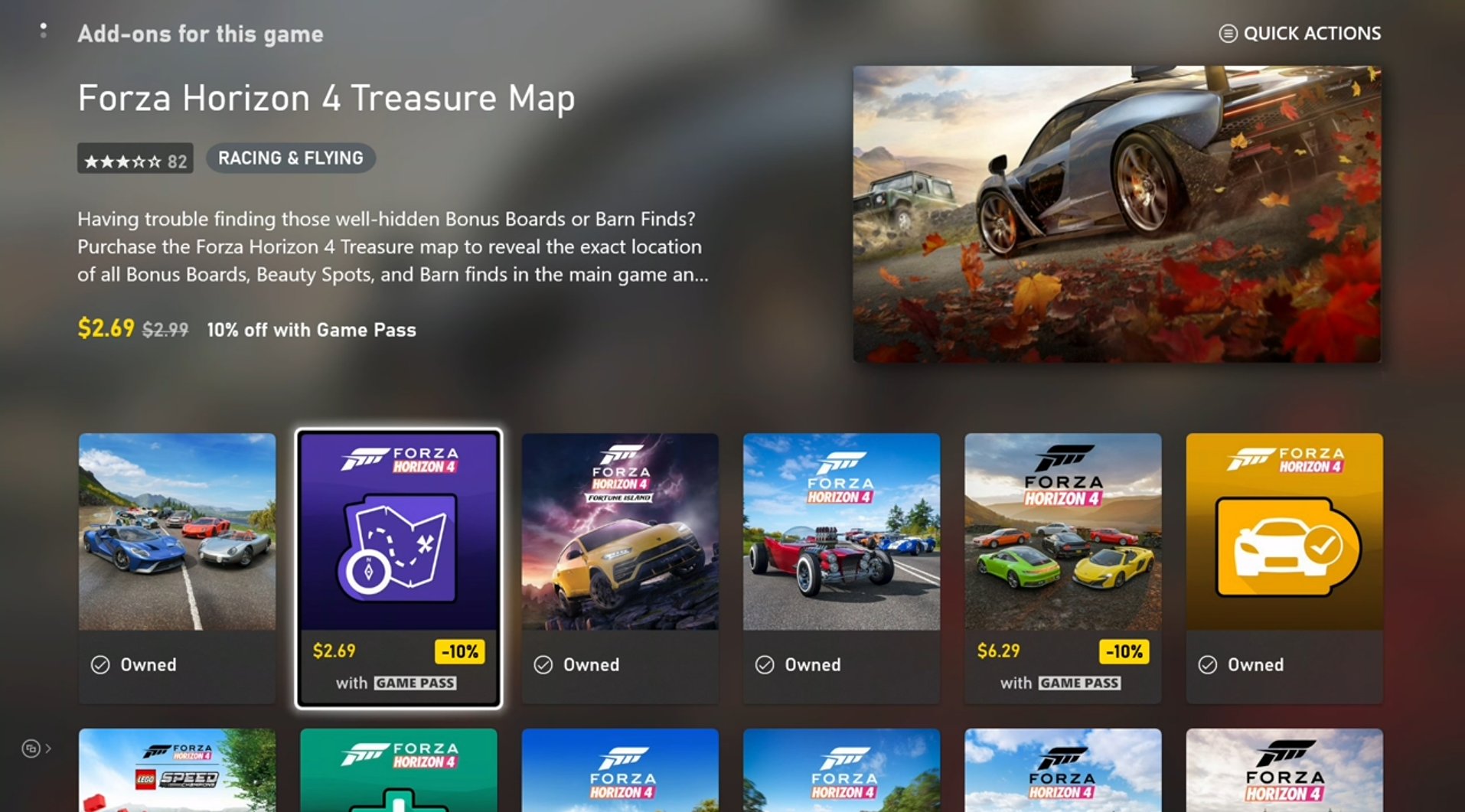 ## 2. 评估用户拥有或有权使用哪些产品
此步骤涉及很多前面展示过的相同代码,但需要进行以下替换:
* [XStoreQueryAssociatedProductsAsync](/reference/system/xstore/xstore_members) → [XStoreQueryEntitledProductsAsync](/reference/system/xstore/xstore_members)
* [XStoreQueryAssociatedProductsResult](/reference/system/xstore/xstore_members) → [XStoreQueryEntitledProductsResult](/reference/system/xstore/xstore_members)
`QueryEntitledProducts` API 返回用户有权使用的产品。有权 (Entitled) 意味着用户要么直接拥有该产品,要么通过其他产品(如捆绑包和订阅)满足权益,或通过另一位用户的共享权益获得权益。
此外,[XStoreQueryAssociatedProductsAsync](/reference/system/xstore/xstore_members)(及相关函数)的结果可用于确定权益。[XStoreProduct](/reference/system/xstore/xstore_members) 结构体包含一个 `isInUserCollection` 字段,当用户有权使用该产品时该字段设置为 true。
### 消耗品所有权
消耗品数量在 `XStoreProduct.skus[i].collectionData.quantity` 中标注。通常,消耗品产品只有一个 SKU。
你也可以使用 [XStoreQueryConsumableBalanceRemainingAsync](/reference/system/xstore/xstore_members) 查询数量,但请避免对大量消耗品分别使用它,因为每次调用都会产生一次服务调用。
为了维护基于消耗品的生态系统的完整性,请使用服务端对消耗品进行验证和兑换。有关更多信息,请参阅[基于消耗品的生态系统](/publishing/xstore-commerce/xstore-consumables)。
### 耐用品所有权
仅检查账号是否拥有该产品还不足以判断他们是否有权在游戏内使用该产品。耐用品必须遵守[游戏的产品共享模式](/publishing/xstore-commerce/xstore-product-sharing)中描述的内容共享策略。
对于 **带包的耐用品**,使用 [XStoreAcquireLicenseForPackageAsync](/reference/system/xstore/xstore_members) 判断根据内容共享规则它是否可授权。
对于 **无包的耐用品**,使用 [XStoreAcquireLicenseForDurablesAsync](/reference/system/xstore/xstore_members) 进行相同操作。
对于 **数字**授权的游戏,使用 [XStoreQueryAddOnLicensesAsync](/reference/system/xstore/xstore_members) 返回可授权的无包耐用品产品列表。
有关更多信息,请参阅[管理并授权可下载内容](/publishing/xstore-commerce/xstore-dlc)和[如何使用无包的耐用品](/publishing/xstore-commerce/xstore-dwob)。
## 3. 购买符合条件的产品
若要显示可购买产品的购买流程,请将 `storeId` 传入 [XStoreShowPurchaseUIAsync](/reference/system/xstore/xstore_members) API:
```cpp theme={null}
void MakePurchase(const char* storeId)
{
auto async = new XAsyncBlock{};
async->context = &storeId;
async->queue = m_asyncQueue;
async->callback = [](XAsyncBlock *async)
{
const char* = reinterpret_cast(async->context);
HRESULT hr = XStoreShowPurchaseUIResult(async);
if (SUCCEEDED(hr))
{
printf("Purchase succeeded (%s)\n", storeId);
// Refresh ownership and update game
}
else
{
printf("Purchase failed (%s) 0x%x\n", storeId, hr);
if (hr == E_GAMESTORE_ALREADY_PURCHASED)
{
printf("Already own this\n");
}
}
delete async;
};
HRESULT hr = XStoreShowPurchaseUIAsync(
m_xStoreContext,
storeId,
nullptr, // Can be used to override the title bar text
nullptr, // Can be used to provide extra details to purchase
async);
if (FAILED(hr))
{
delete async;
printf("Error calling XStoreShowPurchaseUIAsync : 0x%x\n", hr);
return;
}
}
```
玩家也可以在游戏之外购买,例如显式切换到 Xbox.com、PC、移动应用或其他渠道上的 Microsoft Store。因此,请在游戏中提供一个能可靠按需刷新产品所有权的位置。初始登录流程是一个理想的位置,但也应将刷新添加到进入游戏内商店的过渡中,或在设置中的某处。
## 参考 API 文档
* [XStore(API 内容)](/reference/system/xstore/xstore_members)
* 函数
* [XStoreCreateContext](/reference/system/xstore/xstore_members)
* [XStoreQueryAssociatedProductsAsync](/reference/system/xstore/xstore_members)
* [XStoreQueryProductsAsync](/reference/system/xstore/xstore_members)
* [XStoreQueryAssociatedProductsForStoreIdAsync](/reference/system/xstore/xstore_members)
* [XStoreQueryProductForCurrentGameAsync](/reference/system/xstore/xstore_members)
* [XStoreShowAssociatedProductsUIAsync](/reference/system/xstore/xstore_members)
* [XStoreQueryEntitledProductsAsync](/reference/system/xstore/xstore_members)
* [XStoreQueryAssociatedProductsResult](/reference/system/xstore/xstore_members)
* [XStoreQueryEntitledProductsResult](/reference/system/xstore/xstore_members)
* [XStoreQueryConsumableBalanceRemainingAsync](/reference/system/xstore/xstore_members)
* [XStoreAcquireLicenseForPackageAsync](/reference/system/xstore/xstore_members)
* [XStoreAcquireLicenseForDurablesAsync](/reference/system/xstore/xstore_members)
* [XStoreQueryAddOnLicensesAsync](/reference/system/xstore/xstore_members)
* [XStoreShowPurchaseUIAsync](/reference/system/xstore/xstore_members)
* 结构体
* [XStoreProduct](/reference/system/xstore/xstore_members)
## 另请参阅
[商务概述](/publishing/xstore-commerce/xstore-commerce-overview)
[启用 XStore 开发与测试](/publishing/xstore-commerce/xstore-product-testing-setup)
[XStore API 参考](/reference/system/xstore/xstore_members)
## Related topics
- [GDK 商务系统概述](/zh-CN/publishing/xstore-commerce/xstore-overview.md)
- [XStore 商务概述](/zh-CN/publishing/xstore-commerce/xstore-commerce-overview.md)
- [管理并授权可下载内容 (DLC)](/zh-CN/publishing/xstore-commerce/xstore-dlc.md)
- [为玩家授予对附加内容的访问权限](/zh-CN/publishing/xstore-commerce/xstore-granting-access.md)
- [API 访问策略](/zh-CN/services/playfab/api-references/api-access-policy.md)
## 2. 评估用户拥有或有权使用哪些产品
此步骤涉及很多前面展示过的相同代码,但需要进行以下替换:
* [XStoreQueryAssociatedProductsAsync](/reference/system/xstore/xstore_members) → [XStoreQueryEntitledProductsAsync](/reference/system/xstore/xstore_members)
* [XStoreQueryAssociatedProductsResult](/reference/system/xstore/xstore_members) → [XStoreQueryEntitledProductsResult](/reference/system/xstore/xstore_members)
`QueryEntitledProducts` API 返回用户有权使用的产品。有权 (Entitled) 意味着用户要么直接拥有该产品,要么通过其他产品(如捆绑包和订阅)满足权益,或通过另一位用户的共享权益获得权益。
此外,[XStoreQueryAssociatedProductsAsync](/reference/system/xstore/xstore_members)(及相关函数)的结果可用于确定权益。[XStoreProduct](/reference/system/xstore/xstore_members) 结构体包含一个 `isInUserCollection` 字段,当用户有权使用该产品时该字段设置为 true。
### 消耗品所有权
消耗品数量在 `XStoreProduct.skus[i].collectionData.quantity` 中标注。通常,消耗品产品只有一个 SKU。
你也可以使用 [XStoreQueryConsumableBalanceRemainingAsync](/reference/system/xstore/xstore_members) 查询数量,但请避免对大量消耗品分别使用它,因为每次调用都会产生一次服务调用。
为了维护基于消耗品的生态系统的完整性,请使用服务端对消耗品进行验证和兑换。有关更多信息,请参阅[基于消耗品的生态系统](/publishing/xstore-commerce/xstore-consumables)。
### 耐用品所有权
仅检查账号是否拥有该产品还不足以判断他们是否有权在游戏内使用该产品。耐用品必须遵守[游戏的产品共享模式](/publishing/xstore-commerce/xstore-product-sharing)中描述的内容共享策略。
对于 **带包的耐用品**,使用 [XStoreAcquireLicenseForPackageAsync](/reference/system/xstore/xstore_members) 判断根据内容共享规则它是否可授权。
对于 **无包的耐用品**,使用 [XStoreAcquireLicenseForDurablesAsync](/reference/system/xstore/xstore_members) 进行相同操作。
对于 **数字**授权的游戏,使用 [XStoreQueryAddOnLicensesAsync](/reference/system/xstore/xstore_members) 返回可授权的无包耐用品产品列表。
有关更多信息,请参阅[管理并授权可下载内容](/publishing/xstore-commerce/xstore-dlc)和[如何使用无包的耐用品](/publishing/xstore-commerce/xstore-dwob)。
## 3. 购买符合条件的产品
若要显示可购买产品的购买流程,请将 `storeId` 传入 [XStoreShowPurchaseUIAsync](/reference/system/xstore/xstore_members) API:
```cpp theme={null}
void MakePurchase(const char* storeId)
{
auto async = new XAsyncBlock{};
async->context = &storeId;
async->queue = m_asyncQueue;
async->callback = [](XAsyncBlock *async)
{
const char* = reinterpret_cast(async->context);
HRESULT hr = XStoreShowPurchaseUIResult(async);
if (SUCCEEDED(hr))
{
printf("Purchase succeeded (%s)\n", storeId);
// Refresh ownership and update game
}
else
{
printf("Purchase failed (%s) 0x%x\n", storeId, hr);
if (hr == E_GAMESTORE_ALREADY_PURCHASED)
{
printf("Already own this\n");
}
}
delete async;
};
HRESULT hr = XStoreShowPurchaseUIAsync(
m_xStoreContext,
storeId,
nullptr, // Can be used to override the title bar text
nullptr, // Can be used to provide extra details to purchase
async);
if (FAILED(hr))
{
delete async;
printf("Error calling XStoreShowPurchaseUIAsync : 0x%x\n", hr);
return;
}
}
```
玩家也可以在游戏之外购买,例如显式切换到 Xbox.com、PC、移动应用或其他渠道上的 Microsoft Store。因此,请在游戏中提供一个能可靠按需刷新产品所有权的位置。初始登录流程是一个理想的位置,但也应将刷新添加到进入游戏内商店的过渡中,或在设置中的某处。
## 参考 API 文档
* [XStore(API 内容)](/reference/system/xstore/xstore_members)
* 函数
* [XStoreCreateContext](/reference/system/xstore/xstore_members)
* [XStoreQueryAssociatedProductsAsync](/reference/system/xstore/xstore_members)
* [XStoreQueryProductsAsync](/reference/system/xstore/xstore_members)
* [XStoreQueryAssociatedProductsForStoreIdAsync](/reference/system/xstore/xstore_members)
* [XStoreQueryProductForCurrentGameAsync](/reference/system/xstore/xstore_members)
* [XStoreShowAssociatedProductsUIAsync](/reference/system/xstore/xstore_members)
* [XStoreQueryEntitledProductsAsync](/reference/system/xstore/xstore_members)
* [XStoreQueryAssociatedProductsResult](/reference/system/xstore/xstore_members)
* [XStoreQueryEntitledProductsResult](/reference/system/xstore/xstore_members)
* [XStoreQueryConsumableBalanceRemainingAsync](/reference/system/xstore/xstore_members)
* [XStoreAcquireLicenseForPackageAsync](/reference/system/xstore/xstore_members)
* [XStoreAcquireLicenseForDurablesAsync](/reference/system/xstore/xstore_members)
* [XStoreQueryAddOnLicensesAsync](/reference/system/xstore/xstore_members)
* [XStoreShowPurchaseUIAsync](/reference/system/xstore/xstore_members)
* 结构体
* [XStoreProduct](/reference/system/xstore/xstore_members)
## 另请参阅
[商务概述](/publishing/xstore-commerce/xstore-commerce-overview)
[启用 XStore 开发与测试](/publishing/xstore-commerce/xstore-product-testing-setup)
[XStore API 参考](/reference/system/xstore/xstore_members)
## Related topics
- [GDK 商务系统概述](/zh-CN/publishing/xstore-commerce/xstore-overview.md)
- [XStore 商务概述](/zh-CN/publishing/xstore-commerce/xstore-commerce-overview.md)
- [管理并授权可下载内容 (DLC)](/zh-CN/publishing/xstore-commerce/xstore-dlc.md)
- [为玩家授予对附加内容的访问权限](/zh-CN/publishing/xstore-commerce/xstore-granting-access.md)
- [API 访问策略](/zh-CN/services/playfab/api-references/api-access-policy.md)