> ## Documentation Index
> Fetch the complete documentation index at: https://devdocs.xbox.com/llms.txt
> Use this file to discover all available pages before exploring further.
# 使用 Microsoft Store API 对你的服务进行身份验证
> 介绍如何获取和使用委派身份验证 X-token 或 User Store ID 与 Microsoft Store 服务进行身份验证。
本文介绍如何使用委派 X-token 或 User Store ID 对 Microsoft Store API 的服务到服务调用进行身份验证:
* [User Store ID 和 Microsoft Entra ID](#authenticating-with-microsoft-entra-id-and-user-store-ids):将身份验证和结果与登录 Microsoft Store 应用的用户账号关联起来。
* [委派身份验证 X-token](#authenticating-with-delegated-authentication-x-tokens):将身份验证和结果与当前正在游玩游戏的用户的 XBOX services 账号关联起来。
新的 XBOX 和 PC 游戏应使用 User Store ID 身份验证。X-token 的范围限定为当前玩家账号,且在某些服务(包括 Recurrence 和 Purchase)上不受支持。在 PC 上,购买账号和游玩账号可能不同。详情请参阅[在 PC 上处理商店账号不匹配的场景](/publishing/xstore-commerce/xstore-mismatched-accounts)。
对于跨平台和长时间运行的服务流程,请使用 User Store ID,因为它们可以在没有活动客户端交互的情况下续订。相比之下,X-token 流程在达到最大生存期后需要刷新客户端连接。
以下各部分总结了每种身份验证类型所需的配置和资源。
## 使用 Microsoft Entra ID 和 User Store ID 进行身份验证
所有 Microsoft Store 服务 API 都支持通过 Microsoft Entra ID 和 User Store ID 进行身份验证。若要使用此身份验证方式,你(或你的组织)必须拥有 Microsoft Entra ID 租户,并在其下注册一个应用程序 ID。若要注册应用程序,你的账号需要在该租户下具有全局管理员角色。如果你已经使用 Microsoft Office 365 或来自 Microsoft 的其他企业服务,那么你已经拥有可以在 Azure 门户中管理的 Microsoft Entra ID 租户。
有关如何获取此身份验证方式所需的 User Store ID 的指南,请参阅[为服务到服务身份验证请求 User Store ID](/publishing/xstore-commerce/xstore-requesting-userstoreid)。
在 PC 上,权益 (entitlement) 与登录 Microsoft Store 应用的用户关联,而不是与当前正在游玩游戏的用户关联。由于这些账号可能不同,鼓励 PC 游戏参考[在 PC 上处理商店账号不匹配的场景](/publishing/xstore-commerce/xstore-mismatched-accounts)中的信息。
当你通过 Microsoft Entra 身份验证流程调用 Microsoft Store API 时,Microsoft Entra 访问令牌会按如下方式在请求的 `Authorization` 头中使用。
```bash theme={null}
Authorization: Bearer
```
如果你在沙盒中操作,请在 JSON 请求正文中包含以下声明。如果没有该声明,结果默认为 RETAIL。
示例:
```json theme={null}
"sbx": "XDKS.1"
```
**开发者管理的消耗品限制:** 尽管 User Store ID 和 Entra ID 身份验证适用于沙盒环境中大多数 Microsoft Store API 调用,但在开发沙盒中,[Consume API](/reference/microsoft-store-apis/xstore-v8-consume) 对于开发者管理的消耗品不支持此身份验证方式。若要在沙盒中消费开发者管理的消耗品,请改用[委派身份验证 XSTS 令牌](#authenticating-with-delegated-authentication-x-tokens)。
你还必须包含下表中显示的受益人 (beneficiary) 值,包括来自客户端的 User Store ID。
| 参数 | 类型 | 说明 | 是否必需 |
| ---------------------- | -------- | ----------------------------------------------------------------------------------------------------------------------------------------------- | ---- |
| `identityType` | `string` | 指定字符串值 `b2b`。 | 是 |
| `identityValue` | `string` | 表示要将消耗品报告为已履约的用户身份的 [User Store ID 密钥](/publishing/xstore-commerce/xstore-requesting-userstoreid#step-4-create-a-user-store-id-key)。 | 是 |
| `localTicketReference` | `string` | 用于返回响应的请求标识符。请使用与 User Store ID 密钥中 *userId* [声明](/publishing/xstore-commerce/xstore-requesting-userstoreid#claims-in-a-user-store-id-key)相同的值。 | 是 |
示例:
```json theme={null}
"beneficiaries": [
{
"identitytype" : "b2b",
"identityValue" : "eyJ0eXAiOiJ...",
"localTicketReference" : "testReference"
}
],
```
有关如何获取、管理和使用 User Store ID 身份验证的详细信息,请参阅以下资源。
* [Microsoft.StoreServices (GitHub)](https://github.com/microsoft/Microsoft-Store-Services):用于从后端进行身份验证并调用 Microsoft Store 服务的库和源码。
* [Microsoft.StoreServices 示例 (GitHub)](https://github.com/microsoft/Microsoft-Store-Services-Sample):演示身份验证、商务集成和退款对账模式的服务示例。
* [为服务到服务身份验证请求 User Store ID](/publishing/xstore-commerce/xstore-requesting-userstoreid)
* [续订 User Store ID 密钥](/publishing/xstore-commerce/xstore-renew-userstoreid)
* [从服务管理产品权益](https://learn.microsoft.com/windows/uwp/monetize/view-and-grant-products-from-a-service)
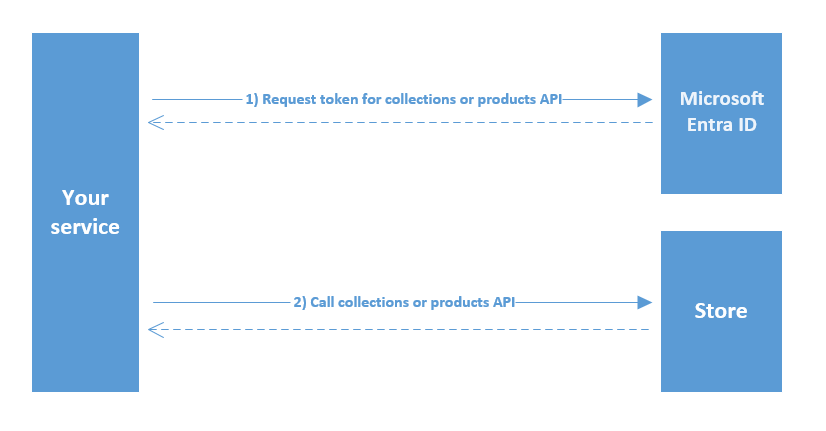
### 调用 Microsoft Store API 的示意图
下图描述了从你的服务使用 User Store ID 调用 Microsoft Store API 的流程。
 ### 使用 User Store ID 和 Microsoft Entra ID 身份验证查看和管理产品所需的额外配置
若要使用 Microsoft Entra ID 和 User Store ID,请在合作伙伴中心的游戏 **产品集合和购买 (Product collections and purchases)** 设置中添加你的 Microsoft Entra 应用程序的客户端 ID。你最多可以配置两个客户端 ID,用于通过 Collections 和 Purchase 服务访问该产品及其附加内容。当产品未正确关联到你的 Microsoft Entra 应用程序客户端 ID 时,最常见的症状是:对 Collections 的调用成功,但结果中没有项目。
#### 将产品配置为可通过 Microsoft Entra ID 和 User Store ID 对你的服务可见
1. 在游戏的合作伙伴中心页面上,从左侧面板选择 **产品集合和购买 (Product collections and purchases)**。
2. 输入你用于对服务进行身份验证的 Microsoft Entra 应用程序的客户端 ID。
3. 选择 **保存** 按钮。
4. 将游戏产品及其所有附加内容重新发布到你的沙盒或开发环境中的 Microsoft Store。
发布流程完成后,你应能看到服务调用返回正确的项目。
## 使用委派身份验证 X-token 进行身份验证
使用委派身份验证 X-token 对服务到服务调用进行身份验证,方法是按以下格式向请求添加 `Authorization` 头。
```JSON theme={null}
Authorization: XBL3.0 x=;
```
X-token 的目标依赖方必须是 [https://licensing.xboxlive.com](https://licensing.xboxlive.com),与旧版 XBOX Inventory 服务相同。如果你之前已将服务设置为调用 XBOX Inventory,则可以对此终结点重用相同的令牌。你还需要一个与指定端点的签名策略匹配的签名头。
有关如何获取、管理和使用委派身份验证 X-token 及签名的详细信息,请参阅以下资源。
* [Game Service Sample](https://aka.ms/gdkdl):一个全面的 Web 服务示例,演示对客户端 X-token 的验证与处理、服务到服务身份验证、商务服务等。请从 [GDK 下载站点](https://aka.ms/gdkdl)下载最新版本。下载 All Samples 的最新版本。Game Service Samples 位于下载的 .zip 文件中的 samples\Live\GameService 下。
* [Xfest 2019 - XSTS Auth and Server to Server made Easy](https://forums.xboxlive.com/articles/96129/xfest-online-2019-archive.html):对 X-token 的概述与说明,以及 Game Service Sample 如何帮助你启动自己的服务到服务身份验证工作。若要下载演讲资料,请在存档站点上选择 **GDK Track Downloads**。
* **XBOX services 身份验证和服务到服务调用**:关于身份验证、X-token 以及对 XBOX services 进行服务到服务调用所需的步骤和调用的更详细文档。
### 使用委派身份验证 X-token 查看和管理产品所需的额外配置
X-token 与合作伙伴中心中的 Business Partner ID 绑定,因此你必须将产品链接到相同的 Business Partner ID。实际上,产品必须位于其 Dev Studio ID 与你的依赖方所使用的 Business Partner ID 相匹配的 Product Group 下。
当产品未正确关联到正确的 Business Partner ID 时,最常见的症状是:对 Collections 的调用成功,但结果中未返回任何项目。有关更多信息,请参阅论坛帖子 [B2B call to Collections LicensePreview service returns empty results (Partner Center configured game)](https://forums.xboxlive.com/questions/78683/b2b-call-to-collections-licensepreview-service-ret.html)。
#### 在合作伙伴中心配置产品和 Web 服务
1. 使用 Web 服务的 **Generate Certificate** 链接创建 Business Partner 证书。(选择 **Developer Settings** > **XBOX Live** > **Web Services**。)在你的依赖方所绑定的 Web 服务对应的行中选择该链接。
2. 前往 Business Partner 管理 UI(选择 **Developer Settings** > **XBOX Live** > **Business Partner**),复制与你在第 1 步中所使用的 Web 服务相匹配的 Business Partner ID。(示例 Business Partner ID:12345678-9012-3456-7890-123456789012)
3. 在你产品的 **Partner Center Overview** 页面上,选择 **Create a new**,然后选择 **Product group**。
4. 将此产品组分配到某个 Dev Studio,如果你尚未拥有 Dev Studio,请选择 **Create a new developer studio**。
5. 确保所选 Dev Studio 的 ID 与第 2 步中的 Business Partner ID 匹配。如果 **Dev Studio ID (optional)** 为空,请将 Business Partner ID 复制进去。如果此字段已有正在使用的值,请改为创建一个新的 Dev Studio,而不要覆盖它,以避免破坏现有的服务到服务产品映射。
6. 在 Dev Studio 配置好与 Business Partner 匹配的 ID 后,返回到你创建的 Product Group。将你的游戏和所有产品添加到 **Included in this product group** 列表。
7. 选择 **Save** 完成产品组的创建。
8. 前往你游戏的 XBOX Settings UI,确保关联的 Business Partner 与第 2 步中使用的相同。
9. 将产品组中的所有项目重新发布到沙盒或开发环境中的 Microsoft Store。
发布流程完成后,你将看到服务调用返回正确的项目。
## 另请参阅
[Microsoft Store 服务 API](/reference/microsoft-store-apis/index)
[为服务到服务身份验证请求 User Store ID](/publishing/xstore-commerce/xstore-requesting-userstoreid)
[续订 User Store ID 密钥](/publishing/xstore-commerce/xstore-renew-userstoreid)
## Related topics
- [为服务到服务身份验证请求 User Store ID](/zh-CN/publishing/xstore-commerce/xstore-requesting-userstoreid.md)
- [续订 User Store ID 密钥](/zh-CN/publishing/xstore-commerce/xstore-renew-userstoreid.md)
- [使用 X-token 或 OAuth 2.0 请求 User Store ID](/zh-CN/publishing/xstore-commerce/xstore-requesting-userstoreid-oauth.md)
- [GDK 商务系统概述](/zh-CN/publishing/xstore-commerce/xstore-overview.md)
- [可选服务](/zh-CN/build/gdk-and-engines/optional-services.md)
### 使用 User Store ID 和 Microsoft Entra ID 身份验证查看和管理产品所需的额外配置
若要使用 Microsoft Entra ID 和 User Store ID,请在合作伙伴中心的游戏 **产品集合和购买 (Product collections and purchases)** 设置中添加你的 Microsoft Entra 应用程序的客户端 ID。你最多可以配置两个客户端 ID,用于通过 Collections 和 Purchase 服务访问该产品及其附加内容。当产品未正确关联到你的 Microsoft Entra 应用程序客户端 ID 时,最常见的症状是:对 Collections 的调用成功,但结果中没有项目。
#### 将产品配置为可通过 Microsoft Entra ID 和 User Store ID 对你的服务可见
1. 在游戏的合作伙伴中心页面上,从左侧面板选择 **产品集合和购买 (Product collections and purchases)**。
2. 输入你用于对服务进行身份验证的 Microsoft Entra 应用程序的客户端 ID。
3. 选择 **保存** 按钮。
4. 将游戏产品及其所有附加内容重新发布到你的沙盒或开发环境中的 Microsoft Store。
发布流程完成后,你应能看到服务调用返回正确的项目。
## 使用委派身份验证 X-token 进行身份验证
使用委派身份验证 X-token 对服务到服务调用进行身份验证,方法是按以下格式向请求添加 `Authorization` 头。
```JSON theme={null}
Authorization: XBL3.0 x=;
```
X-token 的目标依赖方必须是 [https://licensing.xboxlive.com](https://licensing.xboxlive.com),与旧版 XBOX Inventory 服务相同。如果你之前已将服务设置为调用 XBOX Inventory,则可以对此终结点重用相同的令牌。你还需要一个与指定端点的签名策略匹配的签名头。
有关如何获取、管理和使用委派身份验证 X-token 及签名的详细信息,请参阅以下资源。
* [Game Service Sample](https://aka.ms/gdkdl):一个全面的 Web 服务示例,演示对客户端 X-token 的验证与处理、服务到服务身份验证、商务服务等。请从 [GDK 下载站点](https://aka.ms/gdkdl)下载最新版本。下载 All Samples 的最新版本。Game Service Samples 位于下载的 .zip 文件中的 samples\Live\GameService 下。
* [Xfest 2019 - XSTS Auth and Server to Server made Easy](https://forums.xboxlive.com/articles/96129/xfest-online-2019-archive.html):对 X-token 的概述与说明,以及 Game Service Sample 如何帮助你启动自己的服务到服务身份验证工作。若要下载演讲资料,请在存档站点上选择 **GDK Track Downloads**。
* **XBOX services 身份验证和服务到服务调用**:关于身份验证、X-token 以及对 XBOX services 进行服务到服务调用所需的步骤和调用的更详细文档。
### 使用委派身份验证 X-token 查看和管理产品所需的额外配置
X-token 与合作伙伴中心中的 Business Partner ID 绑定,因此你必须将产品链接到相同的 Business Partner ID。实际上,产品必须位于其 Dev Studio ID 与你的依赖方所使用的 Business Partner ID 相匹配的 Product Group 下。
当产品未正确关联到正确的 Business Partner ID 时,最常见的症状是:对 Collections 的调用成功,但结果中未返回任何项目。有关更多信息,请参阅论坛帖子 [B2B call to Collections LicensePreview service returns empty results (Partner Center configured game)](https://forums.xboxlive.com/questions/78683/b2b-call-to-collections-licensepreview-service-ret.html)。
#### 在合作伙伴中心配置产品和 Web 服务
1. 使用 Web 服务的 **Generate Certificate** 链接创建 Business Partner 证书。(选择 **Developer Settings** > **XBOX Live** > **Web Services**。)在你的依赖方所绑定的 Web 服务对应的行中选择该链接。
2. 前往 Business Partner 管理 UI(选择 **Developer Settings** > **XBOX Live** > **Business Partner**),复制与你在第 1 步中所使用的 Web 服务相匹配的 Business Partner ID。(示例 Business Partner ID:12345678-9012-3456-7890-123456789012)
3. 在你产品的 **Partner Center Overview** 页面上,选择 **Create a new**,然后选择 **Product group**。
4. 将此产品组分配到某个 Dev Studio,如果你尚未拥有 Dev Studio,请选择 **Create a new developer studio**。
5. 确保所选 Dev Studio 的 ID 与第 2 步中的 Business Partner ID 匹配。如果 **Dev Studio ID (optional)** 为空,请将 Business Partner ID 复制进去。如果此字段已有正在使用的值,请改为创建一个新的 Dev Studio,而不要覆盖它,以避免破坏现有的服务到服务产品映射。
6. 在 Dev Studio 配置好与 Business Partner 匹配的 ID 后,返回到你创建的 Product Group。将你的游戏和所有产品添加到 **Included in this product group** 列表。
7. 选择 **Save** 完成产品组的创建。
8. 前往你游戏的 XBOX Settings UI,确保关联的 Business Partner 与第 2 步中使用的相同。
9. 将产品组中的所有项目重新发布到沙盒或开发环境中的 Microsoft Store。
发布流程完成后,你将看到服务调用返回正确的项目。
## 另请参阅
[Microsoft Store 服务 API](/reference/microsoft-store-apis/index)
[为服务到服务身份验证请求 User Store ID](/publishing/xstore-commerce/xstore-requesting-userstoreid)
[续订 User Store ID 密钥](/publishing/xstore-commerce/xstore-renew-userstoreid)
## Related topics
- [为服务到服务身份验证请求 User Store ID](/zh-CN/publishing/xstore-commerce/xstore-requesting-userstoreid.md)
- [续订 User Store ID 密钥](/zh-CN/publishing/xstore-commerce/xstore-renew-userstoreid.md)
- [使用 X-token 或 OAuth 2.0 请求 User Store ID](/zh-CN/publishing/xstore-commerce/xstore-requesting-userstoreid-oauth.md)
- [GDK 商务系统概述](/zh-CN/publishing/xstore-commerce/xstore-overview.md)
- [可选服务](/zh-CN/build/gdk-and-engines/optional-services.md)