> ## Documentation Index
> Fetch the complete documentation index at: https://devdocs.xbox.com/llms.txt
> Use this file to discover all available pages before exploring further.
# PC 开发者常见问题
> PC GDK 开发者常见问题的解答:沙箱依赖、Gaming Services 更新、多用户包卸载,以及本地游戏存档位置。
| 问题 |
| ----------------------------------------------------------------------------------------------------------------------------------------- |
| [为什么我在开发者沙箱中未安装某些 MicrosoftGame.config 依赖?](#why-are-some-of-my-microsoftgame-config-dependencies-not-installed-in-the-developer-sandbox) |
| [为什么发布后看不到沙箱内的商店内容:错误 194?](#why-can-t-i-see-sandboxed-store-content-after-publishing-error-194) |
| [为什么无法获取最新版本的 gaming services?](#why-can-t-i-get-the-latest-version-of-gaming-services) |
| [如何卸载由其他用户安装的包?](#how-can-i-uninstall-a-package-that-was-installed-by-another-user) |
| [如何报告问题?](#how-can-i-report-a-problem) |
| [本地游戏存档应保存在哪里?](#where-should-i-save-local-game-saves) |
### 为什么我在开发者沙箱中未安装某些 MicrosoftGame.config 依赖?
在开发者沙箱下,商店无法安装 MicrosoftGame.config 中声明的框架依赖(framework dependencies)。这些依赖需要在 PC 上手动安装才能让你的作品正常运行。
务必确保你安装的版本与 MicrosoftGame.config 中指定的版本相同。
有关更多信息,请参见 Framework package dependencies。
### 为什么发布后看不到沙箱内的商店内容:错误 194?
你需要在 PC 上登录 XBOX Live。如果你最近运行了 `wsreset`,应先注销再重新登录。
### 为什么无法获取最新版本的 gaming services?
你可能不在 RETAIL 沙箱中。切换到 RETAIL 沙箱,运行 Windows Update,然后再返回到你的开发沙箱。
### 如何卸载由其他用户安装的包?
要为 PC 上所有用户移除一个包,请在提升权限的 PowerShell 提示符中运行以下命令:`Remove-AppXPackage -allusers `。
### 如何报告问题?
安装 Microsoft Game Development Kit(GDK)之后,Visual Studio 菜单栏中会出现 **XBOX** 项。要打开可用于报告问题的对话框,请选择 **XBOX** > **XBOX Report-a-Problem**。
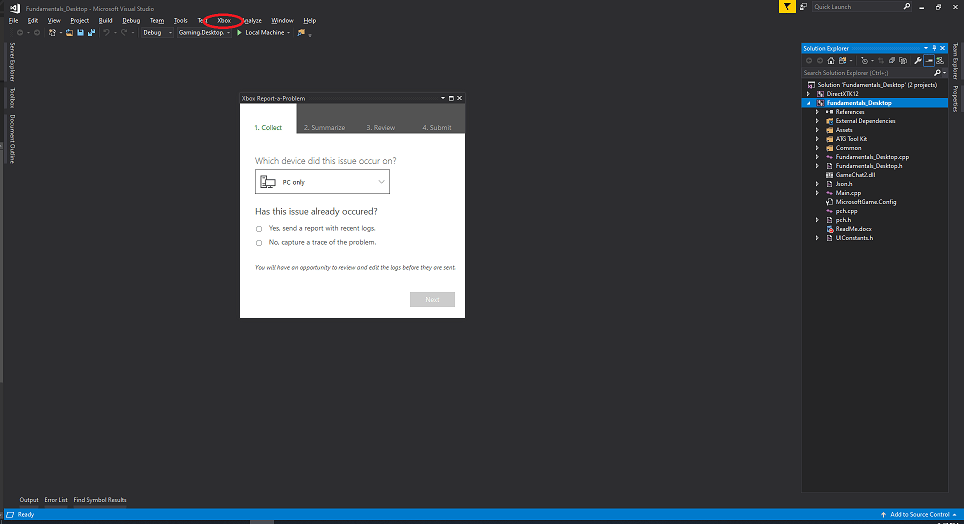 请不要通过 **反馈图标** > **Report-a-Problem** 来报告问题。
### 本地游戏存档应保存在哪里?
我们建议使用 [XGameSaveFiles](/build/core-features/common/game-save/xgamesavefiles) 保存游戏进度。它提供托管文件路径,并会自动同步到云端。对于移植到 PC Game Pass 但无法直接使用 GDK 的作品,可改用 [no-code cloud saves](/build/core-features/common/game-save/game-saves-walkthroughs-and-samples#porting-previous-titles-to-pc-game-saves-with-no-code-cloud-saves)。要完整对比可用 API,请参见 [Game Saves 开发者指南](/build/core-features/common/game-save/game-saves-developer-guide)。
如果你的作品不使用 GDK Game Saves API 而是独立管理存档数据,我们建议保存到 Windows *Saved Games* 已知文件夹,并使用 *\\\\* 的约定来组织存档数据。该文件夹位于 *%USERPROFILE%\Saved Games*,对应的 Windows 已知文件夹 ID 为 [FOLDERID\_SavedGames](https://learn.microsoft.com/windows/win32/shell/knownfolderid#FOLDERID_SavedGames)。要以编程方式获取该路径,请按以下示例调用 [SHGetKnownFolderPath](https://learn.microsoft.com/windows/win32/api/shlobj_core/nf-shlobj_core-shgetknownfolderpath)。
```cpp theme={null}
#include
PWSTR savedGamesPath = nullptr;
HRESULT hr = SHGetKnownFolderPath(FOLDERID_SavedGames, 0, nullptr, &savedGamesPath);
if (SUCCEEDED(hr))
{
// Use savedGamesPath, e.g., append "\\"
// ...
CoTaskMemFree(savedGamesPath);
}
```
不要将游戏数据保存到用户的 *Documents* 文件夹下。OneDrive 会自动同步 *Documents* 文件夹,这可能与云存档同步产生冲突并导致数据损坏。默认情况下,OneDrive 不会同步 *Saved Games* 已知文件夹,是本地游戏存档最安全的选择。
请确保你的代码会在这些文件夹不存在时创建它们,以便玩家能够找到并备份自己的存档。
对于使用 no-code cloud saves 的作品,请在 MicrosoftGame.config 中将 `NoCodePCRoot` 的 `RelativeTo` 属性设置为 `SavedGames`,以使用同一文件夹。更多信息请参见 [Porting previous titles to PC Game Saves with no-code cloud saves](/build/core-features/common/game-save/game-saves-walkthroughs-and-samples#porting-previous-titles-to-pc-game-saves-with-no-code-cloud-saves)。
## Related topics
- [XBOX PC Remote 工具常见问题解答和故障排除指南](/zh-CN/tools/tools-pc/xbox-pc-remote-tools/faq.md)
- [多人游戏常见问题和故障排除](/zh-CN/services/xbox-services/multiplayer/mpsd/concepts/live-multiplayer-2015-faq.md)
- [GameInput 常见问题](/zh-CN/build/core-features/common/input/overviews/input-faq.md)
- [Economy 版本 2 (V2) 常见问题解答](/zh-CN/services/playfab/economy-monetization/economy-v2/faq.md)
- [XBOX PC Remote Tools](/zh-CN/tools/tools-pc/xbox-pc-remote-tools/index.md)
请不要通过 **反馈图标** > **Report-a-Problem** 来报告问题。
### 本地游戏存档应保存在哪里?
我们建议使用 [XGameSaveFiles](/build/core-features/common/game-save/xgamesavefiles) 保存游戏进度。它提供托管文件路径,并会自动同步到云端。对于移植到 PC Game Pass 但无法直接使用 GDK 的作品,可改用 [no-code cloud saves](/build/core-features/common/game-save/game-saves-walkthroughs-and-samples#porting-previous-titles-to-pc-game-saves-with-no-code-cloud-saves)。要完整对比可用 API,请参见 [Game Saves 开发者指南](/build/core-features/common/game-save/game-saves-developer-guide)。
如果你的作品不使用 GDK Game Saves API 而是独立管理存档数据,我们建议保存到 Windows *Saved Games* 已知文件夹,并使用 *\\\\* 的约定来组织存档数据。该文件夹位于 *%USERPROFILE%\Saved Games*,对应的 Windows 已知文件夹 ID 为 [FOLDERID\_SavedGames](https://learn.microsoft.com/windows/win32/shell/knownfolderid#FOLDERID_SavedGames)。要以编程方式获取该路径,请按以下示例调用 [SHGetKnownFolderPath](https://learn.microsoft.com/windows/win32/api/shlobj_core/nf-shlobj_core-shgetknownfolderpath)。
```cpp theme={null}
#include
PWSTR savedGamesPath = nullptr;
HRESULT hr = SHGetKnownFolderPath(FOLDERID_SavedGames, 0, nullptr, &savedGamesPath);
if (SUCCEEDED(hr))
{
// Use savedGamesPath, e.g., append "\\"
// ...
CoTaskMemFree(savedGamesPath);
}
```
不要将游戏数据保存到用户的 *Documents* 文件夹下。OneDrive 会自动同步 *Documents* 文件夹,这可能与云存档同步产生冲突并导致数据损坏。默认情况下,OneDrive 不会同步 *Saved Games* 已知文件夹,是本地游戏存档最安全的选择。
请确保你的代码会在这些文件夹不存在时创建它们,以便玩家能够找到并备份自己的存档。
对于使用 no-code cloud saves 的作品,请在 MicrosoftGame.config 中将 `NoCodePCRoot` 的 `RelativeTo` 属性设置为 `SavedGames`,以使用同一文件夹。更多信息请参见 [Porting previous titles to PC Game Saves with no-code cloud saves](/build/core-features/common/game-save/game-saves-walkthroughs-and-samples#porting-previous-titles-to-pc-game-saves-with-no-code-cloud-saves)。
## Related topics
- [XBOX PC Remote 工具常见问题解答和故障排除指南](/zh-CN/tools/tools-pc/xbox-pc-remote-tools/faq.md)
- [多人游戏常见问题和故障排除](/zh-CN/services/xbox-services/multiplayer/mpsd/concepts/live-multiplayer-2015-faq.md)
- [GameInput 常见问题](/zh-CN/build/core-features/common/input/overviews/input-faq.md)
- [Economy 版本 2 (V2) 常见问题解答](/zh-CN/services/playfab/economy-monetization/economy-v2/faq.md)
- [XBOX PC Remote Tools](/zh-CN/tools/tools-pc/xbox-pc-remote-tools/index.md)