> ## Documentation Index
> Fetch the complete documentation index at: https://devdocs.xbox.com/llms.txt
> Use this file to discover all available pages before exploring further.
# 触控入门
> 触控入门
本文介绍了如何为您的 XBOX 游戏串流游戏配置触摸屏叠加控件。
您可以让您的游戏在不连接控制器的情况下也能游玩。触摸屏控件可以增加玩您游戏的用户数量,提升移动用户的参与度,并为用户提供适合其设备的直观体验。
有两种途径将触控输入带入您的游戏。
1. **Touch Adaptation Kit 布局**。串流客户端可以在游戏上叠加触控控件。您可以提供针对您游戏优化控件的自定义布局,并针对游戏的不同部分切换到不同的布局。
2. **原生触控**。对于游戏中相较控制器交互而言使用标准触控交互响应更自然的区域,您可以直接支持触控。常见需求场景包括菜单、物品栏管理和地图交互。
任一形式的触控输入都不是默认启用的。要在本地测试触控,可以配置内容测试应用启用原生触控或触控适配套件包旁加载。[串流配置概述](/build/core-features/common/game-streaming/game-streaming-content-test-application-stream-config) 提供了更多关于如何使用这些设置的信息。当触控在本地正常工作后,请联系您的 Microsoft 客户代表以在串流时为其他人启用触控输入。
有关 CTA 的更多信息,请参阅 [Web 内容测试应用 (CTA)](/build/core-features/common/game-streaming/game-streaming-web-content-test-application)。
## Touch Adaptation Kit 布局
有关使用 Touch Adaptation Kit 设计触控布局的最佳实践的更高级指南,请查看 [触控控件设计师指南](/build/core-features/common/game-streaming/building-touch-layouts/game-streaming-tak-designers-guide)。
您可以使用 [Touch Adaptation Kit (TAK)](/build/core-features/common/game-streaming/game-streaming-touch-touch-adaptation-kit-overview) 执行以下操作。
* [创建](/build/core-features/common/game-streaming/building-touch-layouts/game-streaming-touch-building-touch-layout)自定义触控适配布局。
* [部署](/build/core-features/common/game-streaming/building-touch-layouts/game-streaming-touch-publishing-layouts)自定义触控适配布局到您的设备。
* 使用 [Cloud Aware 触控适配套件 API](/reference/system/xgamestreaming/xgamestreaming_members#TouchAdaptation) 来控制控件布局的显示。
触控适配套件布局*仅*对正在主动使用触控输入的用户可见。当控制器正在被主动使用时,触控控件会被隐藏。因此,添加触控适配套件布局并调用 [Cloud Aware 触控适配套件 API](/reference/system/xgamestreaming/xgamestreaming_members#TouchAdaptation) 总是安全且优先的选择。
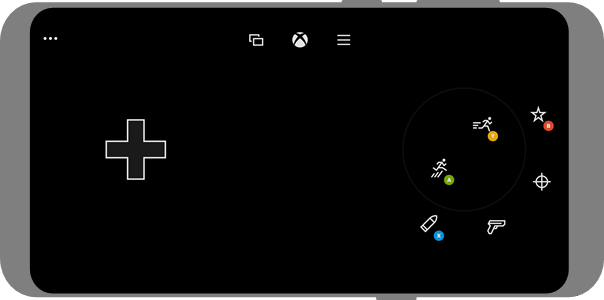
您的游戏可以拥有类似以下屏幕截图中所示的触控适配布局。
 ## 支持原生触控
支持原生触控类似于在游戏中支持鼠标或其他输入。触控事件将由 [IGameInputReading](/reference/input/gameinput/interfaces/igameinputreading/igameinputreading) 表示,其 [GameInputKind](/reference/input/gameinput/enums/gameinputkind) 值为 `GameInputKindTouch`。
有关实现原生触控的完整指南,请查看 [使用 IGameInput 为您的游戏构建原生触控界面](/build/core-features/common/game-streaming/game-streaming-native-touch-igameinput)
## 参考 API 文档
* [XGameStreaming(API 内容)](/reference/system/xgamestreaming/xgamestreaming_members)
## 另请参阅
[XBOX 游戏串流简介](/build/core-features/common/game-streaming/game-streaming-overview)
[触控控件设计师指南](/build/core-features/common/game-streaming/building-touch-layouts/game-streaming-tak-designers-guide)
[使用 IGameInput 为您的游戏构建原生触控界面](/build/core-features/common/game-streaming/game-streaming-native-touch-igameinput)
[如何获取 TAK CLI](https://aka.ms/get-takcli)
## 支持原生触控
支持原生触控类似于在游戏中支持鼠标或其他输入。触控事件将由 [IGameInputReading](/reference/input/gameinput/interfaces/igameinputreading/igameinputreading) 表示,其 [GameInputKind](/reference/input/gameinput/enums/gameinputkind) 值为 `GameInputKindTouch`。
有关实现原生触控的完整指南,请查看 [使用 IGameInput 为您的游戏构建原生触控界面](/build/core-features/common/game-streaming/game-streaming-native-touch-igameinput)
## 参考 API 文档
* [XGameStreaming(API 内容)](/reference/system/xgamestreaming/xgamestreaming_members)
## 另请参阅
[XBOX 游戏串流简介](/build/core-features/common/game-streaming/game-streaming-overview)
[触控控件设计师指南](/build/core-features/common/game-streaming/building-touch-layouts/game-streaming-tak-designers-guide)
[使用 IGameInput 为您的游戏构建原生触控界面](/build/core-features/common/game-streaming/game-streaming-native-touch-igameinput)
[如何获取 TAK CLI](https://aka.ms/get-takcli)