> ## Documentation Index
> Fetch the complete documentation index at: https://devdocs.xbox.com/llms.txt
> Use this file to discover all available pages before exploring further.
# Performance page
> Performance page
Use the Performance page to see real-time performance data for your console as shown in the following screenshot.
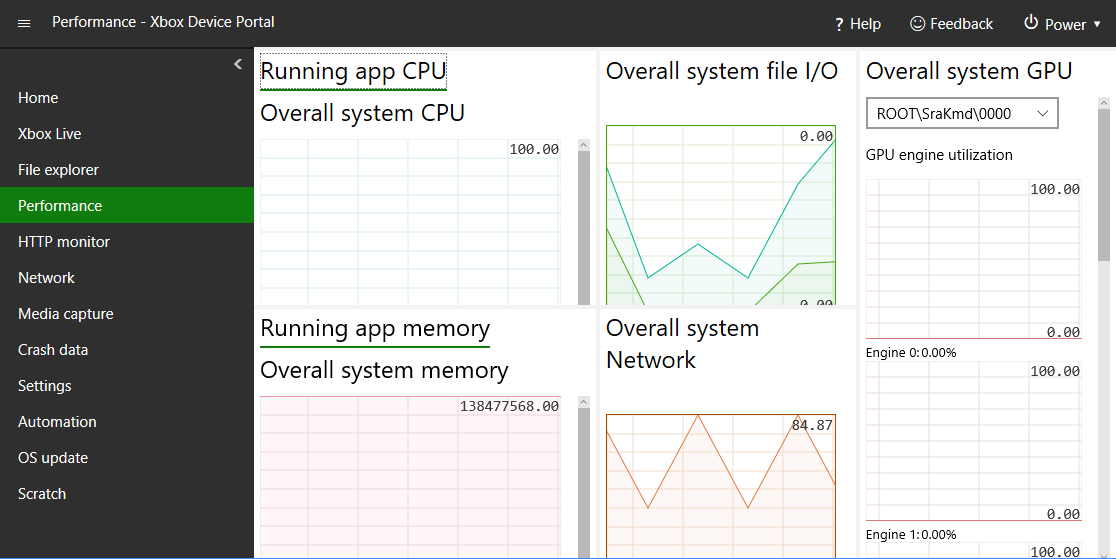 The Performance page has the following panes.
## Running app CPU pane
The Running app CPU pane shows the percentage of the total CPU that's available.
## Running app memory pane
The Running app memory pane shows the total, in-use, available-committed, paged, and non-paged memory.
## Overall system GPU pane
The Overall system GPU pane shows the GPU engine utilization and the percentage of the total GPU that's available.
## Overall system file I/O
The Overall system file I/O pane shows IO reads and writes.
## Overall system Network pane
The Overall system Network pane shows the received and sent network traffic.
## Related topics
- [Developer Home (DevHome) on XBOX dev kits](/tools/tools-console/devhome/index.md)
- [XBOX Device Portal (Windows Device Portal on XBOX)](/tools/tools-console/wdp/index.md)
- [Developer Home on the console (Dev Home)](/tools/tools-console/devhome/devhome.md)
- [NDA topic directory - live Microsoft Learn links](/nda/nda-topic-directory.md)
- [Insights Best Practices](/services/playfab/data-analytics/legacy/insights/best-practices.md)
The Performance page has the following panes.
## Running app CPU pane
The Running app CPU pane shows the percentage of the total CPU that's available.
## Running app memory pane
The Running app memory pane shows the total, in-use, available-committed, paged, and non-paged memory.
## Overall system GPU pane
The Overall system GPU pane shows the GPU engine utilization and the percentage of the total GPU that's available.
## Overall system file I/O
The Overall system file I/O pane shows IO reads and writes.
## Overall system Network pane
The Overall system Network pane shows the received and sent network traffic.
## Related topics
- [Developer Home (DevHome) on XBOX dev kits](/tools/tools-console/devhome/index.md)
- [XBOX Device Portal (Windows Device Portal on XBOX)](/tools/tools-console/wdp/index.md)
- [Developer Home on the console (Dev Home)](/tools/tools-console/devhome/devhome.md)
- [NDA topic directory - live Microsoft Learn links](/nda/nda-topic-directory.md)
- [Insights Best Practices](/services/playfab/data-analytics/legacy/insights/best-practices.md)