> ## Documentation Index
> Fetch the complete documentation index at: https://devdocs.xbox.com/llms.txt
> Use this file to discover all available pages before exploring further.
# OS update page
> OS update page
Use the OS update page to set the OS recovery update policy for your console and manually install an OS recovery as shown in the following screenshot.
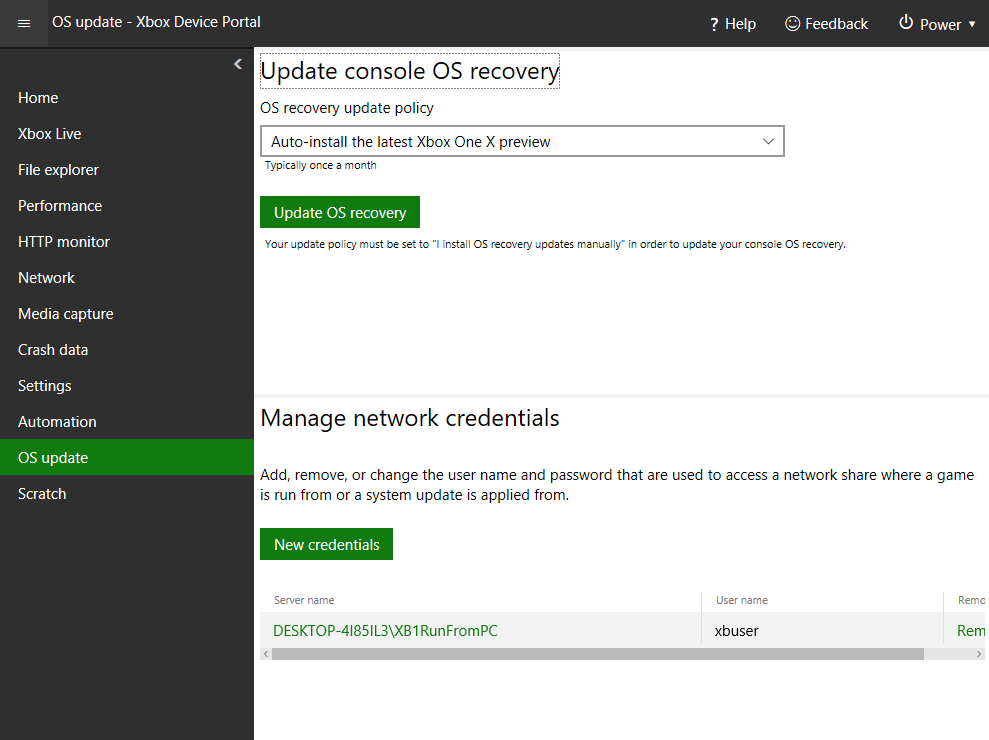 The OS update page has the following panes.
## Update console OS recovery pane
Use the Update console OS recovery pane to set the OS recovery update policy for the console and manually install an OS recovery.
## Manage network credentials pane
Use the Manage network credentials pane to add, remove, or change the username and password that's used to access a network share where a game is run from or where a system update is applied from.
## Related topics
- [XBOX Device Portal (Windows Device Portal on XBOX)](/tools/tools-console/wdp/index.md)
- [Settings page (Dev Home)](/tools/tools-console/devhome/devhome-settings.md)
- [OS Patch level updates for Windows](/services/playfab/multiplayer/servers/os-patch-updates.md)
- [Working with the Microsoft GDK Game OS memory manager](/build/console-features/memory/system-memory-working.md)
- [NDA topics index for XBOX GDK console development](/nda/nda-overview.md)
The OS update page has the following panes.
## Update console OS recovery pane
Use the Update console OS recovery pane to set the OS recovery update policy for the console and manually install an OS recovery.
## Manage network credentials pane
Use the Manage network credentials pane to add, remove, or change the username and password that's used to access a network share where a game is run from or where a system update is applied from.
## Related topics
- [XBOX Device Portal (Windows Device Portal on XBOX)](/tools/tools-console/wdp/index.md)
- [Settings page (Dev Home)](/tools/tools-console/devhome/devhome-settings.md)
- [OS Patch level updates for Windows](/services/playfab/multiplayer/servers/os-patch-updates.md)
- [Working with the Microsoft GDK Game OS memory manager](/build/console-features/memory/system-memory-working.md)
- [NDA topics index for XBOX GDK console development](/nda/nda-overview.md)