> ## Documentation Index
> Fetch the complete documentation index at: https://devdocs.xbox.com/llms.txt
> Use this file to discover all available pages before exploring further.
# Network page
> Network page
Use the Network page to switch between the available network interfaces and profiles, configure Fiddler, and retrieve the network configuration information as shown in the following screenshot.
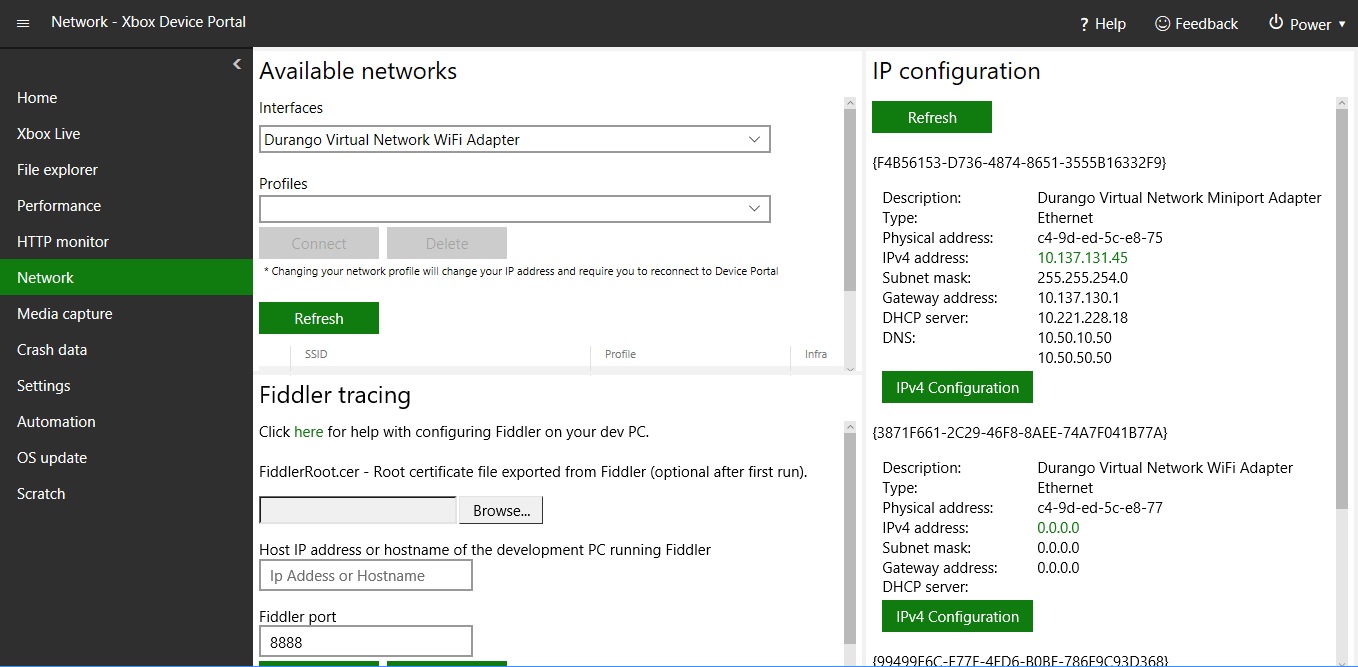 The Network page has the following panes.
## Available networks pane
The Available networks pane shows the available networks. You can select the network that the console should use.
## Fiddler tracing pane
The Fiddler tracing page shows the configuration settings for Fiddler to use with your console.
## IP configuration pane
The IP configuration pane shows the IP configuration values for the available interfaces.
## Related topics
- [XBOX Device Portal (Windows Device Portal on XBOX)](/tools/tools-console/wdp/index.md)
- [Networking page](/tools/tools-console/devhome/devhome-networking.md)
- [Performance page](/tools/tools-console/wdp/windows-device-portal-on-xbox-performance.md)
- [OS update page](/tools/tools-console/wdp/windows-device-portal-on-xbox-os-update.md)
- [Home page](/tools/tools-console/wdp/windows-device-portal-on-xbox-home.md)
The Network page has the following panes.
## Available networks pane
The Available networks pane shows the available networks. You can select the network that the console should use.
## Fiddler tracing pane
The Fiddler tracing page shows the configuration settings for Fiddler to use with your console.
## IP configuration pane
The IP configuration pane shows the IP configuration values for the available interfaces.
## Related topics
- [XBOX Device Portal (Windows Device Portal on XBOX)](/tools/tools-console/wdp/index.md)
- [Networking page](/tools/tools-console/devhome/devhome-networking.md)
- [Performance page](/tools/tools-console/wdp/windows-device-portal-on-xbox-performance.md)
- [OS update page](/tools/tools-console/wdp/windows-device-portal-on-xbox-os-update.md)
- [Home page](/tools/tools-console/wdp/windows-device-portal-on-xbox-home.md)