> ## Documentation Index
> Fetch the complete documentation index at: https://devdocs.xbox.com/llms.txt
> Use this file to discover all available pages before exploring further.
# Home page
> Home page
Use the Home page to view installed games and apps, and manage XBOX services test accounts as shown in the following screenshot. To add tools to the **Home** page, select **Menu**, and then select **Add tools to workspace**.
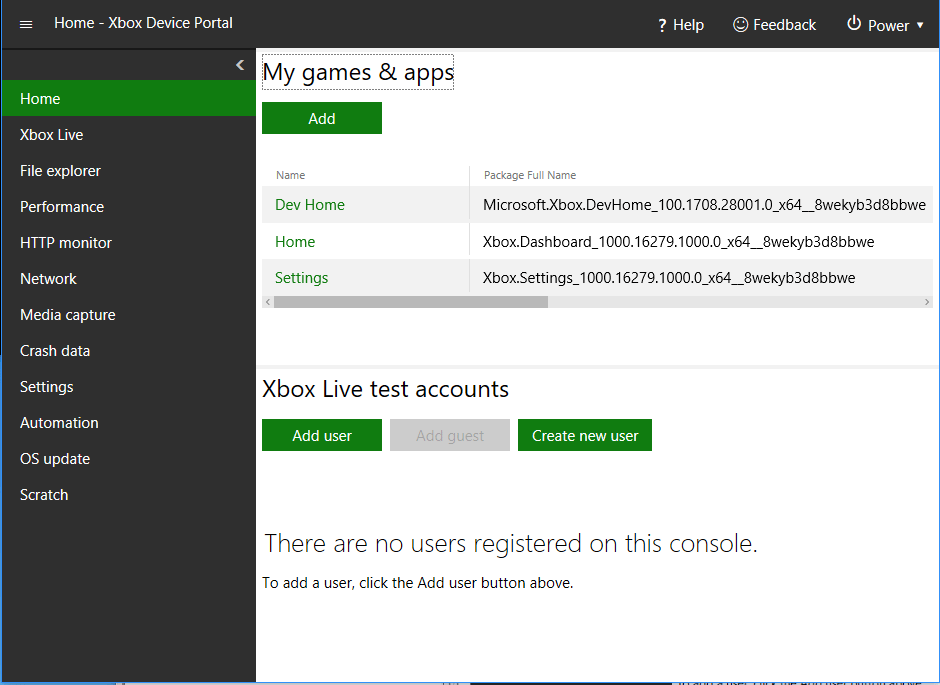 The Home page has the following panes.
## My games & apps pane
Use the My games & apps pane to perform the following actions.
* View the list of games and apps that are installed on the development console.
* Quickly launch games and apps.
* View the process lifetime management (PLM) state of games and apps. .
* Change PLM states.
* Register and run a title from a remote network share. For more information, see [Deploying your title to your XBOX Development Kit](/home/setup-install/concepts/deployment).
* Configure an overlay folder for a game. For more information, see [Managing overlay folders (XBOX Device Portal)](/tools/tools-console/wdp/windows-device-portal-on-xbox-overlay-folders).
## XBOX services test accounts pane
Use the XBOX services test accounts pane to perform the following actions.
* View the list of users who are registered on the console.
* Sign a user in or out with a single click.
* Add users and guest accounts.
* View details of users and guest accounts.
## See also
[XBOX services test accounts](/services/xbox-services/develop/test-accounts/live-test-accounts)
## Related topics
- [Home page (Dev Home)](/tools/tools-console/devhome/devhome-home.md)
- [Developer Home on the console (Dev Home)](/tools/tools-console/devhome/devhome.md)
- [Developer Home (DevHome) on XBOX dev kits](/tools/tools-console/devhome/index.md)
- [Configure properties for a game](/publishing/game-publishing/tutorial-xbox-managed/how-to-configure-properties.md)
- [Configure pricing and availability for a game](/publishing/game-publishing/tutorial-xbox-managed/how-to-configure-pricing-and-availability.md)
The Home page has the following panes.
## My games & apps pane
Use the My games & apps pane to perform the following actions.
* View the list of games and apps that are installed on the development console.
* Quickly launch games and apps.
* View the process lifetime management (PLM) state of games and apps. .
* Change PLM states.
* Register and run a title from a remote network share. For more information, see [Deploying your title to your XBOX Development Kit](/home/setup-install/concepts/deployment).
* Configure an overlay folder for a game. For more information, see [Managing overlay folders (XBOX Device Portal)](/tools/tools-console/wdp/windows-device-portal-on-xbox-overlay-folders).
## XBOX services test accounts pane
Use the XBOX services test accounts pane to perform the following actions.
* View the list of users who are registered on the console.
* Sign a user in or out with a single click.
* Add users and guest accounts.
* View details of users and guest accounts.
## See also
[XBOX services test accounts](/services/xbox-services/develop/test-accounts/live-test-accounts)
## Related topics
- [Home page (Dev Home)](/tools/tools-console/devhome/devhome-home.md)
- [Developer Home on the console (Dev Home)](/tools/tools-console/devhome/devhome.md)
- [Developer Home (DevHome) on XBOX dev kits](/tools/tools-console/devhome/index.md)
- [Configure properties for a game](/publishing/game-publishing/tutorial-xbox-managed/how-to-configure-properties.md)
- [Configure pricing and availability for a game](/publishing/game-publishing/tutorial-xbox-managed/how-to-configure-pricing-and-availability.md)