> ## Documentation Index
> Fetch the complete documentation index at: https://devdocs.xbox.com/llms.txt
> Use this file to discover all available pages before exploring further.
# Visual Studio 2026 GDK support notes
> Visual Studio 2026 Microsoft Game Development Kit (GDK) support notes
This article describes GDK support for Visual Studio 2026. [Visual Studio 2026](https://visualstudio.microsoft.com/) supports Microsoft Game Development Kit (GDK) development.
## Installing Visual Studio 2026
The GDK supports development with either the **Professional** edition or the **Enterprise** edition of Visual Studio 2026. The Community edition isn't supported.
GDK Visual Studio extension (VSIX) components aren't supported on ARM-based devices. To use GDK Visual Studio project templates, property pages, and debugging extensions, install the GDK on an x64-based development PC.
When installing Visual Studio 2026, select the **Game development with C++** workload during setup as shown in the following screenshot.
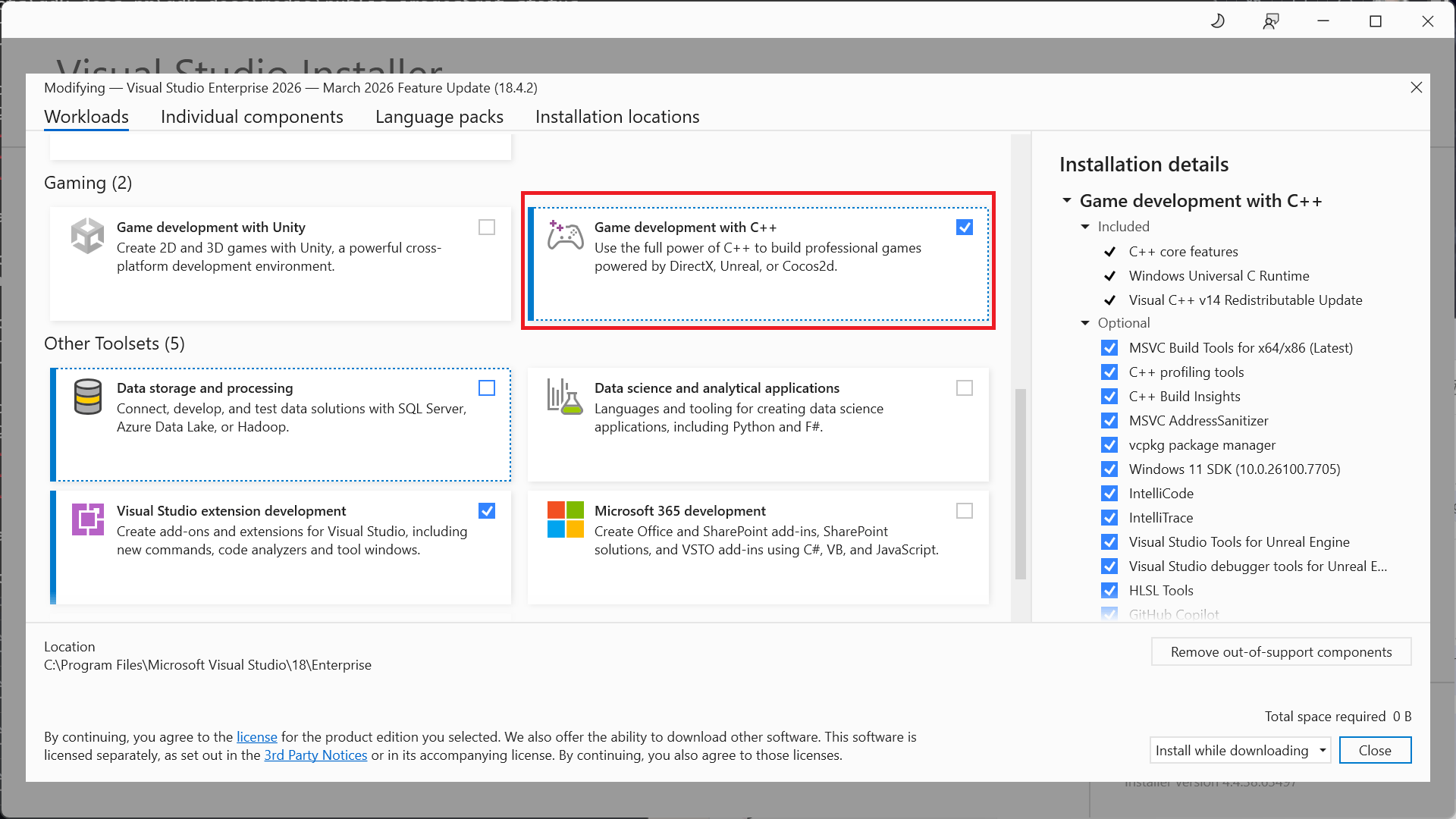 In addition to the core C++ tools that you need for game development, make sure the **Windows 10 SDK (22000)** component is installed to provide the Windows SDK required to build games with the GDK. You can also use the \*Windows SDK for Windows 11, Version 22H2 (10.0.22621), or *Windows SDK for Windows 11, Version 24H2 (10.0.26100)*, but they're not required.
While not required, installing the **Desktop development with C++** workload provides more tools and samples that you might find helpful. For example, **Desktop development with C++** is required if you're building with the Clang/LLVM toolset.
## Installing optional toolsets
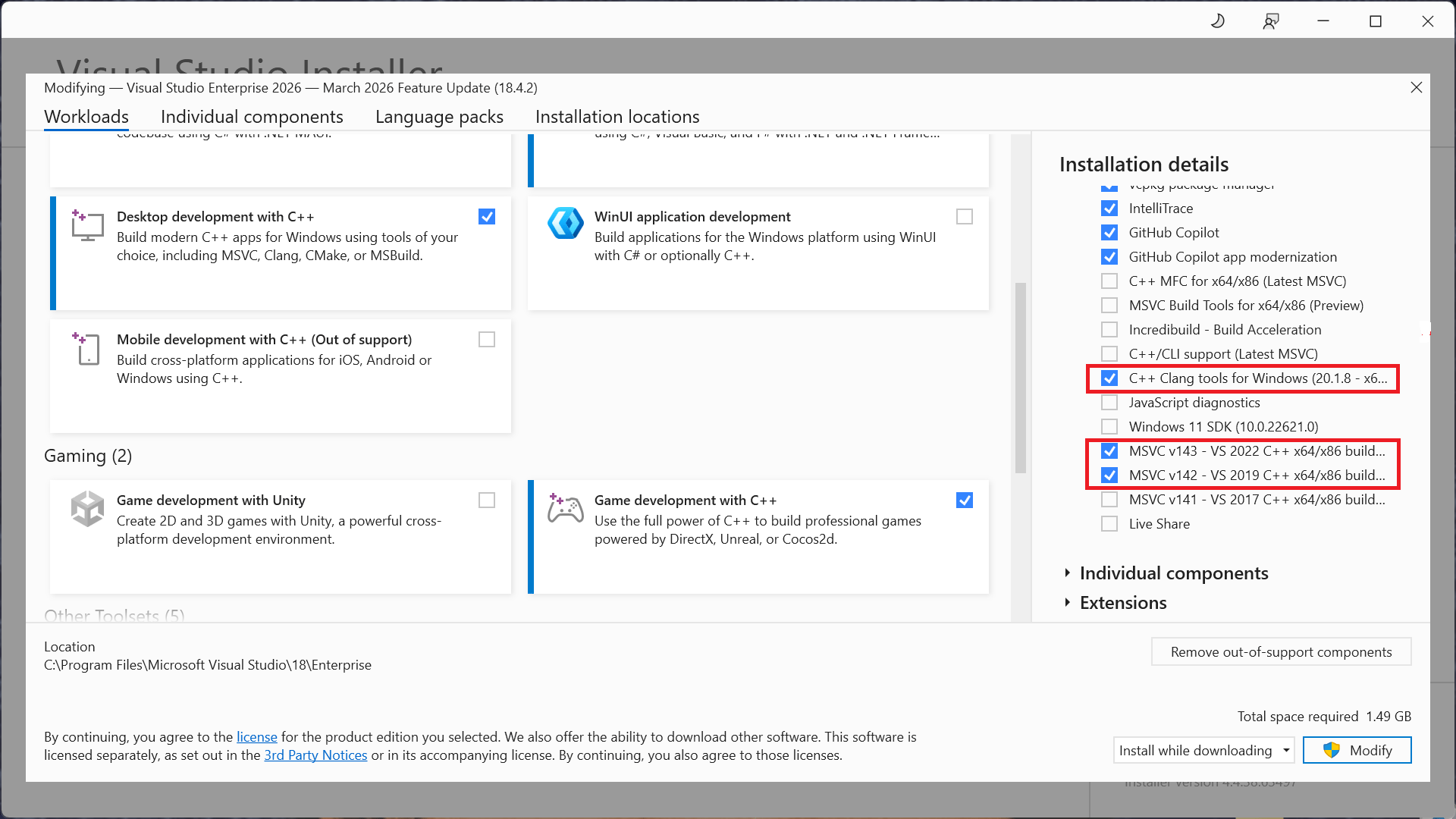
The **Game development with C++** workload installs the Visual Studio 2026 version of the MSVC build tools (version **v145**). In addition to the **v145** toolset, the GDK also supports building with the following toolsets:
* v143 (the Visual Studio 2019 toolset)
* v142 (the Visual Studio 2019 toolset)
* the C++ Clang tools for windows
This flexibility allows you to upgrade to the Visual Studio 2026 IDE without updating your toolset.
You can find the optional toolsets under the **Desktop Development with C++** workload, or by searching the **Individual Components** in the Visual Studio installation dialog.
In addition to the core C++ tools that you need for game development, make sure the **Windows 10 SDK (22000)** component is installed to provide the Windows SDK required to build games with the GDK. You can also use the \*Windows SDK for Windows 11, Version 22H2 (10.0.22621), or *Windows SDK for Windows 11, Version 24H2 (10.0.26100)*, but they're not required.
While not required, installing the **Desktop development with C++** workload provides more tools and samples that you might find helpful. For example, **Desktop development with C++** is required if you're building with the Clang/LLVM toolset.
## Installing optional toolsets
The **Game development with C++** workload installs the Visual Studio 2026 version of the MSVC build tools (version **v145**). In addition to the **v145** toolset, the GDK also supports building with the following toolsets:
* v143 (the Visual Studio 2019 toolset)
* v142 (the Visual Studio 2019 toolset)
* the C++ Clang tools for windows
This flexibility allows you to upgrade to the Visual Studio 2026 IDE without updating your toolset.
You can find the optional toolsets under the **Desktop Development with C++** workload, or by searching the **Individual Components** in the Visual Studio installation dialog.
 ## Selecting a toolset for a project
Specify the toolset to use for a project by using the **Platform Toolset** property from the project's property page.
## Selecting a toolset for a project
Specify the toolset to use for a project by using the **Platform Toolset** property from the project's property page.
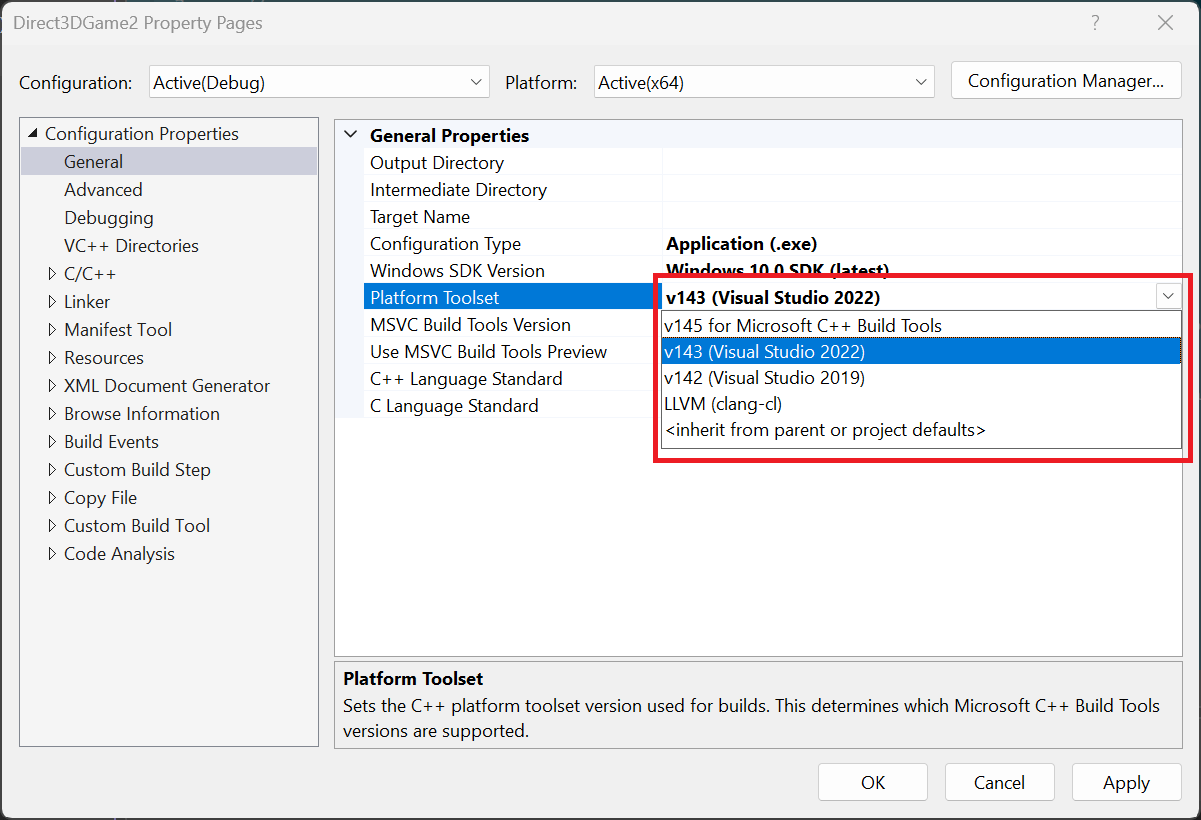 You can also manually specify the **PlatformToolset** property in the project file, as shown in the following property group.
```xml theme={null}
Application
v145
true
Unicode
false
false
```
## Visual Studio 2026 Servicing Model
Visual Studio 2026 includes a new servicing model that includes both an Insiders and Stable Channel. For more information, see [Visual Studio Product Lifecycle and Servicing](https://learn.microsoft.com/visualstudio/productinfo/vs-servicing).
## Reporting bugs
Report bugs for the **Visual C++ compiler** (if possible) through Visual Studio *Report a Problem...*. See [Microsoft Docs](https://learn.microsoft.com/visualstudio/ide/how-to-report-a-problem-with-visual-studio) and the [Developer Community](https://aka.ms/feedback/report?space=62) website. For details on creating a good bug report for the compiler, see [this page](https://aka.ms/compilerbug).
You can add a comment to a public report issue marked as "Microsoft only" if private information is required to reproduce the issue.
For bug reporting for the **clang/LLVM for Windows compiler**, use [https://bugs.llvm.org/](https://bugs.llvm.org/)
For bug reports for the **Microsoft Standard C++ Library** (also known as STL), use [https://github.com/microsoft/STL/issues](https://github.com/microsoft/STL/issues)
As always, feel free to reach out to your *Microsoft Representative* for critical issues that need escalation.
## See also
[Visual Studio](/tools/tools-console/visualstudio/visualstudio)
[Project templates in Visual Studio for XBOX development](/tools/tools-console/visualstudio/durango-visual-studio-templates)
[Visual Studio properties for XBOX development](/tools/tools-console/visualstudio/durango-property-pages)
[Debugging XBOX projects by using Visual Studio](/tools/tools-console/visualstudio/debugging-with-visualstudio)
## Related topics
- [Visual Studio 2022 GDK support notes](/tools/tools-console/visualstudio/vs-2022-support-notes.md)
- [Visual Studio 2019 support notes](/tools/tools-pc/visualstudio/gr-vs-2019-support-notes.md)
- [Visual Studio 2022 support notes](/tools/tools-pc/visualstudio/gr-vs-2022-support-notes.md)
- [Visual Studio 2019 GDK support notes](/tools/tools-console/visualstudio/vs-2019-support-notes.md)
- [Visual Studio (contents)](/tools/tools-pc/visualstudio/gr-visualstudio-toc.md)
You can also manually specify the **PlatformToolset** property in the project file, as shown in the following property group.
```xml theme={null}
Application
v145
true
Unicode
false
false
```
## Visual Studio 2026 Servicing Model
Visual Studio 2026 includes a new servicing model that includes both an Insiders and Stable Channel. For more information, see [Visual Studio Product Lifecycle and Servicing](https://learn.microsoft.com/visualstudio/productinfo/vs-servicing).
## Reporting bugs
Report bugs for the **Visual C++ compiler** (if possible) through Visual Studio *Report a Problem...*. See [Microsoft Docs](https://learn.microsoft.com/visualstudio/ide/how-to-report-a-problem-with-visual-studio) and the [Developer Community](https://aka.ms/feedback/report?space=62) website. For details on creating a good bug report for the compiler, see [this page](https://aka.ms/compilerbug).
You can add a comment to a public report issue marked as "Microsoft only" if private information is required to reproduce the issue.
For bug reporting for the **clang/LLVM for Windows compiler**, use [https://bugs.llvm.org/](https://bugs.llvm.org/)
For bug reports for the **Microsoft Standard C++ Library** (also known as STL), use [https://github.com/microsoft/STL/issues](https://github.com/microsoft/STL/issues)
As always, feel free to reach out to your *Microsoft Representative* for critical issues that need escalation.
## See also
[Visual Studio](/tools/tools-console/visualstudio/visualstudio)
[Project templates in Visual Studio for XBOX development](/tools/tools-console/visualstudio/durango-visual-studio-templates)
[Visual Studio properties for XBOX development](/tools/tools-console/visualstudio/durango-property-pages)
[Debugging XBOX projects by using Visual Studio](/tools/tools-console/visualstudio/debugging-with-visualstudio)
## Related topics
- [Visual Studio 2022 GDK support notes](/tools/tools-console/visualstudio/vs-2022-support-notes.md)
- [Visual Studio 2019 support notes](/tools/tools-pc/visualstudio/gr-vs-2019-support-notes.md)
- [Visual Studio 2022 support notes](/tools/tools-pc/visualstudio/gr-vs-2022-support-notes.md)
- [Visual Studio 2019 GDK support notes](/tools/tools-console/visualstudio/vs-2019-support-notes.md)
- [Visual Studio (contents)](/tools/tools-pc/visualstudio/gr-visualstudio-toc.md)