> ## Documentation Index
> Fetch the complete documentation index at: https://devdocs.xbox.com/llms.txt
> Use this file to discover all available pages before exploring further.
# Visual Studio 2022 GDK support notes
> Visual Studio 2022 Microsoft Game Development Kit (GDK) support notes
This article describes GDK support for Visual Studio 2022. Visual Studio 2022 [version 17.12 or 17.14](https://learn.microsoft.com/visualstudio/releases/2022/servicing-vs2022) supports Microsoft Game Development Kit (GDK) development. Long Term Support Channels are provided for versions 17.12 and 17.14 per [Visual Studio Product Lifecycle and Servicing](https://learn.microsoft.com/visualstudio/productinfo/vs-servicing).
Visual Studio 2022 versions 17.0 through 17.11 are out of support as of January 2026.
## Installing Visual Studio 2022
The GDK supports development with either the **Professional** edition or the **Enterprise** edition of Visual Studio 2022. The Community edition isn't supported.
GDK Visual Studio extension (VSIX) components aren't supported on ARM-based devices. To use GDK Visual Studio project templates, property pages, and debugging extensions, install the GDK on an x64-based development PC.
When installing Visual Studio 2022, select the **Game development with C++** workload during setup as shown in the following screenshot.
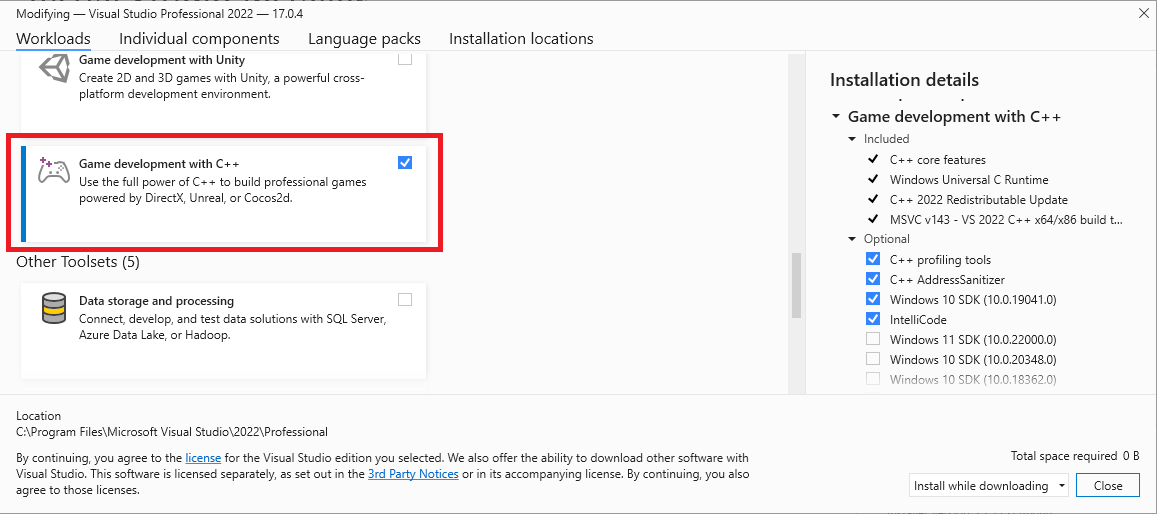 In addition to the core C++ tools that you need for game development, make sure the **Windows 10 SDK (22000)** component is installed to provide the Windows SDK required to build games with the GDK. You can also use the *Windows SDK for Windows 11, Version 22H2 (10.0.22621)* or *Windows SDK for Windows 11, Version 24H2 (10.0.26100)*, but they're not required.
While not required, installing the **Desktop development with C++** workload provides more tools and samples that you might find helpful. For example, **Desktop development with C++** is required if you're building with the Clang/LLVM toolset.
## Installing optional toolsets
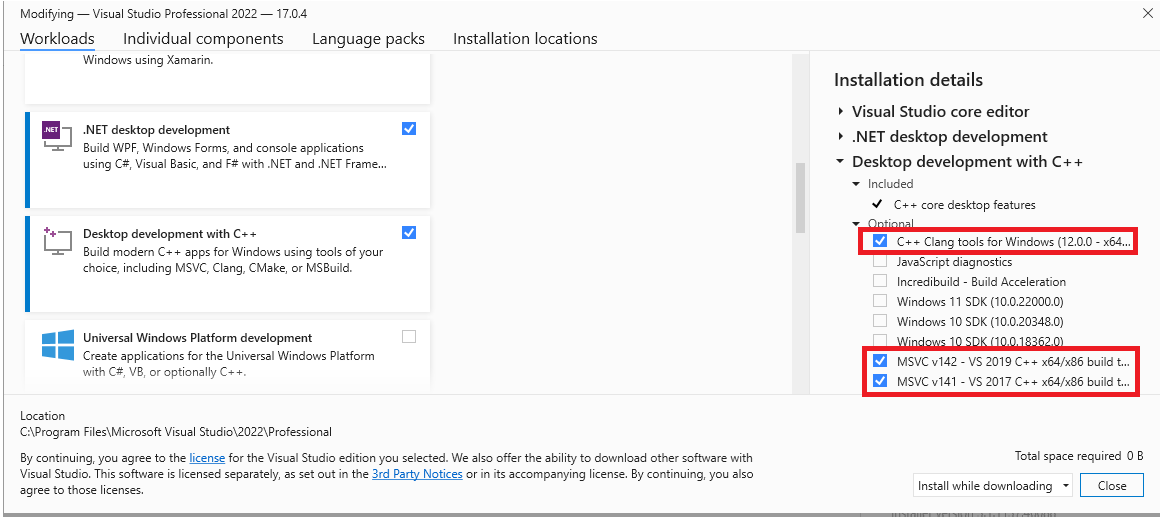
The **Game development with C++** workload installs the Visual Studio 2022 version of the MSVC build tools (version **v143**). In addition to the **v143** toolset, the GDK also supports building with the following toolsets:
* v142 (the Visual Studio 2019 toolset)
* the C++ Clang tools for windows
This flexibility allows you to upgrade to the Visual Studio 2022 IDE without updating your toolset.
You can find the optional toolsets under the **Desktop Development with C++** workload, or by searching the **Individual Components** in the Visual Studio installation dialog.
In addition to the core C++ tools that you need for game development, make sure the **Windows 10 SDK (22000)** component is installed to provide the Windows SDK required to build games with the GDK. You can also use the *Windows SDK for Windows 11, Version 22H2 (10.0.22621)* or *Windows SDK for Windows 11, Version 24H2 (10.0.26100)*, but they're not required.
While not required, installing the **Desktop development with C++** workload provides more tools and samples that you might find helpful. For example, **Desktop development with C++** is required if you're building with the Clang/LLVM toolset.
## Installing optional toolsets
The **Game development with C++** workload installs the Visual Studio 2022 version of the MSVC build tools (version **v143**). In addition to the **v143** toolset, the GDK also supports building with the following toolsets:
* v142 (the Visual Studio 2019 toolset)
* the C++ Clang tools for windows
This flexibility allows you to upgrade to the Visual Studio 2022 IDE without updating your toolset.
You can find the optional toolsets under the **Desktop Development with C++** workload, or by searching the **Individual Components** in the Visual Studio installation dialog.
 ## Selecting a toolset for a project
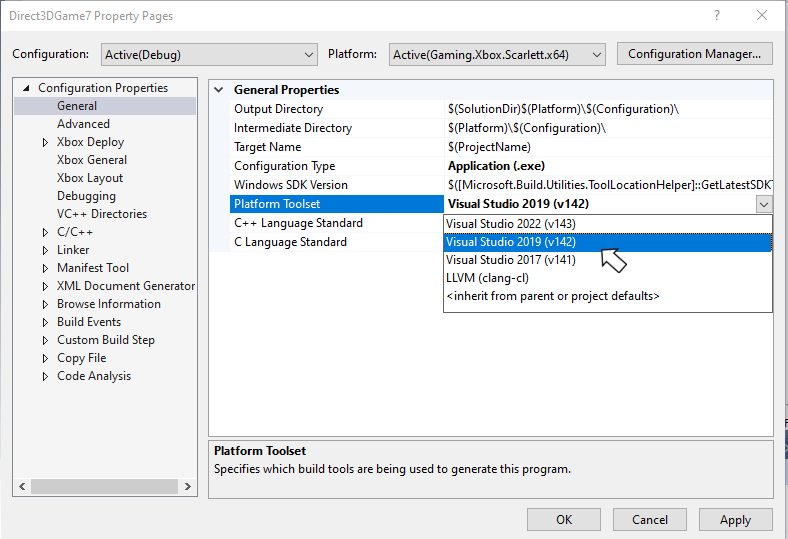
Specify the toolset to use for a project by using the **Platform Toolset** property from the project's property page.
## Selecting a toolset for a project
Specify the toolset to use for a project by using the **Platform Toolset** property from the project's property page.
 You can also specify the **PlatformToolset** property manually in the project file, as shown in the following property group.
```xml theme={null}
Application
v143
true
Unicode
false
false
```
## Debugging XBOX projects by using Visual Studio 2022
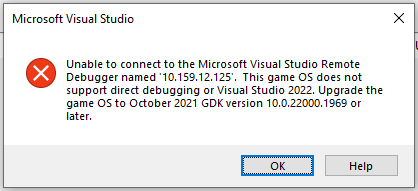
To debug by using Visual Studio 2022, build the title you're debugging by using the March 2022 (or newer) GDK. This dependency exists because the Game OS that ships in those versions of the GDK contains binaries that are required for debugging by using Visual Studio 2022. If you attempt to debug by using Visual Studio 2022 against an older Game OS, you see the following error message.
You can also specify the **PlatformToolset** property manually in the project file, as shown in the following property group.
```xml theme={null}
Application
v143
true
Unicode
false
false
```
## Debugging XBOX projects by using Visual Studio 2022
To debug by using Visual Studio 2022, build the title you're debugging by using the March 2022 (or newer) GDK. This dependency exists because the Game OS that ships in those versions of the GDK contains binaries that are required for debugging by using Visual Studio 2022. If you attempt to debug by using Visual Studio 2022 against an older Game OS, you see the following error message.
 When you use the **Attach** dialog under the **Debug** menu in Visual Studio 2022, select **XBOX Direct Connection** in the **Connection Type** dropdown and enter the console's Host IP address in the **Connection Target** text box. Use the [xbconnect](/tools/tools-console/commandlinetools/xbconnect) command line tool to determine the Host IP.
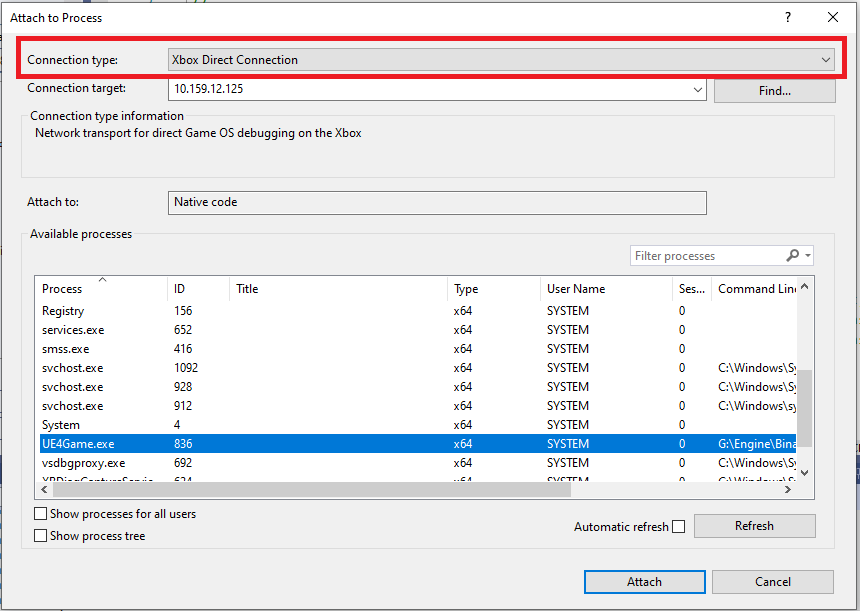 These values are different from the values you enter when attaching by using Visual Studio 2019. When you use Visual Studio 2019, the connection type is **Remote no authentication** and the IP address is the console's System IP address.
## Visual Studio 2022 servicing model
Visual Studio 2022 includes a new servicing model that you can use to select a servicing baseline, and then only get updates for that baseline. This new model replaces the servicing models from previous versions of Visual Studio, which strongly encouraged the use of the latest available version. For more details, see [Visual Studio Product Lifecycle and Servicing](https://learn.microsoft.com/lifecycle/products/visual-studio-2022).
## Reporting bugs
Report bug reports for the **Visual C++ compiler** (if possible) via Visual Studio *Report a Problem...*. For more information, see [Microsoft Docs](https://learn.microsoft.com/visualstudio/ide/how-to-report-a-problem-with-visual-studio) and the [Developer Community](https://aka.ms/feedback/report?space=62) website. Be sure to read [this page](https://aka.ms/compilerbug) for details on creating a good bug report for the compiler.
You can add a comment to a public report issue marked as "Microsoft only" if private information is required to reproduce the issue.
For bug reporting for the **clang/LLVM for Windows compiler**, use [https://bugs.llvm.org/](https://bugs.llvm.org/)
For bug reports for the **Microsoft Standard C++ Library** (also known as STL), use [https://github.com/microsoft/STL/issues](https://github.com/microsoft/STL/issues)
As always, feel free to reach out to your *Microsoft Representative* for critical issues that need escalation.
## Known issues
* The Game OS doesn't support the `std:chrono` time zone functionality added in C++20 P0355R7 \ *Calendars And Time Zones* because it doesn't include `icu.dll`, `icuin.dll`, `icuuc.dll`, or the associated data files in the XVD image. If you use these functions, your app throws a C++ exception at runtime. The calendars functionality in PR0355R7 is supported.
## See also
[Visual Studio](/tools/tools-console/visualstudio/visualstudio)
[Project templates in Visual Studio for XBOX development](/tools/tools-console/visualstudio/durango-visual-studio-templates)
[Visual Studio properties for XBOX development](/tools/tools-console/visualstudio/durango-property-pages)
[Debugging XBOX projects by using Visual Studio](/tools/tools-console/visualstudio/debugging-with-visualstudio)
## Related topics
- [Visual Studio 2022 support notes](/tools/tools-pc/visualstudio/gr-vs-2022-support-notes.md)
- [Visual Studio 2019 support notes](/tools/tools-pc/visualstudio/gr-vs-2019-support-notes.md)
- [Visual Studio 2019 GDK support notes](/tools/tools-console/visualstudio/vs-2019-support-notes.md)
- [Visual Studio 2026 GDK support notes](/tools/tools-console/visualstudio/vs-2026-support-notes.md)
- [Visual Studio (contents)](/tools/tools-pc/visualstudio/gr-visualstudio-toc.md)
These values are different from the values you enter when attaching by using Visual Studio 2019. When you use Visual Studio 2019, the connection type is **Remote no authentication** and the IP address is the console's System IP address.
## Visual Studio 2022 servicing model
Visual Studio 2022 includes a new servicing model that you can use to select a servicing baseline, and then only get updates for that baseline. This new model replaces the servicing models from previous versions of Visual Studio, which strongly encouraged the use of the latest available version. For more details, see [Visual Studio Product Lifecycle and Servicing](https://learn.microsoft.com/lifecycle/products/visual-studio-2022).
## Reporting bugs
Report bug reports for the **Visual C++ compiler** (if possible) via Visual Studio *Report a Problem...*. For more information, see [Microsoft Docs](https://learn.microsoft.com/visualstudio/ide/how-to-report-a-problem-with-visual-studio) and the [Developer Community](https://aka.ms/feedback/report?space=62) website. Be sure to read [this page](https://aka.ms/compilerbug) for details on creating a good bug report for the compiler.
You can add a comment to a public report issue marked as "Microsoft only" if private information is required to reproduce the issue.
For bug reporting for the **clang/LLVM for Windows compiler**, use [https://bugs.llvm.org/](https://bugs.llvm.org/)
For bug reports for the **Microsoft Standard C++ Library** (also known as STL), use [https://github.com/microsoft/STL/issues](https://github.com/microsoft/STL/issues)
As always, feel free to reach out to your *Microsoft Representative* for critical issues that need escalation.
## Known issues
* The Game OS doesn't support the `std:chrono` time zone functionality added in C++20 P0355R7 \ *Calendars And Time Zones* because it doesn't include `icu.dll`, `icuin.dll`, `icuuc.dll`, or the associated data files in the XVD image. If you use these functions, your app throws a C++ exception at runtime. The calendars functionality in PR0355R7 is supported.
## See also
[Visual Studio](/tools/tools-console/visualstudio/visualstudio)
[Project templates in Visual Studio for XBOX development](/tools/tools-console/visualstudio/durango-visual-studio-templates)
[Visual Studio properties for XBOX development](/tools/tools-console/visualstudio/durango-property-pages)
[Debugging XBOX projects by using Visual Studio](/tools/tools-console/visualstudio/debugging-with-visualstudio)
## Related topics
- [Visual Studio 2022 support notes](/tools/tools-pc/visualstudio/gr-vs-2022-support-notes.md)
- [Visual Studio 2019 support notes](/tools/tools-pc/visualstudio/gr-vs-2019-support-notes.md)
- [Visual Studio 2019 GDK support notes](/tools/tools-console/visualstudio/vs-2019-support-notes.md)
- [Visual Studio 2026 GDK support notes](/tools/tools-console/visualstudio/vs-2026-support-notes.md)
- [Visual Studio (contents)](/tools/tools-pc/visualstudio/gr-visualstudio-toc.md)