> ## Documentation Index
> Fetch the complete documentation index at: https://devdocs.xbox.com/llms.txt
> Use this file to discover all available pages before exploring further.
# Address Sanitizer Support for XBOX
> Address Sanitizer Support for XBOX
Like most C++ programs, games can suffer from a class of bugs that affect program correctness and program stability, which is why starting in Visual Studio 2022, the Microsoft C/C++ compiler (MSVC) and IDE supports the AddressSanitizer (ASan) technology. This is a compiler and runtime technology that exposes many hard-to-find bugs with zero false positives, for example :
* Alloc/dealloc mismatches and new/delete type mismatches
* Allocations too large for the heap
* calloc overflow and alloca overflow
* Double free and use after free
* Global variable overflow
* Heap buffer overflow
* Invalid alignment of aligned values
* memcpy and strncat parameter overlap
* Stack buffer overflow and underflow
* Stack use after return and use after scope
* Memory use after it's poisoned
Further information regarding ASan can be found on the Visual Studio pages : [AddressSanitizer](https://learn.microsoft.com/cpp/sanitizers/asan) (Microsoft Docs)
## Enabling ASan in the compiler
Address Sanitizer is integrated with the Visual Studio project system, the CMake build system, and the IDE. Projects can enable AddressSanitizer by using one extra compiler option *`/fsanitize=address`* or by setting a project property in Visual Studio :
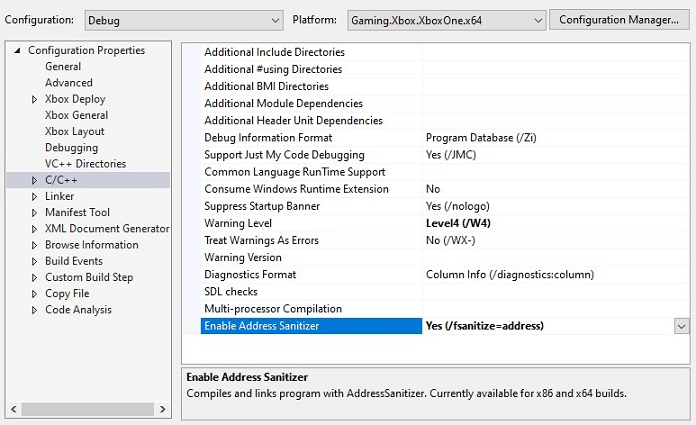 This option is compatible with all levels of optimization and configurations of x64. However, it's **incompatible** with `edit-and-continue`, `incremental linking`, and `/RTC` which must be disabled before compiling with ASan.
When enabling ASan it requires an additional library to be linked into your code. This reference is added automatically by the build system. This also requires you to set an "Additional Library Directories" under ***Linker > General*** for your project. Please ensures that the
`$(VC_LibraryPath_VC_x64)` value is the last one in the list to prevent it being used for other libraries, as shown below:
This option is compatible with all levels of optimization and configurations of x64. However, it's **incompatible** with `edit-and-continue`, `incremental linking`, and `/RTC` which must be disabled before compiling with ASan.
When enabling ASan it requires an additional library to be linked into your code. This reference is added automatically by the build system. This also requires you to set an "Additional Library Directories" under ***Linker > General*** for your project. Please ensures that the
`$(VC_LibraryPath_VC_x64)` value is the last one in the list to prevent it being used for other libraries, as shown below:
 ## ASan Runtime Requirements
When a game is built with ASan enabled it requires one additional DLL to be present at runtime, which enables the functionality. By default, when ASan is enabled in the compiler, it will copy the DLL to the output directory for your project and should then be deployed to the console next to the Executable.
If needed, the DLL's can be found manually in the `$(VC_ExecutablePath_x64)` directory of Visual Studio. XBOX requires one of these two, depending on the build version :
| DLL Filename | Build Type |
| -------------------------------------- | -------------- |
| `clang_rt.asan_dbg_dynamic-x86_64.dll` | Debug builds |
| `clang_rt.asan_dynamic-x86_64.dll` | Release builds |
## Runtime Debugger Support
When running an ASan enabled game with a debugger attached, if an error is found it will break into the debugger and show a detailed report allowing you to determine where the error occurred.
But if you are running without a debugger attached, in an automated test framework for example, then the error information is displayed in the standard output and the game will terminate. This can be helpful, but you might require more state information to find the root cause of the crash, which is where Crash Dump support comes in.
If you are running without a debugger attached and require symbols to be resolved at that point then you need to deploy the `llvm-symbolizer.exe` file alongside your game EXE. This file can be found in the same location as the ASan Runtime DLL's listed above.
## Runtime Crash Dump support
Starting with Visual Studio 16.9.8, or 16.10.2, ASan can be configured to save a crash dump file that contains the metadata associated with the error. The debugger in Visual Studio can parse the metadata that's saved in the dump file to provide more context for the crash. You can configure this crash dump saving on a per-build basis, store these binary artifacts, and then view them in the IDE with proper source indexing.
Crash Dump documentation can be found here:
[Configuring Crash Dumps](https://learn.microsoft.com/cpp/sanitizers/asan-offline-crash-dumps) (Microsoft Docs)
But the approach linked above requires the setting of an environment variable, which isn't supported on XBOX, so an alternative method was implemented. To add Crash Dump support to your XBOX title you can simply define a function callback which provides the required crash dump filename information to ASan, three examples of which are shown below.
The filename usually has a ***.dmp*** suffix to follow the Visual Studio IDE conventions
```c++ theme={null}
// 1. Use a hardcoded dump name
extern "C" const wchar_t* __vcasan_save_dumps()
{
return L"myCrashDump.dmp";
}
// 2. Programmatically build the dump name
extern "C" const wchar_t* __vcasan_save_dumps()
{
return TestFramework.buildName + TestFramework.buildInfo + TestFramework.dateTime;
}
// 3. You can conditionally choose NOT to collect a crash dump
extern "C" const wchar_t* __vcasan_save_dumps()
{
// Choose to create a crash dump based on a runtime flag
if ( gCollectCrashDumps )
{
return L"myCrashDump.dmp";
}
else
{
// Returning NULL stops ASan creating a crash dump
return NULL;
};
}
```
There are no specific requirements around the name returned by this function, but it must be a valid filepath on the target device where the code is being run. For example, writing the crash dumps to the D: drive on the console means they can be found and retrieved easily during development.
We also added the ability to alter the type of crash dump that is produced. There are instances where a simple "Triage" dump is sufficient to see the callstack of where the process failed, but for some issues you might need the surrounding memory when the issue occurred. To this end, we have provided three configurable crash dump types that are supported by the XBOX platform and match the crash dumps types produced by the console and xbWatson.
As with the previous function, this override is **optional** on XBOX, but it is highly recommended if you want to use crash dumps to collect ASan information without a debugger attached. If you provide the dump filename but **not** a dumptype override, then it will fail to generate a valid crash dump on XBOX.
This callback returns a number to indicate the dump type required. Valid types are shown in the example below:
```c++ theme={null}
extern "C" const signed int __vcasan_override_dumptype()
{
// The current valid values are:
// 0 : Triage Dump
// 1 : Mini Dump
// 2 : Heap Dump
// Values outside this range are defaulted to 2 (Full Heap)
// This example uses Heap Dumps which give the most information
return 2;
}
```
## Example ASan Code
This code demonstrates how easily these functions can be added into an existing codebase and adapted as required:
```c++ theme={null}
#include
extern "C" const wchar_t* __vcasan_save_dumps()
{
// Specify dump filename
return L"myCrashDump.dmp";
}
extern "C" const signed int __vcasan_override_dumptype()
{
// Full heap dump requested
return 2;
}
static const int arraySize = 8;
static int asanArray[arraySize];
static int asanAccumulator = 0;
int main()
{
// ASan should use the callback functions that we have provided
for (int loop = 0; loop <= arraySize; loop++)
{
// We don't really care about accumulating the values
// We just want to access outside the array causing an ASan error
asanAccumulator += asanArray[loop];
}
// If we get here, we have failed as ASan should have caught the error above
printf("fail");
return 0;
}
```
Compile the code via this command line:
```c++ theme={null}
cl /nologo /fsanitize=address /Zi ASanTest.cpp
```
When executed, this code will throw an ASan exception and produce a crash dump as specified by the functions above. You can integrate these functions into your existing codebase and generate crash dumps of your choosing when ASan is enabled.
## Known Issues
* Visual Studio 2019 (16.11) ASan is not compatible with Game OS.
* The ASan DLL is not compatible with the Game OS and will fail to load with initial releases of both 17.12 and 17.13. This is fixed as of 17.12.6 and 17.13.3.
* A regression in ASan support for the Game OS which resulted in a crash on startup with Visual Studio 2022 was fixed in 17.14.29 and Visual Studio 2026 in 18.4.1.
* Under the debugger when running on XBOX, the following exception message will be emitted on a regular cadence but can be safely ignored.
```
Exception thrown at 0x00007FF8FCAAFCF6 (clang_rt.asan_dynamic-x86_64.dll) in game.exe: 0xE0736171: Access violation reading location 0x000017FF1F9E1250.
```
## Related topics
- [D3D12_FEATURE_DATA_GPU_VIRTUAL_ADDRESS_SUPPORT](/reference/graphics/d3d12/structs/d3d12_feature_data_gpu_virtual_address_support_public.md)
- [Visual Studio 2022 GDK support notes](/tools/tools-console/visualstudio/vs-2022-support-notes.md)
- [XblFormatSecureDeviceAddress](/reference/live/xsapi-c/multiplayer_c/functions/xblformatsecuredeviceaddress.md)
- [Visualstudio](/tools/tools-console/visualstudio/index.md)
- [XAG 122: Accessible customer support](/build/game-principles/accessibility/xag-deep-dives/xag-122-accessible-customer-support.md)
## ASan Runtime Requirements
When a game is built with ASan enabled it requires one additional DLL to be present at runtime, which enables the functionality. By default, when ASan is enabled in the compiler, it will copy the DLL to the output directory for your project and should then be deployed to the console next to the Executable.
If needed, the DLL's can be found manually in the `$(VC_ExecutablePath_x64)` directory of Visual Studio. XBOX requires one of these two, depending on the build version :
| DLL Filename | Build Type |
| -------------------------------------- | -------------- |
| `clang_rt.asan_dbg_dynamic-x86_64.dll` | Debug builds |
| `clang_rt.asan_dynamic-x86_64.dll` | Release builds |
## Runtime Debugger Support
When running an ASan enabled game with a debugger attached, if an error is found it will break into the debugger and show a detailed report allowing you to determine where the error occurred.
But if you are running without a debugger attached, in an automated test framework for example, then the error information is displayed in the standard output and the game will terminate. This can be helpful, but you might require more state information to find the root cause of the crash, which is where Crash Dump support comes in.
If you are running without a debugger attached and require symbols to be resolved at that point then you need to deploy the `llvm-symbolizer.exe` file alongside your game EXE. This file can be found in the same location as the ASan Runtime DLL's listed above.
## Runtime Crash Dump support
Starting with Visual Studio 16.9.8, or 16.10.2, ASan can be configured to save a crash dump file that contains the metadata associated with the error. The debugger in Visual Studio can parse the metadata that's saved in the dump file to provide more context for the crash. You can configure this crash dump saving on a per-build basis, store these binary artifacts, and then view them in the IDE with proper source indexing.
Crash Dump documentation can be found here:
[Configuring Crash Dumps](https://learn.microsoft.com/cpp/sanitizers/asan-offline-crash-dumps) (Microsoft Docs)
But the approach linked above requires the setting of an environment variable, which isn't supported on XBOX, so an alternative method was implemented. To add Crash Dump support to your XBOX title you can simply define a function callback which provides the required crash dump filename information to ASan, three examples of which are shown below.
The filename usually has a ***.dmp*** suffix to follow the Visual Studio IDE conventions
```c++ theme={null}
// 1. Use a hardcoded dump name
extern "C" const wchar_t* __vcasan_save_dumps()
{
return L"myCrashDump.dmp";
}
// 2. Programmatically build the dump name
extern "C" const wchar_t* __vcasan_save_dumps()
{
return TestFramework.buildName + TestFramework.buildInfo + TestFramework.dateTime;
}
// 3. You can conditionally choose NOT to collect a crash dump
extern "C" const wchar_t* __vcasan_save_dumps()
{
// Choose to create a crash dump based on a runtime flag
if ( gCollectCrashDumps )
{
return L"myCrashDump.dmp";
}
else
{
// Returning NULL stops ASan creating a crash dump
return NULL;
};
}
```
There are no specific requirements around the name returned by this function, but it must be a valid filepath on the target device where the code is being run. For example, writing the crash dumps to the D: drive on the console means they can be found and retrieved easily during development.
We also added the ability to alter the type of crash dump that is produced. There are instances where a simple "Triage" dump is sufficient to see the callstack of where the process failed, but for some issues you might need the surrounding memory when the issue occurred. To this end, we have provided three configurable crash dump types that are supported by the XBOX platform and match the crash dumps types produced by the console and xbWatson.
As with the previous function, this override is **optional** on XBOX, but it is highly recommended if you want to use crash dumps to collect ASan information without a debugger attached. If you provide the dump filename but **not** a dumptype override, then it will fail to generate a valid crash dump on XBOX.
This callback returns a number to indicate the dump type required. Valid types are shown in the example below:
```c++ theme={null}
extern "C" const signed int __vcasan_override_dumptype()
{
// The current valid values are:
// 0 : Triage Dump
// 1 : Mini Dump
// 2 : Heap Dump
// Values outside this range are defaulted to 2 (Full Heap)
// This example uses Heap Dumps which give the most information
return 2;
}
```
## Example ASan Code
This code demonstrates how easily these functions can be added into an existing codebase and adapted as required:
```c++ theme={null}
#include
extern "C" const wchar_t* __vcasan_save_dumps()
{
// Specify dump filename
return L"myCrashDump.dmp";
}
extern "C" const signed int __vcasan_override_dumptype()
{
// Full heap dump requested
return 2;
}
static const int arraySize = 8;
static int asanArray[arraySize];
static int asanAccumulator = 0;
int main()
{
// ASan should use the callback functions that we have provided
for (int loop = 0; loop <= arraySize; loop++)
{
// We don't really care about accumulating the values
// We just want to access outside the array causing an ASan error
asanAccumulator += asanArray[loop];
}
// If we get here, we have failed as ASan should have caught the error above
printf("fail");
return 0;
}
```
Compile the code via this command line:
```c++ theme={null}
cl /nologo /fsanitize=address /Zi ASanTest.cpp
```
When executed, this code will throw an ASan exception and produce a crash dump as specified by the functions above. You can integrate these functions into your existing codebase and generate crash dumps of your choosing when ASan is enabled.
## Known Issues
* Visual Studio 2019 (16.11) ASan is not compatible with Game OS.
* The ASan DLL is not compatible with the Game OS and will fail to load with initial releases of both 17.12 and 17.13. This is fixed as of 17.12.6 and 17.13.3.
* A regression in ASan support for the Game OS which resulted in a crash on startup with Visual Studio 2022 was fixed in 17.14.29 and Visual Studio 2026 in 18.4.1.
* Under the debugger when running on XBOX, the following exception message will be emitted on a regular cadence but can be safely ignored.
```
Exception thrown at 0x00007FF8FCAAFCF6 (clang_rt.asan_dynamic-x86_64.dll) in game.exe: 0xE0736171: Access violation reading location 0x000017FF1F9E1250.
```
## Related topics
- [D3D12_FEATURE_DATA_GPU_VIRTUAL_ADDRESS_SUPPORT](/reference/graphics/d3d12/structs/d3d12_feature_data_gpu_virtual_address_support_public.md)
- [Visual Studio 2022 GDK support notes](/tools/tools-console/visualstudio/vs-2022-support-notes.md)
- [XblFormatSecureDeviceAddress](/reference/live/xsapi-c/multiplayer_c/functions/xblformatsecuredeviceaddress.md)
- [Visualstudio](/tools/tools-console/visualstudio/index.md)
- [XAG 122: Accessible customer support](/build/game-principles/accessibility/xag-deep-dives/xag-122-accessible-customer-support.md)