> ## Documentation Index
> Fetch the complete documentation index at: https://devdocs.xbox.com/llms.txt
> Use this file to discover all available pages before exploring further.
# Designing XBOX services Experiences
> Walkthrough for planning XBOX services Player Data, including user stats, achievements, and leaderboards, using a sample racing game scenario.
This article walks you through a sample process of thinking about and adding Player Data to your game, including user statistics, achievements, and leaderboards.
## Example
Let's configure a fictional game that shows you how Player Data in XBOX services can help you light up amazing XBOX services experiences in the XBOX dashboard, the XBOX app on Windows 10, and in your game.
For this scenario, we'll work with an imaginary racing game called *Races 2020*.
To get the most value out of these experiences, we will follow these recommended planning phases:
1. Design your XBL experiences.
2. Design the stats needed to power your scenarios.
3. Configure Featured Stats, Achievements, or Leaderboards as needed.
## Design your XBOX services experiences
We want *Race 2020* to get the most out of XBOX services, to keep users engaged both inside and outside of the game.
The first questions to ask are:
1. What do we want our GameHub's Achievements tab experience to be like? (Featured Statistics & Social Leaderboards)
2. What goals and motivations do we want to provide for players? (Achievements)
3. What scores or stats do we want players to use to rank themselves against other players in game? (Leaderboards)
## GameHubs - Featured Statistics and social Leaderboards
GameHubs are landing experiences where users can learn everything about a game.
As a developer and/or publisher, a GameHub is the perfect place for you to *showcase* how great and rich your game is to XBOX users who have not bought the game yet.
GameHubs are also designed to show progress and engaging metrics to gamers who already own the title.
Under the **Achievements** tab, users can find Game Progress & Achievements, Hero Stats, and social Leaderboards.
This section's goal is to capture the most engaging metrics for the game and expose them to provide a unique picture of the player's experience with the game and rank the player against the player's friends in a social leaderboard.
For example, the Forza 6 **Achievement** tab could look something like this:
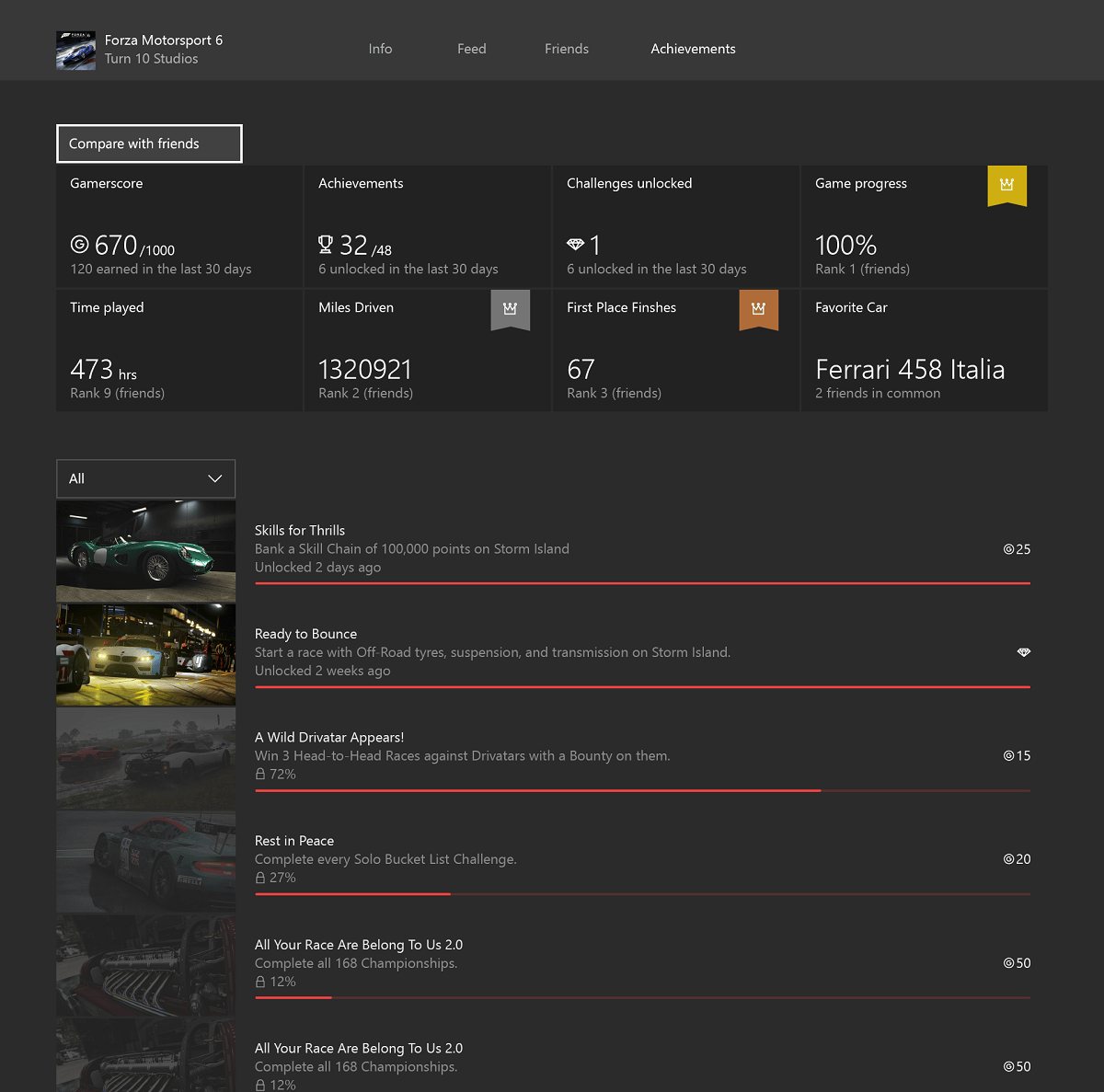 Some of the statistics such as Miles Driven and First Place Finishes have gold, silver, or bronze decorations that illustrate where the player ranks against the player's friends.
Interacting with any of these statistics will show a complete leaderboard, like the following:
Some of the statistics such as Miles Driven and First Place Finishes have gold, silver, or bronze decorations that illustrate where the player ranks against the player's friends.
Interacting with any of these statistics will show a complete leaderboard, like the following:
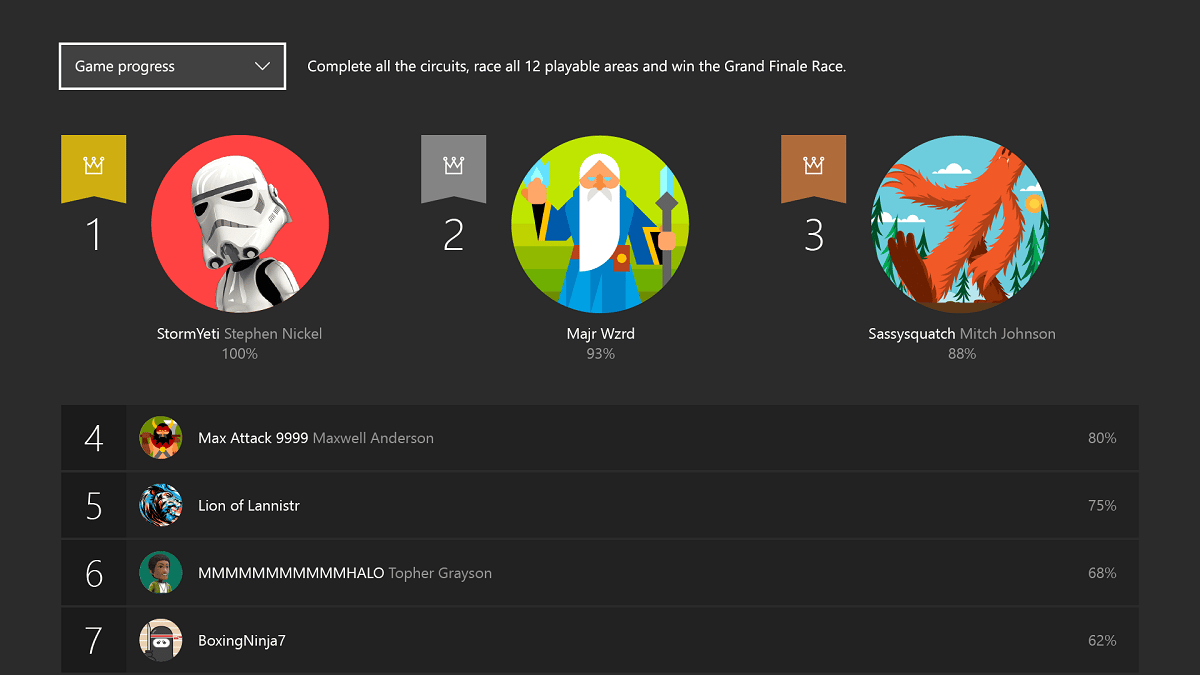 For *Races 2020*, the following is a good set of statistics that represent a player's experience with the title as well as good ranking metrics:
* Fastest lap
* Most 1st place wins
* Miles driven
## Achievements
Achievements are a system-wide mechanism for directing and rewarding users' in-game actions in a consistent manner across all games.
Designing this correctly helps guide users to experience the game at its fullest and extends the lifetime of the game.
For *Races 2020*, here is a subset of the achievements we want to configure:
* Finish 1 lap in under 60 seconds.
* Finish 10 races in 1st place.
* Complete at least 1 race on each of the tracks.
* Own 5 cars.
* Drive for 10,000 miles.
## Leaderboards
Leaderboards provide a way for gamers to rate themselves against other gamers for specific actions they can achieve in the game.
Besides the social leaderboards in the GameHubs, you can configure Global Leaderboards to be used in-game.
These are some of the Leaderboards to rank all of our users on:
* Fastest lap time
* Metadata: track where this happened
* Metadata: car used
* Metadata: weather conditions
* Most 1st place wins
* Most cars collected
## Next Steps
After you design Stats, Leaderboards and Achievements, you can implement them in your title, starting with configuration in Partner Center.
The next few sections describe the end-to-end process: see [Stats & Leaderboards](/services/xbox-services/player-data/stats-leaderboards/live-stats-leaderboards-nav).
## Related topics
- [Player Data](/services/xbox-services/player-data/live-playerdata-nav.md)
- [Player data](/services/xbox-services/player-data/index.md)
- [Event-based Stats VS. title-managed Stats](/services/xbox-services/player-data/stats-leaderboards/live-stats-eb-vs-tm.md)
- [XBOX services multiplayer overview](/services/xbox-services/multiplayer/overviews/live-multiplayer-intro.md)
- [XBOX Player Data overview](/services/xbox-services/player-data/live-playerdata-overview.md)
For *Races 2020*, the following is a good set of statistics that represent a player's experience with the title as well as good ranking metrics:
* Fastest lap
* Most 1st place wins
* Miles driven
## Achievements
Achievements are a system-wide mechanism for directing and rewarding users' in-game actions in a consistent manner across all games.
Designing this correctly helps guide users to experience the game at its fullest and extends the lifetime of the game.
For *Races 2020*, here is a subset of the achievements we want to configure:
* Finish 1 lap in under 60 seconds.
* Finish 10 races in 1st place.
* Complete at least 1 race on each of the tracks.
* Own 5 cars.
* Drive for 10,000 miles.
## Leaderboards
Leaderboards provide a way for gamers to rate themselves against other gamers for specific actions they can achieve in the game.
Besides the social leaderboards in the GameHubs, you can configure Global Leaderboards to be used in-game.
These are some of the Leaderboards to rank all of our users on:
* Fastest lap time
* Metadata: track where this happened
* Metadata: car used
* Metadata: weather conditions
* Most 1st place wins
* Most cars collected
## Next Steps
After you design Stats, Leaderboards and Achievements, you can implement them in your title, starting with configuration in Partner Center.
The next few sections describe the end-to-end process: see [Stats & Leaderboards](/services/xbox-services/player-data/stats-leaderboards/live-stats-leaderboards-nav).
## Related topics
- [Player Data](/services/xbox-services/player-data/live-playerdata-nav.md)
- [Player data](/services/xbox-services/player-data/index.md)
- [Event-based Stats VS. title-managed Stats](/services/xbox-services/player-data/stats-leaderboards/live-stats-eb-vs-tm.md)
- [XBOX services multiplayer overview](/services/xbox-services/multiplayer/overviews/live-multiplayer-intro.md)
- [XBOX Player Data overview](/services/xbox-services/player-data/live-playerdata-overview.md)