> ## Documentation Index
> Fetch the complete documentation index at: https://devdocs.xbox.com/llms.txt
> Use this file to discover all available pages before exploring further.
# Using SmartMatch matchmaking
> Use XBOX SmartMatch matchmaking to create match ticket sessions, set player attributes, manage QoS, and reuse game sessions in your multiplayer title.
This topic describes how to use SmartMatch to match players in a multiplayer game.
[Flow chart: the SmartMatch matchmaking process](#flow-chart-smartmatch-matchmaking-process)
[Creating a match ticket session and a match ticket](#creating-a-match-ticket-session-and-a-match-ticket)
[Setting matchmaking attributes on the session and players](#setting-matchmaking-attributes-on-the-session-and-players)
[Making the match](#making-the-match)
[Maintaining the match ticket](#maintaining-the-match-ticket)
[Reusing the game session as a match ticket session](#reusing-the-game-session-as-a-match-ticket-session)
[Deleting the match ticket](#deleting-the-match-ticket)
[Performing matchmaking for games by using XBOX Compute](#performing-matchmaking-for-games-using-xbox-live-compute)
[See also](#see-also)
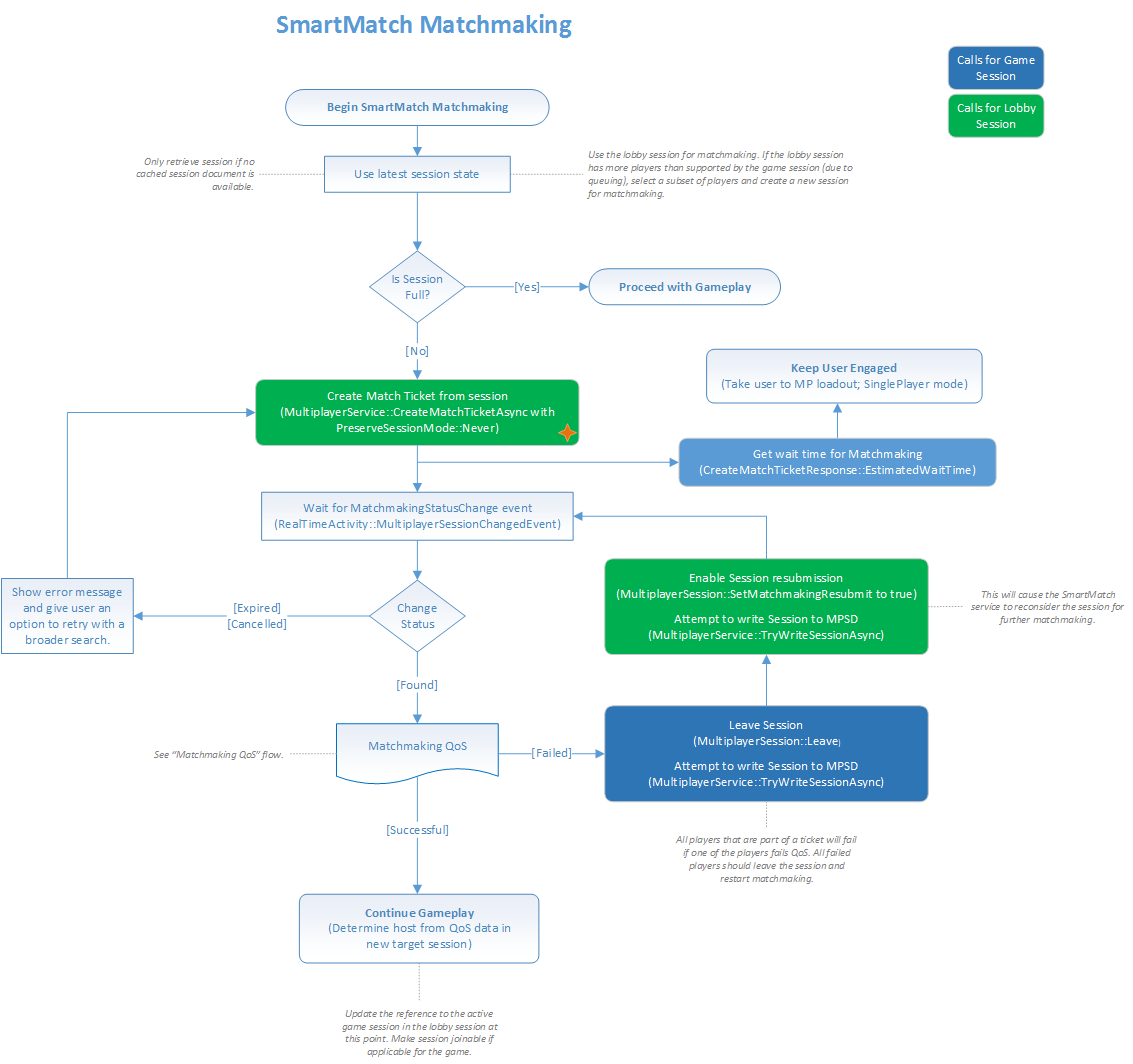
## Flow chart: the SmartMatch matchmaking process
The following flow chart illustrates the SmartMatch matchmaking process.
 [Return to the top of this topic.](#top)
## Creating a match ticket session and a match ticket
Before the matchmaking process begins, a matchmaking "scout" sets up a match ticket session to represent the group of people who want to enter matchmaking together.
All the players in this group join the session by using [XblMultiplayerSessionJoin](/reference/live/xsapi-c/multiplayer_c/functions/xblmultiplayersessionjoin).
After the ticket session has been created and populated with players, the title submits the session to the matchmaking service by using [XblMatchmakingCreateMatchTicketAsync](/reference/live/xsapi-c/matchmaking_c/functions/xblmatchmakingcreatematchticketasync).
This method creates a match ticket that represents the ticket session, and then updates the `/servers/matchmaking/properties/system/status` field in the ticket session to `searching`.
For more information, see the [Create a match ticket](/services/xbox-services/multiplayer/mpsd/how-to/live-mpsd-how-tos#camt) section in the Multiplayer tasks topic.
The response from the match ticket creation method is an [XblCreateMatchTicketResponse](/reference/live/xsapi-c/matchmaking_c/structs/xblcreatematchticketresponse) object.
The response contains the match ticket ID. It's a GUID that can be used to cancel matchmaking by deleting the ticket.
The response also contains an average wait time for the hopper, which can be used to set player expectations.
[Return to the top of this topic.](#top)
## Setting matchmaking attributes on the session and players
When submitting a session to matchmaking, the title can set attributes that the matchmaking service uses to group the session with other sessions.
The title can specify attributes at the ticket level or at the per-member level.
### Setting matchmaking attributes at the match ticket level
The title submits attributes at the match ticket level in the `ticketAttributesJson` parameter of the [XblMatchmakingCreateMatchTicketAsync](/reference/live/xsapi-c/matchmaking_c/functions/xblmatchmakingcreatematchticketasync) method.
Attributes that are specified at the ticket level override the same attributes that are specified at the per-member level.
### Setting matchmaking attributes at the per-member level
The title specifies per-member attributes on each member within the match ticket session.
These attributes are set by calling [XblMultiplayerSessionCurrentUserSetCustomPropertyJson](/reference/live/xsapi-c/multiplayer_c/functions/xblmultiplayersessioncurrentusersetcustompropertyjson) by using a property name of `matchAttrs`.
This call places the attributes in the `/members/{index}/properties/custom/matchAttrs` field on each player within the ticket session.
The matchmaking process "flattens" per-member, each into a single ticket-level attribute, based on the `flatten` method that was specified for that attribute in the XBOX services configuration for the hopper.
This is configured in [Partner Center](https://partner.microsoft.com/dashboard).
[Return to the top of this topic.](#top)
## Making the match
With the ticket session and the match ticket set up, the matchmaking service matches the represented ticket session with other ticket sessions that represent other groups, and then creates or identifies a match target session.
The service also creates reservations for the matched players in the target session, and then marks the ticket sessions as matched.
Multiplayer Session Directory (MPSD) notifies the title of this change to the ticket session.
The title must then take steps to initialize the target session to confirm that enough players are present. The title performs Quality of Service (QoS) checks to ensure that the players can successfully connect to one another.
If initialization or QoS fails, the title marks the ticket session for resubmission to matchmaking so that another group can be found.
For more information, see [Target session initialization and QoS](/services/xbox-services/multiplayer/matchmaking/concepts/live-matchmaking-target-session).
During match activity, the following changes are made to the JSON objects for the session.
* `/servers/matchmaking/properties/system/status` field set to `found`
* `/servers/matchmaking/properties/system/targetSessionRef` field set to the target session
* `/members/{index}/properties/custom/matchAttrs` field for each ticket session copied to the `/members/{index}/constants/custom/matchmakingResult/playerAttrs` field
* For each player, ticket attributes copied from the `ticketAttributes` field in the match ticket to the `/members/{index}/constants/custom/matchmakingResult/ticketAttrs` field
[Return to the top of this topic.](#top)
## Maintaining the match ticket
The matchmaking service uses a snapshot of the ticket session at the time when the match ticket is created for the session.
As a result, if any players join or leave the ticket session, the title must use the matchmaking service to delete and then re-create the match ticket.
[Return to the top of this topic.](#top)
## Reusing the game session as a match ticket session
Two sessions with `preserveSession` set to `Always` can't match with each other because they can't be combined. The matchmaking flow that's used by the title should take this into consideration.
A title can reuse an existing game session as a match ticket session to find more players to join a game that's already in progress.
To enable this, the title must create the match ticket by calling [XblMatchmakingCreateMatchTicketAsync](/reference/live/xsapi-c/matchmaking_c/functions/xblmatchmakingcreatematchticketasync) with the `preserveSession` parameter set to [XblPreserveSessionMode](/reference/live/xsapi-c/matchmaking_c/enums/xblpreservesessionmode)`::Always`.
The matchmaking service then ensures that the existing session that's used for the ticket is preserved throughout the matchmaking process and becomes the resulting target session.
[Return to the top of this topic.](#top)
## Deleting the match ticket
To delete the match ticket, the title calls [XblMatchmakingDeleteMatchTicketAsync](/reference/live/xsapi-c/matchmaking_c/functions/xblmatchmakingdeletematchticketasync).
Deleting the ticket:
1. Stops matchmaking for the players in the ticket session.
2. Updates the `/servers/matchmaking/properties/system/status` field in the ticket session to `canceled`.
[Return to the top of this topic.](#top)
## Performing matchmaking for games by using XBOX Compute
Following are the high-level steps that take place to get a player matchmade into an XBOX Compute-based game.
A similar flow should apply to games that are hosted by third parties.
1. The scout creates a ticket session to represent the group. This session contains a list of potential datacenters that are located in the session configuration in `/constants/system/measurementServerAddresses`. It comes from either the session template if the datacenter list is static or from the client writing it up at session creation after first getting it from XBOX Compute. This session also contains the `gsiSetId`, `gameVariantId`, and `maxAllowedPlayers` values in the `targetSessionConstants/custom/gameServerPlatform` object.
2. All other players in the group join the ticket session.
3. All members of the group download the `measurementServerAddresses` values from the `/constants/system` object for the ticket session, ping them by using the platform API, and then upload an ordered list of preferred datacenters to the session as defined in `/members/{index}/properties/system/serverMeasurements`.
> \[!NOTE]
> The title can set and retrieve the `measurementServerAddresses` values from the session by using the [XblMultiplayerSessionConstantsSetMeasurementServerAddressesJson](/reference/live/xsapi-c/multiplayer_c/functions/xblmultiplayersessionconstantssetmeasurementserveraddressesjson) method and [XblMultiplayerSessionConstants](/reference/live/xsapi-c/multiplayer_c/structs/xblmultiplayersessionconstants)`::MeasurementServerAddressesJson`.
4. The scout calls [XblMatchmakingCreateMatchTicketAsync](/reference/live/xsapi-c/matchmaking_c/functions/xblmatchmakingcreatematchticketasync), passing in a reference to the ticket session.
> \[!NOTE]
> If ticket session objects have mismatched constants, the create ticket method might not succeed. This can be avoided by adding a `MUST` rule to the hopper, to prevent matching with players who have mismatched constants.
If [XblMatchTicketDetailsResponse](/reference/live/xsapi-c/matchmaking_c/structs/xblmatchticketdetailsresponse)`::PreserveSession` is set to `Never`, the matchmaking service copies the server measurements from each member into the internal representation of the ticket.
It flattens the server measurements of the members of the ticket into a single server measurements collection for the ticket that's stored in the internal representation of the ticket as a `special` ticket attribute.
If [XblMatchTicketDetailsResponse](/reference/live/xsapi-c/matchmaking_c/structs/xblmatchticketdetailsresponse)`::PreserveSession` is set to `Always`, the server measurements aren't used.
The matchmaking service instead copies the `/properties/system/matchmaking/serverConnectionString` value for the session into the internal representation of the ticket as a `serverMeasurements` collection of size 1 with latency zero.
5. The matchmaking service matches the ticket session with others, representing other groups and taking the server measurement collections into account. The service tries to match the group with other groups that have the same highly preferred datacenters.
6. After a matched group has been found, the matchmaking service creates or identifies a target session and adds all the players from the ticket sessions that are matched together. The service writes the final flattened server measurements for the matched group into `/properties/system/serverConnectionStringCandidates`. It writes the originally submitted server measurements for each newly added member in the target session to `/members/{index}/constants/system/matchmakingResult/serverMeasurements`.
7. All players perform initialization on the target session as previously mentioned. However, because the players will be connecting to XBOX Compute, they don't perform QoS with one another to confirm connectivity.
8. All players play.
[Return to the top of this topic.](#top)
## See also
[Matchmaking overview](/services/xbox-services/multiplayer/matchmaking/live-matchmaking-overview)
## Related topics
- [SmartMatch matchmaking](/services/xbox-services/multiplayer/matchmaking/live-matchmaking-nav.md)
- [Playing a game by using SmartMatch matchmaking (flowchart)](/services/xbox-services/multiplayer/mpm/concepts/flowcharts/live-mpm-play-with-smartmatch-matchmaking.md)
- [Multiplayer matchmaking with SmartMatch and MPM](/services/xbox-services/multiplayer/mpm/how-to/live-play-multiplayer-with-matchmaking.md)
- [Matchmaking concepts](/services/xbox-services/multiplayer/matchmaking/concepts/live-matchmaking-concepts-nav.md)
- [Multiplayer Manager example code](/services/xbox-services/multiplayer/mpm/how-to/live-mm-howto-nav.md)
[Return to the top of this topic.](#top)
## Creating a match ticket session and a match ticket
Before the matchmaking process begins, a matchmaking "scout" sets up a match ticket session to represent the group of people who want to enter matchmaking together.
All the players in this group join the session by using [XblMultiplayerSessionJoin](/reference/live/xsapi-c/multiplayer_c/functions/xblmultiplayersessionjoin).
After the ticket session has been created and populated with players, the title submits the session to the matchmaking service by using [XblMatchmakingCreateMatchTicketAsync](/reference/live/xsapi-c/matchmaking_c/functions/xblmatchmakingcreatematchticketasync).
This method creates a match ticket that represents the ticket session, and then updates the `/servers/matchmaking/properties/system/status` field in the ticket session to `searching`.
For more information, see the [Create a match ticket](/services/xbox-services/multiplayer/mpsd/how-to/live-mpsd-how-tos#camt) section in the Multiplayer tasks topic.
The response from the match ticket creation method is an [XblCreateMatchTicketResponse](/reference/live/xsapi-c/matchmaking_c/structs/xblcreatematchticketresponse) object.
The response contains the match ticket ID. It's a GUID that can be used to cancel matchmaking by deleting the ticket.
The response also contains an average wait time for the hopper, which can be used to set player expectations.
[Return to the top of this topic.](#top)
## Setting matchmaking attributes on the session and players
When submitting a session to matchmaking, the title can set attributes that the matchmaking service uses to group the session with other sessions.
The title can specify attributes at the ticket level or at the per-member level.
### Setting matchmaking attributes at the match ticket level
The title submits attributes at the match ticket level in the `ticketAttributesJson` parameter of the [XblMatchmakingCreateMatchTicketAsync](/reference/live/xsapi-c/matchmaking_c/functions/xblmatchmakingcreatematchticketasync) method.
Attributes that are specified at the ticket level override the same attributes that are specified at the per-member level.
### Setting matchmaking attributes at the per-member level
The title specifies per-member attributes on each member within the match ticket session.
These attributes are set by calling [XblMultiplayerSessionCurrentUserSetCustomPropertyJson](/reference/live/xsapi-c/multiplayer_c/functions/xblmultiplayersessioncurrentusersetcustompropertyjson) by using a property name of `matchAttrs`.
This call places the attributes in the `/members/{index}/properties/custom/matchAttrs` field on each player within the ticket session.
The matchmaking process "flattens" per-member, each into a single ticket-level attribute, based on the `flatten` method that was specified for that attribute in the XBOX services configuration for the hopper.
This is configured in [Partner Center](https://partner.microsoft.com/dashboard).
[Return to the top of this topic.](#top)
## Making the match
With the ticket session and the match ticket set up, the matchmaking service matches the represented ticket session with other ticket sessions that represent other groups, and then creates or identifies a match target session.
The service also creates reservations for the matched players in the target session, and then marks the ticket sessions as matched.
Multiplayer Session Directory (MPSD) notifies the title of this change to the ticket session.
The title must then take steps to initialize the target session to confirm that enough players are present. The title performs Quality of Service (QoS) checks to ensure that the players can successfully connect to one another.
If initialization or QoS fails, the title marks the ticket session for resubmission to matchmaking so that another group can be found.
For more information, see [Target session initialization and QoS](/services/xbox-services/multiplayer/matchmaking/concepts/live-matchmaking-target-session).
During match activity, the following changes are made to the JSON objects for the session.
* `/servers/matchmaking/properties/system/status` field set to `found`
* `/servers/matchmaking/properties/system/targetSessionRef` field set to the target session
* `/members/{index}/properties/custom/matchAttrs` field for each ticket session copied to the `/members/{index}/constants/custom/matchmakingResult/playerAttrs` field
* For each player, ticket attributes copied from the `ticketAttributes` field in the match ticket to the `/members/{index}/constants/custom/matchmakingResult/ticketAttrs` field
[Return to the top of this topic.](#top)
## Maintaining the match ticket
The matchmaking service uses a snapshot of the ticket session at the time when the match ticket is created for the session.
As a result, if any players join or leave the ticket session, the title must use the matchmaking service to delete and then re-create the match ticket.
[Return to the top of this topic.](#top)
## Reusing the game session as a match ticket session
Two sessions with `preserveSession` set to `Always` can't match with each other because they can't be combined. The matchmaking flow that's used by the title should take this into consideration.
A title can reuse an existing game session as a match ticket session to find more players to join a game that's already in progress.
To enable this, the title must create the match ticket by calling [XblMatchmakingCreateMatchTicketAsync](/reference/live/xsapi-c/matchmaking_c/functions/xblmatchmakingcreatematchticketasync) with the `preserveSession` parameter set to [XblPreserveSessionMode](/reference/live/xsapi-c/matchmaking_c/enums/xblpreservesessionmode)`::Always`.
The matchmaking service then ensures that the existing session that's used for the ticket is preserved throughout the matchmaking process and becomes the resulting target session.
[Return to the top of this topic.](#top)
## Deleting the match ticket
To delete the match ticket, the title calls [XblMatchmakingDeleteMatchTicketAsync](/reference/live/xsapi-c/matchmaking_c/functions/xblmatchmakingdeletematchticketasync).
Deleting the ticket:
1. Stops matchmaking for the players in the ticket session.
2. Updates the `/servers/matchmaking/properties/system/status` field in the ticket session to `canceled`.
[Return to the top of this topic.](#top)
## Performing matchmaking for games by using XBOX Compute
Following are the high-level steps that take place to get a player matchmade into an XBOX Compute-based game.
A similar flow should apply to games that are hosted by third parties.
1. The scout creates a ticket session to represent the group. This session contains a list of potential datacenters that are located in the session configuration in `/constants/system/measurementServerAddresses`. It comes from either the session template if the datacenter list is static or from the client writing it up at session creation after first getting it from XBOX Compute. This session also contains the `gsiSetId`, `gameVariantId`, and `maxAllowedPlayers` values in the `targetSessionConstants/custom/gameServerPlatform` object.
2. All other players in the group join the ticket session.
3. All members of the group download the `measurementServerAddresses` values from the `/constants/system` object for the ticket session, ping them by using the platform API, and then upload an ordered list of preferred datacenters to the session as defined in `/members/{index}/properties/system/serverMeasurements`.
> \[!NOTE]
> The title can set and retrieve the `measurementServerAddresses` values from the session by using the [XblMultiplayerSessionConstantsSetMeasurementServerAddressesJson](/reference/live/xsapi-c/multiplayer_c/functions/xblmultiplayersessionconstantssetmeasurementserveraddressesjson) method and [XblMultiplayerSessionConstants](/reference/live/xsapi-c/multiplayer_c/structs/xblmultiplayersessionconstants)`::MeasurementServerAddressesJson`.
4. The scout calls [XblMatchmakingCreateMatchTicketAsync](/reference/live/xsapi-c/matchmaking_c/functions/xblmatchmakingcreatematchticketasync), passing in a reference to the ticket session.
> \[!NOTE]
> If ticket session objects have mismatched constants, the create ticket method might not succeed. This can be avoided by adding a `MUST` rule to the hopper, to prevent matching with players who have mismatched constants.
If [XblMatchTicketDetailsResponse](/reference/live/xsapi-c/matchmaking_c/structs/xblmatchticketdetailsresponse)`::PreserveSession` is set to `Never`, the matchmaking service copies the server measurements from each member into the internal representation of the ticket.
It flattens the server measurements of the members of the ticket into a single server measurements collection for the ticket that's stored in the internal representation of the ticket as a `special` ticket attribute.
If [XblMatchTicketDetailsResponse](/reference/live/xsapi-c/matchmaking_c/structs/xblmatchticketdetailsresponse)`::PreserveSession` is set to `Always`, the server measurements aren't used.
The matchmaking service instead copies the `/properties/system/matchmaking/serverConnectionString` value for the session into the internal representation of the ticket as a `serverMeasurements` collection of size 1 with latency zero.
5. The matchmaking service matches the ticket session with others, representing other groups and taking the server measurement collections into account. The service tries to match the group with other groups that have the same highly preferred datacenters.
6. After a matched group has been found, the matchmaking service creates or identifies a target session and adds all the players from the ticket sessions that are matched together. The service writes the final flattened server measurements for the matched group into `/properties/system/serverConnectionStringCandidates`. It writes the originally submitted server measurements for each newly added member in the target session to `/members/{index}/constants/system/matchmakingResult/serverMeasurements`.
7. All players perform initialization on the target session as previously mentioned. However, because the players will be connecting to XBOX Compute, they don't perform QoS with one another to confirm connectivity.
8. All players play.
[Return to the top of this topic.](#top)
## See also
[Matchmaking overview](/services/xbox-services/multiplayer/matchmaking/live-matchmaking-overview)
## Related topics
- [SmartMatch matchmaking](/services/xbox-services/multiplayer/matchmaking/live-matchmaking-nav.md)
- [Playing a game by using SmartMatch matchmaking (flowchart)](/services/xbox-services/multiplayer/mpm/concepts/flowcharts/live-mpm-play-with-smartmatch-matchmaking.md)
- [Multiplayer matchmaking with SmartMatch and MPM](/services/xbox-services/multiplayer/mpm/how-to/live-play-multiplayer-with-matchmaking.md)
- [Matchmaking concepts](/services/xbox-services/multiplayer/matchmaking/concepts/live-matchmaking-concepts-nav.md)
- [Multiplayer Manager example code](/services/xbox-services/multiplayer/mpm/how-to/live-mm-howto-nav.md)