> ## Documentation Index
> Fetch the complete documentation index at: https://devdocs.xbox.com/llms.txt
> Use this file to discover all available pages before exploring further.
# Configuring access policies in Partner Center
> Step-by-step Partner Center guide for Managed Partners to add access policies that let companion apps and web services share XBOX services data.
This article is for Managed Partners, and does not apply to titles in the XBOX Creators Program.
You can use [Partner Center](https://partner.microsoft.com/dashboard) to allow other services, games, and apps to access your title's XBOX services settings and data.
For example, you might want a web service to display leaderboards on your website, or you might have a companion app that can access the game's title storage to view or modify saved game data.
By default, only the title itself can access the settings and data stored on XBOX services.
You can change this by configuring access policies in Partner Center.
**To add configuration:**
1. After selecting your title in [Partner Center](https://partner.microsoft.com/dashboard), navigate to **XBOX services** > **Gameplay settings**.
2. Click the link to **Access policies**.
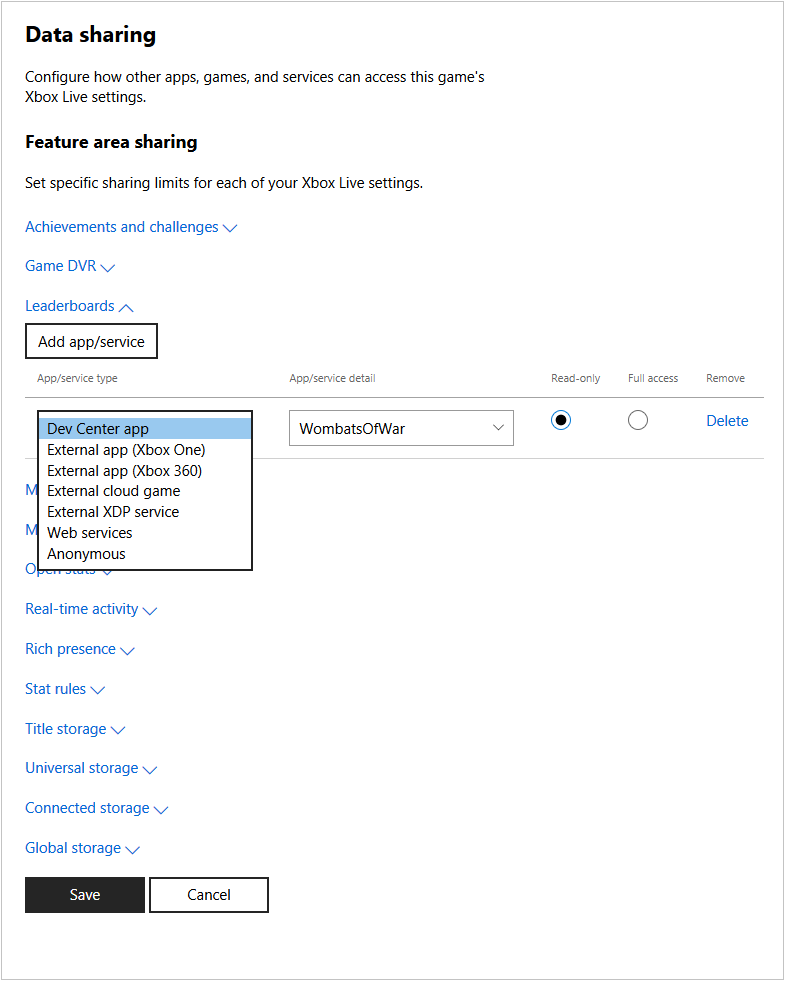
3. Select the setting you want to grant access to, and click **Add app/service**. A new row will be added at the end of the list of apps and services configured to access that setting.
4. Select the type of app or service in the dropdown list, and enter details to indicate the app, title ID, or service ID of the app or service that will access the data.
5. Select if the app or service can only read the data, or if it has full access to the data.
6. Repeat for each setting, and for each app or service that needs access to those settings. To remove an entry, click **Delete**.
7. When you're finished, click **Save** to save your changes.
 ## Related topics
- [Configuring access policies via Partner Center](/services/xbox-services/fundamentals/s2s-auth-calls/custom-service-config/access-policies/config/live-access-policies-config-nav.md)
- [Access policies overview](/services/xbox-services/fundamentals/s2s-auth-calls/custom-service-config/access-policies/live-access-policies-overview.md)
- [Portal configuration overview](/services/xbox-services/fundamentals/portal-config/live-portal-config-overview.md)
- [Configuring data sharing in Partner Center](/services/xbox-services/fundamentals/portal-config/live-data-sharing-udc.md)
- [Configuring Game DVR in Partner Center](/services/xbox-services/fundamentals/portal-config/live-game-dvr.md)
## Related topics
- [Configuring access policies via Partner Center](/services/xbox-services/fundamentals/s2s-auth-calls/custom-service-config/access-policies/config/live-access-policies-config-nav.md)
- [Access policies overview](/services/xbox-services/fundamentals/s2s-auth-calls/custom-service-config/access-policies/live-access-policies-overview.md)
- [Portal configuration overview](/services/xbox-services/fundamentals/portal-config/live-portal-config-overview.md)
- [Configuring data sharing in Partner Center](/services/xbox-services/fundamentals/portal-config/live-data-sharing-udc.md)
- [Configuring Game DVR in Partner Center](/services/xbox-services/fundamentals/portal-config/live-game-dvr.md)