> ## Documentation Index
> Fetch the complete documentation index at: https://devdocs.xbox.com/llms.txt
> Use this file to discover all available pages before exploring further.
# Using Player inventory
> Work with PlayFab player inventory using server-authoritative client and server APIs to purchase items, grant currency, and manage catalog-backed content.
# Player inventory
## Requirements
In order to use the player inventory, you must have a catalog defined for your title. Read our [Catalogs](/services/playfab/economy-monetization/economy/items/catalogs) tutorial for more information.
Optionally, you can also define stores for your catalog.
While a catalog is the list of all of the items available in the game, a store is a subset of items from the catalog that has the option of unique pricing.
Multiple stores can be defined per catalog, so that you can have distinct sets of items for presentation to the player, based upon user segmentation or other factors.
Once you've defined a catalog through the [**Game Manager**](https://developer.playfab.com/), or through our admin **[SetCatalogItems](xref:titleid.playfabapi.com.admin.title-widedatamanagement.setcatalogitems)** or **[UpdateCatalogItems](xref:titleid.playfabapi.com.admin.title-widedatamanagement.updatecatalogitems)** API calls, you'll be able to use a wide variety of Inventory API calls on the client and server.
## API overview
All inventory API calls are designed to be *server-authoritative* and secure. When used properly, customers won't be able to cheat, or acquire items they didn't earn.
**Clients**:
* Buy Items with virtual currency: **[PurchaseItem](xref:titleid.playfabapi.com.client.playeritemmanagement.purchaseitem)**
* Make Real Money purchases: **[StartPurchase](xref:titleid.playfabapi.com.client.playeritemmanagement.startpurchase), [PayForPurchase](xref:titleid.playfabapi.com.client.playeritemmanagement.payforpurchase), [ConfirmPurchase](xref:titleid.playfabapi.com.client.playeritemmanagement.confirmpurchase)**
* Can view the items a player has: **[GetUserInventory](xref:titleid.playfabapi.com.client.playeritemmanagement.getuserinventory)**
* Can remove items: **[ConsumeItem](xref:titleid.playfabapi.com.client.playeritemmanagement.consumeitem), [UnlockContainerInstance](xref:titleid.playfabapi.com.client.playeritemmanagement.unlockcontainerinstance)**
* Can trade items: **[OpenTrade](xref:titleid.playfabapi.com.client.trading.opentrade), [GetPlayerTrades](xref:titleid.playfabapi.com.client.trading.getplayertrades), [AcceptTrade](xref:titleid.playfabapi.com.client.trading.accepttrade), [CancelTrade](xref:titleid.playfabapi.com.client.trading.canceltrade)**
**Server**:
* May Gift/Grant items: **[GrantItemsToUser](xref:titleid.playfabapi.com.server.playeritemmanagement.grantitemstouser)**
* Can view the items: **[GetUserInventory](xref:titleid.playfabapi.com.server.playeritemmanagement.getuserinventory)**
* Can modify items: **[ModifyItemUses](xref:titleid.playfabapi.com.server.playeritemmanagement.modifyitemuses), [UpdateUserInventoryItemCustomData](xref:titleid.playfabapi.com.server.playeritemmanagement.updateuserinventoryitemcustomdata)**
* Can remove items: **[RevokeInventoryItem](xref:titleid.playfabapi.com.server.playeritemmanagement.revokeinventoryitem), [ConsumeItem](xref:titleid.playfabapi.com.server.playeritemmanagement.consumeitem), [UnlockContainerInstance](xref:titleid.playfabapi.com.server.playeritemmanagement.unlockcontainerinstance)**
The example shown below illustrates the code blocks that call these API methods, and sets up basic use-cases for player inventory.
For reference, these examples come from **Unicorn Battle**, a game we built as an example to demonstrate the PlayFab features.
The **AU** virtual currency used below is **Gold**, a free currency earned by fighting monsters (See our [Currencies](/services/playfab/economy-monetization/economy-v2/tutorials/currencies) tutorial).
Before we get started, we'll be defining a few utility functions that will be used and reused in most of the examples in this guide.
```csharp theme={null}
// **** Shared example utility functions ****
// This is typically NOT how you handle success
// You will want to receive a specific result-type for your API, and utilize the result parameters
void LogSuccess(PlayFabResultCommon result) {
var requestName = result.Request.GetType().Name;
Debug.Log(requestName + " successful");
}
// Error handling can be very advanced, such as retry mechanisms, logging, or other options
// The simplest possible choice is just to log it
void LogFailure(PlayFabError error) {
Debug.LogError(error.GenerateErrorReport());
}
```
## Client-only example: purchase and consume a health potion
Client API call order: [PurchaseItem](xref:titleid.playfabapi.com.client.playeritemmanagement.purchaseitem), [GetUserInventory](xref:titleid.playfabapi.com.client.playeritemmanagement.getuserinventory), [ConsumeItem](xref:titleid.playfabapi.com.server.playeritemmanagement.consumeitem)
First we must begin by defining the item in our catalog.
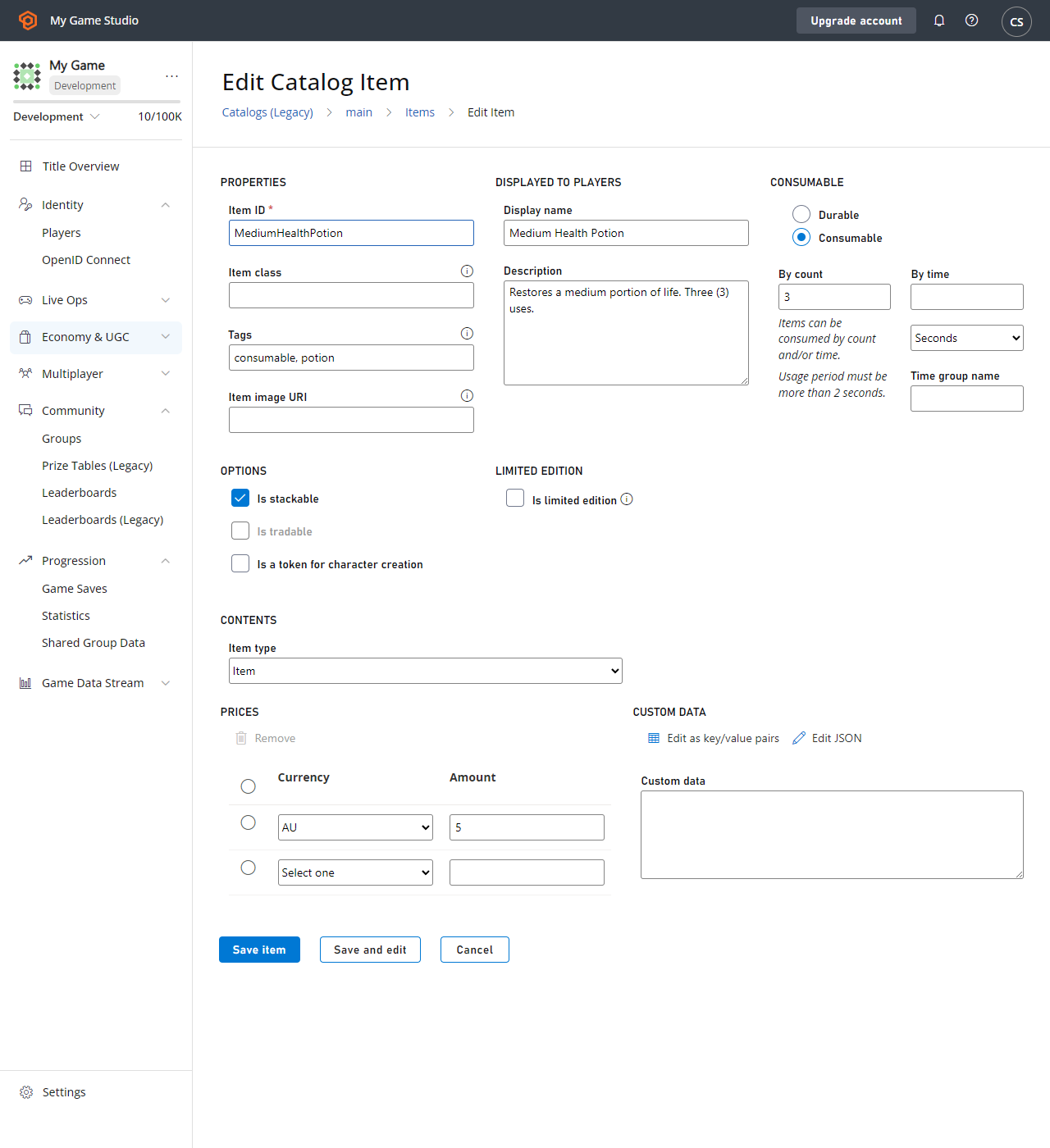 Here are the `CatalogItem` requirements for the **Health Potion**.
* `PurchaseItem` requires a positive item price (`5 AU`).
* `ConsumeItem` requires the item to be `Consumable`, with a positive item count (`3`).
* The player making the purchase must have five AU available in their virtual currency balance.
The code for each call is provided below.
```csharp theme={null}
void MakePurchase() {
PlayFabClientAPI.PurchaseItem(new PurchaseItemRequest {
// In your game, this should just be a constant matching your primary catalog
CatalogVersion = "CharacterClasses",
ItemId = "MediumHealthPotion",
Price = 5,
VirtualCurrency = "AU"
}, LogSuccess, LogFailure);
}
void GetInventory() {
PlayFabClientAPI.GetUserInventory(new GetUserInventoryRequest(), LogSuccess, LogFailure);
}
void ConsumePotion() {
PlayFabClientAPI.ConsumeItem(new ConsumeItemRequest {
ConsumeCount = 1,
// This is a hex-string value from the GetUserInventory result
ItemInstanceId = "potionInstanceId"
}, LogSuccess, LogFailure);
}
```
## Example: player is granted and opens a container
API call order:
* PlayFab Server API [GrantItemsToUser](xref:titleid.playfabapi.com.server.playeritemmanagement.grantitemstouser)
* PlayFab Client API [UnlockContainerInstance](xref:titleid.playfabapi.com.client.playeritemmanagement.unlockcontainerinstance)
First, we must begin with a container defined in our catalog. For our container in this example, we selected a **CrystalContainer**.
This example also demonstrates opening the container with a key - an *optional* item that must also be in the player inventory for the `UnlockContainerInstance` call to be successful.
Here are the `CatalogItem` requirements for the **Health Potion**.
* `PurchaseItem` requires a positive item price (`5 AU`).
* `ConsumeItem` requires the item to be `Consumable`, with a positive item count (`3`).
* The player making the purchase must have five AU available in their virtual currency balance.
The code for each call is provided below.
```csharp theme={null}
void MakePurchase() {
PlayFabClientAPI.PurchaseItem(new PurchaseItemRequest {
// In your game, this should just be a constant matching your primary catalog
CatalogVersion = "CharacterClasses",
ItemId = "MediumHealthPotion",
Price = 5,
VirtualCurrency = "AU"
}, LogSuccess, LogFailure);
}
void GetInventory() {
PlayFabClientAPI.GetUserInventory(new GetUserInventoryRequest(), LogSuccess, LogFailure);
}
void ConsumePotion() {
PlayFabClientAPI.ConsumeItem(new ConsumeItemRequest {
ConsumeCount = 1,
// This is a hex-string value from the GetUserInventory result
ItemInstanceId = "potionInstanceId"
}, LogSuccess, LogFailure);
}
```
## Example: player is granted and opens a container
API call order:
* PlayFab Server API [GrantItemsToUser](xref:titleid.playfabapi.com.server.playeritemmanagement.grantitemstouser)
* PlayFab Client API [UnlockContainerInstance](xref:titleid.playfabapi.com.client.playeritemmanagement.unlockcontainerinstance)
First, we must begin with a container defined in our catalog. For our container in this example, we selected a **CrystalContainer**.
This example also demonstrates opening the container with a key - an *optional* item that must also be in the player inventory for the `UnlockContainerInstance` call to be successful.
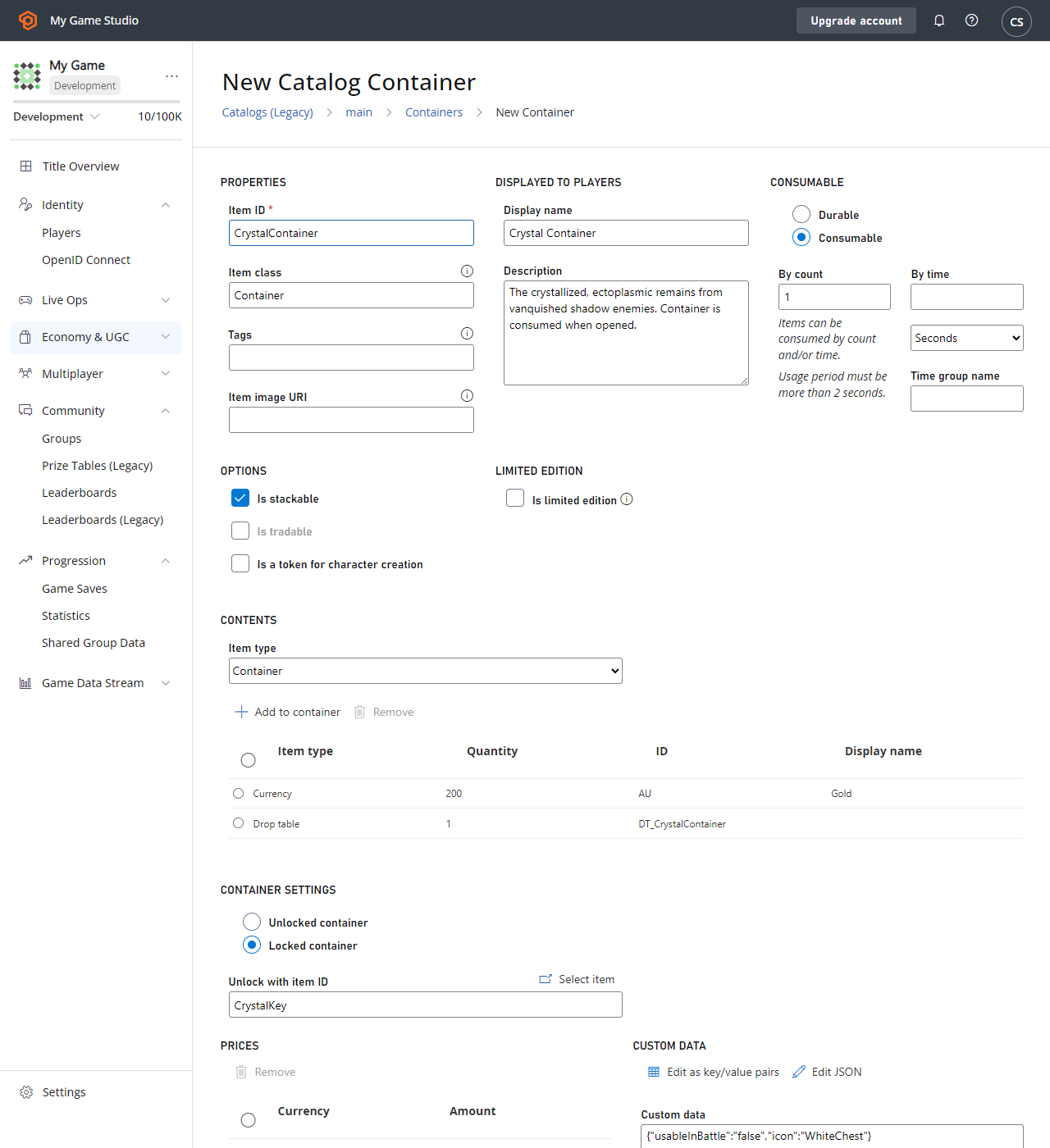 `CatalogItem` requirements for our **CrystalContainer** in this example include:
* That **CrystalContainer** be defined as a **Container**.
* That **Containers** can optionally define a **Key Item**, which is then required to unlock the **Container** - in this case, a **CrystalKey**.
* It's highly suggested that your **Container** and any **Key** *both* be **Consumable**, with a positive use count, so that they're removed from the player inventory after use.
### Server code
```csharp theme={null}
void GrantItem() {
PlayFabServerAPI.GrantItemsToUser(new GrantItemsToUserRequest {
// In your game, this should just be a constant
CatalogVersion = "CharacterClasses",
// Servers must define which character they're modifying in every API call
PlayFabId = "playFabId",
ItemIds = new List { "CrystalContainer" }
}, LogSuccess, LogFailure);
}
```
### Client code
```csharp theme={null}
void OpenContainer() {
PlayFabClientAPI.UnlockContainerInstance(new UnlockContainerInstanceRequest {
// In your game, this should just be a constant matching your primary catalog
CatalogVersion = "CharacterClasses",
ContainerItemInstanceId = "containerInstanceId",
KeyItemInstanceId = "keyInstanceId"
}, LogSuccess, LogFailure);
}
```
### Consuming keys and containers
In the previous example, it's suggested that the key and/or container are *consumable*, though that's only a recommendation.
But if a container and its key (if any) are *not consumable*, the container can be reopened *infinitely*, granting its contents to the player each time.
Because the player inventory capacity is *not* infinite, this pattern is greatly discouraged. When a consumable container is unlocked, both the container and the consumable key that was used will automatically have their usage count *decreased*, removing them from the player inventory when the usage count reaches zero.
### Viable options
**Consumable Container**, no **Key**: The most basic pattern, in which the container is consumed when opened, and there's no key.
**Consumable Container, consumable Key**: The simple locked container case, which allows the player to open the container with they key. *Both* are consumed, and the player can only open a container with uses remaining with a key with uses remaining.
**Durable Container, consumable Key**: This allows a player to open the container every time they find a key. The key is consumed, and the container is only opened while the key has uses remaining.
**Consumable Container, durable Key**: This allows a player to keep a key that can open *all* of the containers for which it's the key item. The container is consumed, but the player retains the ability to open containers with the key later.
## Example: buying inventory items from the player
There's no built-in API for buying back inventory items from the player, as the process is game-specific. However, you can use the *existing* API methods to craft your own **SellItem** experience:
* The PlayFab Server API [RevokeInventoryItem](xref:titleid.playfabapi.com.server.playeritemmanagement.revokeinventoryitem)\*\* allows you to remove an inventory item.
* The PlayFab Server API [AddUserVirtualCurrency](xref:titleid.playfabapi.com.server.playeritemmanagement.adduservirtualcurrency)\*\* can return an appropriate amount of virtual currency. It isn't currently possible to return real money through PlayFab API methods.
Items and virtual currencies have a close relationship. For more information, see our [Currencies](/services/playfab/economy-monetization/economy-v2/tutorials/currencies) tutorial.
The following CloudScript function combines the two described server calls into a single client-accessible call.
```javascript theme={null}
var SELL_PRICE_RATIO = 0.75;
function SellItem_internal(soldItemInstanceId, requestedVcType) {
var inventory = server.GetUserInventory({ PlayFabId: currentPlayerId });
var itemInstance = null;
for (var i = 0; i < inventory.Inventory.length; i++) {
if (inventory.Inventory[i].ItemInstanceId === soldItemInstanceId)
itemInstance = inventory.Inventory[i];
}
if (!itemInstance)
throw "Item instance not found"; // Protection against client providing incorrect data
var catalog = server.GetCatalogItems({ CatalogVersion: itemInstance.CatalogVersion });
var catalogItem = null;
for (var c = 0; c < catalog.Catalog.length; c++) {
if (itemInstance.ItemId === catalog.Catalog[c].ItemId)
catalogItem = catalog.Catalog[c];
}
if (!catalogItem)
throw "Catalog Item not found"; // Title catalog consistency check (You should never remove a catalog/catalogItem if any player owns that item
var buyPrice = 0;
if (catalogItem.VirtualCurrencyPrices.hasOwnProperty(requestedVcType))
buyPrice = catalogItem.VirtualCurrencyPrices[requestedVcType];
if (buyPrice <= 0)
throw "Cannot redeem this item for: " + requestedVcType; // The client requested a virtual currency which doesn't apply to this item
// Once we get here all safety checks are passed - Perform the sell
var sellPrice = Math.floor(buyPrice * SELL_PRICE_RATIO);
server.AddUserVirtualCurrency({ PlayFabId: currentPlayerId, Amount: sellPrice, VirtualCurrency: requestedVcType });
server.RevokeInventoryItem({ PlayFabId: currentPlayerId, ItemInstanceId: soldItemInstanceId });
}
handlers.SellItem = function (args) {
if (!args || !args.soldItemInstanceId || !args.requestedVcType)
throw "Invalid input parameters, expected soldItemInstanceId and requestedVcType";
SellItem_internal(args.soldItemInstanceId, args.requestedVcType);
};
```
### Best practices
* Make sure to verify all client input information as *valid* before making any changes.
* CloudScript isn't atomic, so call order matters: **AddUserVirtualCurrency** may succeed and **RevokeInventoryItem** may fail.
It is generally better to give the player something they *didn't* earn in this process, than to take something away *without* compensation.
This CloudScript function can then be accessed from the client.
```csharp theme={null}
void SellItem()
{
PlayFabClientAPI.ExecuteCloudScript(new ExecuteCloudScriptRequest
{
// This must match "SellItem" from the "handlers.SellItem = ..." line in the CloudScript file
FunctionName = "SellItem",
FunctionParameter = new Dictionary{
// This is a hex-string value from the GetUserInventory result
{ "soldItemInstanceId", "sellItemInstanceId" },
// Which redeemable virtual currency should be used in your game
{ "requestedVcType", "AU" },
}
}, LogSuccess, LogFailure);
}
```
## Related topics
- [Player Inventory Quickstart](/services/playfab/economy-monetization/economy-v2/inventory/quickstart.md)
- [Using Player details](/services/playfab/player-progression/player-data/player-details.md)
- [Using the Players Page](/services/playfab/player-progression/player-data/using-the-players-page.md)
- [Using player statistics](/services/playfab/community/leaderboards/tournaments-leaderboards/using-player-statistics.md)
- [Economy (Legacy) quickstart](/services/playfab/economy-monetization/economy/quickstart.md)
`CatalogItem` requirements for our **CrystalContainer** in this example include:
* That **CrystalContainer** be defined as a **Container**.
* That **Containers** can optionally define a **Key Item**, which is then required to unlock the **Container** - in this case, a **CrystalKey**.
* It's highly suggested that your **Container** and any **Key** *both* be **Consumable**, with a positive use count, so that they're removed from the player inventory after use.
### Server code
```csharp theme={null}
void GrantItem() {
PlayFabServerAPI.GrantItemsToUser(new GrantItemsToUserRequest {
// In your game, this should just be a constant
CatalogVersion = "CharacterClasses",
// Servers must define which character they're modifying in every API call
PlayFabId = "playFabId",
ItemIds = new List { "CrystalContainer" }
}, LogSuccess, LogFailure);
}
```
### Client code
```csharp theme={null}
void OpenContainer() {
PlayFabClientAPI.UnlockContainerInstance(new UnlockContainerInstanceRequest {
// In your game, this should just be a constant matching your primary catalog
CatalogVersion = "CharacterClasses",
ContainerItemInstanceId = "containerInstanceId",
KeyItemInstanceId = "keyInstanceId"
}, LogSuccess, LogFailure);
}
```
### Consuming keys and containers
In the previous example, it's suggested that the key and/or container are *consumable*, though that's only a recommendation.
But if a container and its key (if any) are *not consumable*, the container can be reopened *infinitely*, granting its contents to the player each time.
Because the player inventory capacity is *not* infinite, this pattern is greatly discouraged. When a consumable container is unlocked, both the container and the consumable key that was used will automatically have their usage count *decreased*, removing them from the player inventory when the usage count reaches zero.
### Viable options
**Consumable Container**, no **Key**: The most basic pattern, in which the container is consumed when opened, and there's no key.
**Consumable Container, consumable Key**: The simple locked container case, which allows the player to open the container with they key. *Both* are consumed, and the player can only open a container with uses remaining with a key with uses remaining.
**Durable Container, consumable Key**: This allows a player to open the container every time they find a key. The key is consumed, and the container is only opened while the key has uses remaining.
**Consumable Container, durable Key**: This allows a player to keep a key that can open *all* of the containers for which it's the key item. The container is consumed, but the player retains the ability to open containers with the key later.
## Example: buying inventory items from the player
There's no built-in API for buying back inventory items from the player, as the process is game-specific. However, you can use the *existing* API methods to craft your own **SellItem** experience:
* The PlayFab Server API [RevokeInventoryItem](xref:titleid.playfabapi.com.server.playeritemmanagement.revokeinventoryitem)\*\* allows you to remove an inventory item.
* The PlayFab Server API [AddUserVirtualCurrency](xref:titleid.playfabapi.com.server.playeritemmanagement.adduservirtualcurrency)\*\* can return an appropriate amount of virtual currency. It isn't currently possible to return real money through PlayFab API methods.
Items and virtual currencies have a close relationship. For more information, see our [Currencies](/services/playfab/economy-monetization/economy-v2/tutorials/currencies) tutorial.
The following CloudScript function combines the two described server calls into a single client-accessible call.
```javascript theme={null}
var SELL_PRICE_RATIO = 0.75;
function SellItem_internal(soldItemInstanceId, requestedVcType) {
var inventory = server.GetUserInventory({ PlayFabId: currentPlayerId });
var itemInstance = null;
for (var i = 0; i < inventory.Inventory.length; i++) {
if (inventory.Inventory[i].ItemInstanceId === soldItemInstanceId)
itemInstance = inventory.Inventory[i];
}
if (!itemInstance)
throw "Item instance not found"; // Protection against client providing incorrect data
var catalog = server.GetCatalogItems({ CatalogVersion: itemInstance.CatalogVersion });
var catalogItem = null;
for (var c = 0; c < catalog.Catalog.length; c++) {
if (itemInstance.ItemId === catalog.Catalog[c].ItemId)
catalogItem = catalog.Catalog[c];
}
if (!catalogItem)
throw "Catalog Item not found"; // Title catalog consistency check (You should never remove a catalog/catalogItem if any player owns that item
var buyPrice = 0;
if (catalogItem.VirtualCurrencyPrices.hasOwnProperty(requestedVcType))
buyPrice = catalogItem.VirtualCurrencyPrices[requestedVcType];
if (buyPrice <= 0)
throw "Cannot redeem this item for: " + requestedVcType; // The client requested a virtual currency which doesn't apply to this item
// Once we get here all safety checks are passed - Perform the sell
var sellPrice = Math.floor(buyPrice * SELL_PRICE_RATIO);
server.AddUserVirtualCurrency({ PlayFabId: currentPlayerId, Amount: sellPrice, VirtualCurrency: requestedVcType });
server.RevokeInventoryItem({ PlayFabId: currentPlayerId, ItemInstanceId: soldItemInstanceId });
}
handlers.SellItem = function (args) {
if (!args || !args.soldItemInstanceId || !args.requestedVcType)
throw "Invalid input parameters, expected soldItemInstanceId and requestedVcType";
SellItem_internal(args.soldItemInstanceId, args.requestedVcType);
};
```
### Best practices
* Make sure to verify all client input information as *valid* before making any changes.
* CloudScript isn't atomic, so call order matters: **AddUserVirtualCurrency** may succeed and **RevokeInventoryItem** may fail.
It is generally better to give the player something they *didn't* earn in this process, than to take something away *without* compensation.
This CloudScript function can then be accessed from the client.
```csharp theme={null}
void SellItem()
{
PlayFabClientAPI.ExecuteCloudScript(new ExecuteCloudScriptRequest
{
// This must match "SellItem" from the "handlers.SellItem = ..." line in the CloudScript file
FunctionName = "SellItem",
FunctionParameter = new Dictionary{
// This is a hex-string value from the GetUserInventory result
{ "soldItemInstanceId", "sellItemInstanceId" },
// Which redeemable virtual currency should be used in your game
{ "requestedVcType", "AU" },
}
}, LogSuccess, LogFailure);
}
```
## Related topics
- [Player Inventory Quickstart](/services/playfab/economy-monetization/economy-v2/inventory/quickstart.md)
- [Using Player details](/services/playfab/player-progression/player-data/player-details.md)
- [Using the Players Page](/services/playfab/player-progression/player-data/using-the-players-page.md)
- [Using player statistics](/services/playfab/community/leaderboards/tournaments-leaderboards/using-player-statistics.md)
- [Economy (Legacy) quickstart](/services/playfab/economy-monetization/economy/quickstart.md)