> ## Documentation Index
> Fetch the complete documentation index at: https://devdocs.xbox.com/llms.txt
> Use this file to discover all available pages before exploring further.
# Player Ban system
> Apply PlayFab player bans to invalidate authentication tokens for rule-breakers using Game Manager, ReportPlayer, and server API ban management calls.
The player ban feature allows you to restrict access to the game for certain players who break the rules. When a player ban is applied to a player, any existing player authentication tokens are invalidated and future authentication attempts made by the player will be rejected. Player bans may be permanent or temporary for a specified time range, and may be applied to a player ID or an IP address. A ban is scoped to a title and doesn't apply to any other titles in your [namespace](/services/playfab/live-service-management/game-configuration/entities).
For new integrations, we recommend using the dedicated [IP ban system](/services/playfab/player-progression/player-data/ip-bans) instead of specifying IP addresses in player bans.
The following tutorial shows you how to utilize the ban system, using the PlayFab API and Game Manager.
## Identify
While your game might have a custom system to identify cheaters and rule-breakers, PlayFab offers a player-to-player reporting mechanism. In essence, you rely on your players to report other problematic players.
To let the client report a specific player, use the following snippet in your client code.
```csharp theme={null}
public void ReportPlayer(string problematicPlayerId, string reason) {
PlayFabClientAPI.ReportPlayer(new ReportPlayerClientRequest() {
ReporteeId = problematicPlayerId,
Comment = reason
}, result => {
//... Handle success
}, error => {
Debug.Log(error.GenerateErrorReport());
});
}
```
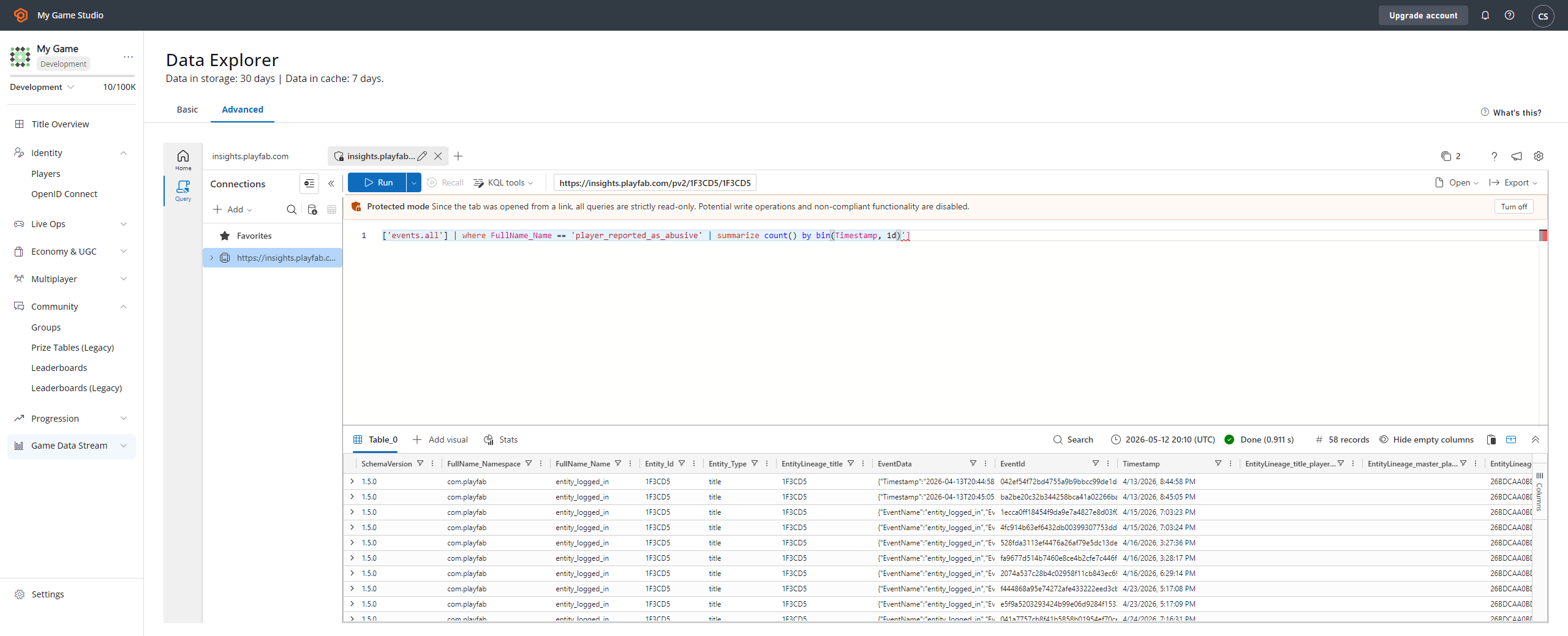
This API call produces:
* A **Report Event**, which you're able to locate via the **Analytics** tool **(1)**.
* Select the **player\_reported\_as\_abusive** event type **(2)**.
* This shows:
* The **Event Name (3)**.
* The reported **Player ID (4)**.
 ## Applying bans
Once the problematic player is identified, you might apply a ban. There are two ways to apply bans: manually through Game Manager, or programmatically through code.
### Creating a ban from Game Manager
Your community management rep might want to apply a ban using Game Manager.
1. Navigate to the Players section.
2. Locate and select the problematic Player.
3. Navigate to the **Bans** tab.
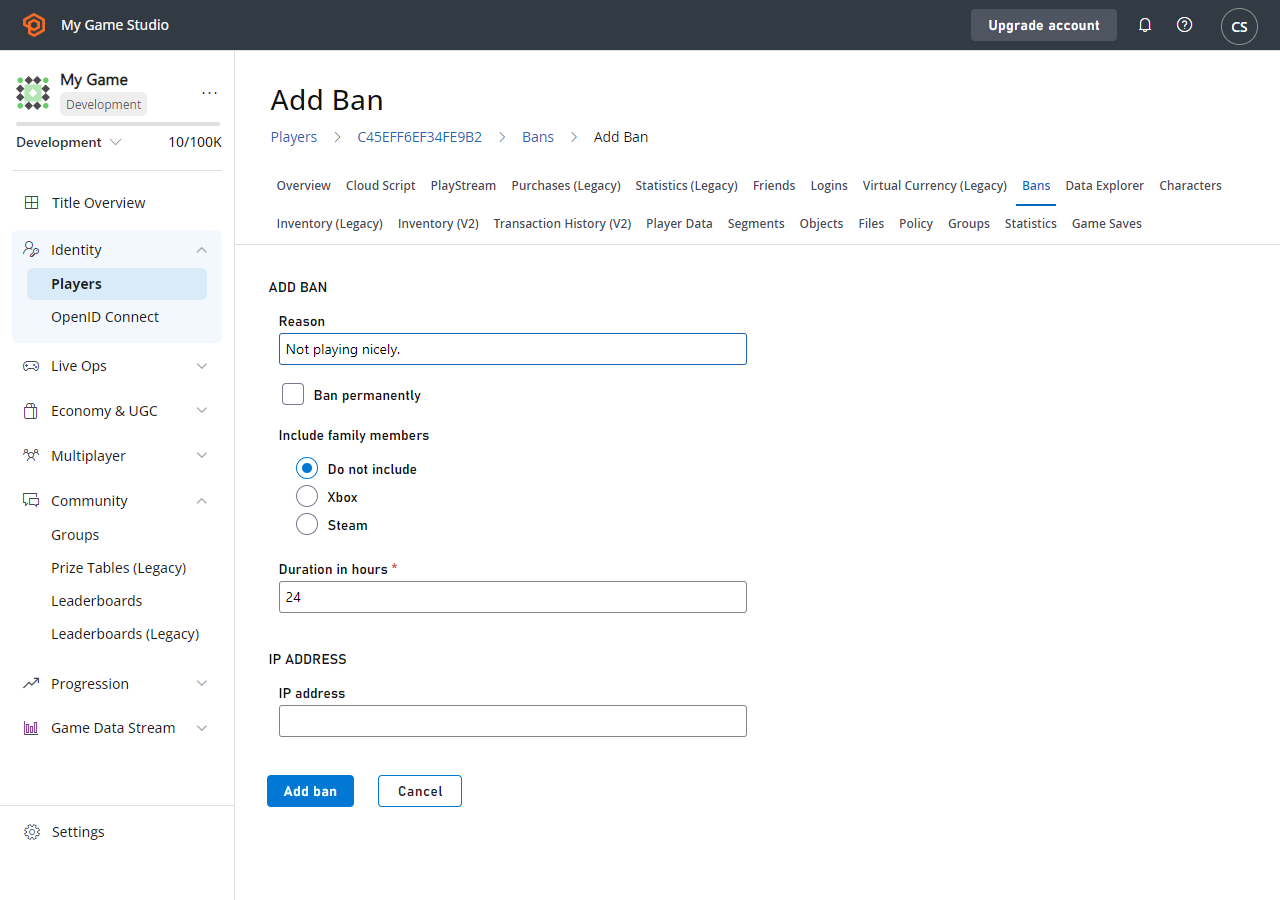
4. Select **Add Ban** to display the **Add Ban** form.
5. Type in the **Reason** for the ban, and the desired duration. Optionally, you can **Ban** by a specific **IP ADDRESS (4)**.
6. Last, select the **ADD BAN** button.
## Applying bans
Once the problematic player is identified, you might apply a ban. There are two ways to apply bans: manually through Game Manager, or programmatically through code.
### Creating a ban from Game Manager
Your community management rep might want to apply a ban using Game Manager.
1. Navigate to the Players section.
2. Locate and select the problematic Player.
3. Navigate to the **Bans** tab.
4. Select **Add Ban** to display the **Add Ban** form.
5. Type in the **Reason** for the ban, and the desired duration. Optionally, you can **Ban** by a specific **IP ADDRESS (4)**.
6. Last, select the **ADD BAN** button.
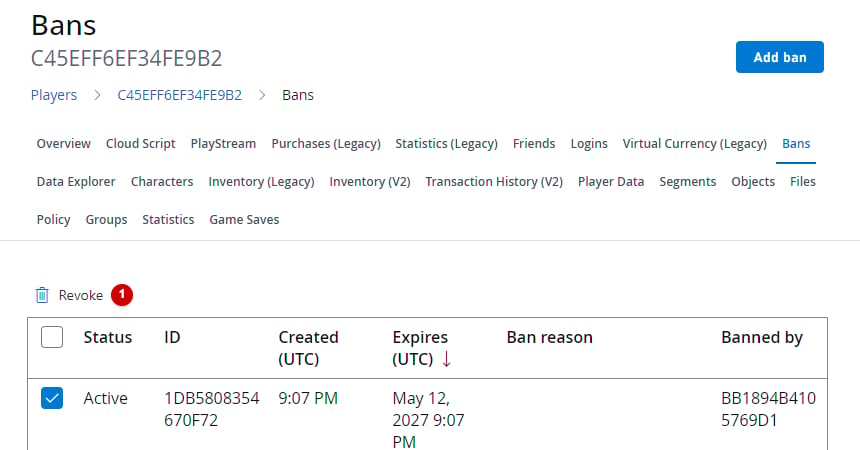
 If everything is set correctly, you see a new **Ban** in the table. You might optionally remove a **Ban** manually by selecting it in the **REVOKE BANS** field.
 ### Creating a ban from a server or service
Alternatively, you might use the [Services SDK](/services/playfab/sdks/playfab-sdk-intro) to apply a ban via code by using the snippet provided below.
```csharp theme={null}
public void AddBan(string playerId, uint hours) {
PlayFabServerAPI.BanUsers(new BanUsersRequest() {
Bans = new List() {
new BanRequest() {
DurationInHours = hours,
PlayFabId = playerId,
Reason = "Automatic ban for WH",
}
}
}, result => {
//... Handle success
}, error => {
Debug.Log(error.GenerateErrorReport());
});
}
```
Bans applied via code are also displayed in the table of bans for the target player in Game Manager.
The PlayFab server SDK methods provide more options, such as **IP** address bans.
Each ban you apply gets an assigned ID. Consider the following Server SDK API methods for precise ban management:
* [GetUserBans](xref:titleid.playfabapi.com.server.accountmanagement.getuserbans)
* [RevokeAllBansForUser](xref:titleid.playfabapi.com.server.accountmanagement.revokeallbansforuser)
* [RevokeBans](xref:titleid.playfabapi.com.server.accountmanagement.revokebans)
* [UpdateBans](xref:titleid.playfabapi.com.server.accountmanagement.updatebans)
You can use CloudScript functions as part of an automated system that may ban a player. To find out more about CloudScript, see our tutorial [Writing Custom CloudScript](/services/playfab/live-service-management/service-gateway/automation/cloudscript/writing-custom-cloudscript).
## See Also
[BanUsers](xref:titleid.playfabapi.com.server.accountmanagement.banusers)
## Related topics
- [IP Ban System](/services/playfab/player-progression/player-data/ip-bans.md)
- [Sending reputation feedback from a title](/services/xbox-services/community/reputation/concepts/live-sending-reputation-feedback.md)
- [player_banned](/services/playfab/api-references/events/PlayerIdentity/player-banned.md)
- [PFAccountManagementBanRequest](/services/playfab/api-references/c/pfaccountmanagementtypes/structs/pfaccountmanagementbanrequest.md)
- [PFAccountManagementBanUsersRequest](/services/playfab/api-references/c/pfaccountmanagementtypes/structs/pfaccountmanagementbanusersrequest.md)
### Creating a ban from a server or service
Alternatively, you might use the [Services SDK](/services/playfab/sdks/playfab-sdk-intro) to apply a ban via code by using the snippet provided below.
```csharp theme={null}
public void AddBan(string playerId, uint hours) {
PlayFabServerAPI.BanUsers(new BanUsersRequest() {
Bans = new List() {
new BanRequest() {
DurationInHours = hours,
PlayFabId = playerId,
Reason = "Automatic ban for WH",
}
}
}, result => {
//... Handle success
}, error => {
Debug.Log(error.GenerateErrorReport());
});
}
```
Bans applied via code are also displayed in the table of bans for the target player in Game Manager.
The PlayFab server SDK methods provide more options, such as **IP** address bans.
Each ban you apply gets an assigned ID. Consider the following Server SDK API methods for precise ban management:
* [GetUserBans](xref:titleid.playfabapi.com.server.accountmanagement.getuserbans)
* [RevokeAllBansForUser](xref:titleid.playfabapi.com.server.accountmanagement.revokeallbansforuser)
* [RevokeBans](xref:titleid.playfabapi.com.server.accountmanagement.revokebans)
* [UpdateBans](xref:titleid.playfabapi.com.server.accountmanagement.updatebans)
You can use CloudScript functions as part of an automated system that may ban a player. To find out more about CloudScript, see our tutorial [Writing Custom CloudScript](/services/playfab/live-service-management/service-gateway/automation/cloudscript/writing-custom-cloudscript).
## See Also
[BanUsers](xref:titleid.playfabapi.com.server.accountmanagement.banusers)
## Related topics
- [IP Ban System](/services/playfab/player-progression/player-data/ip-bans.md)
- [Sending reputation feedback from a title](/services/xbox-services/community/reputation/concepts/live-sending-reputation-feedback.md)
- [player_banned](/services/playfab/api-references/events/PlayerIdentity/player-banned.md)
- [PFAccountManagementBanRequest](/services/playfab/api-references/c/pfaccountmanagementtypes/structs/pfaccountmanagementbanrequest.md)
- [PFAccountManagementBanUsersRequest](/services/playfab/api-references/c/pfaccountmanagementtypes/structs/pfaccountmanagementbanusersrequest.md)