> ## Documentation Index
> Fetch the complete documentation index at: https://devdocs.xbox.com/llms.txt
> Use this file to discover all available pages before exploring further.
# Tutorial Get a player profile
> Retrieve PlayFab player profile data in Unity using GetPlayerProfile, configure PlayerProfileViewConstraints, and read created and last login timestamps.
# Tutorial: Get a player profile
In this tutorial you learn how to:
\[!div class="checklist"] \* Create a user with a display name \* Make a player profile call \* Get Player Created time and Last Login time \* Configure the player profile view constraints for the title \* Get the player profile via login operation
## Requirements
* A [PlayFab developer account](https://developer.playfab.com).
* An installed copy of the Unity Editor. To install Unity for personal use via Unity Hub, or Unity+ for professional use, see [Download Unity](https://unity3d.com/get-unity/download).
The PlayFab Unity3D SDK supports Unity Editor version 5.3 (released December 2015) and higher.
* A Unity Project \* this can be any of the following:
* A brand new project. For more information, see [Starting Unity for the first time](https://docs.unity3d.com/550/Documentation/Manual/GettingStarted.html).
* A guided tutorial project. For more information, see [Getting Started with Unity](https://learn.unity.com/).
* An existing project.
* The PlayFab [Unity3D SDK](/services/playfab/sdks/unity3d).
For this tutorial, basic knowledge of how to create a player for your title is needed, so that you can perform a `GetPlayerProfile` on the player.
It's also worthwhile to read the [Game Manager quickstart](/services/playfab/live-service-management/gamemanager/quickstart) if you're unfamiliar with the Game Manager, as it's the place where we configure profile constraints.
The C# Samples in this article are written for the Unity SDK. The Unity SDK uses an event driven model to handle non-synchronous tasks. To run the sample code using the C# SDK, you must modify the code to use an async Task model. Methods that must be modified have Async append to the method name in the signature. For example, SetObject in the Unity SDK becomes SetObjectAsync in the C# SDK. For more information, see [Asynchronous programming with async and await](https://learn.microsoft.com/en-us/dotnet/csharp/programming-guide/concepts/async/).
## Create a user with a display name
The first step is to create a player and add a display name to the user. This example will create a new user with the display name `UnicornTossMaster`.
```csharp theme={null}
void CreatePlayerAndUpdateDisplayName() {
PlayFabClientAPI.LoginWithCustomID( new LoginWithCustomIDRequest {
CustomId = "PlayFabGetPlayerProfileCustomId",
CreateAccount = true
}, result => {
Debug.Log("Successfully logged in a player with PlayFabId: " + result.PlayFabId);
UpdateDisplayName();
}, error => Debug.LogError(error.GenerateErrorReport()));
}
void UpdateDisplayName() {
PlayFabClientAPI.UpdateUserTitleDisplayName( new UpdateUserTitleDisplayNameRequest {
DisplayName = "UnicornTossMaster"
}, result => {
Debug.Log("The player's display name is now: " + result.DisplayName);
}, error => Debug.LogError(error.GenerateErrorReport()));
}
```
The console output should show:
```
Successfully logged in a player with PlayFabId: SOME_PLAYFAB_ID
The player's display name is now: UnicornTossMaster
```
## Make a player profile call
The next step is to make a very basic profile for the player usin
The following example uses a basic [GetPlayerProfile](xref:titleid.playfabapi.com.server.accountmanagement.getplayerprofile) call.
```csharp theme={null}
void GetPlayerProfile(string playFabId) {
PlayFabClientAPI.GetPlayerProfile( new GetPlayerProfileRequest() {
PlayFabId = playFabId,
ProfileConstraints = new PlayerProfileViewConstraints() {
ShowDisplayName = true
}
},
result => Debug.Log("The player's DisplayName profile data is: " + result.PlayerProfile.DisplayName),
error => Debug.LogError(error.GenerateErrorReport()));
}
```
The response includes a [PlayerProfileModel](xref:titleid.playfabapi.com.server.accountmanagement.getplayerprofile#playerprofilemodel) object that contains the display name `UnicornTossMaster` for the player.
## Get Player Created time and Last Login time
In the [PlayerProfileModel](xref:titleid.playfabapi.com.server.accountmanagement.getplayerprofile#playerprofilemodel) object there's a fair amount of data about the player. In the previous step, a `GetPlayerProfile` was issued, and the response that was received only contained display name information.
The next step is to get even *more* profile data for the player. To do so, call `GetPlayerProfile` with additional fields in the [PlayerProfileViewConstraints](xref:titleid.playfabapi.com.server.accountmanagement.getplayerprofile#playerprofileviewconstraints) request parameter.
The following **C#** example modifies the `GetPlayerProfile` method from step 2 and calls `GetPlayerProfile` to request the `Created` and `LastLogin` fields by setting their flags in the [ProfileConstraints](xref:titleid.playfabapi.com.server.accountmanagement.getplayerprofile#playerprofileviewconstraints).
**This will be an unsuccessful call at this step!!!**
```csharp theme={null}
void CreatePlayerAndUpdateDisplayName(string playFabId) {
PlayFabClientAPI.GetPlayerProfile( new GetPlayerProfileRequest() {
PlayFabId = playFabId,
ProfileConstraints = new PlayerProfileViewConstraints {
ShowDisplayName = true,
ShowCreated = true,
ShowLastLogin = true
}
},
result => Debug.Log("The player's profile Created date is: " + result.PlayerProfile.Created),
error => Debug.LogError(error.GenerateErrorReport()));
}
```
If you run this sample code at this point, it returns an error with an `Error Code 1303`. `RequestViewConstraintParamsNotAllowed`, and an error message stating that there are `Invalid view constraints` with a JSON output of constraints that the title currently has set.
The error occurs because you haven't yet configured the ability to show `Created` and `LastLogin` in your title's profile constraint settings.
## Configure the player profile view constraints for the title
To get more data when you call the [GetPlayerProfile](xref:titleid.playfabapi.com.server.accountmanagement.getplayerprofile) API, you need to configure the constraints on the data to be available. These settings are in the title's settings in Game Manager.
By default, the **ALLOW CLIENT ACCESS TO PROFILE PROPERTIES:** had only **Display name** enabled, which allowed you to retrieve **Display Name** value.
To configure additional constraints for the title:
* In [Game Manager](https://developer.playfab.com), select your title.
* Select the gear icon in the upper left-hand corner, then select **Title settings**.
* Select the **Client Profile Options** tab.
* To enable both **Created** and **LastLogin** in the [ProfileConstraints](xref:titleid.playfabapi.com.server.accountmanagement.getplayerprofile#playerprofileviewconstraints), check **Creation date** and **Last login time**, then select **SAVE CLIENT PROFILE OPTIONS**.
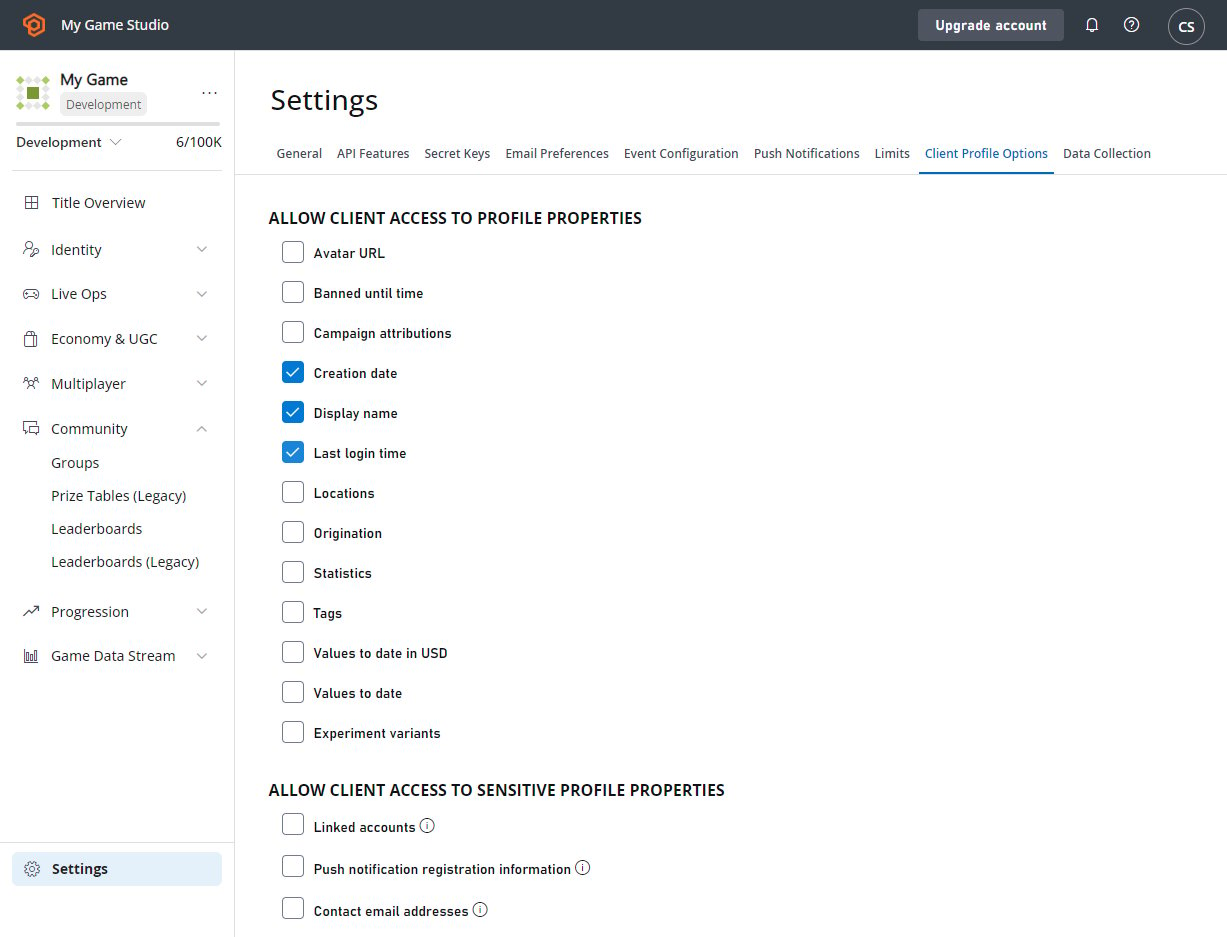 Now when you call 1`CreatePlayerAndUpdateDisplayName` it returns the [PlayerProfileModel](xref:titleid.playfabapi.com.server.accountmanagement.getplayerprofile#playerprofilemodel) object with data on the user's creation time, last login, and the display name of `UnicornTossMaster`.
## Get the player profile via login operation
In most cases you want to retrieve player profile data as soon as a player logs in. The PlayFab API allows you to combine the log in call and the call to retrieve the player profile into a single call.
The following example shows how to gain profile information through a login request, and uses `LoginWithCustomId` as an example.
This works with *every* login mechanism.
```csharp theme={null}
void CreatePlayerAndUpdateDisplayName(string customId) {
PlayFabClientAPI.LoginWithCustomID( new LoginWithCustomIDRequest() {
CustomId = customId,
// Define info request parameters
InfoRequestParameters = new GetPlayerCombinedInfoRequestParams() {
// And make sure PlayerProfile is included
GetPlayerProfile = true,
// Define rules for PlayerProfile request
ProfileConstraints = new PlayerProfileViewConstraints() {
// And make sure that both AvatarUrl and LastLogin are included.
ShowAvatarUrl = true,
ShowLastLogin = true,
}
}
},
result =>
{
// Extract the data you have requested
var avatarUrl = result.InfoResultPayload.PlayerProfile.AvatarUrl;
},
error => Debug.LogError(error.GenerateErrorReport()));
}
```
## Related topics
- [PFProfilesGetTitlePlayersFromMasterPlayerAccountIdsGetResult](/services/playfab/api-references/c/pfprofiles/functions/pfprofilesgettitleplayersfrommasterplayeraccountidsgetresult.md)
- [PFAccountManagementGetPlayerProfileResult](/services/playfab/api-references/c/pfaccountmanagementtypes/structs/pfaccountmanagementgetplayerprofileresult.md)
- [PFProfilesGetTitlePlayersFromMasterPlayerAccountIdsAsync](/services/playfab/api-references/c/pfprofiles/functions/pfprofilesgettitleplayersfrommasterplayeraccountidsasync.md)
- [PFProfilesGetTitlePlayersFromMasterPlayerAccountIdsResponse](/services/playfab/api-references/c/pfprofilestypes/structs/pfprofilesgettitleplayersfrommasterplayeraccountidsresponse.md)
- [PFProfilesGetTitlePlayersFromMasterPlayerAccountIdsRequest](/services/playfab/api-references/c/pfprofilestypes/structs/pfprofilesgettitleplayersfrommasterplayeraccountidsrequest.md)
Now when you call 1`CreatePlayerAndUpdateDisplayName` it returns the [PlayerProfileModel](xref:titleid.playfabapi.com.server.accountmanagement.getplayerprofile#playerprofilemodel) object with data on the user's creation time, last login, and the display name of `UnicornTossMaster`.
## Get the player profile via login operation
In most cases you want to retrieve player profile data as soon as a player logs in. The PlayFab API allows you to combine the log in call and the call to retrieve the player profile into a single call.
The following example shows how to gain profile information through a login request, and uses `LoginWithCustomId` as an example.
This works with *every* login mechanism.
```csharp theme={null}
void CreatePlayerAndUpdateDisplayName(string customId) {
PlayFabClientAPI.LoginWithCustomID( new LoginWithCustomIDRequest() {
CustomId = customId,
// Define info request parameters
InfoRequestParameters = new GetPlayerCombinedInfoRequestParams() {
// And make sure PlayerProfile is included
GetPlayerProfile = true,
// Define rules for PlayerProfile request
ProfileConstraints = new PlayerProfileViewConstraints() {
// And make sure that both AvatarUrl and LastLogin are included.
ShowAvatarUrl = true,
ShowLastLogin = true,
}
}
},
result =>
{
// Extract the data you have requested
var avatarUrl = result.InfoResultPayload.PlayerProfile.AvatarUrl;
},
error => Debug.LogError(error.GenerateErrorReport()));
}
```
## Related topics
- [PFProfilesGetTitlePlayersFromMasterPlayerAccountIdsGetResult](/services/playfab/api-references/c/pfprofiles/functions/pfprofilesgettitleplayersfrommasterplayeraccountidsgetresult.md)
- [PFAccountManagementGetPlayerProfileResult](/services/playfab/api-references/c/pfaccountmanagementtypes/structs/pfaccountmanagementgetplayerprofileresult.md)
- [PFProfilesGetTitlePlayersFromMasterPlayerAccountIdsAsync](/services/playfab/api-references/c/pfprofiles/functions/pfprofilesgettitleplayersfrommasterplayeraccountidsasync.md)
- [PFProfilesGetTitlePlayersFromMasterPlayerAccountIdsResponse](/services/playfab/api-references/c/pfprofilestypes/structs/pfprofilesgettitleplayersfrommasterplayeraccountidsresponse.md)
- [PFProfilesGetTitlePlayersFromMasterPlayerAccountIdsRequest](/services/playfab/api-references/c/pfprofilestypes/structs/pfprofilesgettitleplayersfrommasterplayeraccountidsrequest.md)