> ## Documentation Index
> Fetch the complete documentation index at: https://devdocs.xbox.com/llms.txt
> Use this file to discover all available pages before exploring further.
# Builds overview page
> Tour the Builds overview page in PlayFab Game Manager to view multiplayer server build settings and manage aliases, title assets, and shared services.
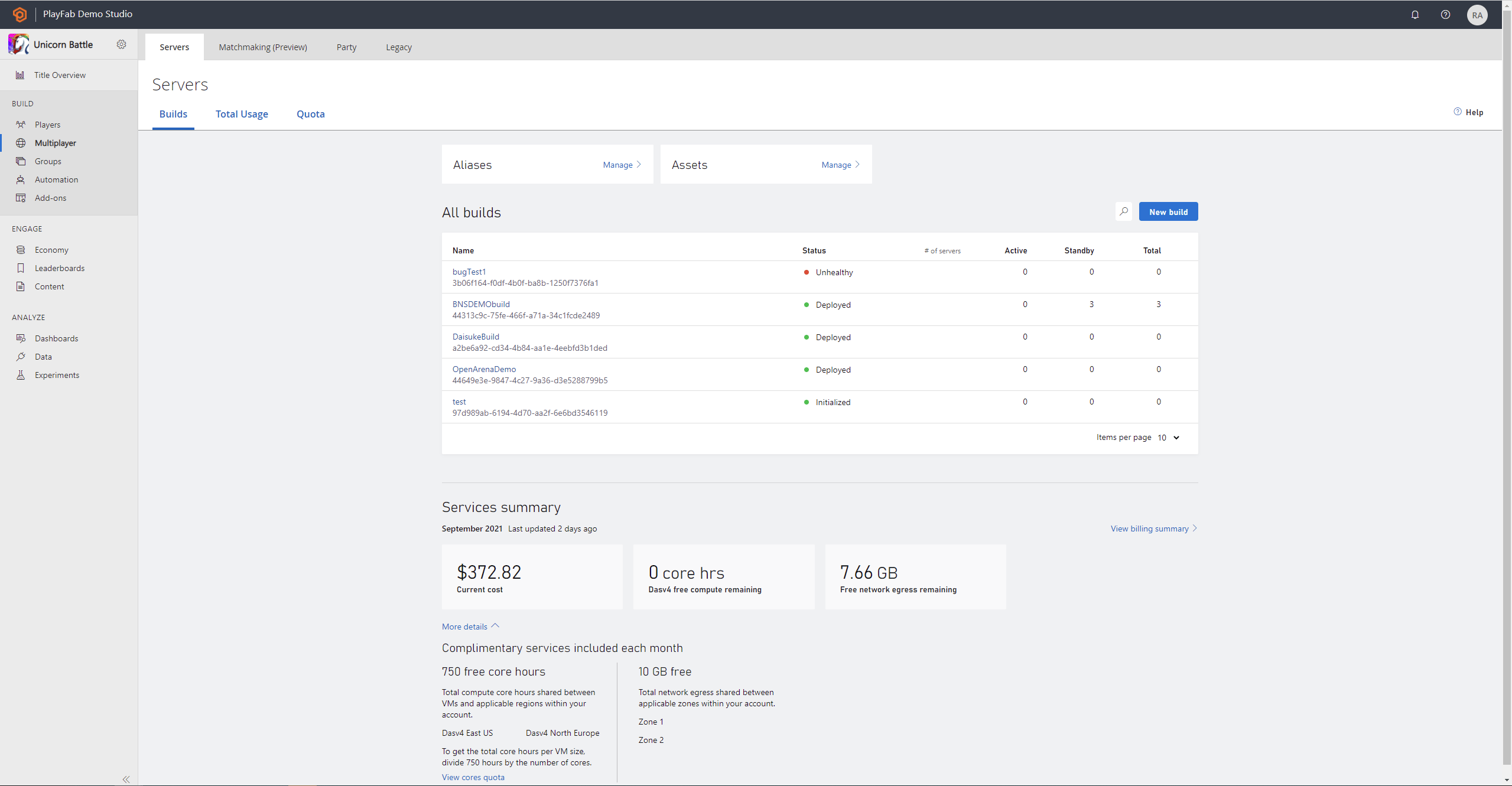
This article describes the Builds overview page for Multiplayer Servers in Game Manager.
From the Builds page, you can view summary information and edit shared settings for your servers. This includes:
* A broad overview of your build settings and their overrides
* **Access** to managing components **shared** across builds such as assets and aliases
* View complimentary services available to the build.
 ## Build aliases
To access your aliases, select **Manage** on the Aliases card at the top of the **Builds overview** page.
The manage aliases page allows you to:
* Create new build aliases
* View details of aliases
* Edit and delete aliases
## Title assets
To access assets select on the **Manage** button on the Assets card to navigate to the **Manage Assets** page.
The **Manage Assets** page allows you to view and manage your title's assets. This includes:
* Uploading new assets
* Viewiewing assets associated with a build
* Viewiewing assets unassociated with a build
Both assets associated and unassociated with a build may be downloaded to a local disk. Only assets unassociated with a build can be selected for deletion.
## Services summary
## Build aliases
To access your aliases, select **Manage** on the Aliases card at the top of the **Builds overview** page.
The manage aliases page allows you to:
* Create new build aliases
* View details of aliases
* Edit and delete aliases
## Title assets
To access assets select on the **Manage** button on the Assets card to navigate to the **Manage Assets** page.
The **Manage Assets** page allows you to view and manage your title's assets. This includes:
* Uploading new assets
* Viewiewing assets associated with a build
* Viewiewing assets unassociated with a build
Both assets associated and unassociated with a build may be downloaded to a local disk. Only assets unassociated with a build can be selected for deletion.
## Services summary
 Under the **Services summary** you can view your current cost, amount of free compute hour remaining, and free network egress you have left for the month. For more information on billing, select the “View billing summary” on the page. For an expanded view, select "More details".
## See also
* [Servers Overview](/services/playfab/multiplayer/servers/build-server-overview)
* [VM performance metrics](/services/playfab/multiplayer/servers/vm-metrics)
## Related topics
- [Servers overview page](/services/playfab/multiplayer/servers/build-server-overview.md)
- [Managing a build alias and allocating to it](/services/playfab/multiplayer/servers/allocating-with-build-alias.md)
- [Community overview page](/services/playfab/community/what-is-community.md)
- [Identity overview page](/services/playfab/identity/identity-overview.md)
- [Unity overview](/paths/unity/overview.md)
Under the **Services summary** you can view your current cost, amount of free compute hour remaining, and free network egress you have left for the month. For more information on billing, select the “View billing summary” on the page. For an expanded view, select "More details".
## See also
* [Servers Overview](/services/playfab/multiplayer/servers/build-server-overview)
* [VM performance metrics](/services/playfab/multiplayer/servers/vm-metrics)
## Related topics
- [Servers overview page](/services/playfab/multiplayer/servers/build-server-overview.md)
- [Managing a build alias and allocating to it](/services/playfab/multiplayer/servers/allocating-with-build-alias.md)
- [Community overview page](/services/playfab/community/what-is-community.md)
- [Identity overview page](/services/playfab/identity/identity-overview.md)
- [Unity overview](/paths/unity/overview.md)