> ## Documentation Index
> Fetch the complete documentation index at: https://devdocs.xbox.com/llms.txt
> Use this file to discover all available pages before exploring further.
# Title News quickstart
> Create and publish localized PlayFab Title News posts with title, body, date, status, and language fields to share patch notes and event updates with players.
Title News is a mechanism for communicating with your players for patch notes or big events your game may be hosting. It contains a few basic elements:
* **Date**
* **Status**
* **Title**
* **Body**
* **Language(s)**
The Body element is a string which can contain raw text or JSON.
## Requirements
This quickstart builds on information presented in other topics. Please refer to the topic links that follow if you have questions.
* You should be familiar with the PlayFab [Game Manager](/services/playfab/live-service-management/gamemanager/quickstart).
You must already have a **title default language** set to continue with localized title news.
* Title news can now be localized. For details on working with the default languages in your title and with the preferred languages for your players, please review the [Setting Default Languages](/services/playfab/live-service-management/game-configuration/title-communications/news/setting-default-languages) tutorial. Remember - to continue with localized title news, you must have **title default language** set accordingly.
PlayFab supports storing localized strings on behalf of game developers, by associating a title and body with a language for a title news entry.
We have added the necessary logic to provide your players with the correct strings for the language they prefer. When the client queries for title news, they will receive different versions of title news, based on the players preferred language. You can add multiple translated versions to a single title news entry.
## Creating Title News entries
There are two ways to create Title News entries:
1. Via Game Manager.
2. Using the Admin API method [AddNews](xref:titleid.playfabapi.com.admin.title-widedatamanagement.addnews).
### Creating title news with Game Manager
To create title news entries with **Game Manager**:
Navigate to your title -> **Content** -> **Title News** -> **New Title News** as shown in the following image.
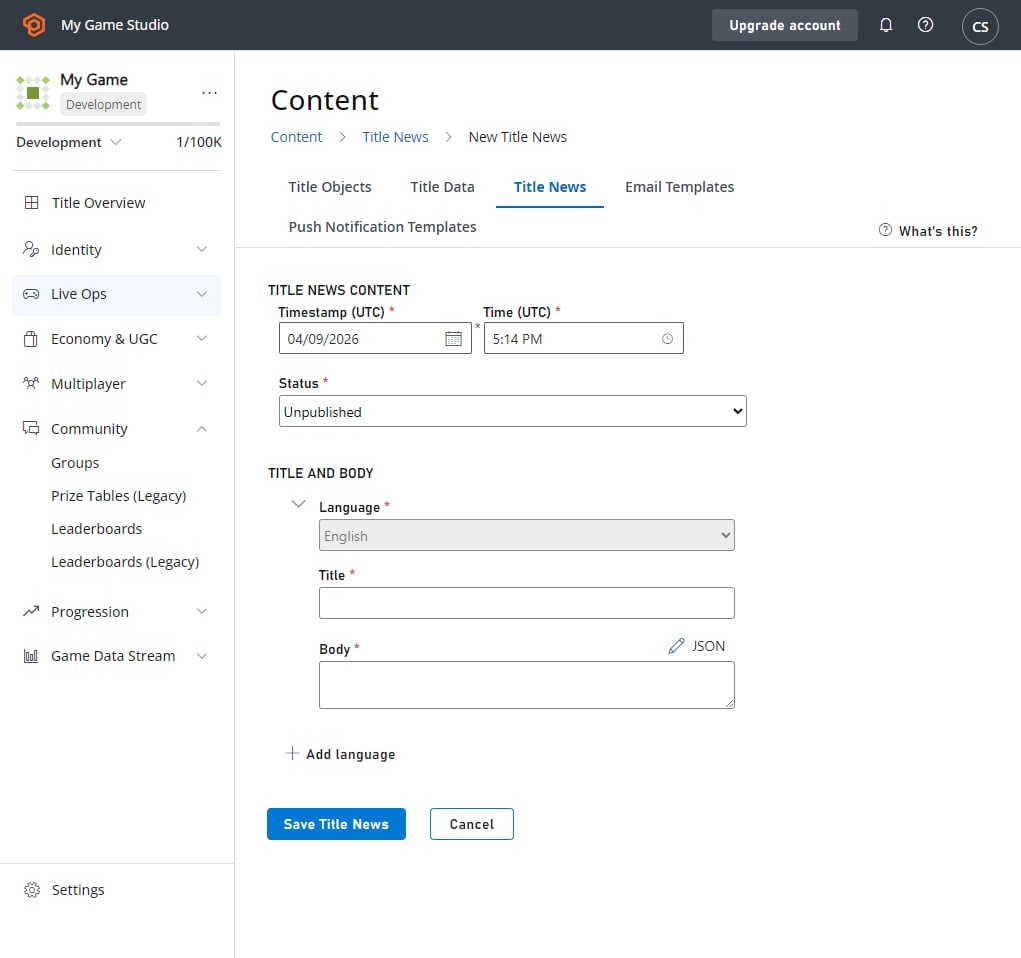 For the purposes of this tutorial, we will assume your title's default language is English. This means that you must add strings for your default language before you can save the title news.
Adding more languages is as simple as clicking on **ADD LANGUAGE**, choosing the language you want to add, and then typing in the localized strings. Select the **Save Title News** button, and your entry is created.
The timestamp is the time that players will see next to the title news. The timestamp is automatically set to the system date at the moment you select the **Save Title News** button, but you can *also* set it manually. After saving the title news page, you'll be redirected back to the page that contains the list of your title news entries.
### Creating title news using the PlayFab Admin API
You can create title news by calling [AddNews](xref:titleid.playfabapi.com.admin.title-widedatamanagement.addnews) method. Using this Admin API allows you to specify a custom timestamp. News added this way is *immediately* published. You can then add localized content to the item you just created by calling [AddLocalizedNews](xref:titleid.playfabapi.com.admin.title-widedatamanagement.addlocalizednews), with the news ID returned from the `AddNews` method.
The code example that follows demonstrates this.
```csharp theme={null}
void CreateNews() {
PlayFabAdminAPI.AddNews(new AddNewsRequest {
Timestamp = new DateTime(2014, 1, 8, 12, 0, 0), // Any date - This one is the founding of PlayFab
Title = "My Second News",
Body = "This is my second news post."
},
result => Debug.Log("News post added!"),
error => Debug.LogError(error.GenerateErrorReport()));
}
void CreateNews() {
PlayFabAdminAPI.AddLocalizedNewsRequest(new AddLocalizedNewsRequest{
NewsId = "74623b12-6c80-ee4b-7c3b-58e638aa62bd",
Language = "de"
Title = " Meine zweite Nachricht",
Body = " Dies ist meine zweite Nachricht."
},
result => Debug.Log("Localized news post added!"),
error => Debug.LogError(error.GenerateErrorReport()));
}
```
## Reading title news
The `GetTitleNews` method makes reading the title news very easy. The method returns all published title news entries and does not return archived and unpublished entries.
* Calling [GetTitleNews](xref:titleid.playfabapi.com.client.title-widedatamanagement.gettitlenews) from the client API will return the news entries in the preferred language of the player, if the title news item has added localized content in that language, or in the title default language.
* Calling [GetTitleNews](xref:titleid.playfabapi.com.server.title-widedatamanagement.gettitlenews) from the server API will return the news entries in the title default language.
```csharp theme={null}
// Using the Client API method
void ReadTitleNews() {
PlayFabClientAPI.GetTitleNews(new GetTitleNewsRequest(), result => {
Debug.Log("Got latest news!");
// Process news using result.News
}, error => Debug.LogError(error.GenerateErrorReport()));
}
// Using the Server API method
void ReadTitleNews() {
PlayFabServerAPI.GetTitleNews(new GetTitleNewsRequest(), result => {
Debug.Log("Got latest news!");
// Process news using result.News
}, error => Debug.LogError(error.GenerateErrorReport()));
}
```
## Updating an existing title news entry
The content of a title news entry can only be modified in Game Manager.
To locate and select the entry you wish to modify in **Game Manager**:
* Go to the menu on the left and select **Content**.
* Go to your **Title News** tab.
* Select **Existing Entry**.
To make your updates, save them, and optionally add localized versions:
* Update the **Title**, **Status**, or **Data** for the entry.
* Select the **Save Title News** button.
* If you are updating a title news entry that only has a title and body in a single language, you can now add localized versions of this title news by selecting **Add Language**.
If you plan to post unpublished entries for a future release, this will be the way you transition them through a published and archived state. Updating title news also lets you fix typos.
## Deleting title news
Once an entry is no longer needed, you can delete it in the **Game Manager**.
Find the entry you wish to modify, then:
* Navigate to your **Title**.
* In your menu on the left, select **Content**.
* Go to **Title News**.
* Put a check in the checkbox for the **Existing Entry**.
* Select the **Title News** entries you wish to delete and choose **X Delete Title News**.
For the purposes of this tutorial, we will assume your title's default language is English. This means that you must add strings for your default language before you can save the title news.
Adding more languages is as simple as clicking on **ADD LANGUAGE**, choosing the language you want to add, and then typing in the localized strings. Select the **Save Title News** button, and your entry is created.
The timestamp is the time that players will see next to the title news. The timestamp is automatically set to the system date at the moment you select the **Save Title News** button, but you can *also* set it manually. After saving the title news page, you'll be redirected back to the page that contains the list of your title news entries.
### Creating title news using the PlayFab Admin API
You can create title news by calling [AddNews](xref:titleid.playfabapi.com.admin.title-widedatamanagement.addnews) method. Using this Admin API allows you to specify a custom timestamp. News added this way is *immediately* published. You can then add localized content to the item you just created by calling [AddLocalizedNews](xref:titleid.playfabapi.com.admin.title-widedatamanagement.addlocalizednews), with the news ID returned from the `AddNews` method.
The code example that follows demonstrates this.
```csharp theme={null}
void CreateNews() {
PlayFabAdminAPI.AddNews(new AddNewsRequest {
Timestamp = new DateTime(2014, 1, 8, 12, 0, 0), // Any date - This one is the founding of PlayFab
Title = "My Second News",
Body = "This is my second news post."
},
result => Debug.Log("News post added!"),
error => Debug.LogError(error.GenerateErrorReport()));
}
void CreateNews() {
PlayFabAdminAPI.AddLocalizedNewsRequest(new AddLocalizedNewsRequest{
NewsId = "74623b12-6c80-ee4b-7c3b-58e638aa62bd",
Language = "de"
Title = " Meine zweite Nachricht",
Body = " Dies ist meine zweite Nachricht."
},
result => Debug.Log("Localized news post added!"),
error => Debug.LogError(error.GenerateErrorReport()));
}
```
## Reading title news
The `GetTitleNews` method makes reading the title news very easy. The method returns all published title news entries and does not return archived and unpublished entries.
* Calling [GetTitleNews](xref:titleid.playfabapi.com.client.title-widedatamanagement.gettitlenews) from the client API will return the news entries in the preferred language of the player, if the title news item has added localized content in that language, or in the title default language.
* Calling [GetTitleNews](xref:titleid.playfabapi.com.server.title-widedatamanagement.gettitlenews) from the server API will return the news entries in the title default language.
```csharp theme={null}
// Using the Client API method
void ReadTitleNews() {
PlayFabClientAPI.GetTitleNews(new GetTitleNewsRequest(), result => {
Debug.Log("Got latest news!");
// Process news using result.News
}, error => Debug.LogError(error.GenerateErrorReport()));
}
// Using the Server API method
void ReadTitleNews() {
PlayFabServerAPI.GetTitleNews(new GetTitleNewsRequest(), result => {
Debug.Log("Got latest news!");
// Process news using result.News
}, error => Debug.LogError(error.GenerateErrorReport()));
}
```
## Updating an existing title news entry
The content of a title news entry can only be modified in Game Manager.
To locate and select the entry you wish to modify in **Game Manager**:
* Go to the menu on the left and select **Content**.
* Go to your **Title News** tab.
* Select **Existing Entry**.
To make your updates, save them, and optionally add localized versions:
* Update the **Title**, **Status**, or **Data** for the entry.
* Select the **Save Title News** button.
* If you are updating a title news entry that only has a title and body in a single language, you can now add localized versions of this title news by selecting **Add Language**.
If you plan to post unpublished entries for a future release, this will be the way you transition them through a published and archived state. Updating title news also lets you fix typos.
## Deleting title news
Once an entry is no longer needed, you can delete it in the **Game Manager**.
Find the entry you wish to modify, then:
* Navigate to your **Title**.
* In your menu on the left, select **Content**.
* Go to **Title News**.
* Put a check in the checkbox for the **Existing Entry**.
* Select the **Title News** entries you wish to delete and choose **X Delete Title News**.