> ## Documentation Index
> Fetch the complete documentation index at: https://devdocs.xbox.com/llms.txt
> Use this file to discover all available pages before exploring further.
# Custom Stores for Player Segments in Economy (Legacy)
> Tutorial for Economy (Legacy) that describes how to create alternate stores that are available only to players from defined Player Segments.
# Custom stores for player segments (Legacy Economy)
Economy v1 APIs are in maintenance mode and will not be receiving any new features, only bug fixes. **The v1 APIs will be maintained for the foreseeable future.** See the [Economy v2 Overview](/services/playfab/economy-monetization/economy-v2/overview) to learn more about the next version of PlayFab Economy!
In our [Stores and Sales](/services/playfab/economy-monetization/economy/tutorials/stores-and-sales) tutorial, we demonstrate how to set up a store and make a few items available to a player at special or alternate prices.
In our [Player segmentation quickstart](/services/playfab/live-service-management/game-configuration/segmentation/segmentation-quickstart), we provide an example of how to group your players into segments, based on player information or behavior.
This tutorial describes how to *combine* these features, and produce alternate stores available *only* to players from defined player segments.
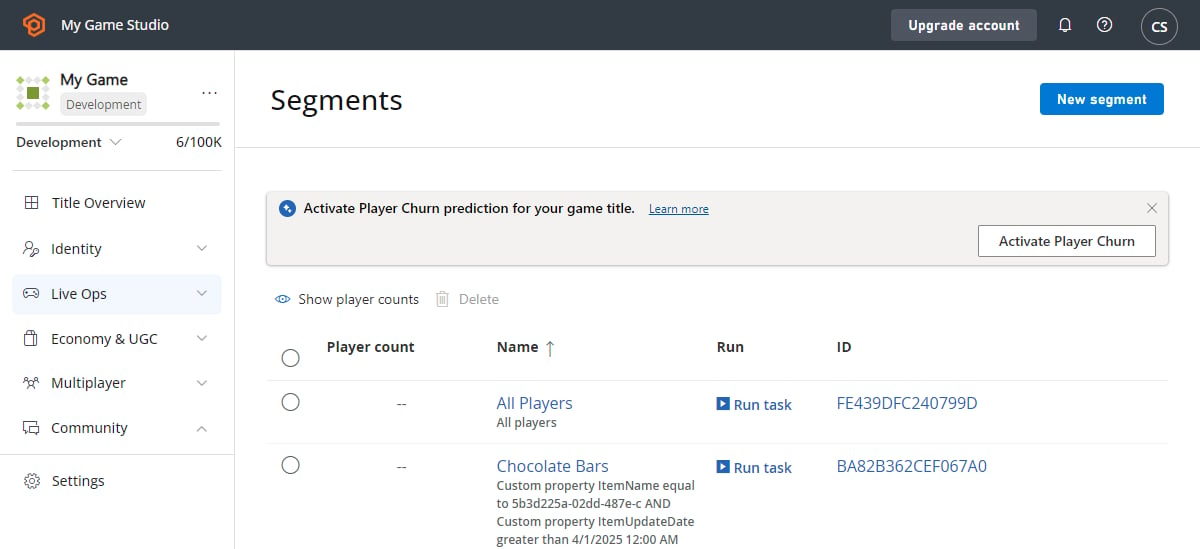
1. Let's begin with some example segments. In the screenshot shown below, we've provided some segments that are segmented-store-testing friendly.
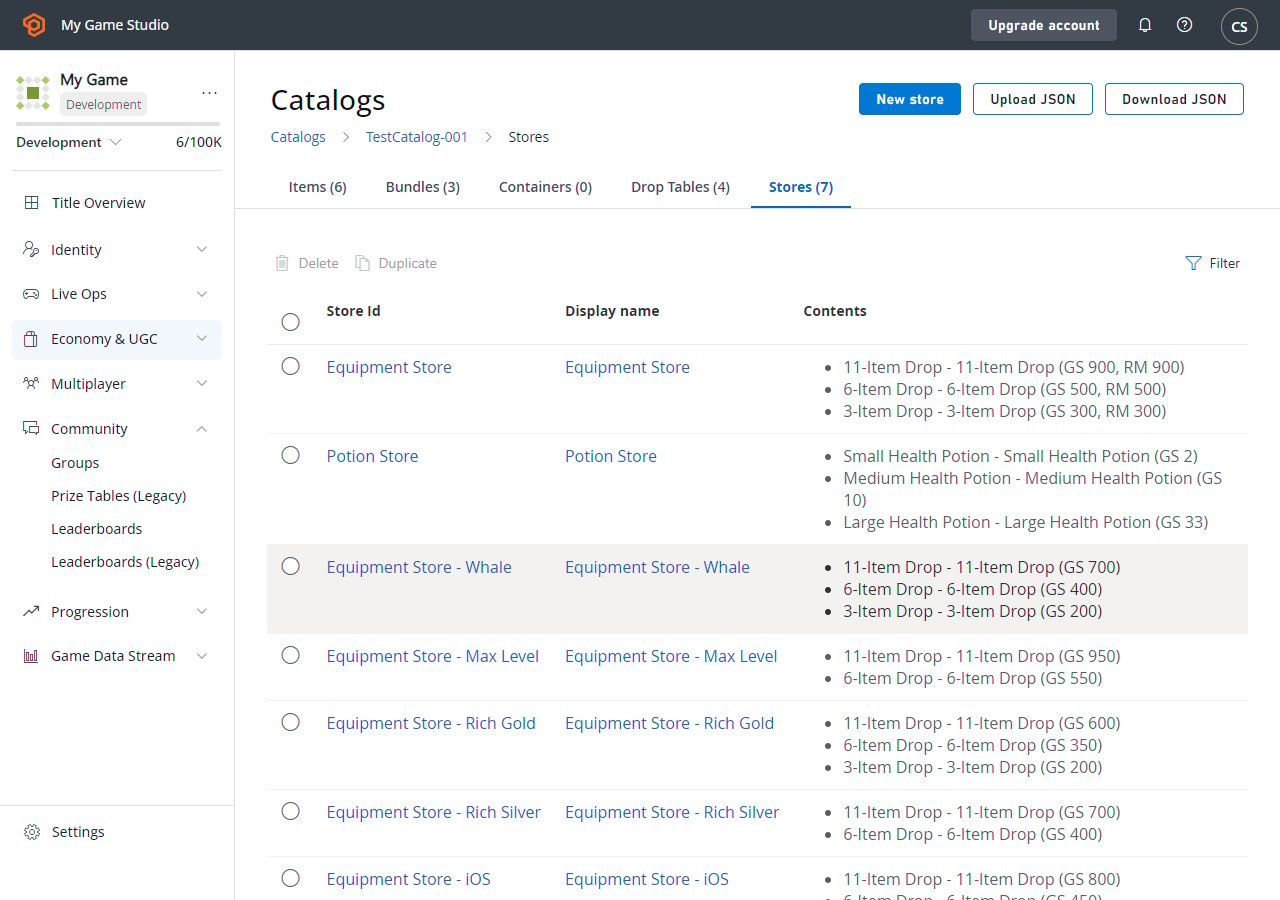
 2. Next, we'll reuse the **Equipment Store** created in the [Stores and Sales](/services/playfab/economy-monetization/economy/tutorials/stores-and-sales) tutorial, and add player segmentation. You must create each store separately and give it an identifiable name. Each store should have content that is customized for that segment.
Using the **DUPLICATE** feature on the **Stores** screen, you can duplicate stores quickly, and then modify the **Store Id**, **Store name**, and other parameters to make the new store unique.
The following screen shot shows our customized stores.
2. Next, we'll reuse the **Equipment Store** created in the [Stores and Sales](/services/playfab/economy-monetization/economy/tutorials/stores-and-sales) tutorial, and add player segmentation. You must create each store separately and give it an identifiable name. Each store should have content that is customized for that segment.
Using the **DUPLICATE** feature on the **Stores** screen, you can duplicate stores quickly, and then modify the **Store Id**, **Store name**, and other parameters to make the new store unique.
The following screen shot shows our customized stores.
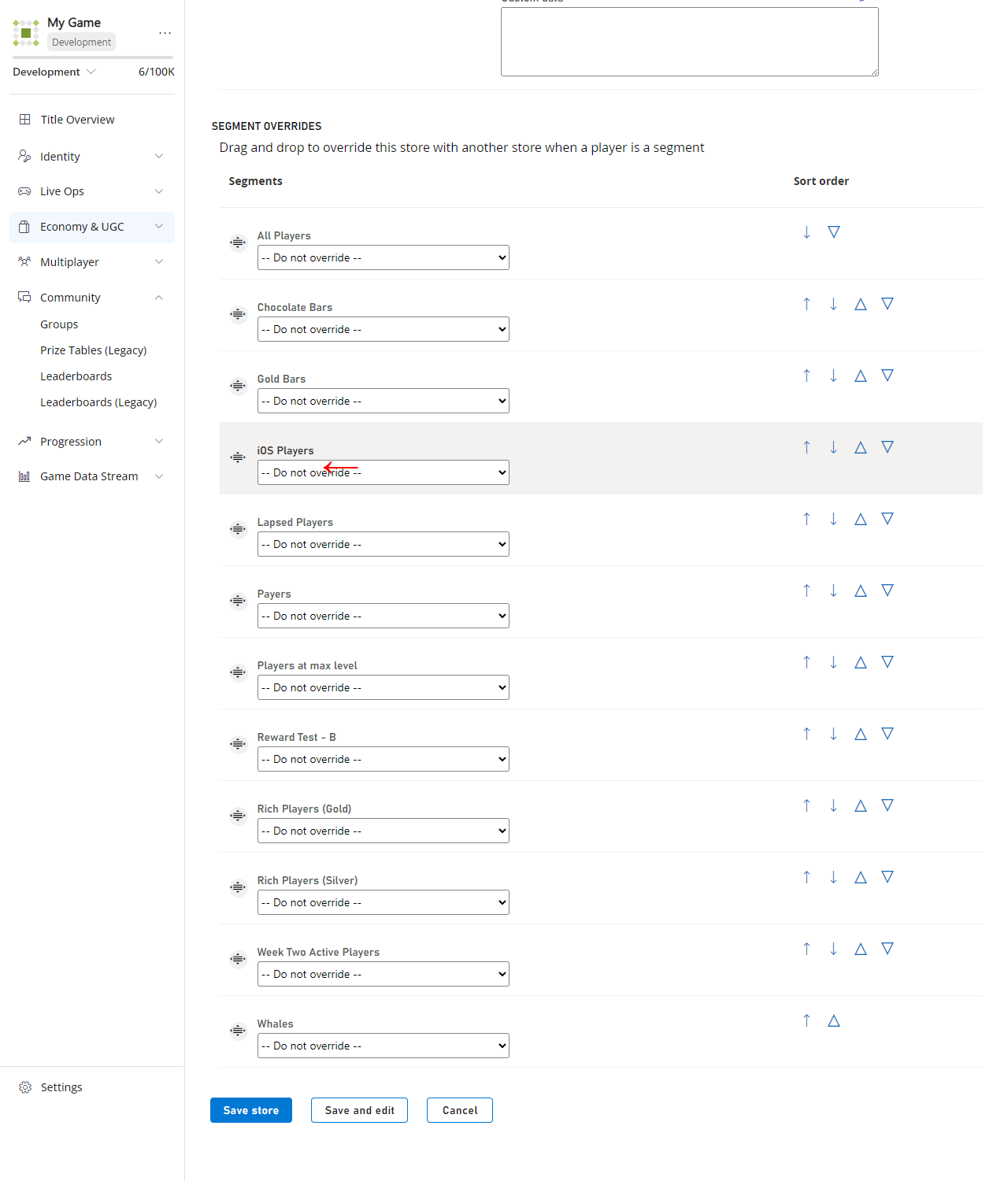
 1. Finally, edit the **Equipment Store**, and fill in the **SEGMENT OVERRIDES** section at the bottom (this section is *only visible* if there are defined player segments).
 ## Best Practices for store segmentation
* Store segmentation is public information:
* There are many ways for players to gain information about alternate stores.
* Players naturally transition between segments, and they'll see those changes when they transition.
* Players discuss content on forums, community sites, wikis, etc.
* In the PlayFab API, store information is *public* unless you disable those APIs with our [API Access Policy](/services/playfab/api-references/api-access-policy).
* You should assume that players will be aware of other stores and their details.
* Provide varying content, *not* varying pricing:
* Players will feel cheated if:
* Prices go up or down when they transition segments.
* Prices described on wikis are different than their own.
* The only exception to the pricing rule would be *first time* purchases:
* You must secure the client API methods with our [API Access Policy](/services/playfab/api-references/api-access-policy) to prevent multiple purchases, or make repurchasing less meaningful through game design.
* Content should be relevant to the segment:
* Whales are willing to spend large amounts of real money *and are likely to buy expensive bundles* if the value is worthwhile.
* First time buyers may be given a good deal, but can *only* be (usefully) obtained once.
* End game players may only be interested in a specific subset of items.
## Related topics
- [Stores (Economy Legacy) Quickstart](/services/playfab/economy-monetization/economy/stores/quickstart.md)
- [Economy (Legacy) quickstart](/services/playfab/economy-monetization/economy/quickstart.md)
- [Stores and sales in Economy (Legacy)](/services/playfab/economy-monetization/economy/tutorials/stores-and-sales.md)
- [Catalogs (Legacy Economy)](/services/playfab/economy-monetization/economy/items/catalogs.md)
- [Stores (Legacy Economy)](/services/playfab/economy-monetization/economy/stores/index.md)
## Best Practices for store segmentation
* Store segmentation is public information:
* There are many ways for players to gain information about alternate stores.
* Players naturally transition between segments, and they'll see those changes when they transition.
* Players discuss content on forums, community sites, wikis, etc.
* In the PlayFab API, store information is *public* unless you disable those APIs with our [API Access Policy](/services/playfab/api-references/api-access-policy).
* You should assume that players will be aware of other stores and their details.
* Provide varying content, *not* varying pricing:
* Players will feel cheated if:
* Prices go up or down when they transition segments.
* Prices described on wikis are different than their own.
* The only exception to the pricing rule would be *first time* purchases:
* You must secure the client API methods with our [API Access Policy](/services/playfab/api-references/api-access-policy) to prevent multiple purchases, or make repurchasing less meaningful through game design.
* Content should be relevant to the segment:
* Whales are willing to spend large amounts of real money *and are likely to buy expensive bundles* if the value is worthwhile.
* First time buyers may be given a good deal, but can *only* be (usefully) obtained once.
* End game players may only be interested in a specific subset of items.
## Related topics
- [Stores (Economy Legacy) Quickstart](/services/playfab/economy-monetization/economy/stores/quickstart.md)
- [Economy (Legacy) quickstart](/services/playfab/economy-monetization/economy/quickstart.md)
- [Stores and sales in Economy (Legacy)](/services/playfab/economy-monetization/economy/tutorials/stores-and-sales.md)
- [Catalogs (Legacy Economy)](/services/playfab/economy-monetization/economy/items/catalogs.md)
- [Stores (Legacy Economy)](/services/playfab/economy-monetization/economy/stores/index.md)