> ## Documentation Index
> Fetch the complete documentation index at: https://devdocs.xbox.com/llms.txt
> Use this file to discover all available pages before exploring further.
# Scheduled Scaling
> Automate legacy PlayFab Insights performance level scaling with cron-based scheduled tasks so cluster capacity matches demand and reduces analytics spend.
# Insights Scheduled Scaling
PlayFab Insights Management was retired on 3/31/2026. We recommend using [Data Connections](/services/playfab/data-analytics/export-data/data-connection-adx) to manage your performance and cost going forward. If your title is still using **Scheduled Scaling**, continue to see this article for best practice details. For more information, see [PlayFab Digest: March feature updates](https://developer.microsoft.com/en-us/games/articles/2026/04/playfab-digest-march-feature-updates/).
The Insights Performance Level can be set to scale up and down at specific times of the day. This allows a studio to match their analytics resources demand to their supply and optimize costs. Scheduled Tasks can be found under automation in Game Manager. It can also be reached by clicking the *Add Insights scaling scheduled task* button in Insights Management.
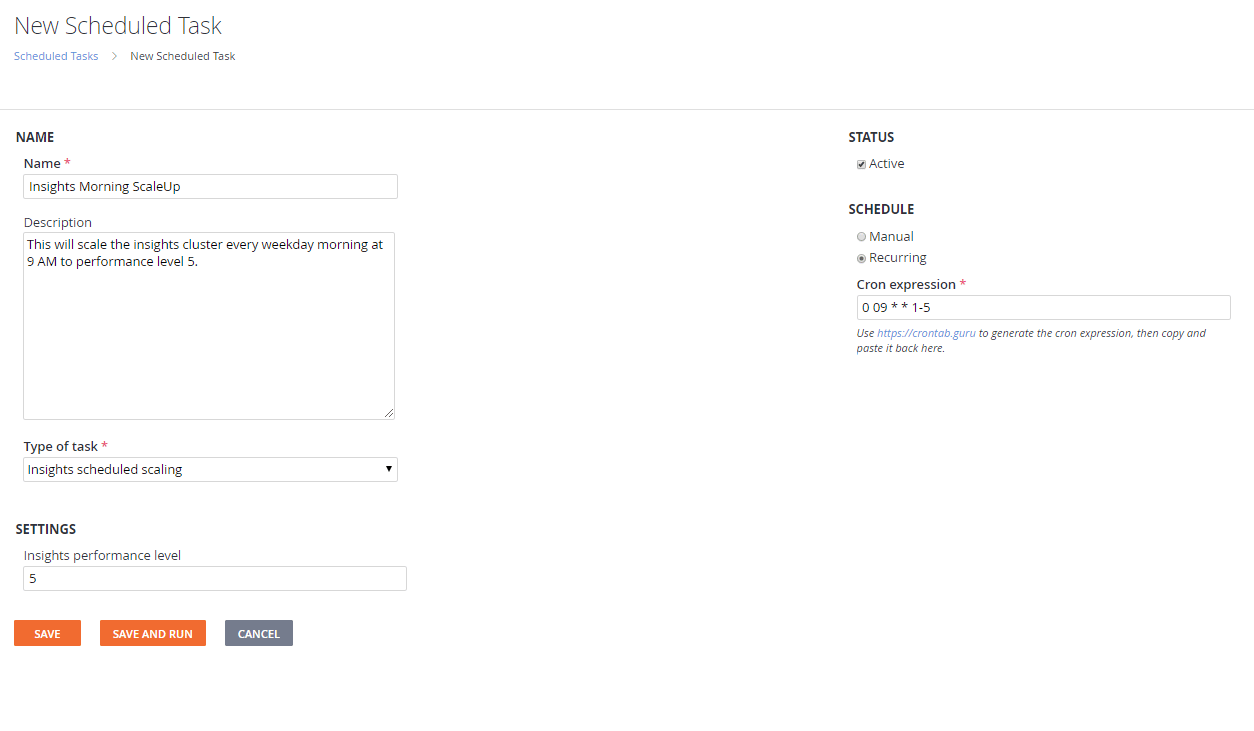 To create a task for scaling your cluster:
1. Provide a name and description for the task.
2. Select the type "Insights scheduled scaling".
3. Select the performance level you wish to scale to.
4. Select "recurring" on the right under "SCHEDULE" and provide a valid cron expression.
5. Select Save at the bottom.
The scheduled scale appears in the scheduled tasks section and in the Insights Management Page. The task can be deactivated without deleting if you don't want it to run, but also don't want to delete it.
## **Recommendation**
Changing your performance level allocates hardware resources to your data system immediately. However, transferring data into your new resources can take several minutes. It isn't recommended that you schedule large changes in performance level quickly after previous changes. See [Best Practices](/services/playfab/data-analytics/legacy/insights/best-practices) for recommendations.
## Related topics
- [Insights](/services/playfab/data-analytics/legacy/insights/overview.md)
- [Insights Best Practices](/services/playfab/data-analytics/legacy/insights/best-practices.md)
- [PlayFab Release Notes 2020](/services/playfab/release-notes/2020.md)
- [Scaling Programmatically](/services/playfab/multiplayer/servers/scaling-programmatically.md)
- [Scheduled Standby](/services/playfab/multiplayer/servers/scheduled-standby.md)
To create a task for scaling your cluster:
1. Provide a name and description for the task.
2. Select the type "Insights scheduled scaling".
3. Select the performance level you wish to scale to.
4. Select "recurring" on the right under "SCHEDULE" and provide a valid cron expression.
5. Select Save at the bottom.
The scheduled scale appears in the scheduled tasks section and in the Insights Management Page. The task can be deactivated without deleting if you don't want it to run, but also don't want to delete it.
## **Recommendation**
Changing your performance level allocates hardware resources to your data system immediately. However, transferring data into your new resources can take several minutes. It isn't recommended that you schedule large changes in performance level quickly after previous changes. See [Best Practices](/services/playfab/data-analytics/legacy/insights/best-practices) for recommendations.
## Related topics
- [Insights](/services/playfab/data-analytics/legacy/insights/overview.md)
- [Insights Best Practices](/services/playfab/data-analytics/legacy/insights/best-practices.md)
- [PlayFab Release Notes 2020](/services/playfab/release-notes/2020.md)
- [Scaling Programmatically](/services/playfab/multiplayer/servers/scaling-programmatically.md)
- [Scheduled Standby](/services/playfab/multiplayer/servers/scheduled-standby.md)