> ## Documentation Index
> Fetch the complete documentation index at: https://devdocs.xbox.com/llms.txt
> Use this file to discover all available pages before exploring further.
# Performance and retention
> Tune legacy PlayFab Insights performance levels and retention settings to balance cache size, compute, concurrent query limits, and event ingestion throughput.
# Insights Management: Performance Levels & Retention
PlayFab Insights Management was retired on 3/31/2026. We recommend using [Data Connections](/services/playfab/data-analytics/export-data/data-connection-adx) to manage your performance and cost going forward. If your title is still using **Performance Levels & Retention**, continue to see this article for best practice details. For more information, see [PlayFab Digest: March feature updates](https://developer.microsoft.com/en-us/games/articles/2026/04/playfab-digest-march-feature-updates/).
PlayFab Insights provides studios the ability to change the performance characteristics of their data system. Controls are located in **Management** under the data section in Game Manager.
## Performance Levels
### Why are performance levels important?
Performance levels determine
* the resources (cache size, compute power, memory) given to each query
* the limits of concurrent queries, max number of concurrent queries, events per second, and active event exports
Performance levels can also be used to increase the max number of events per second and the number of allowed active event exports for a title.
### How can I change my performance level?
The **Performance Level** slider is used to select a new performance level. The Performance Level Settings table shows a comparison of your current settings versus new settings you've selected: 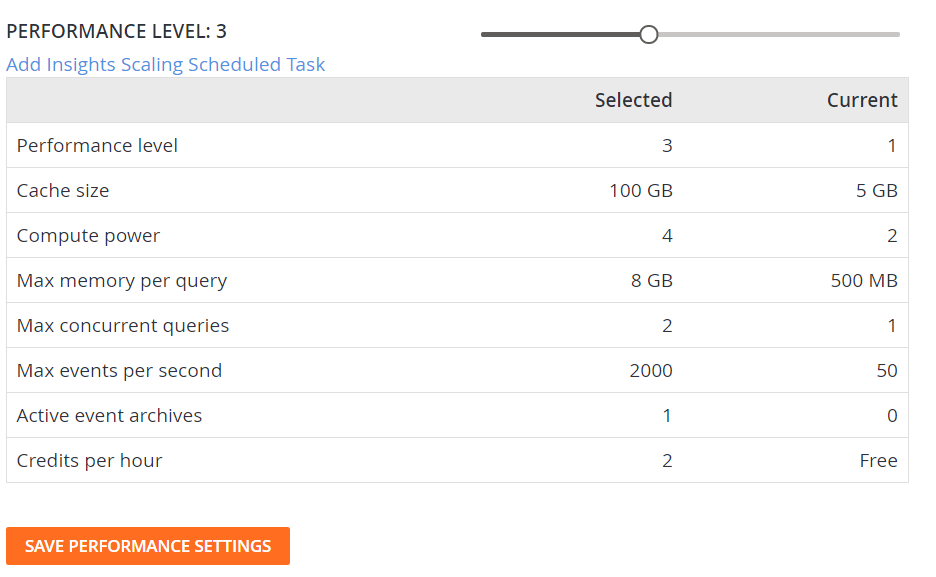 ### Is performance level access limited?
Yes. Every title begins at Performance Level 1, a free tier of service that is included in all PlayFab offerings. Live titles can change their performance level at will, however, titles in Development Mode must either enable paid insights features or launch to access performance levels greater than 1.
To enable paid Insights features while a title is in Development Mode:
1. Sign in to [developer.playfab.com](https://developer.playfab.com)
2. Select a title in Development Mode to enter the Title Overview page
3. Navigate to the "Data" tab on the left-hand side of the page
4. Navigate to the "Management (Preview)" tab on the top of the page
5. In the banner, select "Enable" to enable paid Insights features
If a payment method is missing from your account, you need to add one in order to access paid Insights tiers. To do this, select "Add credit card" on the page's banner that will take you to the billing information page. Once a payment instrument is added, the Insights Management page allows you to enable paid Insights features as described.
Once paid insights features are enabled for a title, that title will also have access to customized data retention values.
### *Cache Size*
PlayFab Insights uses a specialized variation of Azure Data Explorer (Kusto). Insights separates storage into two categories: Hot Cache and Storage. Hot Cache is memory and SSD storage and is extremely fast to query. Complex queries and data functions are executed quickly when all data is readily accessible in the hot cache. Data stored outside the hot cache in storage is still easily accessible and can be queried, but query times may slow down with large datasets in storage. Data is separated by ingestion time, the most recent data stored first in hot storage. Data storage is an entirely internal process to Insights and data is accessed in the same manner no matter where it's stored.
Example:
A studio has selected performance level 3 and therefore has 100 GB of cache. They've also select 1200 days of retention, so there's just over three years of data stored in their cluster. If the studio has a daily data footprint of 1 GB a day, then 100 Days of data are stored in the hot cache. A user can run a query over 90 days and query only hot cache, they can run that same query over all three years and query from both sources, no change is needed in query structure.
**How is cache affected when I change my performance level?**
When you change your performance down, data is loaded from hot cache into storage as the hardware resources are reduced. Similarly, when increasing your performance level, hardware is instantly allocated to you and data is transferred into your cache. This process is generally very fast, but terabyte level shifts in cache size can take a short time to complete. For more information, see [Best Practices](/services/playfab/data-analytics/legacy/insights/best-practices).
### *Compute Power*
Compute power represents the maximum quantity of vCPUs allocated for each query. Based on the parallelization of a given query plan, some queries can't take full advantage of all vCPUs at once (order, distinct). Additionally, to improve interactivity of the querying experience, priority is given to queries by start time, meaning subsequent concurrent queries may see decreased vCPU allocation.
Compute power also increases the maximum query length before timeout. the following table represents current numbers:
| Compute Power | Maximum Compute Time (Seconds) |
| ----------------------- | ------------------------------ |
| 2 (Free Tier) | 30 |
| 2 (Performance Level 2) | 60 |
| 4 | 120 |
| 8 | 180 |
| 16 | 210 |
| 32 | 240 |
| 48 | 270 |
| 64 | 300 |
### *Max Memory Per Query*
This represents the total memory allocated to the query. Note this is different than the memory for storing data. Query memory is specifically for storing query data for computation and processing, this is an important resource for more complex queries.
### *Max Concurrent Queries*
This value represents the amount of simultaneous queries that can run at each performance level.
### *Max Events Per Second*
The total maximum events per second that the data system can ingest. This number is a combination of your Playstream and telemetry events and any external ingestion that might be taking place.
**What happens if I exceed my row write limit?**
Paid titles are charged an overage fee of one credit for every 2.7m (2,700,000) extra events ingested. This overage cost is designed to allow customers with predictable ingestion loads to sit at a smaller performance level during off hours for cost savings.
### *Event Exports*
Event Archives allow customers to export all or some of their data on a regular schedule to Azure Blob or AWS S3. For more information, see [Exporting Data](/services/playfab/data-analytics/legacy/insights/export).
### *Credits Per Hour*
Insights is billed per minute at the credits per hour rate (Credits Per Hour / 60). For more information about Insights Credit Pricing, see [PlayFab pricing](https://playfab.com/pricing/).
## Retention
### Is performance level access limited?
Yes. Every title begins at Performance Level 1, a free tier of service that is included in all PlayFab offerings. Live titles can change their performance level at will, however, titles in Development Mode must either enable paid insights features or launch to access performance levels greater than 1.
To enable paid Insights features while a title is in Development Mode:
1. Sign in to [developer.playfab.com](https://developer.playfab.com)
2. Select a title in Development Mode to enter the Title Overview page
3. Navigate to the "Data" tab on the left-hand side of the page
4. Navigate to the "Management (Preview)" tab on the top of the page
5. In the banner, select "Enable" to enable paid Insights features
If a payment method is missing from your account, you need to add one in order to access paid Insights tiers. To do this, select "Add credit card" on the page's banner that will take you to the billing information page. Once a payment instrument is added, the Insights Management page allows you to enable paid Insights features as described.
Once paid insights features are enabled for a title, that title will also have access to customized data retention values.
### *Cache Size*
PlayFab Insights uses a specialized variation of Azure Data Explorer (Kusto). Insights separates storage into two categories: Hot Cache and Storage. Hot Cache is memory and SSD storage and is extremely fast to query. Complex queries and data functions are executed quickly when all data is readily accessible in the hot cache. Data stored outside the hot cache in storage is still easily accessible and can be queried, but query times may slow down with large datasets in storage. Data is separated by ingestion time, the most recent data stored first in hot storage. Data storage is an entirely internal process to Insights and data is accessed in the same manner no matter where it's stored.
Example:
A studio has selected performance level 3 and therefore has 100 GB of cache. They've also select 1200 days of retention, so there's just over three years of data stored in their cluster. If the studio has a daily data footprint of 1 GB a day, then 100 Days of data are stored in the hot cache. A user can run a query over 90 days and query only hot cache, they can run that same query over all three years and query from both sources, no change is needed in query structure.
**How is cache affected when I change my performance level?**
When you change your performance down, data is loaded from hot cache into storage as the hardware resources are reduced. Similarly, when increasing your performance level, hardware is instantly allocated to you and data is transferred into your cache. This process is generally very fast, but terabyte level shifts in cache size can take a short time to complete. For more information, see [Best Practices](/services/playfab/data-analytics/legacy/insights/best-practices).
### *Compute Power*
Compute power represents the maximum quantity of vCPUs allocated for each query. Based on the parallelization of a given query plan, some queries can't take full advantage of all vCPUs at once (order, distinct). Additionally, to improve interactivity of the querying experience, priority is given to queries by start time, meaning subsequent concurrent queries may see decreased vCPU allocation.
Compute power also increases the maximum query length before timeout. the following table represents current numbers:
| Compute Power | Maximum Compute Time (Seconds) |
| ----------------------- | ------------------------------ |
| 2 (Free Tier) | 30 |
| 2 (Performance Level 2) | 60 |
| 4 | 120 |
| 8 | 180 |
| 16 | 210 |
| 32 | 240 |
| 48 | 270 |
| 64 | 300 |
### *Max Memory Per Query*
This represents the total memory allocated to the query. Note this is different than the memory for storing data. Query memory is specifically for storing query data for computation and processing, this is an important resource for more complex queries.
### *Max Concurrent Queries*
This value represents the amount of simultaneous queries that can run at each performance level.
### *Max Events Per Second*
The total maximum events per second that the data system can ingest. This number is a combination of your Playstream and telemetry events and any external ingestion that might be taking place.
**What happens if I exceed my row write limit?**
Paid titles are charged an overage fee of one credit for every 2.7m (2,700,000) extra events ingested. This overage cost is designed to allow customers with predictable ingestion loads to sit at a smaller performance level during off hours for cost savings.
### *Event Exports*
Event Archives allow customers to export all or some of their data on a regular schedule to Azure Blob or AWS S3. For more information, see [Exporting Data](/services/playfab/data-analytics/legacy/insights/export).
### *Credits Per Hour*
Insights is billed per minute at the credits per hour rate (Credits Per Hour / 60). For more information about Insights Credit Pricing, see [PlayFab pricing](https://playfab.com/pricing/).
## Retention
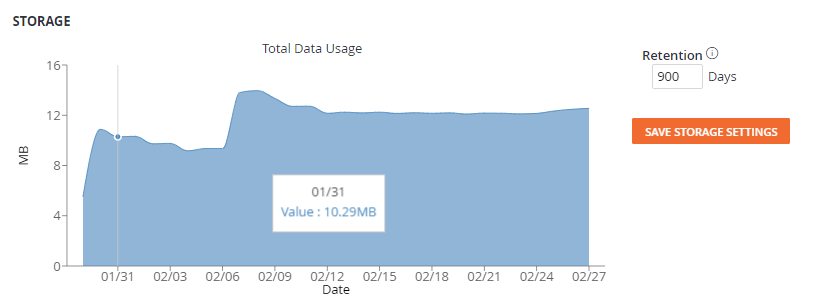 The retention setting allows a studio to set the total number of days data is kept. The default setting is 30 days, which fulfills most GDPR compliance regulations. Retention can be set globally or by table using [Management Commands](/services/playfab/data-analytics/legacy/insights/management-commands). Retention is charged at a rate of 50 credits per terabyte month, studios are only charged for what is in use by day. For more information about Insights Credit Pricing, see [Insights Credit Pricing](https://playfab.com/pricing/).
**Example** A studio has 10 terabytes of data stored at the beginning of the month and doesn't increase that storage. The total cost would be 500 (10 TB \* 50 credits/TB) Credits.
**Example** A studio begins the month at 250 GB of data and increases to 750 GB of data throughout the month linearly. The total charge would be 25 (average of each day of the month 0.5 TB \* 50 credits/TB) Credits.
## Related topics
- [Insights Best Practices](/services/playfab/data-analytics/legacy/insights/best-practices.md)
- [Insights](/services/playfab/data-analytics/legacy/insights/overview.md)
- [Insights pricing](/services/playfab/data-analytics/legacy/insights/pricing.md)
- [Metrics quickstart](/services/playfab/data-analytics/learn-data/trends/trends-quickstart.md)
- [Daily A/B Test KPI Report](/services/playfab/data-analytics/learn-data/reports/daily-ab-test-kpi-report.md)
The retention setting allows a studio to set the total number of days data is kept. The default setting is 30 days, which fulfills most GDPR compliance regulations. Retention can be set globally or by table using [Management Commands](/services/playfab/data-analytics/legacy/insights/management-commands). Retention is charged at a rate of 50 credits per terabyte month, studios are only charged for what is in use by day. For more information about Insights Credit Pricing, see [Insights Credit Pricing](https://playfab.com/pricing/).
**Example** A studio has 10 terabytes of data stored at the beginning of the month and doesn't increase that storage. The total cost would be 500 (10 TB \* 50 credits/TB) Credits.
**Example** A studio begins the month at 250 GB of data and increases to 750 GB of data throughout the month linearly. The total charge would be 25 (average of each day of the month 0.5 TB \* 50 credits/TB) Credits.
## Related topics
- [Insights Best Practices](/services/playfab/data-analytics/legacy/insights/best-practices.md)
- [Insights](/services/playfab/data-analytics/legacy/insights/overview.md)
- [Insights pricing](/services/playfab/data-analytics/legacy/insights/pricing.md)
- [Metrics quickstart](/services/playfab/data-analytics/learn-data/trends/trends-quickstart.md)
- [Daily A/B Test KPI Report](/services/playfab/data-analytics/learn-data/reports/daily-ab-test-kpi-report.md)