> ## Documentation Index
> Fetch the complete documentation index at: https://devdocs.xbox.com/llms.txt
> Use this file to discover all available pages before exploring further.
# Insights
> Legacy PlayFab Insights is a managed Kusto data environment for game telemetry with automatic ingestion, retention controls, and connectivity to external tools.
# What is PlayFab Insights?
PlayFab Insights Management was retired on 3/31/2026. We recommend using [Data Connections](/services/playfab/data-analytics/export-data/data-connection-adx) to manage your performance and cost going forward. If your title is still using **Insights**, continue to see this article for best practice details. For more information, see [PlayFab Digest: March feature updates](https://developer.microsoft.com/en-us/games/articles/2026/04/playfab-digest-march-feature-updates/).
PlayFab Insights is a managed data environment, giving you instant access to your games data without the need for additional engineering. Unlike other hosted data solutions Insights requires no setup, no GDPR work, and no extra engineering. Use PlayFab services and your data is available. Automatically ingest and scale, connect external visualization tools, and query freely.
## Key features
Insights key features revolve around data cluster management, data retention, ingestion options, and connectivity to outside tools.
### Automatic ingestion
PlayFab services automatically fire Playstream events. Any events fired by PlayFab services or created through our SDK are automatically routed to your Insights cluster. There's no need to worry about defining schema or DDL from automatic events. However, the option for sending your own custom events is available. For more information about sending custom events, see the [Custom event overview](/services/playfab/data-analytics/ingest-data/playstream-overview) of Generating PlayStream events.
### Change your performance level to meet your needs
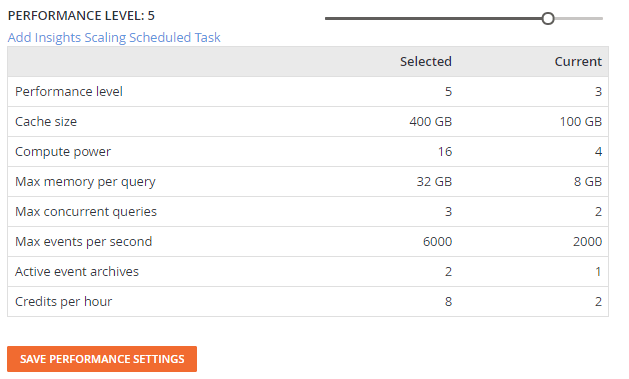 Match your cluster performance to your needs minute by minute. Slide your performance level up or down or alternatively schedule your cluster to have different performance levels automatically using scheduled tasks. See [Performance Level & Retention](/services/playfab/data-analytics/legacy/insights/performance-retention) for details.
### Schedule your performance level
Match your cluster performance to your needs minute by minute. Slide your performance level up or down or alternatively schedule your cluster to have different performance levels automatically using scheduled tasks. See [Performance Level & Retention](/services/playfab/data-analytics/legacy/insights/performance-retention) for details.
### Schedule your performance level
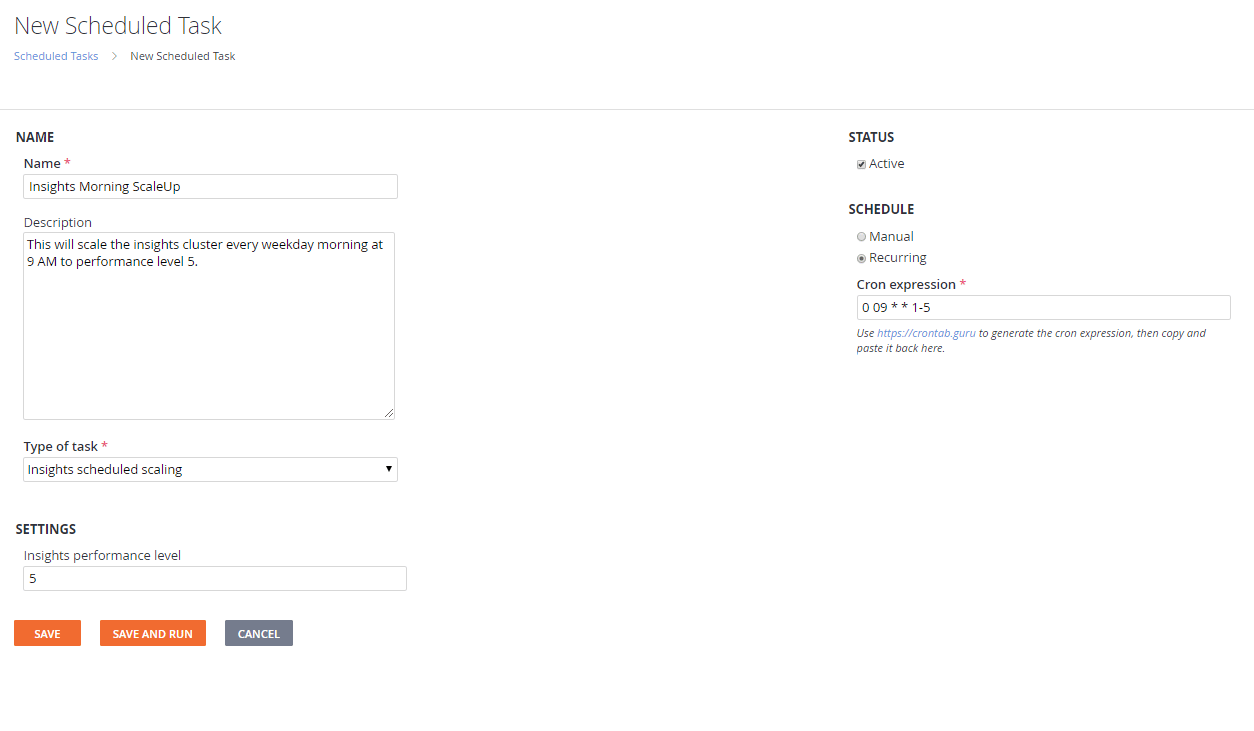 Use standard cron expressions to automatically scale your cluster up and down during known times. See [Scheduled Scaling](/services/playfab/data-analytics/legacy/insights/scheduled-scaling) for details.
### Keep your data as long as you need
Use standard cron expressions to automatically scale your cluster up and down during known times. See [Scheduled Scaling](/services/playfab/data-analytics/legacy/insights/scheduled-scaling) for details.
### Keep your data as long as you need
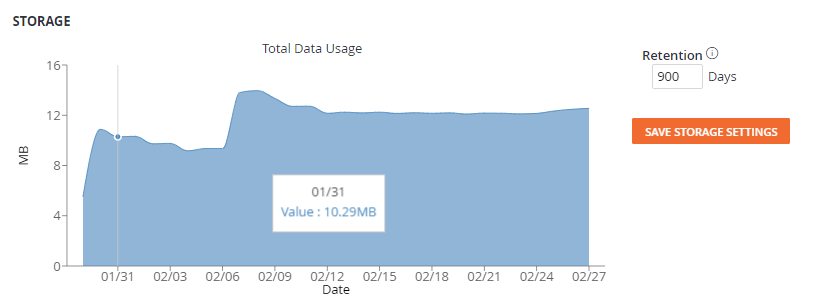 Never delete your data or clear your data out every 30 days, whatever is needed for your studio. See [Performance Level & Retention](/services/playfab/data-analytics/legacy/insights/performance-retention) for details.
### Connect outside tools
Connect Power BI or Grafana for visualization, automate data jobs with Python or Azure Data Factory, explore your data with Azure Data Explorer. See [Connectivity](/services/playfab/data-analytics/legacy/connectivity) for details.
### Export original or cleaned data
Use the automated export service to export all your data to Azure Blob or AWS S3. See [Exporting Data](/services/playfab/data-analytics/legacy/insights/export) for details.
### Bring your own datasets
Ingest your own custom datasets with [Management Commands](/services/playfab/data-analytics/legacy/insights/management-commands). Merge your custom Playstream events, standard Playstream events, and custom uploaded data to create more robust datasets.
### GDPR compliant
Standard reporting is tracked and GDPR compliant. Call the PlayFab GDPR delete request and we'll do the rest. Have custom data you need to delete? No problem, use the [Management Commands](/services/playfab/data-analytics/legacy/insights/management-commands) to maintain your custom data.
## Getting started with PlayFab Insights
PlayFab Insights is available to all studios right out of the box. The only thing needed to get started is some data. Implement any PlayFab service and you get playstream events automatically sent to your *Insights* or you [can send telemetry directly using PlayFab API calls](xref:titleid.playfabapi.com.events.playstreamevents). After you have some data, check out [Data Explorer](/services/playfab/data-analytics/export-data/data-connection-quickstart).
## What services are powered by Insights?
PlayFab Insights powers various features and functionality across Game Manager. Adjusting the performance level affects the following areas across your title:
* Data
* Data Explorer (Preview)
* Event Export
* Management (Preview)
* Dashboards
* Trends (Preview)
* Reports
* Players
* Player Logins
* Player Event History
* Multiplayer
* Party Usage Charts
## Related topics
- [PlayFab consumption best practices](/services/playfab/pricing/consumption-best-practices.md)
- [Insights pricing](/services/playfab/data-analytics/legacy/insights/pricing.md)
- [Insights Export](/services/playfab/data-analytics/legacy/insights/export.md)
- [Connecting Grafana to Insights](/services/playfab/data-analytics/legacy/connectivity/connecting-grafana-to-insights.md)
- [Connecting Python to Insights](/services/playfab/data-analytics/legacy/connectivity/connecting-python-to-insights.md)
Never delete your data or clear your data out every 30 days, whatever is needed for your studio. See [Performance Level & Retention](/services/playfab/data-analytics/legacy/insights/performance-retention) for details.
### Connect outside tools
Connect Power BI or Grafana for visualization, automate data jobs with Python or Azure Data Factory, explore your data with Azure Data Explorer. See [Connectivity](/services/playfab/data-analytics/legacy/connectivity) for details.
### Export original or cleaned data
Use the automated export service to export all your data to Azure Blob or AWS S3. See [Exporting Data](/services/playfab/data-analytics/legacy/insights/export) for details.
### Bring your own datasets
Ingest your own custom datasets with [Management Commands](/services/playfab/data-analytics/legacy/insights/management-commands). Merge your custom Playstream events, standard Playstream events, and custom uploaded data to create more robust datasets.
### GDPR compliant
Standard reporting is tracked and GDPR compliant. Call the PlayFab GDPR delete request and we'll do the rest. Have custom data you need to delete? No problem, use the [Management Commands](/services/playfab/data-analytics/legacy/insights/management-commands) to maintain your custom data.
## Getting started with PlayFab Insights
PlayFab Insights is available to all studios right out of the box. The only thing needed to get started is some data. Implement any PlayFab service and you get playstream events automatically sent to your *Insights* or you [can send telemetry directly using PlayFab API calls](xref:titleid.playfabapi.com.events.playstreamevents). After you have some data, check out [Data Explorer](/services/playfab/data-analytics/export-data/data-connection-quickstart).
## What services are powered by Insights?
PlayFab Insights powers various features and functionality across Game Manager. Adjusting the performance level affects the following areas across your title:
* Data
* Data Explorer (Preview)
* Event Export
* Management (Preview)
* Dashboards
* Trends (Preview)
* Reports
* Players
* Player Logins
* Player Event History
* Multiplayer
* Party Usage Charts
## Related topics
- [PlayFab consumption best practices](/services/playfab/pricing/consumption-best-practices.md)
- [Insights pricing](/services/playfab/data-analytics/legacy/insights/pricing.md)
- [Insights Export](/services/playfab/data-analytics/legacy/insights/export.md)
- [Connecting Grafana to Insights](/services/playfab/data-analytics/legacy/connectivity/connecting-grafana-to-insights.md)
- [Connecting Python to Insights](/services/playfab/data-analytics/legacy/connectivity/connecting-python-to-insights.md)