> ## Documentation Index
> Fetch the complete documentation index at: https://devdocs.xbox.com/llms.txt
> Use this file to discover all available pages before exploring further.
# Segments as a dimension
> Filter the PlayFab Trends dashboard by up to ten player segments to visualize KPI changes over time and compare engagement across audience cohorts.
The Segments as a Dimension on the Trends Dashboard feature leverages on the already existing way of visualizing changes over time, but it now allows you to choose which segments to include as part of the dimension.
Data does not start getting generated for a segment before it being selected.
## Limitations
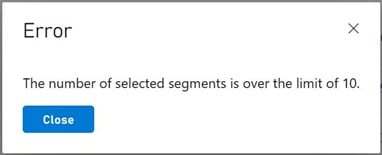
One limitation regarding Segments as a Dimension is the rate limit, if you try to select more than ten segments, you will get an error dialog like this:
 ## See also
[Segmentation overview](/services/playfab/live-service-management/game-configuration/segmentation/segmentation-overview)
## Related topics
- [Segments as a dimension quickstart](/services/playfab/data-analytics/learn-data/trends/segments-dimension-qs.md)
- [Trends](/services/playfab/data-analytics/learn-data/trends/trends-overview.md)
- [PlayFab data and analytics documentation](/services/playfab/data-analytics/index.md)
- [D3D12_UAV_DIMENSION](/reference/graphics/d3d12/enums/d3d12_uav_dimension_public.md)
- [D3D12_DSV_DIMENSION](/reference/graphics/d3d12/enums/d3d12_dsv_dimension_public.md)
## See also
[Segmentation overview](/services/playfab/live-service-management/game-configuration/segmentation/segmentation-overview)
## Related topics
- [Segments as a dimension quickstart](/services/playfab/data-analytics/learn-data/trends/segments-dimension-qs.md)
- [Trends](/services/playfab/data-analytics/learn-data/trends/trends-overview.md)
- [PlayFab data and analytics documentation](/services/playfab/data-analytics/index.md)
- [D3D12_UAV_DIMENSION](/reference/graphics/d3d12/enums/d3d12_uav_dimension_public.md)
- [D3D12_DSV_DIMENSION](/reference/graphics/d3d12/enums/d3d12_dsv_dimension_public.md)