> ## Documentation Index
> Fetch the complete documentation index at: https://devdocs.xbox.com/llms.txt
> Use this file to discover all available pages before exploring further.
# Sessions
> How to enable and manage PlayFab session events in the Unity SDK to log focus time and session duration for players from the client automatically.
PlayFab supports logging events to calculate focus time and session duration. You can learn even more on our [blog](https://blog.playfab.com/blog/sessions-preview-is-live).
## Supported SDK versions
Session support is currently *only* available in Unity SDK. Support for our other SDKs will be added in the future.
You'll need to have the **180829** version or newer. This SDK first introduces two new events that can be configured to be emitted from the client automatically:
1. [client\_session\_start](/services/playfab/api-references/events/Session/client-session-start)
2. [client\_focus\_change](/services/playfab/api-references/events/Session/client-focus-change)
## Logging and managing events
To begin collecting these two events, you'll first need to integrate the Unity SDK in your client.
Instructions on how to do this can be found in the [Unity3D quickstart](/services/playfab/sdks/unity3d/quickstart).
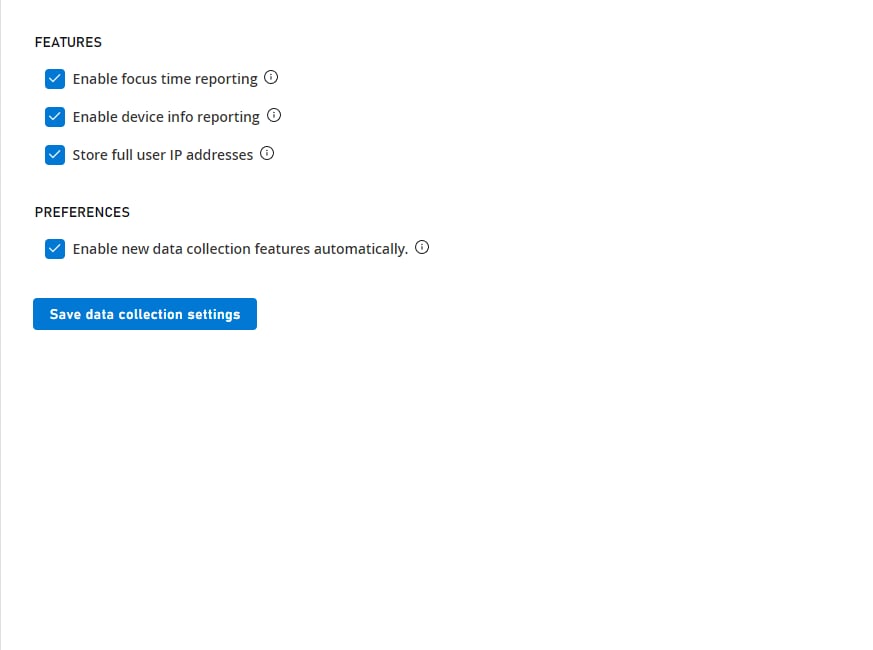
Presently, these events are disabled by default, though we plan to change this in the future. You can manage the collection of focus time from Game Manager:
* Navigate to **Settings**.
* Go to **Data Collection**.
* In the **Options** section, toggle this option **ON** or **OFF**.
Disabling this option will prevent these events from being emitted by the client.
 You can also disable these from the code, by setting the option shown below to `true` in your title setup, as shown below.
```csharp theme={null}
PlayFabSettings.DisableFocusTimeCollection = true
```
## Legacy Instructions
If your game uses an SDK between the **180716** and **180809**, it's possible for you to send the focus time events, although it requires additional steps.
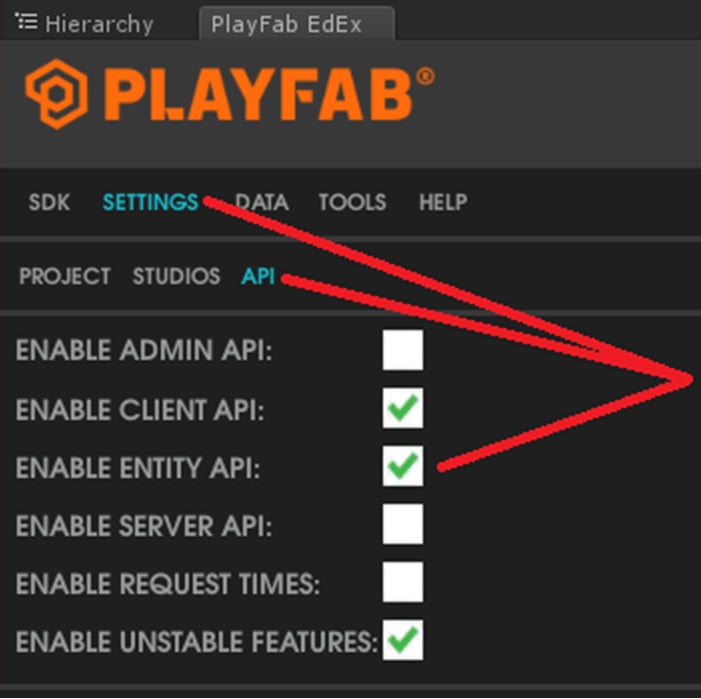
Because these events leverage the [WriteEvents](xref:titleid.playfabapi.com.events.playstreamevents.writeevents) API, you'll first need to ensure the **Enable Entity API** flag is enabled (checked) in the SDK settings at the time you update the SDK.
You can also disable these from the code, by setting the option shown below to `true` in your title setup, as shown below.
```csharp theme={null}
PlayFabSettings.DisableFocusTimeCollection = true
```
## Legacy Instructions
If your game uses an SDK between the **180716** and **180809**, it's possible for you to send the focus time events, although it requires additional steps.
Because these events leverage the [WriteEvents](xref:titleid.playfabapi.com.events.playstreamevents.writeevents) API, you'll first need to ensure the **Enable Entity API** flag is enabled (checked) in the SDK settings at the time you update the SDK.
 Next, you'll need to log into the entity system, by adding the line shown below to each of your login requests.
```csharp theme={null}
LoginTitlePlayerAccountEntity
```
Once you've done that, you should see these same events.
## Related topics
- [Multiplayer session templates](/services/xbox-services/multiplayer/mpsd/concepts/live-session-templates.md)
- [Session template constants](/services/xbox-services/multiplayer/mpsd/concepts/live-session-template-constants.md)
- [XblMultiplayerSessionSessionConstants](/reference/live/xsapi-c/multiplayer_c/functions/xblmultiplayersessionsessionconstants.md)
- [XblMultiplayerSessionSessionProperties](/reference/live/xsapi-c/multiplayer_c/functions/xblmultiplayersessionsessionproperties.md)
- [XblMultiplayerSessionSessionReference](/reference/live/xsapi-c/multiplayer_c/functions/xblmultiplayersessionsessionreference.md)
Next, you'll need to log into the entity system, by adding the line shown below to each of your login requests.
```csharp theme={null}
LoginTitlePlayerAccountEntity
```
Once you've done that, you should see these same events.
## Related topics
- [Multiplayer session templates](/services/xbox-services/multiplayer/mpsd/concepts/live-session-templates.md)
- [Session template constants](/services/xbox-services/multiplayer/mpsd/concepts/live-session-template-constants.md)
- [XblMultiplayerSessionSessionConstants](/reference/live/xsapi-c/multiplayer_c/functions/xblmultiplayersessionsessionconstants.md)
- [XblMultiplayerSessionSessionProperties](/reference/live/xsapi-c/multiplayer_c/functions/xblmultiplayersessionsessionproperties.md)
- [XblMultiplayerSessionSessionReference](/reference/live/xsapi-c/multiplayer_c/functions/xblmultiplayersessionsessionreference.md)