> ## Documentation Index
> Fetch the complete documentation index at: https://devdocs.xbox.com/llms.txt
> Use this file to discover all available pages before exploring further.
# Delete Telemetry Keys
> Step-by-step instructions to permanently delete a PlayFab Telemetry Key from the Data section of Game Manager, including warnings about non-reversible deletion.
# How to delete Telemetry Keys in Game Manager
Deleting a Telemetry Key isn't reversible. Even if you create another key with the same name, the new key will be different from the original one that was deleted.
* Sign in to [Game Manager](https://developer.playfab.com).
* Go to **My Studios and Titles** page and select your game title to display the dashboard.
* Select **Data** from the menu on the left.
* Select the **Telemetry Keys** tab.
* Expand the **three-dot menu** at the top right corner of the Telemetry Key.
* Select the **Delete** action.
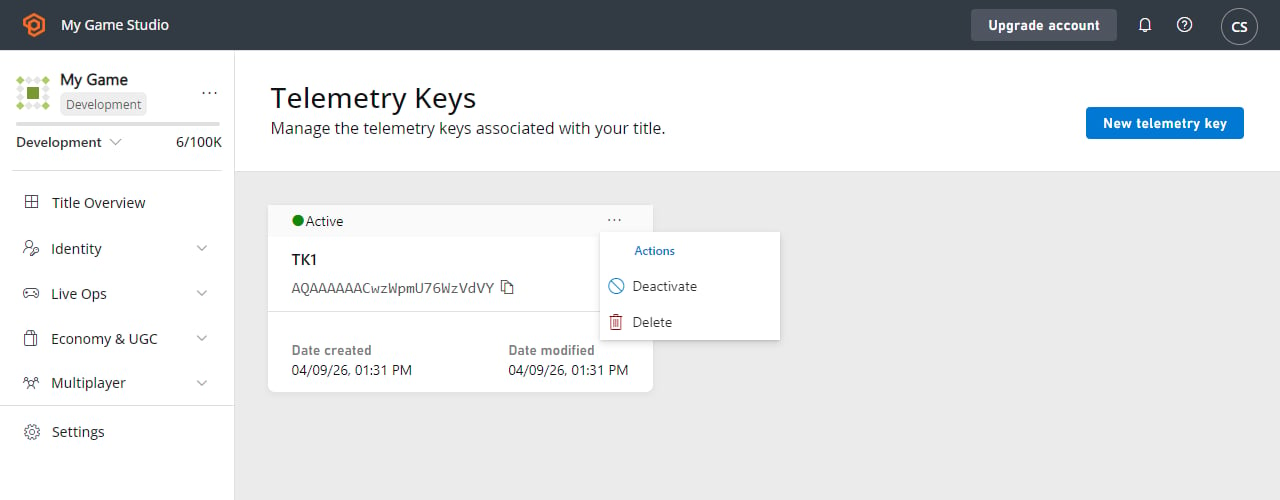 * Select the **Delete** button to confirm.
## Related topics
- [Telemetry Keys](/services/playfab/data-analytics/ingest-data/telemetry-keys-overview.md)
- [Activate or Deactivate Telemetry Keys](/services/playfab/data-analytics/ingest-data/ht-activate-deactivate-telemetry-keys.md)
- [Telemetry Keys QuickStart](/services/playfab/data-analytics/ingest-data/telemetry-keys-qs.md)
- [PFEventPipelineTelemetryKeyConfig](/services/playfab/api-references/c/pfeventpipeline/structs/pfeventpipelinetelemetrykeyconfig.md)
- [PFEventPipelineCreateTelemetryPipelineHandleWithKey](/services/playfab/api-references/c/pfeventpipeline/functions/pfeventpipelinecreatetelemetrypipelinehandlewithkey.md)
* Select the **Delete** button to confirm.
## Related topics
- [Telemetry Keys](/services/playfab/data-analytics/ingest-data/telemetry-keys-overview.md)
- [Activate or Deactivate Telemetry Keys](/services/playfab/data-analytics/ingest-data/ht-activate-deactivate-telemetry-keys.md)
- [Telemetry Keys QuickStart](/services/playfab/data-analytics/ingest-data/telemetry-keys-qs.md)
- [PFEventPipelineTelemetryKeyConfig](/services/playfab/api-references/c/pfeventpipeline/structs/pfeventpipelinetelemetrykeyconfig.md)
- [PFEventPipelineCreateTelemetryPipelineHandleWithKey](/services/playfab/api-references/c/pfeventpipeline/functions/pfeventpipelinecreatetelemetrypipelinehandlewithkey.md)