> ## Documentation Index
> Fetch the complete documentation index at: https://devdocs.xbox.com/llms.txt
> Use this file to discover all available pages before exploring further.
# Quickstart on leaderboards
> Quickstart for PlayFab Leaderboards: create your first leaderboard in Game Manager and configure the C# SDK with your TitleId and developer secret key.
# Quickstart leaderboards
In this guide, we're going to see how to set up the development environment for the Leaderboard service. We're also going
to learn how to create a quick leaderboard from our website [Game Manager](https://developer.playfab.com).
## Prerequisites
We're going to need a PlayFab account to use the PlayFab Leaderboards service. For instructions to create an account,
see [Authentication](/services/playfab/identity/player-identity/authentication)
## Creating a leaderboard
We're going to select Progression on the left menu.
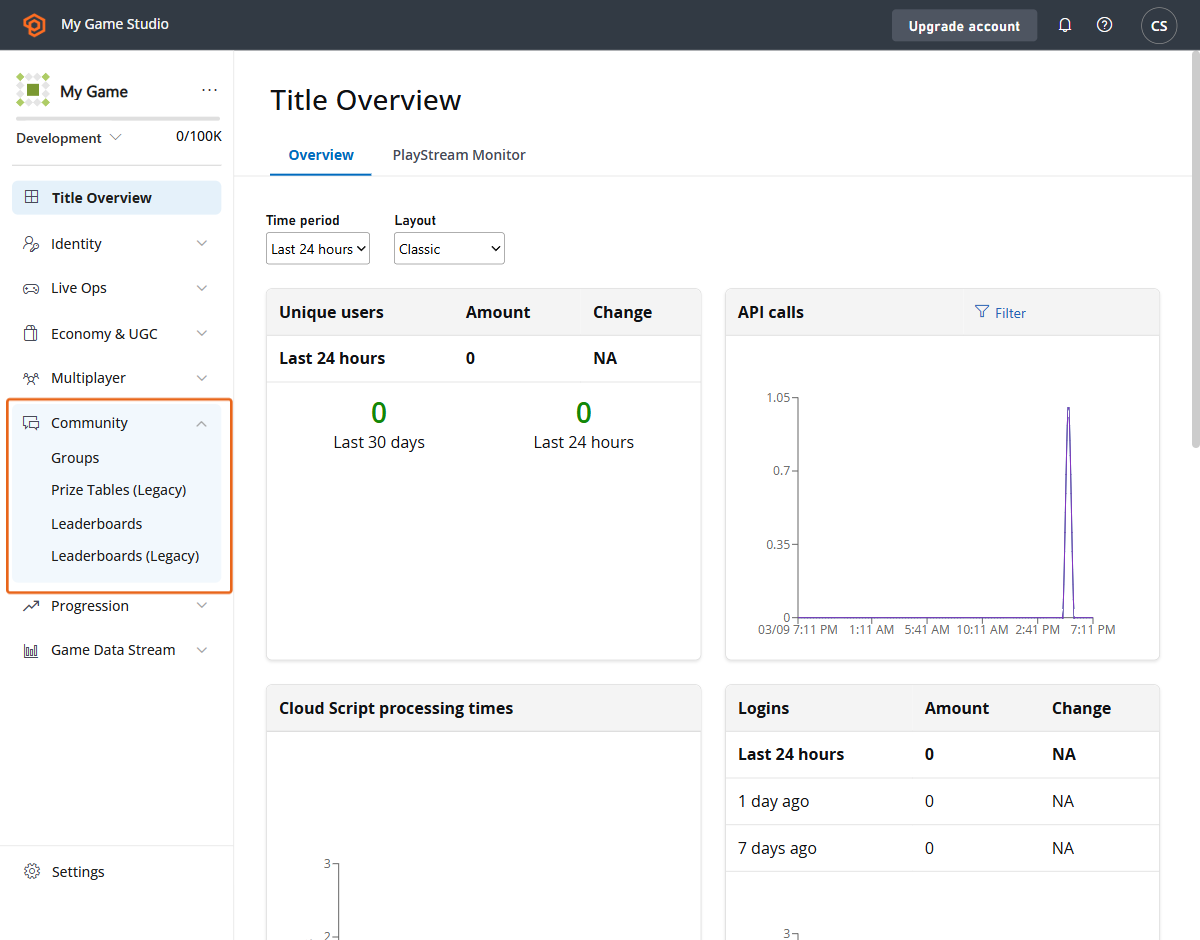 We now select Leaderboards tab from the upper menu.
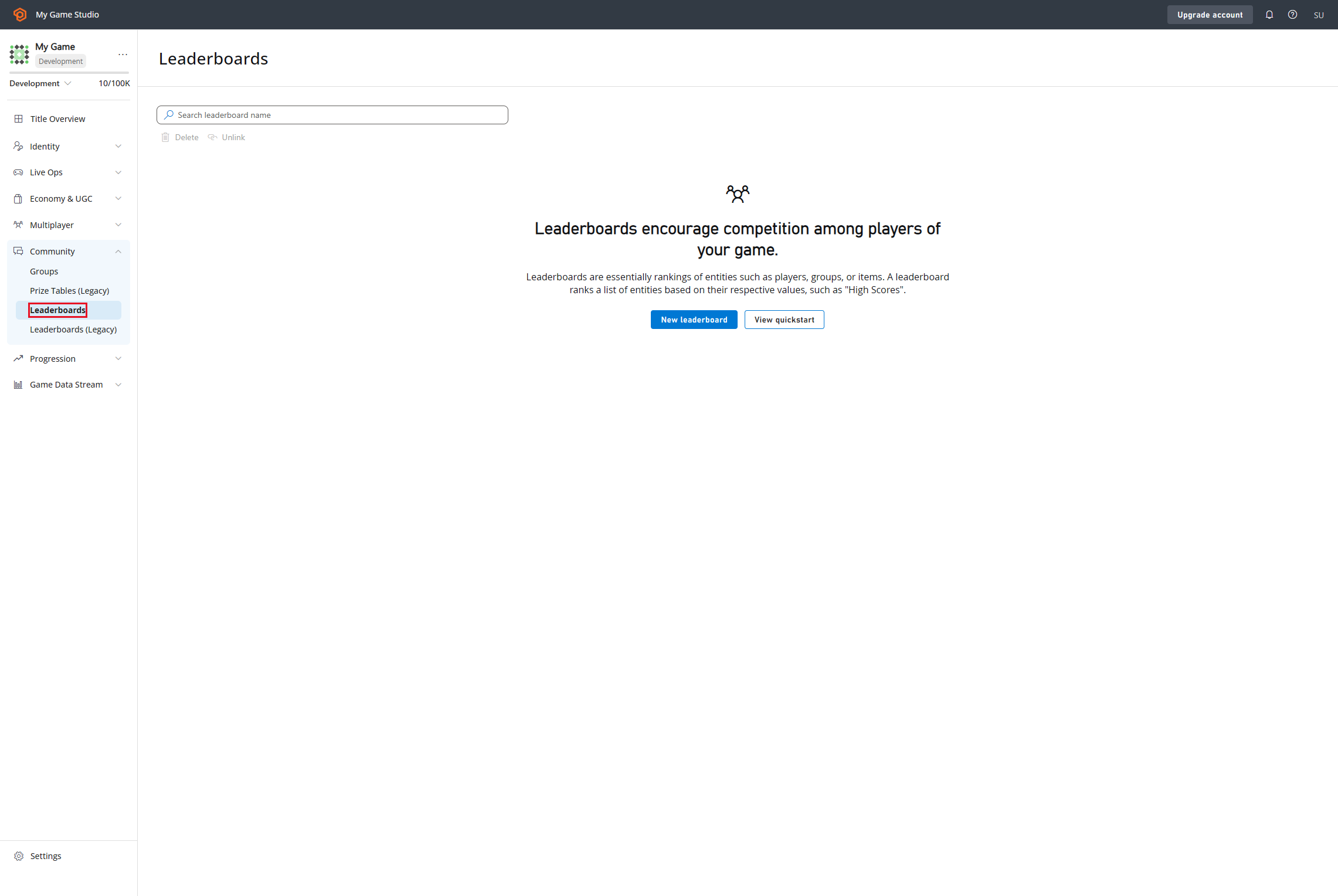 Then we're going to go "New Leaderboard" button and create our leaderboard definition.
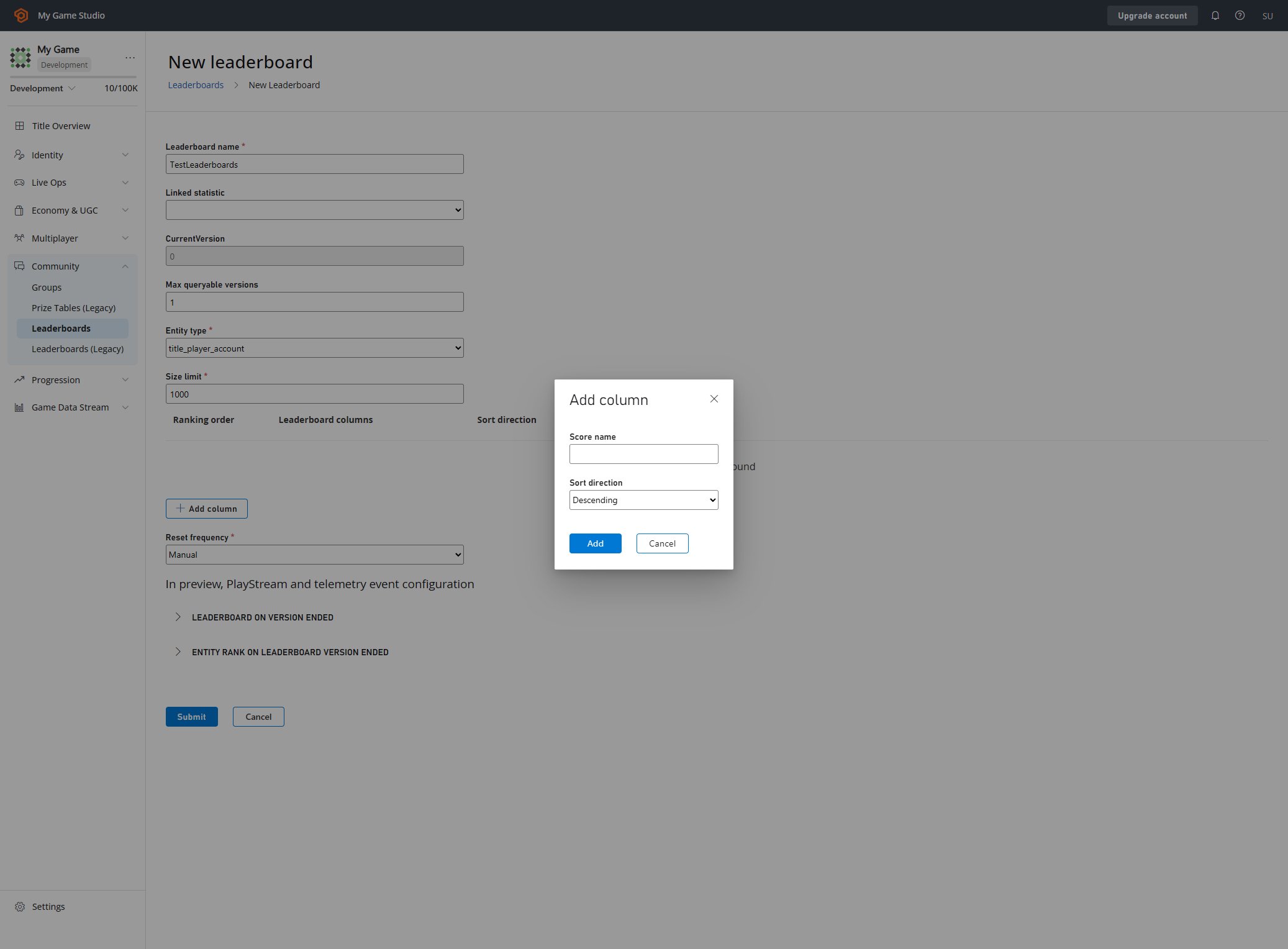 Here we're able to configure every aspect of the leaderboard. Learn more about the parameters available and
how to create leaderboards here:
* [Create Basic Leaderboard](/services/playfab/community/leaderboards/create-basic-leaderboard).
* [API Reference](/services/playfab/community/leaderboards/api-reference)
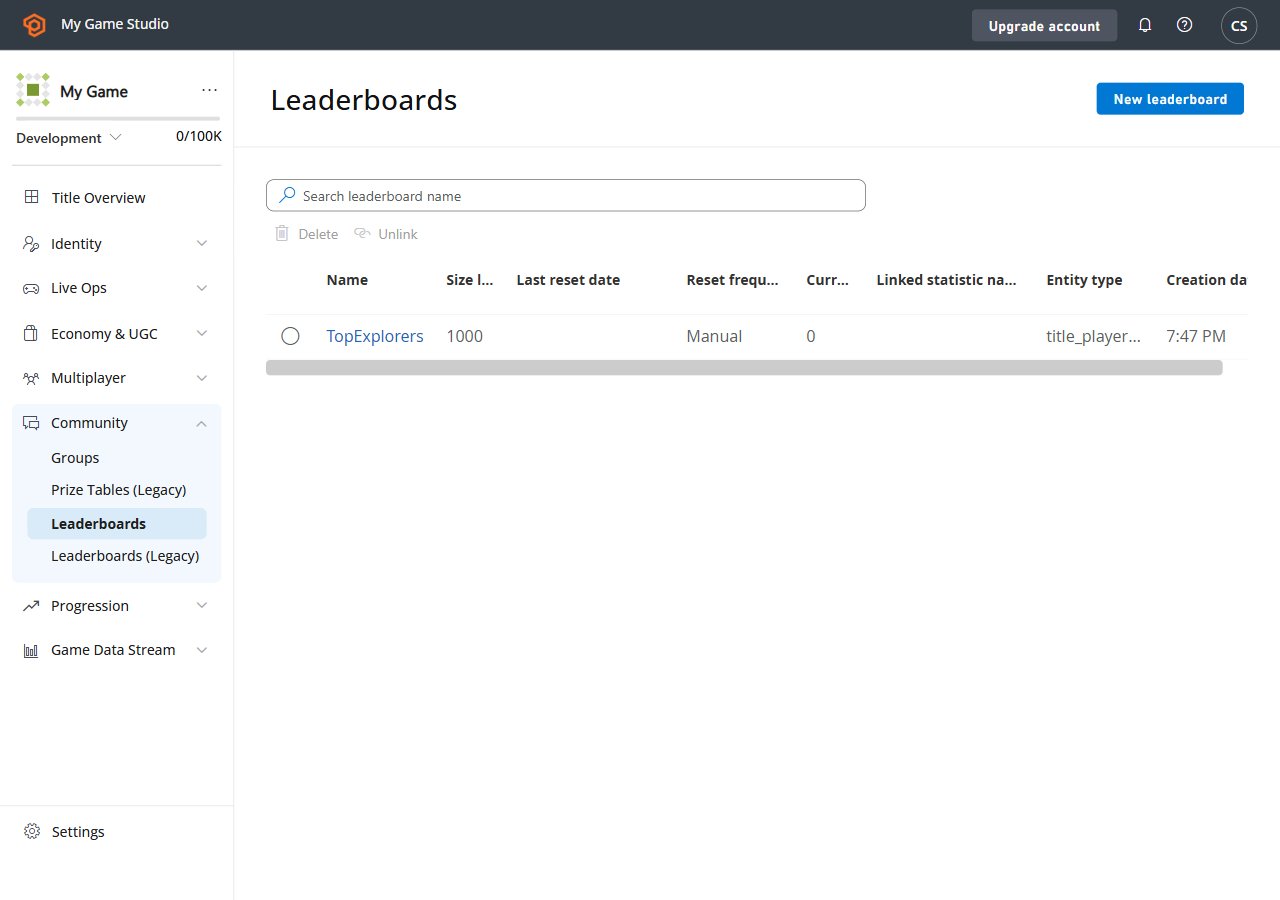
The final result should be like this.
Here we're able to configure every aspect of the leaderboard. Learn more about the parameters available and
how to create leaderboards here:
* [Create Basic Leaderboard](/services/playfab/community/leaderboards/create-basic-leaderboard).
* [API Reference](/services/playfab/community/leaderboards/api-reference)
The final result should be like this.
 ## Setting up the environment
Here we're going to learn how to set up the developer environment to use the C# SDK, but the concepts
presented here can also work with other SDK or plain HTTP requests.
## Setting TitleId and DeveloperSecretKey
DeveloperSecretKey is needed when authenticating as Title Entity.
```C# theme={null}
PlayFabSettings.staticSettings.TitleId = ""; // Change this value to your own titleId from PlayFab Game Manager
PlayFabSettings.staticSettings.DeveloperSecretKey = ""; // Change this to your title's secret key from Game Manager
```
## Creating a title and getting the secret key
* Log in to [https://developer.playfab.com/](https://developer.playfab.com/)
* Create a title
* Find the Title ID in the API Features section under settings.
* Generate secret key:
* Cog next to title name in top left of title view
* Title Settings
* Secret Keys
* New secret key
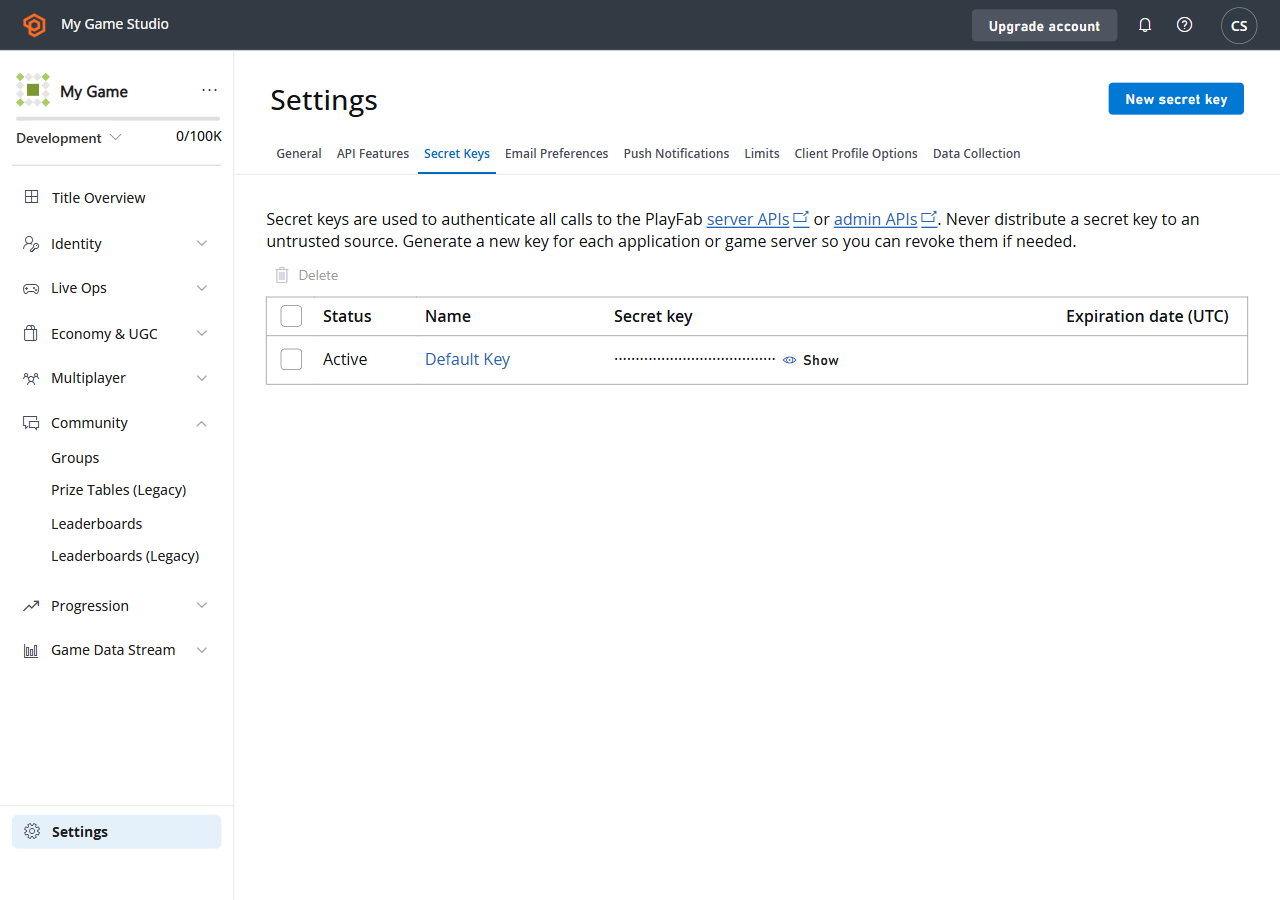
Here's how the UI looks like when you find the Secret Key section within Game Manager.
## Setting up the environment
Here we're going to learn how to set up the developer environment to use the C# SDK, but the concepts
presented here can also work with other SDK or plain HTTP requests.
## Setting TitleId and DeveloperSecretKey
DeveloperSecretKey is needed when authenticating as Title Entity.
```C# theme={null}
PlayFabSettings.staticSettings.TitleId = ""; // Change this value to your own titleId from PlayFab Game Manager
PlayFabSettings.staticSettings.DeveloperSecretKey = ""; // Change this to your title's secret key from Game Manager
```
## Creating a title and getting the secret key
* Log in to [https://developer.playfab.com/](https://developer.playfab.com/)
* Create a title
* Find the Title ID in the API Features section under settings.
* Generate secret key:
* Cog next to title name in top left of title view
* Title Settings
* Secret Keys
* New secret key
Here's how the UI looks like when you find the Secret Key section within Game Manager.
 ## Login as Title
For write operations we recommend using the TitleEntity from your game server, this method is going to return the `AuthenticationContext` that is
going to be used across all the requests we made.
```C# theme={null}
public static async Task LoginAsTitleEntity()
{
GetEntityTokenRequest request = new GetEntityTokenRequest()
{
Entity = new PlayFab.AuthenticationModels.EntityKey()
{
Id = PlayFabSettings.staticSettings.TitleId,
Type = "title",
},
};
PlayFabResult entityTokenResult = await PlayFabAuthenticationAPI.GetEntityTokenAsync(request);
PlayFabAuthenticationContext authContext = new PlayFabAuthenticationContext
{
EntityToken = entityTokenResult.Result.EntityToken
};
return authContext;
}
```
## Login as Player (create Player)
This method creates a player based on an identifier which returns an entity of type `title_player_account`. More information here:
[Entities quickstart](/services/playfab/live-service-management/game-configuration/entities/quickstart)
```C# theme={null}
private static async Task LoginAsPlayer(string customId = "GettingStartedGuide")
{
LoginWithCustomIDRequest request = new LoginWithCustomIDRequest { CustomId = customId, CreateAccount = true };
PlayFabResult loginResult = await PlayFabClientAPI.LoginWithCustomIDAsync(request);
return loginResult.Result.AuthenticationContext;
}
```
## Set the display name property for an entity
In order to have the `DisplayName` property available as part of the response of the "Get Leaderboards APIs",
we need to execute the following code per each entity that we created in order to map the entity to the custom
display name of the game.
```C# theme={null}
private static async Task UpdateEntityDisplayName(PlayFabAuthenticationContext context, string customId)
{
SetDisplayNameRequest request = new SetDisplayNameRequest()
{
AuthenticationContext = context,
DisplayName = customId,
Entity = new PlayFab.ProfilesModels.EntityKey()
{
Id = context.EntityId,
Type = context.EntityType,
},
};
PlayFabResult updateNameResult = await PlayFabProfilesAPI.SetDisplayNameAsync(request);
}
```
## See also
* [Create basic leaderboard](/services/playfab/community/leaderboards/create-basic-leaderboard).
* [Doing more with leaderboards](/services/playfab/community/leaderboards/doing-more-with-leaderboards).
* [Limits ](/services/playfab/community/leaderboards/limits-leaderboards).
* [Quota ](/services/playfab/community/leaderboards/quota-leaderboards).
* [Seasonal leaderboards](/services/playfab/community/leaderboards/seasonal-leaderboards).
* [Group leaderboards](/services/playfab/community/leaderboards/group-leaderboards).
* [Manual tiers](/services/playfab/community/leaderboards/manual-tiers).
* [Ranking players by statistics](/services/playfab/community/leaderboards/leaderboards-linked-to-stats).
* [Add contextual data to leaderboards](/services/playfab/community/leaderboards/metadata-leaderboards).
* [API reference](/services/playfab/community/leaderboards/api-reference).
* [Leaderboard meters](/services/playfab/pricing/meters/leaderboard-meters).
* [Leaderboards and Cloudscript](/services/playfab/community/leaderboards/leaderboards-cloudscript).
* [Leaderboards with Playstream](/services/playfab/community/leaderboards/leaderboards-with-playstream-and-telemetry)
## Related topics
- [PlayFab Leaderboards overview](/services/playfab/community/leaderboards/index.md)
- [Create basic leaderboard](/services/playfab/community/leaderboards/create-basic-leaderboard.md)
- [Tournaments & Leaderboards quickstart](/services/playfab/community/leaderboards/tournaments-leaderboards/quickstart.md)
- [Quickstart on statistics](/services/playfab/player-progression/statistics/quickstart-statistics.md)
- [Quickstart](/services/playfab/economy-monetization/economy-v2/quickstart.md)
## Login as Title
For write operations we recommend using the TitleEntity from your game server, this method is going to return the `AuthenticationContext` that is
going to be used across all the requests we made.
```C# theme={null}
public static async Task LoginAsTitleEntity()
{
GetEntityTokenRequest request = new GetEntityTokenRequest()
{
Entity = new PlayFab.AuthenticationModels.EntityKey()
{
Id = PlayFabSettings.staticSettings.TitleId,
Type = "title",
},
};
PlayFabResult entityTokenResult = await PlayFabAuthenticationAPI.GetEntityTokenAsync(request);
PlayFabAuthenticationContext authContext = new PlayFabAuthenticationContext
{
EntityToken = entityTokenResult.Result.EntityToken
};
return authContext;
}
```
## Login as Player (create Player)
This method creates a player based on an identifier which returns an entity of type `title_player_account`. More information here:
[Entities quickstart](/services/playfab/live-service-management/game-configuration/entities/quickstart)
```C# theme={null}
private static async Task LoginAsPlayer(string customId = "GettingStartedGuide")
{
LoginWithCustomIDRequest request = new LoginWithCustomIDRequest { CustomId = customId, CreateAccount = true };
PlayFabResult loginResult = await PlayFabClientAPI.LoginWithCustomIDAsync(request);
return loginResult.Result.AuthenticationContext;
}
```
## Set the display name property for an entity
In order to have the `DisplayName` property available as part of the response of the "Get Leaderboards APIs",
we need to execute the following code per each entity that we created in order to map the entity to the custom
display name of the game.
```C# theme={null}
private static async Task UpdateEntityDisplayName(PlayFabAuthenticationContext context, string customId)
{
SetDisplayNameRequest request = new SetDisplayNameRequest()
{
AuthenticationContext = context,
DisplayName = customId,
Entity = new PlayFab.ProfilesModels.EntityKey()
{
Id = context.EntityId,
Type = context.EntityType,
},
};
PlayFabResult updateNameResult = await PlayFabProfilesAPI.SetDisplayNameAsync(request);
}
```
## See also
* [Create basic leaderboard](/services/playfab/community/leaderboards/create-basic-leaderboard).
* [Doing more with leaderboards](/services/playfab/community/leaderboards/doing-more-with-leaderboards).
* [Limits ](/services/playfab/community/leaderboards/limits-leaderboards).
* [Quota ](/services/playfab/community/leaderboards/quota-leaderboards).
* [Seasonal leaderboards](/services/playfab/community/leaderboards/seasonal-leaderboards).
* [Group leaderboards](/services/playfab/community/leaderboards/group-leaderboards).
* [Manual tiers](/services/playfab/community/leaderboards/manual-tiers).
* [Ranking players by statistics](/services/playfab/community/leaderboards/leaderboards-linked-to-stats).
* [Add contextual data to leaderboards](/services/playfab/community/leaderboards/metadata-leaderboards).
* [API reference](/services/playfab/community/leaderboards/api-reference).
* [Leaderboard meters](/services/playfab/pricing/meters/leaderboard-meters).
* [Leaderboards and Cloudscript](/services/playfab/community/leaderboards/leaderboards-cloudscript).
* [Leaderboards with Playstream](/services/playfab/community/leaderboards/leaderboards-with-playstream-and-telemetry)
## Related topics
- [PlayFab Leaderboards overview](/services/playfab/community/leaderboards/index.md)
- [Create basic leaderboard](/services/playfab/community/leaderboards/create-basic-leaderboard.md)
- [Tournaments & Leaderboards quickstart](/services/playfab/community/leaderboards/tournaments-leaderboards/quickstart.md)
- [Quickstart on statistics](/services/playfab/player-progression/statistics/quickstart-statistics.md)
- [Quickstart](/services/playfab/economy-monetization/economy-v2/quickstart.md)