> ## Documentation Index
> Fetch the complete documentation index at: https://devdocs.xbox.com/llms.txt
> Use this file to discover all available pages before exploring further.
# XStoreShowAssociatedProductsUIAsync
> XStoreShowAssociatedProductsUIAsync
# XStoreShowAssociatedProductsUIAsync
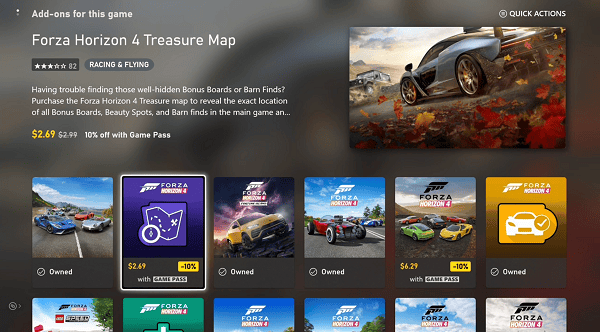
This will open up the Microsoft Store app and show the set of available add-ons associated with the game. This can be further filtered by product type. This is an alternative to enumerating and presenting the available products within the game.
Note, this API opens the store in a web browser and it is suggested to use XStoreShowProductPageUI or XStoreShowPurchaseUI if your games is appearing in the console, XBOX App on PC, or game streaming storefronts.
 ## Syntax
```cpp theme={null}
HRESULT XStoreShowAssociatedProductsUIAsync(
const XStoreContextHandle storeContextHandle,
const char* storeId,
XStoreProductKind productKinds,
XAsyncBlock* async
)
```
### Parameters
*storeContextHandle* \_In\_\
Type: XStoreContextHandle
The store context handle for the user returned by [XStoreCreateContext](/reference/system/xstore/functions/xstorecreatecontext).
*storeId* \_In\_z\_\
Type: char\*
The ID of the product.
*productKinds* \_In\_\
Type: XStoreProductKind
An enumeration indicating the kind of products to show.
*async* \_Inout\_\
Type: XAsyncBlock\*
An [XAsyncBlock](/reference/system/xasync/structs/xasyncblock) defining the asynchronous work being done. The [XAsyncBlock](/reference/system/xasync/structs/xasyncblock) can be used to poll for the call's status and retrieve call results. See [XAsyncBlock](/reference/system/xasync/structs/xasyncblock) for more information.
### Return value
Type: HRESULT
HRESULT success or error code.
## Requirements
**Header:** XStore.h
**Library:** \*\*\*\*.lib
**Supported Platforms**: Windows, XBOX One family consoles and XBOX Series consoles
## Conceptual documentation
* [Implement in-game purchases in your game](https://learn.microsoft.com/gaming/gdk/docs/gdk-dev/pc-dev/tutorials/pc-e2e-guide/e2e-services/e2e-in-game-purchases)
* [Basic store operations](/publishing/xstore-commerce/xstore-basic-operations)
## See also
[XStore](/reference/system/xstore/xstore_members)
## Related topics
- [XStoreShowAssociatedProductsUIResult](/reference/system/xstore/functions/xstoreshowassociatedproductsuiresult.md)
- [Basic store operations](/publishing/xstore-commerce/xstore-basic-operations.md)
- [XStore](/reference/system/xstore/xstore_members.md)
- [Unity C# API wrappers for the GDK](/build/gdk-and-engines/unity/unity-api-wrappers.md)
- [XStoreShowProductPageUIAsync](/reference/system/xstore/functions/xstoreshowproductpageuiasync.md)
## Syntax
```cpp theme={null}
HRESULT XStoreShowAssociatedProductsUIAsync(
const XStoreContextHandle storeContextHandle,
const char* storeId,
XStoreProductKind productKinds,
XAsyncBlock* async
)
```
### Parameters
*storeContextHandle* \_In\_\
Type: XStoreContextHandle
The store context handle for the user returned by [XStoreCreateContext](/reference/system/xstore/functions/xstorecreatecontext).
*storeId* \_In\_z\_\
Type: char\*
The ID of the product.
*productKinds* \_In\_\
Type: XStoreProductKind
An enumeration indicating the kind of products to show.
*async* \_Inout\_\
Type: XAsyncBlock\*
An [XAsyncBlock](/reference/system/xasync/structs/xasyncblock) defining the asynchronous work being done. The [XAsyncBlock](/reference/system/xasync/structs/xasyncblock) can be used to poll for the call's status and retrieve call results. See [XAsyncBlock](/reference/system/xasync/structs/xasyncblock) for more information.
### Return value
Type: HRESULT
HRESULT success or error code.
## Requirements
**Header:** XStore.h
**Library:** \*\*\*\*.lib
**Supported Platforms**: Windows, XBOX One family consoles and XBOX Series consoles
## Conceptual documentation
* [Implement in-game purchases in your game](https://learn.microsoft.com/gaming/gdk/docs/gdk-dev/pc-dev/tutorials/pc-e2e-guide/e2e-services/e2e-in-game-purchases)
* [Basic store operations](/publishing/xstore-commerce/xstore-basic-operations)
## See also
[XStore](/reference/system/xstore/xstore_members)
## Related topics
- [XStoreShowAssociatedProductsUIResult](/reference/system/xstore/functions/xstoreshowassociatedproductsuiresult.md)
- [Basic store operations](/publishing/xstore-commerce/xstore-basic-operations.md)
- [XStore](/reference/system/xstore/xstore_members.md)
- [Unity C# API wrappers for the GDK](/build/gdk-and-engines/unity/unity-api-wrappers.md)
- [XStoreShowProductPageUIAsync](/reference/system/xstore/functions/xstoreshowproductpageuiasync.md)