> ## Documentation Index
> Fetch the complete documentation index at: https://devdocs.xbox.com/llms.txt
> Use this file to discover all available pages before exploring further.
# Wheel
> Wheel
# Wheel
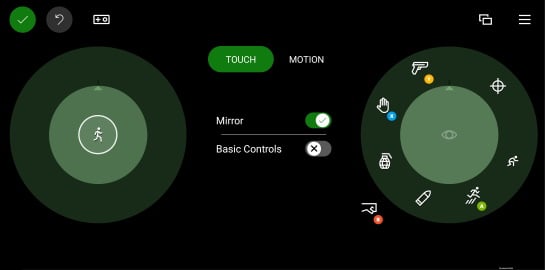
A set of touch controls arranged in an inner and outer circular area.
## Properties
[`inner`](/reference/system/touchadaptationkit/layout/game-streaming-touch-inner-wheel) - *object*, *optional*. Up to four controls that are arranged in the [inner](/reference/system/touchadaptationkit/layout/game-streaming-touch-inner-wheel) portion of the wheel.
`outer` - *array*, *optional*. An array of up to 8 slots that can be filled by controls and/or [control cluster](/reference/system/touchadaptationkit/layout/game-streaming-touch-control-cluster-outer) that are placed around the inner area of the circular area represented by the `wheel`.
* The first slot in the `outer` area starts at the top of the wheel (around 1 o'clock) and continues clockwise.
* A slot can be skipped with `null`.
* A [control cluster](/reference/system/touchadaptationkit/layout/game-streaming-touch-control-cluster-outer) will always take up 2 of the 8 available slots -- the slot it is specified in and the subsequent one.
## Remarks
The size and rotation of the `wheel` control can be adjusted by the player. When customizing to their preferences, the player can change both the size and rotation of the wheels.
 **Tips**
* The [`inner`](/reference/system/touchadaptationkit/layout/game-streaming-touch-inner-wheel) area should be used to position the control(s) that should be most accessible to the player for that hand.
* The `inner` slot on the left should be utilized for the primary player movement control.
* `outer` slots that are require the player to move their hand to reach should be used for infrequently accessed commands.
## Samples
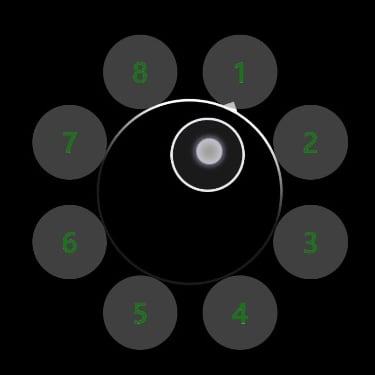
##### Example 1: A sample wheel with a joystick in the center and a custom button in each outer slot
**Tips**
* The [`inner`](/reference/system/touchadaptationkit/layout/game-streaming-touch-inner-wheel) area should be used to position the control(s) that should be most accessible to the player for that hand.
* The `inner` slot on the left should be utilized for the primary player movement control.
* `outer` slots that are require the player to move their hand to reach should be used for infrequently accessed commands.
## Samples
##### Example 1: A sample wheel with a joystick in the center and a custom button in each outer slot
 ```JSON theme={null}
"left": {
"inner": [
{
"type": "joystick",
"axis": {
"input": "axisXY",
"output": "leftJoystick",
"deadzone": {
"threshold": 0.05,
"radial": true
}
}
}
],
"outer" : [
{
"type": "button",
"action": "gamepadX",
"styles": {
"default" : {
"faceImage" : {
"type": "asset",
"value": "one"
},
"background" : {
"type": "color",
"value": "#80808080"
}
}
}
},
{
"type": "button",
"action": "gamepadX",
"styles": {
"default" : {
"faceImage" : {
"type": "asset",
"value": "two"
},
"background" : {
"type": "color",
"value": "#80808080"
}
}
}
},
{
"type": "button",
"action": "gamepadX",
"styles": {
"default" : {
"faceImage" : {
"type": "asset",
"value": "three"
},
"background" : {
"type": "color",
"value": "#80808080"
}
}
}
},
{
"type": "button",
"action": "gamepadX",
"styles": {
"default" : {
"faceImage" : {
"type": "asset",
"value": "four"
},
"background" : {
"type": "color",
"value": "#80808080"
}
}
}
},
{
"type": "button",
"action": "gamepadX",
"styles": {
"default" : {
"faceImage" : {
"type": "asset",
"value": "five"
},
"background" : {
"type": "color",
"value": "#80808080"
}
}
}
},
{
"type": "button",
"action": "gamepadX",
"styles": {
"default" : {
"faceImage" : {
"type": "asset",
"value": "six"
},
"background" : {
"type": "color",
"value": "#80808080"
}
}
}
},
{
"type": "button",
"action": "gamepadX",
"styles": {
"default" : {
"faceImage" : {
"type": "asset",
"value": "seven"
},
"background" : {
"type": "color",
"value": "#80808080"
}
}
}
},
{
"type": "button",
"action": "gamepadX",
"styles": {
"default" : {
"faceImage" : {
"type": "asset",
"value": "eight"
},
"background" : {
"type": "color",
"value": "#80808080"
}
}
}
}
]
}
```
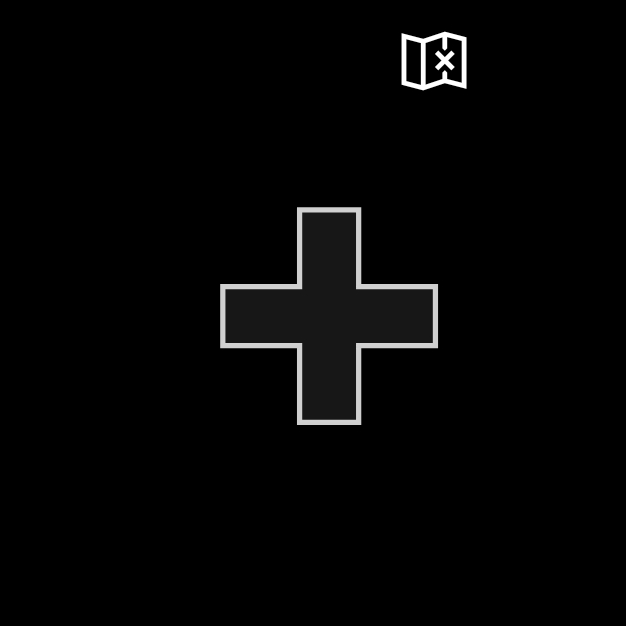
##### Example 2: A sample left wheel with a directional pad and map button
```JSON theme={null}
"left": {
"inner": [
{
"type": "joystick",
"axis": {
"input": "axisXY",
"output": "leftJoystick",
"deadzone": {
"threshold": 0.05,
"radial": true
}
}
}
],
"outer" : [
{
"type": "button",
"action": "gamepadX",
"styles": {
"default" : {
"faceImage" : {
"type": "asset",
"value": "one"
},
"background" : {
"type": "color",
"value": "#80808080"
}
}
}
},
{
"type": "button",
"action": "gamepadX",
"styles": {
"default" : {
"faceImage" : {
"type": "asset",
"value": "two"
},
"background" : {
"type": "color",
"value": "#80808080"
}
}
}
},
{
"type": "button",
"action": "gamepadX",
"styles": {
"default" : {
"faceImage" : {
"type": "asset",
"value": "three"
},
"background" : {
"type": "color",
"value": "#80808080"
}
}
}
},
{
"type": "button",
"action": "gamepadX",
"styles": {
"default" : {
"faceImage" : {
"type": "asset",
"value": "four"
},
"background" : {
"type": "color",
"value": "#80808080"
}
}
}
},
{
"type": "button",
"action": "gamepadX",
"styles": {
"default" : {
"faceImage" : {
"type": "asset",
"value": "five"
},
"background" : {
"type": "color",
"value": "#80808080"
}
}
}
},
{
"type": "button",
"action": "gamepadX",
"styles": {
"default" : {
"faceImage" : {
"type": "asset",
"value": "six"
},
"background" : {
"type": "color",
"value": "#80808080"
}
}
}
},
{
"type": "button",
"action": "gamepadX",
"styles": {
"default" : {
"faceImage" : {
"type": "asset",
"value": "seven"
},
"background" : {
"type": "color",
"value": "#80808080"
}
}
}
},
{
"type": "button",
"action": "gamepadX",
"styles": {
"default" : {
"faceImage" : {
"type": "asset",
"value": "eight"
},
"background" : {
"type": "color",
"value": "#80808080"
}
}
}
}
]
}
```
##### Example 2: A sample left wheel with a directional pad and map button
 ```JSON theme={null}
"left": {
"inner": [
{
"type": "directionalPad",
"scale": 1.5
}
],
"outer" : [
{
"type": "button",
"action": "leftBumper",
"styles": {
"default" : {
"faceImage" : {
"type": "icon",
"value": "map"
}
}
}
},
null,
null,
null,
null,
null,
null
]
}
```
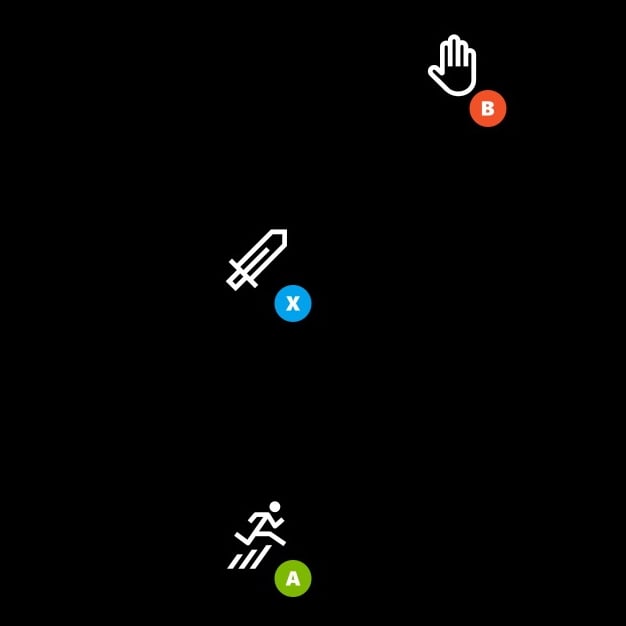
##### Example 3: A sample right wheel with three buttons
The buttons are aligned on the most easily reachable for the right hand. The buttons in the `outer` area are arranged in a cluster to have a larger hit area.
```JSON theme={null}
"left": {
"inner": [
{
"type": "directionalPad",
"scale": 1.5
}
],
"outer" : [
{
"type": "button",
"action": "leftBumper",
"styles": {
"default" : {
"faceImage" : {
"type": "icon",
"value": "map"
}
}
}
},
null,
null,
null,
null,
null,
null
]
}
```
##### Example 3: A sample right wheel with three buttons
The buttons are aligned on the most easily reachable for the right hand. The buttons in the `outer` area are arranged in a cluster to have a larger hit area.
 ```JSON theme={null}
"right": {
"inner": [
{
"type": "button",
"action": "gamepadX",
"styles": {
"default": {
"faceImage": {
"type": "icon",
"value": "sword"
}
}
}
}
],
"outer": [
[
{
"type": "button",
"action": "gamepadB",
"styles": {
"default": {
"faceImage": {
"type": "icon",
"value": "interact"
}
}
}
},
null
],
null,
[
{
"type": "button",
"action": "gamepadA",
"styles": {
"default": {
"faceImage": {
"type": "icon",
"value": "jump"
}
}
}
},
null
]
]
}
```
## See Also
[Touch Adaptation Kit Reference](/build/core-features/common/game-streaming/game-streaming-touch-touch-adaptation-kit-overview)\
[Layout](/reference/system/touchadaptationkit/layout/game-streaming-touch-layout)
## Related topics
- [GameInputRacingWheelButtons](/reference/input/gameinput/enums/gameinputracingwheelbuttons.md)
- [GameInputRacingWheelAxes](/reference/input/gameinput/enums/gameinputracingwheelaxes.md)
- [GameInputRacingWheelState](/reference/input/gameinput/structs/gameinputracingwheelstate.md)
- [GameInputRacingWheelInfo](/reference/input/gameinput/structs/gameinputracingwheelinfo.md)
- [IGameInputReading::GetRacingWheelState](/reference/input/gameinput/interfaces/igameinputreading/methods/igameinputreading_getracingwheelstate.md)
```JSON theme={null}
"right": {
"inner": [
{
"type": "button",
"action": "gamepadX",
"styles": {
"default": {
"faceImage": {
"type": "icon",
"value": "sword"
}
}
}
}
],
"outer": [
[
{
"type": "button",
"action": "gamepadB",
"styles": {
"default": {
"faceImage": {
"type": "icon",
"value": "interact"
}
}
}
},
null
],
null,
[
{
"type": "button",
"action": "gamepadA",
"styles": {
"default": {
"faceImage": {
"type": "icon",
"value": "jump"
}
}
}
},
null
]
]
}
```
## See Also
[Touch Adaptation Kit Reference](/build/core-features/common/game-streaming/game-streaming-touch-touch-adaptation-kit-overview)\
[Layout](/reference/system/touchadaptationkit/layout/game-streaming-touch-layout)
## Related topics
- [GameInputRacingWheelButtons](/reference/input/gameinput/enums/gameinputracingwheelbuttons.md)
- [GameInputRacingWheelAxes](/reference/input/gameinput/enums/gameinputracingwheelaxes.md)
- [GameInputRacingWheelState](/reference/input/gameinput/structs/gameinputracingwheelstate.md)
- [GameInputRacingWheelInfo](/reference/input/gameinput/structs/gameinputracingwheelinfo.md)
- [IGameInputReading::GetRacingWheelState](/reference/input/gameinput/interfaces/igameinputreading/methods/igameinputreading_getracingwheelstate.md)