> ## Documentation Index
> Fetch the complete documentation index at: https://devdocs.xbox.com/llms.txt
> Use this file to discover all available pages before exploring further.
# Layer (Experimental)
> Layer (Experimental)
# Layer (Experimental)
A child touch layout that can be overlayed on top of the base touch layout.
Layers are currently available for use in experimental form and may change behavior based on early adopter feedback.
## Properties
The named layer object contains the following properties.
`center` - *object*, *optional*. [Wheel](/reference/system/touchadaptationkit/layout/game-streaming-touch-wheel) of controls that is displayed in the center of the screen.
`left` - *object*, *optional*. [Wheel](/reference/system/touchadaptationkit/layout/game-streaming-touch-wheel) of controls that is by default displayed under the player's left hand/thumb.
`lower` - *object*, *optional*. An object that lets you place controls in any of the three `leftCenter`, `center`, or `rightCenter` slots in the lower row of controls.
`right` - *object*, *optional*. [Wheel](/reference/system/touchadaptationkit/layout/game-streaming-touch-wheel) of controls that is by default displayed under the player's right hand/thumb.
`upper` - *object*, *optional*. An object that lets you place an array of controls in `right` slots in the upper row of controls.
## Remarks
When a `layer` is utilized, in each of the slots where a `control` would be utilized in a normal layout (in the `center`, `left`, `lower`, `right`, `upper` locations), you can include a control to replace what was being displayed previously or utilize a [`blank`](/reference/system/touchadaptationkit/controls/game-streaming-touch-blank) control to hide what was previously being displayed in that slot.
To have a `layer` be displayed, you must have a [`button`](/reference/system/touchadaptationkit/controls/game-streaming-touch-button) control with a [layer action](/reference/system/touchadaptationkit/layout/game-streaming-touch-layer-action) that will cause the layout to be displayed.
## Sample
This sample starts with a simple platformer layout, with a button in the top right to toggle showing a layer with advanced abilities.
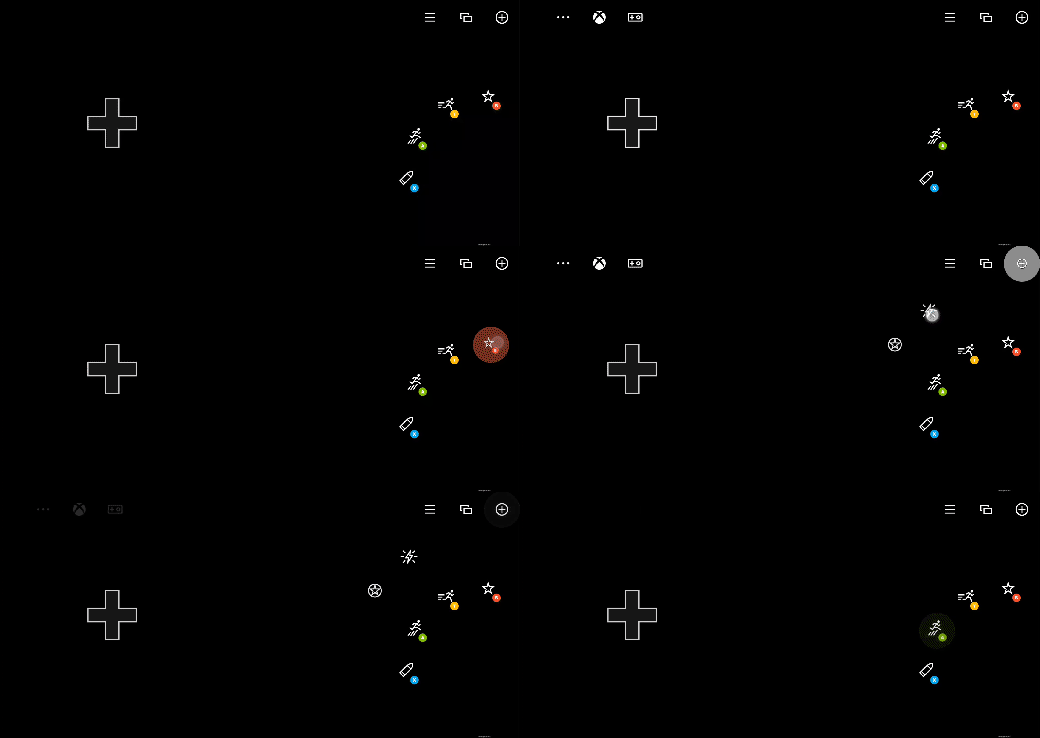 ```JSON theme={null}
{
"$schema": "https://raw.githubusercontent.com/microsoft/xbox-game-streaming-tools/main/touch-adaptation-kit/schemas/layout/v3.1/layout.json",
"content": {
"left": {
"inner": [
{
"type": "directionalPad",
"scale": 1.5
}
]
},
"right": {
"inner": [
{
"type": "button",
"action": "gamepadY",
"styles": {
"default": {
"faceImage": {
"type": "icon",
"value": "dash"
}
}
}
},
{
"type": "button",
"action": "gamepadA",
"styles": {
"default": {
"faceImage": {
"type": "icon",
"value": "jump"
}
}
}
}
],
"outer": [
null,
{
"type": "button",
"action": "gamepadB",
"styles": {
"default": {
"faceImage": {
"type": "icon",
"value": "specialAbility"
}
}
}
},
null,
null,
{
"type": "button",
"action": "gamepadX",
"styles": {
"default": {
"faceImage": {
"type": "icon",
"value": "fire"
}
}
}
}
]
},
"upper": {
"right": [
{
"type": "button",
"action": {
"type": "layer",
"target": "selectAbility"
},
"styles": {
"default": {
"faceImage": {
"type": "icon",
"value": "add"
}
}
},
"toggle" : true
},
{
"type": "button",
"action": "view"
},
{
"type": "button",
"action": "menu"
}
]
},
"layers": {
"selectAbility": {
"right": {
"outer": [
null,
null,
null,
null,
null,
null,
{
"type": "button",
"action": "rightBumper",
"styles": {
"default": {
"faceImage": {
"type": "icon",
"value": "ability2"
}
}
}
},
{
"type": "button",
"action": "leftBumper",
"styles": {
"default": {
"faceImage": {
"type": "icon",
"value": "ability"
}
}
}
}
]
}
}
}
}
}
```
## See also
[Touch Adaptation Kit Reference](/build/core-features/common/game-streaming/game-streaming-touch-touch-adaptation-kit-overview)\
[Blank control](/reference/system/touchadaptationkit/controls/game-streaming-touch-blank)\
[Layer action](/reference/system/touchadaptationkit/layout/game-streaming-touch-layer-action)\
[Layout](/reference/system/touchadaptationkit/layout/game-streaming-touch-layout)
## Related topics
- [Touch Adaptation Kit (TAK) Reference](/build/core-features/common/game-streaming/game-streaming-touch-touch-adaptation-kit-overview.md)
- [D3D12EnableExperimentalFeatures](/reference/graphics/d3d12/functions/d3d12enableexperimentalfeatures_public.md)
- [Referencia del kit de adaptación táctil (TAK)](/es/build/core-features/common/game-streaming/game-streaming-touch-touch-adaptation-kit-overview.md)
- [ClearUnorderedAccessViewFloat](/reference/graphics/d3d12/interfaces/id3d12graphicscommandlist/methods/id3d12graphicscommandlist_clearunorderedaccessviewfloat_public.md)
- [ClearUnorderedAccessViewUint](/reference/graphics/d3d12/interfaces/id3d12graphicscommandlist/methods/id3d12graphicscommandlist_clearunorderedaccessviewuint_public.md)
```JSON theme={null}
{
"$schema": "https://raw.githubusercontent.com/microsoft/xbox-game-streaming-tools/main/touch-adaptation-kit/schemas/layout/v3.1/layout.json",
"content": {
"left": {
"inner": [
{
"type": "directionalPad",
"scale": 1.5
}
]
},
"right": {
"inner": [
{
"type": "button",
"action": "gamepadY",
"styles": {
"default": {
"faceImage": {
"type": "icon",
"value": "dash"
}
}
}
},
{
"type": "button",
"action": "gamepadA",
"styles": {
"default": {
"faceImage": {
"type": "icon",
"value": "jump"
}
}
}
}
],
"outer": [
null,
{
"type": "button",
"action": "gamepadB",
"styles": {
"default": {
"faceImage": {
"type": "icon",
"value": "specialAbility"
}
}
}
},
null,
null,
{
"type": "button",
"action": "gamepadX",
"styles": {
"default": {
"faceImage": {
"type": "icon",
"value": "fire"
}
}
}
}
]
},
"upper": {
"right": [
{
"type": "button",
"action": {
"type": "layer",
"target": "selectAbility"
},
"styles": {
"default": {
"faceImage": {
"type": "icon",
"value": "add"
}
}
},
"toggle" : true
},
{
"type": "button",
"action": "view"
},
{
"type": "button",
"action": "menu"
}
]
},
"layers": {
"selectAbility": {
"right": {
"outer": [
null,
null,
null,
null,
null,
null,
{
"type": "button",
"action": "rightBumper",
"styles": {
"default": {
"faceImage": {
"type": "icon",
"value": "ability2"
}
}
}
},
{
"type": "button",
"action": "leftBumper",
"styles": {
"default": {
"faceImage": {
"type": "icon",
"value": "ability"
}
}
}
}
]
}
}
}
}
}
```
## See also
[Touch Adaptation Kit Reference](/build/core-features/common/game-streaming/game-streaming-touch-touch-adaptation-kit-overview)\
[Blank control](/reference/system/touchadaptationkit/controls/game-streaming-touch-blank)\
[Layer action](/reference/system/touchadaptationkit/layout/game-streaming-touch-layer-action)\
[Layout](/reference/system/touchadaptationkit/layout/game-streaming-touch-layout)
## Related topics
- [Touch Adaptation Kit (TAK) Reference](/build/core-features/common/game-streaming/game-streaming-touch-touch-adaptation-kit-overview.md)
- [D3D12EnableExperimentalFeatures](/reference/graphics/d3d12/functions/d3d12enableexperimentalfeatures_public.md)
- [Referencia del kit de adaptación táctil (TAK)](/es/build/core-features/common/game-streaming/game-streaming-touch-touch-adaptation-kit-overview.md)
- [ClearUnorderedAccessViewFloat](/reference/graphics/d3d12/interfaces/id3d12graphicscommandlist/methods/id3d12graphicscommandlist_clearunorderedaccessviewfloat_public.md)
- [ClearUnorderedAccessViewUint](/reference/graphics/d3d12/interfaces/id3d12graphicscommandlist/methods/id3d12graphicscommandlist_clearunorderedaccessviewuint_public.md)