> ## Documentation Index
> Fetch the complete documentation index at: https://devdocs.xbox.com/llms.txt
> Use this file to discover all available pages before exploring further.
# Inner Wheel
> Inner Wheel
# Inner Wheel
An array of up to four controls that split the inner portion of a wheel.
## Remarks
Do not use a more than one control in the `inner` section of the wheel if the primary task of that area is player movement. Utilize the entire `inner` section for your preferred movement control (e.g., [joystick](/reference/system/touchadaptationkit/controls/game-streaming-touch-joystick) or [directional pad](/reference/system/touchadaptationkit/controls/game-streaming-touch-directionalpad).)
Use a `control cluster` to put multiple touch controls in a single defined area.
In the `inner` area, especially if the `wheel` has `expand` set to true, the controls may have a hit area larger than their visual display.
**Patterns for control cluster in the `inner wheel` area**
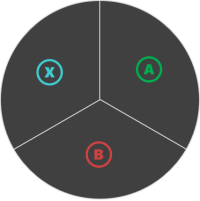
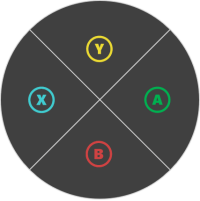
> Images show the hit regions for controls in a cluster on `right` inner wheel, not the actual control rendering. The controls will be rendered in the center spot of the hit region.
#### Pattern 1. One control
 ```JSON theme={null}
{
"inner" : {
"type": "button",
"action": "gamepadA"
}
}
```
#### Pattern 2. Two controls
```JSON theme={null}
{
"inner" : {
"type": "button",
"action": "gamepadA"
}
}
```
#### Pattern 2. Two controls
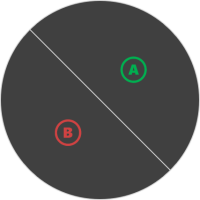 *NOTE:* This orientation is for controls in the `right` wheel. It will be re-oriented for the `left`.
```JSON theme={null}
"right" : {
"inner": [
{
"type": "button",
"action": "gamepadA"
},
{
"type": "button",
"action": "gamepadB"
}
]
}
}
```
#### Pattern 3: Three controls
*NOTE:* This orientation is for controls in the `right` wheel. It will be re-oriented for the `left`.
```JSON theme={null}
"right" : {
"inner": [
{
"type": "button",
"action": "gamepadA"
},
{
"type": "button",
"action": "gamepadB"
}
]
}
}
```
#### Pattern 3: Three controls
 ```JSON theme={null}
{
"inner": [
{
"type": "button",
"action": "gamepadA"
},
{
"type": "button",
"action": "gamepadB"
},
{
"type": "button",
"action": "gamepadX"
}
]
}
```
#### Pattern 4. Four controls
```JSON theme={null}
{
"inner": [
{
"type": "button",
"action": "gamepadA"
},
{
"type": "button",
"action": "gamepadB"
},
{
"type": "button",
"action": "gamepadX"
}
]
}
```
#### Pattern 4. Four controls
 ```JSON theme={null}
{
"inner": [
{
"type": "button",
"action": "gamepadA"
},
{
"type": "button",
"action": "gamepadB"
},
{
"type": "button",
"action": "gamepadX"
},
{
"type": "button",
"action": "gamepadY"
}
]
}
```
## See Also
[Touch Adaptation Kit Reference](/build/core-features/common/game-streaming/game-streaming-touch-touch-adaptation-kit-overview)\
[Wheel](/reference/system/touchadaptationkit/layout/game-streaming-touch-wheel)
## Related topics
- [Touch Adaptation Kit (TAK) Reference](/build/core-features/common/game-streaming/game-streaming-touch-touch-adaptation-kit-overview.md)
- [Touch Adaptation Kit](/reference/system/touchadaptationkit/touchadaptationkit-reference.md)
- [A designer's guide to building touch controls](/build/core-features/common/game-streaming/building-touch-layouts/game-streaming-tak-designers-guide.md)
- [Touch Adaptation Kit (TAK) 参考](/zh-CN/build/core-features/common/game-streaming/game-streaming-touch-touch-adaptation-kit-overview.md)
- [Touch Adaptation Kit (TAK) リファレンス](/ja-jp/build/core-features/common/game-streaming/game-streaming-touch-touch-adaptation-kit-overview.md)
```JSON theme={null}
{
"inner": [
{
"type": "button",
"action": "gamepadA"
},
{
"type": "button",
"action": "gamepadB"
},
{
"type": "button",
"action": "gamepadX"
},
{
"type": "button",
"action": "gamepadY"
}
]
}
```
## See Also
[Touch Adaptation Kit Reference](/build/core-features/common/game-streaming/game-streaming-touch-touch-adaptation-kit-overview)\
[Wheel](/reference/system/touchadaptationkit/layout/game-streaming-touch-wheel)
## Related topics
- [Touch Adaptation Kit (TAK) Reference](/build/core-features/common/game-streaming/game-streaming-touch-touch-adaptation-kit-overview.md)
- [Touch Adaptation Kit](/reference/system/touchadaptationkit/touchadaptationkit-reference.md)
- [A designer's guide to building touch controls](/build/core-features/common/game-streaming/building-touch-layouts/game-streaming-tak-designers-guide.md)
- [Touch Adaptation Kit (TAK) 参考](/zh-CN/build/core-features/common/game-streaming/game-streaming-touch-touch-adaptation-kit-overview.md)
- [Touch Adaptation Kit (TAK) リファレンス](/ja-jp/build/core-features/common/game-streaming/game-streaming-touch-touch-adaptation-kit-overview.md)