> ## Documentation Index
> Fetch the complete documentation index at: https://devdocs.xbox.com/llms.txt
> Use this file to discover all available pages before exploring further.
# Control cluster
> Control cluster
# Control cluster
An array of up to four controls that can be used to occupy two slots in the outer portion of the wheel.
## Remarks
The control cluster can be used to give more fine tuned control over where the touch controls will be displayed on the `outer` portion of the [`wheel`](/reference/system/touchadaptationkit/layout/game-streaming-touch-wheel).
Common uses include:
* Have one control take up two `outer` slots of a [`wheel`](/reference/system/touchadaptationkit/layout/game-streaming-touch-wheel). This is commonly used when you want to have a larger hit area for a button on the `outer` section.
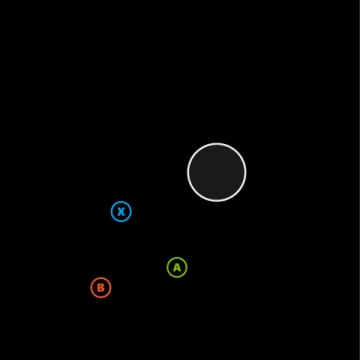
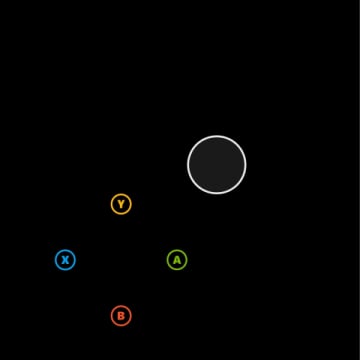
* Expand the layout options in the `outer` slots by creating groupings of three or four controls in a triangle or square configuration.
It is possible to use control clusters to create groupings of controls that may extend beyond the expected boundaries of the `wheel`. When using multiple controls, validate that the behavior is as desired on smaller screened devices.
***
**Patterns for control cluster in the `outer wheel` area**
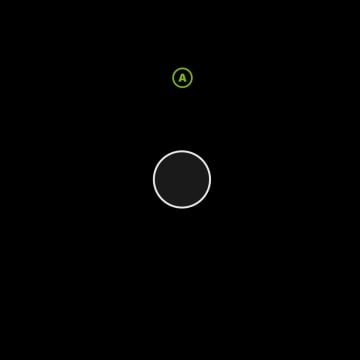
> Images show the full rendering of the wheel with a joystick in the inner slot and the `outer` layout as specified.
#### Pattern 1. One control spanning two outer slots
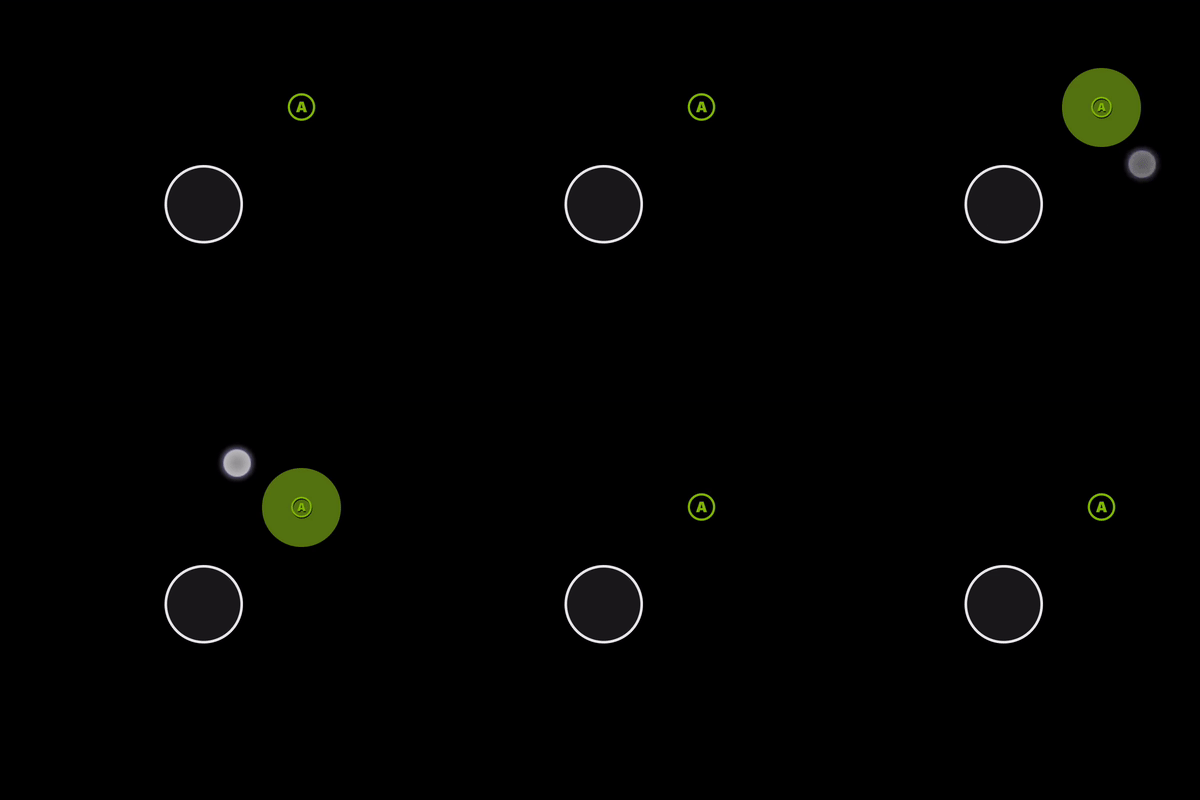 In this example, notice the hit target area for the button.
```JSON theme={null}
{
"outer": [
[
{
"type": "button",
"action": "gamepadA"
},
null
]
]
}
```
#### Pattern 2. One control aligned to 12'oclock on the wheel
In this example, notice the hit target area for the button.
```JSON theme={null}
{
"outer": [
[
{
"type": "button",
"action": "gamepadA"
},
null
]
]
}
```
#### Pattern 2. One control aligned to 12'oclock on the wheel
 ```JSON theme={null}
{
"outer": [
null,
null,
null,
null,
null,
null,
null,
[
null,
{
"type": "button",
"action": "gamepadA"
},
null
]
]
}
```
#### Pattern 3: Three controls in a cluster
Using three controls in a cluster is a good way to add additional controls once all the outer slots are utilized. It works best in the fifth slot on the right hand.
```JSON theme={null}
{
"outer": [
null,
null,
null,
null,
null,
null,
null,
[
null,
{
"type": "button",
"action": "gamepadA"
},
null
]
]
}
```
#### Pattern 3: Three controls in a cluster
Using three controls in a cluster is a good way to add additional controls once all the outer slots are utilized. It works best in the fifth slot on the right hand.
 ```JSON theme={null}
{
"outer": [
null,
null,
null,
null,
[
{
"type": "button",
"action": "gamepadA"
},
{
"type": "button",
"action": "gamepadB"
},
{
"type": "button",
"action": "gamepadX"
}
]
]
}
```
#### Pattern 4. Four controls in a cluster
If you need an additional control in the three cluster, use four controls in the slot. It works best in the fifth slot on the right hand.
```JSON theme={null}
{
"outer": [
null,
null,
null,
null,
[
{
"type": "button",
"action": "gamepadA"
},
{
"type": "button",
"action": "gamepadB"
},
{
"type": "button",
"action": "gamepadX"
}
]
]
}
```
#### Pattern 4. Four controls in a cluster
If you need an additional control in the three cluster, use four controls in the slot. It works best in the fifth slot on the right hand.
 ```JSON theme={null}
{
"outer": [
[
null,
null,
null,
null,
,
{
"type": "button",
"action": "gamepadA"
},
{
"type": "button",
"action": "gamepadB"
},
{
"type": "button",
"action": "gamepadX"
},
{
"type": "button",
"action": "gamepadY"
}
]
]
}
```
## Related topics
- [A designer's guide to building touch controls](/build/core-features/common/game-streaming/building-touch-layouts/game-streaming-tak-designers-guide.md)
- [Touch Adaptation Kit (TAK) Reference](/build/core-features/common/game-streaming/game-streaming-touch-touch-adaptation-kit-overview.md)
- [Touch Adaptation Kit](/reference/system/touchadaptationkit/touchadaptationkit-reference.md)
- [Touch Adaptation Kit (TAK) 参考](/zh-CN/build/core-features/common/game-streaming/game-streaming-touch-touch-adaptation-kit-overview.md)
- [Touch Adaptation Kit (TAK) リファレンス](/ja-jp/build/core-features/common/game-streaming/game-streaming-touch-touch-adaptation-kit-overview.md)
```JSON theme={null}
{
"outer": [
[
null,
null,
null,
null,
,
{
"type": "button",
"action": "gamepadA"
},
{
"type": "button",
"action": "gamepadB"
},
{
"type": "button",
"action": "gamepadX"
},
{
"type": "button",
"action": "gamepadY"
}
]
]
}
```
## Related topics
- [A designer's guide to building touch controls](/build/core-features/common/game-streaming/building-touch-layouts/game-streaming-tak-designers-guide.md)
- [Touch Adaptation Kit (TAK) Reference](/build/core-features/common/game-streaming/game-streaming-touch-touch-adaptation-kit-overview.md)
- [Touch Adaptation Kit](/reference/system/touchadaptationkit/touchadaptationkit-reference.md)
- [Touch Adaptation Kit (TAK) 参考](/zh-CN/build/core-features/common/game-streaming/game-streaming-touch-touch-adaptation-kit-overview.md)
- [Touch Adaptation Kit (TAK) リファレンス](/ja-jp/build/core-features/common/game-streaming/game-streaming-touch-touch-adaptation-kit-overview.md)