> ## Documentation Index
> Fetch the complete documentation index at: https://devdocs.xbox.com/llms.txt
> Use this file to discover all available pages before exploring further.
# Color Palette
> Color Palette
# Color Palette
A collection of reusable colors that can be referenced in layouts.
## Properties
`default` - *object*, *optional*. A collection of [Hexadecimal color](/reference/system/touchadaptationkit/types/game-streaming-touch-hexcolor) definitions that can be referenced using a [color reference](/reference/system/touchadaptationkit/types/game-streaming-touch-colorreference).
`highContrast` - *object*, *optional*. A collection of [Hexadecimal color](/reference/system/touchadaptationkit/types/game-streaming-touch-hexcolor) definitions that can be referenced using a [color reference](/reference/system/touchadaptationkit/types/game-streaming-touch-colorreference). Overrides definitions in `default` when [High contrast mode](/build/core-features/common/game-streaming/building-touch-layouts/game-streaming-tak-high-contrast-mode) is enabled.
## Sample
```JSON theme={null}
{
"$schema": "https://raw.githubusercontent.com/microsoft/xbox-game-streaming-tools/main/touch-adaptation-kit/schemas/layout/4.0/layout.json",
"styles": {
"colors": {
"default": {
"myColor1": "#ff0000ff",
"myColor2": "#00ff00ff",
"system_contentPrimary": "#0000ffff"
},
"highContrast": {
"myColor1": "#00ff00ff",
"system_contrastPrimary": "#0000ffaa"
}
}
},
"content": {
"left": {
"inner": [
{
"type": "directionalPad",
"styles": {
"idle": {
"background": {
"type": "color",
"value": "colors/myColor1"
}
}
}
}
]
},
"right": {
"inner": [
{
"type": "button",
"action": "gamepadY"
},
{
"type": "button",
"action": "gamepadB"
},
{
"type": "button",
"action": "gamepadA",
"styles": {
"idle": {
"background": {
"type": "color",
"value": "colors/myColor2"
}
}
}
},
{
"type": "button",
"action": "gamepadX"
}
]
}
}
}
```
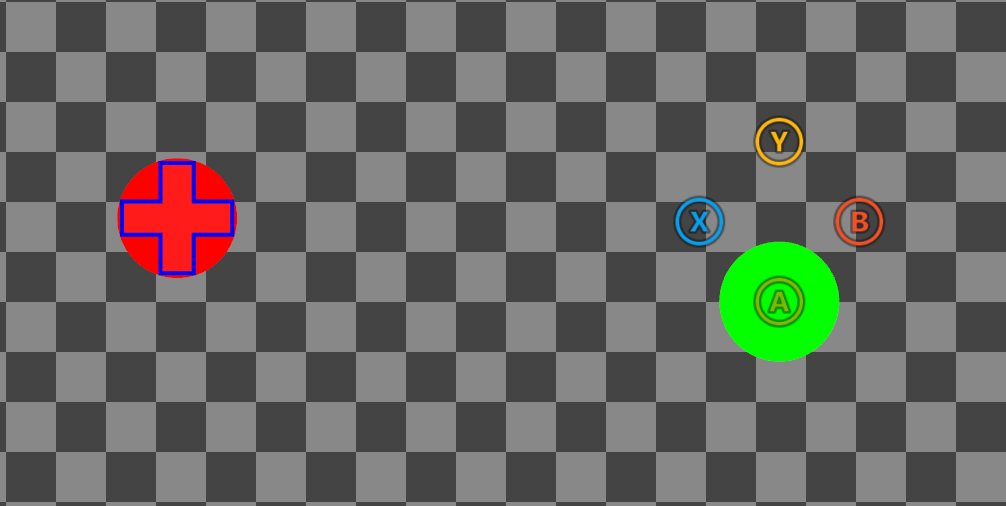
The above layout with high contrast mode **disabled**:
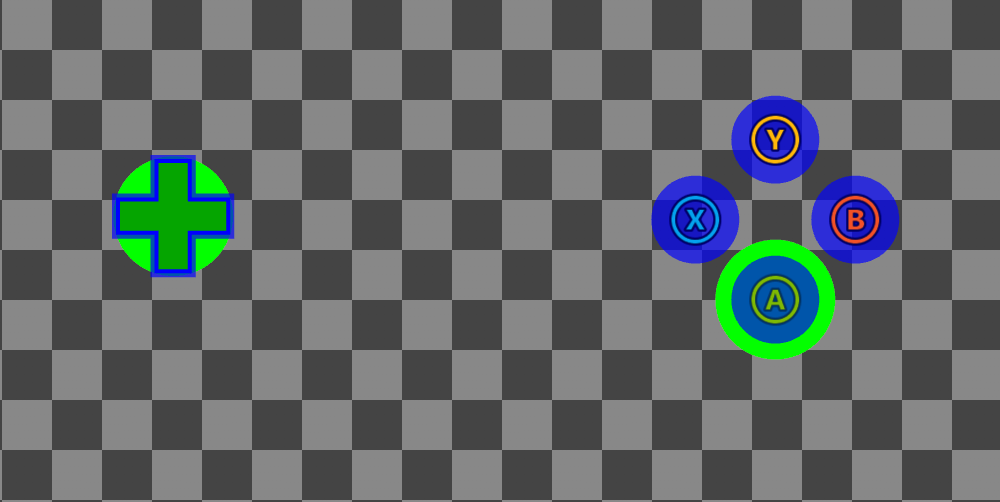
 And with high contrast mode **enabled**:
 ## Remarks
The above [sample](#sample) includes color definitions that override [system colors](#system-colors) (e.g., `system_contentPrimary`, `system_accentPrimary` etc.) as well as custom color definitions (`myColor1`, `myColor2`). Controls **implicitly** sample system colors when styling, meaning any overrides will effect the global styling of all controls (unless a control has it's own override within a custom `styles` block). Custom colors must be **explicitly** referenced using a [color reference](/reference/system/touchadaptationkit/types/game-streaming-touch-colorreference) (e.g., `colors/myColor1`). Additionally, custom color definitions **cannot** use the reserved `system_` prefix as it's reserved for system colors.
Color definitions are declared in `default` and `highContrast` objects, and are activated when [high contrast mode](/build/core-features/common/game-streaming/building-touch-layouts/game-streaming-tak-high-contrast-mode) is disabled or enabled, respectively. When high contrast mode is disabled, colors are sampled from `default`. When enabled, colors are first sampled from `highContrast`, falling back on `default` if no definition exists. If a system color override is not present in `default`, a system default is used, while custom colors **must** be defined in `default`. The following table outlines how the above color definitions will resolve dependent on if high contrast (HC) mode is enabled or not:
| Color definition | HC mode disabled | HC mode enabled |
| :---------------------- | ---------------- | --------------- |
| myColor1 | `#ff0000ff` | `#00ff00ff` |
| myColor2 | `#00ff00ff` | `#00ff00ff` |
| system\_contentPrimary | `#0000ffff` | `#0000ffff` |
| system\_contrastPrimary | system default | `#0000ffaa` |
## System colors
The following table summarizes the list of system colors in the touch adaptation kit, a description of how they are used to style controls, as well as their system default values when high contrast (HC) mode is disabled/enabled.
| System Color | Description | HC mode disabled | HC mode enabled |
| :------------------------- | :----------------------------------------------------------------------------------------------------- | :--------------- | :-------------- |
| system\_contentPrimary | Color used for styling components such as middle strokes, icon tints, and dpad gradients. | `#ffffffff` | `#ffffffff` |
| system\_contentSecondary | Color used for styling components such as backgrounds and fills. | `#ffffff1a` | `#ffffffff` |
| system\_contrastPrimary | Color used for styling contrast components such as inner/outer strokes and face image backplates. | `#00000000` | `#000000bf` |
| system\_contrastSecondary | Color used for styling contrast components such as touchpad strokes. | `#00000000` | `#ffffffff` |
| system\_actionColorDefault | Color used for styling components on controls where the `action` field is set to a non-gamepad action. | `#ffffffff` | `#ffffffe6` |
| system\_actionColorA | Color used for styling components on controls where the `action` field is set to `gamepadA`. | `#7eb902ff` | `#ffffffe6` |
| system\_actionColorB | Color used for styling components on controls where the `action` field is set to `gamepadB`. | `#f25127ff` | `#ffffffe6` |
| system\_actionColorX | Color used for styling components on controls where the `action` field is set to `gamepadX`. | `#00a2eeff` | `#ffffffe6` |
| system\_actionColorY | Color used for styling components on controls where the `action` field is set to `gamepadY`. | `#ffb807ff` | `#ffffffe6` |
| system\_accentPrimary | Color used for styling components such as the ergo-edit inner wheel. | `#8cc08cff` | `#8cc08cff` |
| system\_accentSecondary | Color used for styling components such as the ergo-edit outer wheel. | `#61ab61ff` | `#61ab61ff` |
For an up to date listing, refer to the definitions prefixed with `_SystemColor` in the [latest schema](https://github.com/microsoft/xbox-game-streaming-tools/blob/main/touch-adaptation-kit/schemas/layout/v4.0/layout.json).
## See Also
[Touch Adaptation Kit Reference](/build/core-features/common/game-streaming/game-streaming-touch-touch-adaptation-kit-overview)\
[High contrast mode for Touch Adaptation Layouts](/build/core-features/common/game-streaming/building-touch-layouts/game-streaming-tak-high-contrast-mode)
## Related topics
- [Touch Adaptation Kit](/reference/system/touchadaptationkit/touchadaptationkit-reference.md)
- [High Contrast Mode](/build/core-features/common/game-streaming/building-touch-layouts/game-streaming-tak-high-contrast-mode.md)
- [Customizing the Touch Controls Preview](/build/core-features/common/game-streaming/tak-editor/game-streaming-tak-editor-customize-preview.md)
- [Accessibility metadata](/publishing/game-publishing/concepts/metadata-accessibility.md)
- [Compiler et exécuter votre premier titre console avec le GDKX](/fr-CA/home/build-first-title/first-console-title-walkthrough.md)
## Remarks
The above [sample](#sample) includes color definitions that override [system colors](#system-colors) (e.g., `system_contentPrimary`, `system_accentPrimary` etc.) as well as custom color definitions (`myColor1`, `myColor2`). Controls **implicitly** sample system colors when styling, meaning any overrides will effect the global styling of all controls (unless a control has it's own override within a custom `styles` block). Custom colors must be **explicitly** referenced using a [color reference](/reference/system/touchadaptationkit/types/game-streaming-touch-colorreference) (e.g., `colors/myColor1`). Additionally, custom color definitions **cannot** use the reserved `system_` prefix as it's reserved for system colors.
Color definitions are declared in `default` and `highContrast` objects, and are activated when [high contrast mode](/build/core-features/common/game-streaming/building-touch-layouts/game-streaming-tak-high-contrast-mode) is disabled or enabled, respectively. When high contrast mode is disabled, colors are sampled from `default`. When enabled, colors are first sampled from `highContrast`, falling back on `default` if no definition exists. If a system color override is not present in `default`, a system default is used, while custom colors **must** be defined in `default`. The following table outlines how the above color definitions will resolve dependent on if high contrast (HC) mode is enabled or not:
| Color definition | HC mode disabled | HC mode enabled |
| :---------------------- | ---------------- | --------------- |
| myColor1 | `#ff0000ff` | `#00ff00ff` |
| myColor2 | `#00ff00ff` | `#00ff00ff` |
| system\_contentPrimary | `#0000ffff` | `#0000ffff` |
| system\_contrastPrimary | system default | `#0000ffaa` |
## System colors
The following table summarizes the list of system colors in the touch adaptation kit, a description of how they are used to style controls, as well as their system default values when high contrast (HC) mode is disabled/enabled.
| System Color | Description | HC mode disabled | HC mode enabled |
| :------------------------- | :----------------------------------------------------------------------------------------------------- | :--------------- | :-------------- |
| system\_contentPrimary | Color used for styling components such as middle strokes, icon tints, and dpad gradients. | `#ffffffff` | `#ffffffff` |
| system\_contentSecondary | Color used for styling components such as backgrounds and fills. | `#ffffff1a` | `#ffffffff` |
| system\_contrastPrimary | Color used for styling contrast components such as inner/outer strokes and face image backplates. | `#00000000` | `#000000bf` |
| system\_contrastSecondary | Color used for styling contrast components such as touchpad strokes. | `#00000000` | `#ffffffff` |
| system\_actionColorDefault | Color used for styling components on controls where the `action` field is set to a non-gamepad action. | `#ffffffff` | `#ffffffe6` |
| system\_actionColorA | Color used for styling components on controls where the `action` field is set to `gamepadA`. | `#7eb902ff` | `#ffffffe6` |
| system\_actionColorB | Color used for styling components on controls where the `action` field is set to `gamepadB`. | `#f25127ff` | `#ffffffe6` |
| system\_actionColorX | Color used for styling components on controls where the `action` field is set to `gamepadX`. | `#00a2eeff` | `#ffffffe6` |
| system\_actionColorY | Color used for styling components on controls where the `action` field is set to `gamepadY`. | `#ffb807ff` | `#ffffffe6` |
| system\_accentPrimary | Color used for styling components such as the ergo-edit inner wheel. | `#8cc08cff` | `#8cc08cff` |
| system\_accentSecondary | Color used for styling components such as the ergo-edit outer wheel. | `#61ab61ff` | `#61ab61ff` |
For an up to date listing, refer to the definitions prefixed with `_SystemColor` in the [latest schema](https://github.com/microsoft/xbox-game-streaming-tools/blob/main/touch-adaptation-kit/schemas/layout/v4.0/layout.json).
## See Also
[Touch Adaptation Kit Reference](/build/core-features/common/game-streaming/game-streaming-touch-touch-adaptation-kit-overview)\
[High contrast mode for Touch Adaptation Layouts](/build/core-features/common/game-streaming/building-touch-layouts/game-streaming-tak-high-contrast-mode)
## Related topics
- [Touch Adaptation Kit](/reference/system/touchadaptationkit/touchadaptationkit-reference.md)
- [High Contrast Mode](/build/core-features/common/game-streaming/building-touch-layouts/game-streaming-tak-high-contrast-mode.md)
- [Customizing the Touch Controls Preview](/build/core-features/common/game-streaming/tak-editor/game-streaming-tak-editor-customize-preview.md)
- [Accessibility metadata](/publishing/game-publishing/concepts/metadata-accessibility.md)
- [Compiler et exécuter votre premier titre console avec le GDKX](/fr-CA/home/build-first-title/first-console-title-walkthrough.md)