> ## Documentation Index
> Fetch the complete documentation index at: https://devdocs.xbox.com/llms.txt
> Use this file to discover all available pages before exploring further.
# Touchpad
> Touchpad
# Touchpad
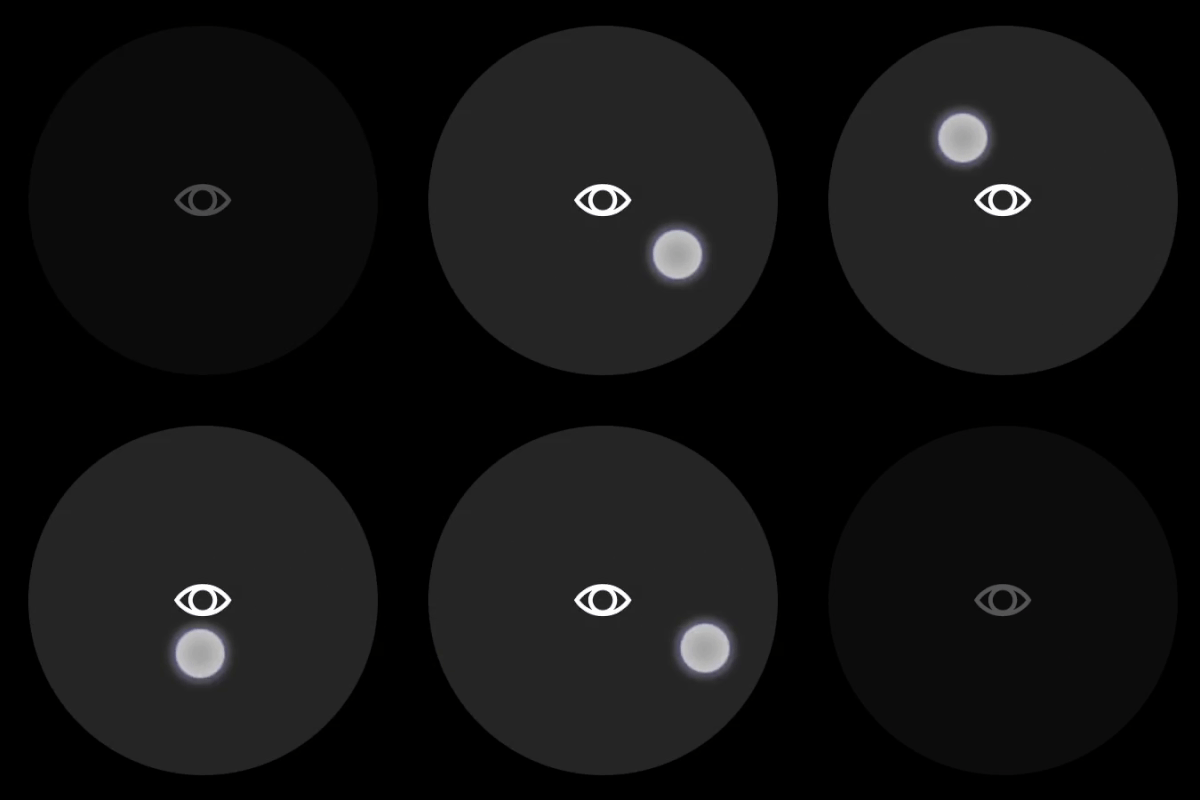
Analog control that enables the player to interact similar to a laptop touchpad.
## Properties
`type` - "touchpad"
`axis` - *object* or *array*. A single [axis](/reference/system/touchadaptationkit/types/game-streaming-touch-axis) or array of [axes](/reference/system/touchadaptationkit/types/game-streaming-touch-axis) that describe the mapping of this touchpad control.
`action` - *object*, *optional*. An [action](/reference/system/touchadaptationkit/types/game-streaming-touch-action) to invoked on touch in addition to the axis mapping.
`renderAsButton` - *boolean*, *optional*. Default to `false`. Set to `true` to render the touchpad visually as a button.
`enabled` - *boolean*, *optional*. Defaults to `true`. Sets the visual state of the control to enabled/disabled. A disabled control will still receive input from the player, but NOT change the visual style based on the input.
`visible` - *boolean*, *optional*. Defaults to `true`. Determines whether the control is displayed to the player to interact with. To change during game play see [Changing touch layouts using game state](/build/core-features/common/game-streaming/building-touch-layouts/game-streaming-touch-changing-layouts-game-state#change_state).
`styles` - *object*, *optional*. Customization of the visual representation of the control. The styles are represented as an object per state that can be styled.
The button control can have the following states styled:
* `default` - The base style.
* `disabled` - The style when the control is disabled. If not specified, then when the control is disabled, a transformation will be applied to the default style to make it appear disabled.
* `idle` - Applied when the player is NOT interacting with the control.
* `moving` - Applied when the when the player is touching the control and no `action` is defined.
* `activated` - Applied when the when the player is touching the control and an `action` is defined.
**Styling properties per state**
`opacity` - *number*, *optional*. The opacity to be applied to the control. Default to 1.0 for all states but `disabled`.
`background` - *object*, *optional*. Can either be a [color](/reference/system/touchadaptationkit/types/game-streaming-touch-color) or [image asset](/reference/system/touchadaptationkit/types/game-streaming-touch-asset).
`faceImage` - *object*, *optional*. Can either be an [icon](/reference/system/touchadaptationkit/types/game-streaming-touch-icon) or [image asset](/reference/system/touchadaptationkit/types/game-streaming-touch-asset).
**Asset dimensions**
For each of the style objects that accept image assets, a given asset is provided at a base resolution and at 1.5x, 2.0x, 3.0x, and 4.0x scales of that base resolution. The resolution of a given image must be less or equal to the following maximum resolutions:
| Object | @1.0x | @1.5x | @2.0x | @3.0x | @4.0x |
| :---------------------------------- | :------ | :---- | :------ | :------ | :------ |
| faceImage | 60x60 | 90x90 | 120x120 | 180x180 | 240x240 |
| background (renderAsButton = true) | 60x60 | 90x90 | 120x120 | 180x180 | 240x240 |
| background (renderAsButton = false) | 120x120 | 90x90 | 240x240 | 360x360 | 480x480 |
## Remarks
The `touchpad` is best used for non-sticky, no-deadzone output — typically the look camera in a first/third-person perspective game.
For games that support mouse input, the `touchpad` can be used with relative mouse to provide a more tuned look camera experience.
**Styling remarks**
When `renderAsButton` is `true`:
* When in the `activated` state, the `faceImage` is displayed 25% smaller.
* There are labels and default styling for the background color for buttons that do not use custom assets and have a single action of `gamepadX`, `gamepadY`, `gamepadA`, or `gamepadB`.
## Samples
#### Example 1: Touchpad with a look icon
**Figure 1. Touchpad Control**
 ```JSON theme={null}
{
"type": "touchpad",
"axis": {
"input": "axisXY",
"output": "rightJoystick",
"sensitivity": 3
},
"styles": {
"default" : {
"faceImage" : {
"type": "icon",
"value": "look"
}
}
}
}
```
#### Example 2: Touchpad with a look icon that is rendered as a button
**Figure 1. Button Touchpad Control**
```JSON theme={null}
{
"type": "touchpad",
"axis": {
"input": "axisXY",
"output": "rightJoystick",
"sensitivity": 3
},
"styles": {
"default" : {
"faceImage" : {
"type": "icon",
"value": "look"
}
}
}
}
```
#### Example 2: Touchpad with a look icon that is rendered as a button
**Figure 1. Button Touchpad Control**
 ```JSON theme={null}
{
"type": "touchpad",
"renderAsButton": true,
"axis": {
"input": "axisXY",
"output": "rightJoystick",
"sensitivity": 3
},
"styles": {
"default" : {
"faceImage" : {
"type": "icon",
"value": "look"
}
}
}
}
```
## Requirements
**Layout Version:** 1.0+ (Styling available from layout version 3.0+)
## Related topics
- [Touch Adaptation Kit](/reference/system/touchadaptationkit/touchadaptationkit-reference.md)
- [Templates](/build/core-features/common/game-streaming/tak-command-line-tool/game-streaming-tak-command-line-templates.md)
- [Touch Adaptation Kit (TAK) Reference](/build/core-features/common/game-streaming/game-streaming-touch-touch-adaptation-kit-overview.md)
- [A designer's guide to building touch controls](/build/core-features/common/game-streaming/building-touch-layouts/game-streaming-tak-designers-guide.md)
- [First Person Shooter Touch Control Layout](/build/core-features/common/game-streaming/building-touch-layouts/samples/game-streaming-touch-tak-sample-first-person.md)
```JSON theme={null}
{
"type": "touchpad",
"renderAsButton": true,
"axis": {
"input": "axisXY",
"output": "rightJoystick",
"sensitivity": 3
},
"styles": {
"default" : {
"faceImage" : {
"type": "icon",
"value": "look"
}
}
}
}
```
## Requirements
**Layout Version:** 1.0+ (Styling available from layout version 3.0+)
## Related topics
- [Touch Adaptation Kit](/reference/system/touchadaptationkit/touchadaptationkit-reference.md)
- [Templates](/build/core-features/common/game-streaming/tak-command-line-tool/game-streaming-tak-command-line-templates.md)
- [Touch Adaptation Kit (TAK) Reference](/build/core-features/common/game-streaming/game-streaming-touch-touch-adaptation-kit-overview.md)
- [A designer's guide to building touch controls](/build/core-features/common/game-streaming/building-touch-layouts/game-streaming-tak-designers-guide.md)
- [First Person Shooter Touch Control Layout](/build/core-features/common/game-streaming/building-touch-layouts/samples/game-streaming-touch-tak-sample-first-person.md)