> ## Documentation Index
> Fetch the complete documentation index at: https://devdocs.xbox.com/llms.txt
> Use this file to discover all available pages before exploring further.
# Joystick
> Joystick
# Joystick
An analog control that behaves like a joystick.
## Properties
`type` - "joystick"
`axis` - *object* or *array*. A single [axis](/reference/system/touchadaptationkit/types/game-streaming-touch-axis) or array of [axes](/reference/system/touchadaptationkit/types/game-streaming-touch-axis) that describe the mapping of this joystick control.
`action` - *object*, *optional*. An [action(s)](/reference/system/touchadaptationkit/types/game-streaming-touch-action) to invoke in addition to the axis mapping.
`actionThreshold` - *number*, *optional*.Normalized minimum joystick value (radial) required to invoke the action. Default value of 0.
`enabled` - *boolean*, *optional*. Defaults to `true`. Sets the visual state of the control to enabled/disabled. A disabled control will still receive input from the player, but NOT change the visual style based on the input.
`expand` - *boolean*, *optional*. Default value of `true`. Expand joystick range to match user ergonomic preferences when placed in a center control socket. Set to false to use a standardized fixed joystick size.
`relative` - *boolean*, *optional*.
By default (`true`), the joystick will calculate its value using a relative calculation based on user's initial touch. Setting this value to `false` will instead calculate its value based on the center point of the control.
`visible` - *boolean*, *optional*. Defaults to `true`. Determines whether the control is displayed to the player to interact with. To change during game play see [Changing touch layouts using game state](/build/core-features/common/game-streaming/building-touch-layouts/game-streaming-touch-changing-layouts-game-state#change_state).
`styles` - *object*, *optional*. Customization of the visual representation of the control. The styles are represented as an object per state that can be styled.
The button control can have the following states styled:
* `default` - The base style.
* `disabled` - The style when the control is disabled. If not specified, then when the control is disabled, a transformation will be applied to the default style to make it appear disabled.
* `idle` - Applied when the player is NOT interacting with the control.
* `moving` - Applied when the when the joystick knob is being interacted withregardless of the deadzone defined.
* `activated` - Applied when an `action` is defined and the knob is moved outside the threshold to execute the action.
**Styling properties per state**
`opacity` - *number*, *optional*. The opacity to be applied to the control. Default to 1.0 for all states but `disabled`.
`background` - *object*, *optional*. Can either be a [color](/reference/system/touchadaptationkit/types/game-streaming-touch-color) or [image asset](/reference/system/touchadaptationkit/types/game-streaming-touch-asset).
[`knob`](/reference/system/touchadaptationkit/types/game-streaming-touch-knob) - *object*, *optional*. The [knob](/reference/system/touchadaptationkit/types/game-streaming-touch-knob) object specifies the styling for the button-like portion of the joystick that can be interacted with by the player.
[`outline`](/reference/system/touchadaptationkit/types/game-streaming-touch-joystick-outline) - *object*, *optional*. The [outline](/reference/system/touchadaptationkit/types/game-streaming-touch-joystick-outline) object specifies the styling of the outline and indicator that are presented when the joystick is being interacted with.
**Asset dimensions**
For each of the style objects that accept image assets, a given asset is provided at a base resolution and at 1.5x, 2.0x, 3.0x, and 4.0x scales of that base resolution. The resolution of a given image must be less or equal to the following maximum resolutions:
| Object | @1.0x | @1.5x | @2.0x | @3.0x | @4.0x |
| :-------------- | :------ | :---- | :------ | :------ | :------ |
| background | 120x120 | 90x90 | 240x240 | 360x360 | 480x480 |
| knob.faceImage | 60x60 | 90x90 | 120x120 | 180x180 | 240x240 |
| knob.background | 60x60 | 90x90 | 120x120 | 180x180 | 240x240 |
## Remarks
The `joystick` control can be used to provide analog control that maps to the different physical controller joysticks.
If the `joystick` is the main method of movement, it is recommended to play in the left center slot and set `expand` to true to provide the best experience for the player.
Consider customizing the `faceImage` to provide a hint to the player around what the joystick will control (this is especially important if your game utilizes more than one joystick).
For motions that only rely on 1 axis, utilize a single axis joystick to maximize playability.
**Styling remarks**
If using a `background` asset and `expand` is true, the `background` asset will NOT be scaled to the full center socket size.
By default, the `outline` is only displayed while the player is interacting with the control.
If using a custom `background` asset and `expand` is set to `true`, note that the asset will NOT expand with the player's control customization.
When streaming via the Windows version of the Content Test Application, not all styling will display correctly.
## Samples
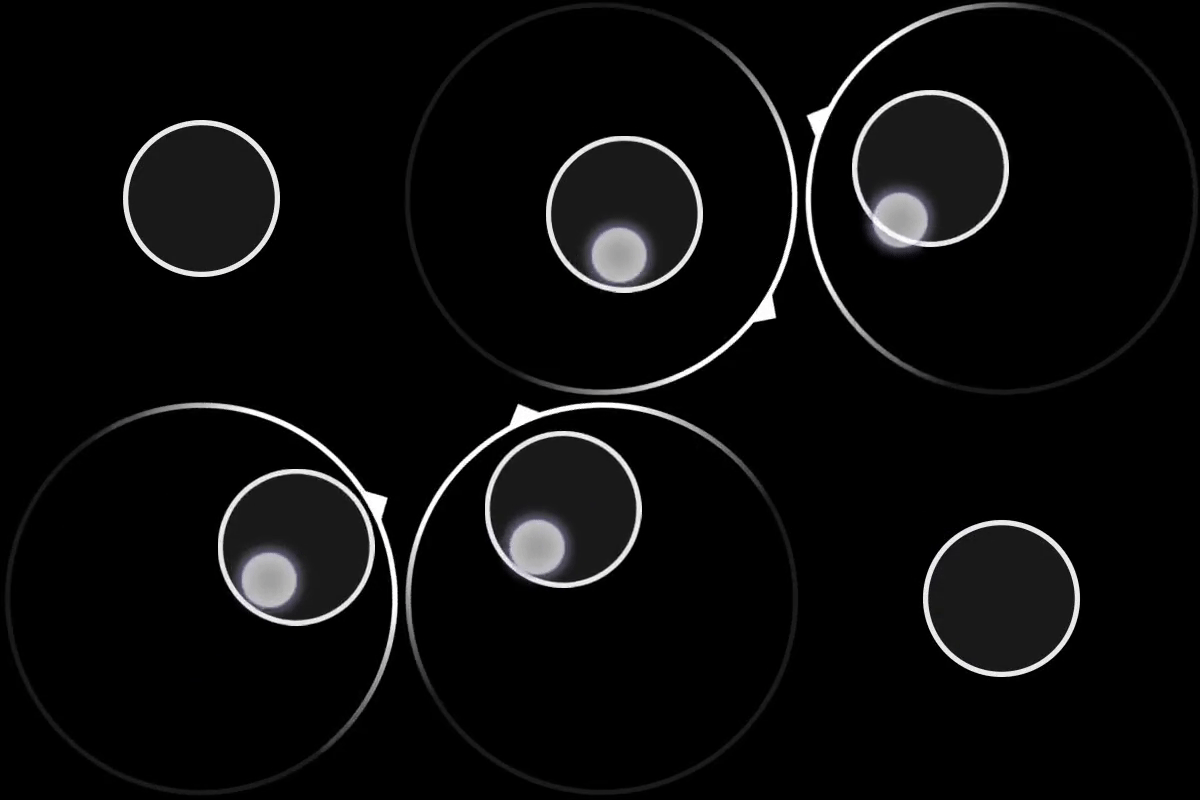
#### Example 1: Simple joystick
A basic 1:1 mapping to a joystick with a slight deadzone. Thumbsticks on the physical controller calculate their value via rotation.
**Figure 1. Joystick Control**
 ```JSON theme={null}
{
"type": "joystick",
"axis": {
"input": "axisXY",
"output": "leftJoystick",
"deadzone": {
"threshold": 0.05,
"radial": true
}
}
}
```
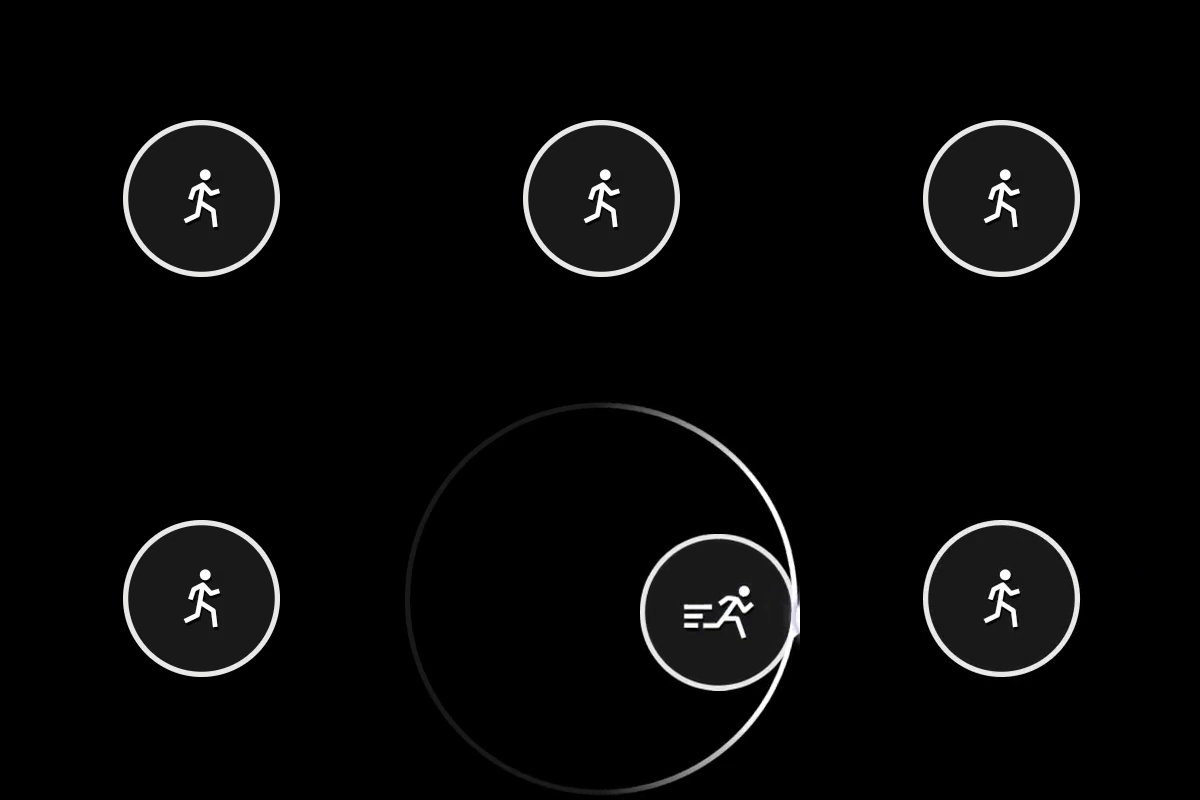
#### Example 2: Joystick that switches from walk to sprint when threshold is passed.
When the threshold (0.75) is passed, the leftTrigger will be sent along with the joystick movement. The icon will change from the 'walk' to 'sprint'
**Figure 1. Joystick Control with Action Threshold**
```JSON theme={null}
{
"type": "joystick",
"axis": {
"input": "axisXY",
"output": "leftJoystick",
"deadzone": {
"threshold": 0.05,
"radial": true
}
}
}
```
#### Example 2: Joystick that switches from walk to sprint when threshold is passed.
When the threshold (0.75) is passed, the leftTrigger will be sent along with the joystick movement. The icon will change from the 'walk' to 'sprint'
**Figure 1. Joystick Control with Action Threshold**
 ```JSON theme={null}
{
"type": "joystick",
"action": "leftTrigger",
"actionThreshold":0.75,
"axis": {
"input": "axisXY",
"output": "leftJoystick",
"deadzone": {
"threshold": 0.05,
"radial": true
}
},
"styles": {
"default": {
"knob": {
"faceImage": {
"type": "icon",
"value": "walk"
}
}
},
"activated": {
"knob": {
"faceImage": {
"type": "icon",
"value": "sprint"
},
"background" : {
"type": "color",
"value": "#0e7a0d"
}
}
}
}
}
```
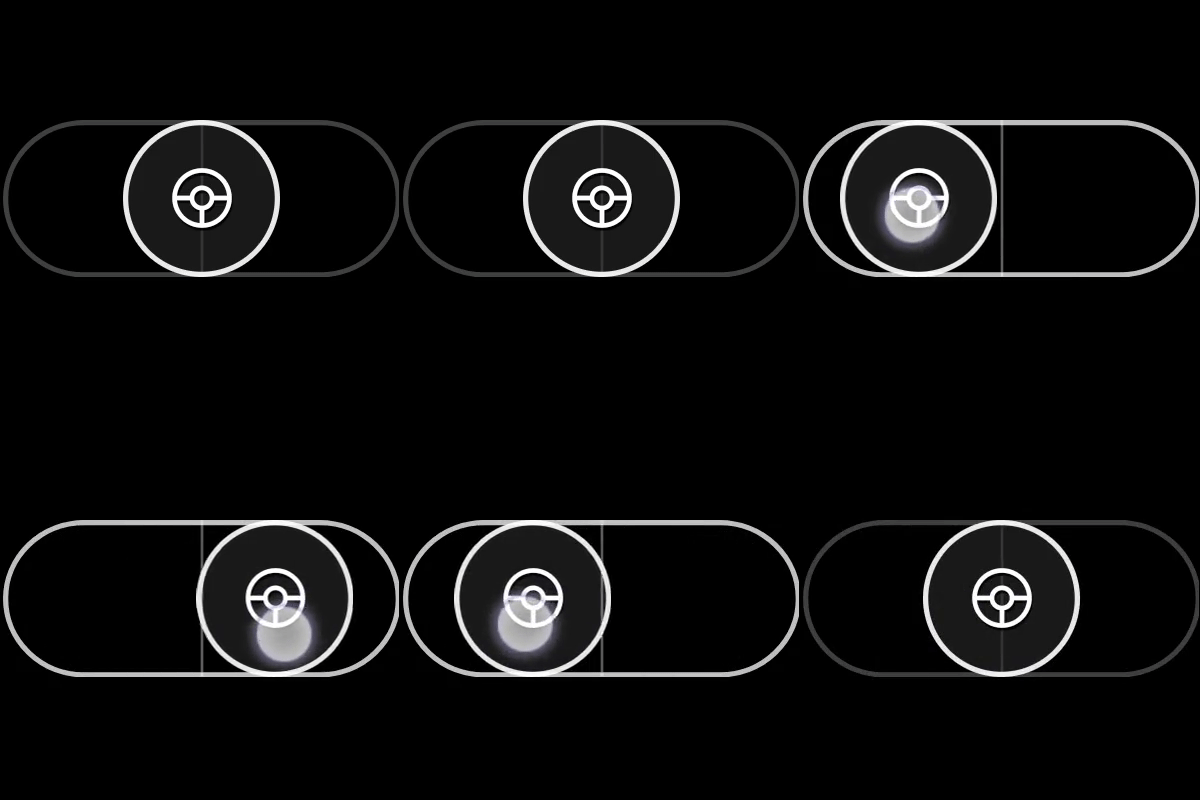
#### Example 3: Single-axis (horizontal) joystick that looks like a steering wheel
**Figure 1. Horizontal Steering Wheel Joystick Control**
```JSON theme={null}
{
"type": "joystick",
"action": "leftTrigger",
"actionThreshold":0.75,
"axis": {
"input": "axisXY",
"output": "leftJoystick",
"deadzone": {
"threshold": 0.05,
"radial": true
}
},
"styles": {
"default": {
"knob": {
"faceImage": {
"type": "icon",
"value": "walk"
}
}
},
"activated": {
"knob": {
"faceImage": {
"type": "icon",
"value": "sprint"
},
"background" : {
"type": "color",
"value": "#0e7a0d"
}
}
}
}
}
```
#### Example 3: Single-axis (horizontal) joystick that looks like a steering wheel
**Figure 1. Horizontal Steering Wheel Joystick Control**
 ```JSON theme={null}
{
"type": "joystick",
"axis": {
"input": "axisX",
"output": "leftJoystickX",
"deadzone": {
"threshold": 0.35
}
},
"relative": false,
"styles": {
"default": {
"knob": {
"faceImage": {
"type": "icon",
"value": "steering"
}
}
}
}
}
```
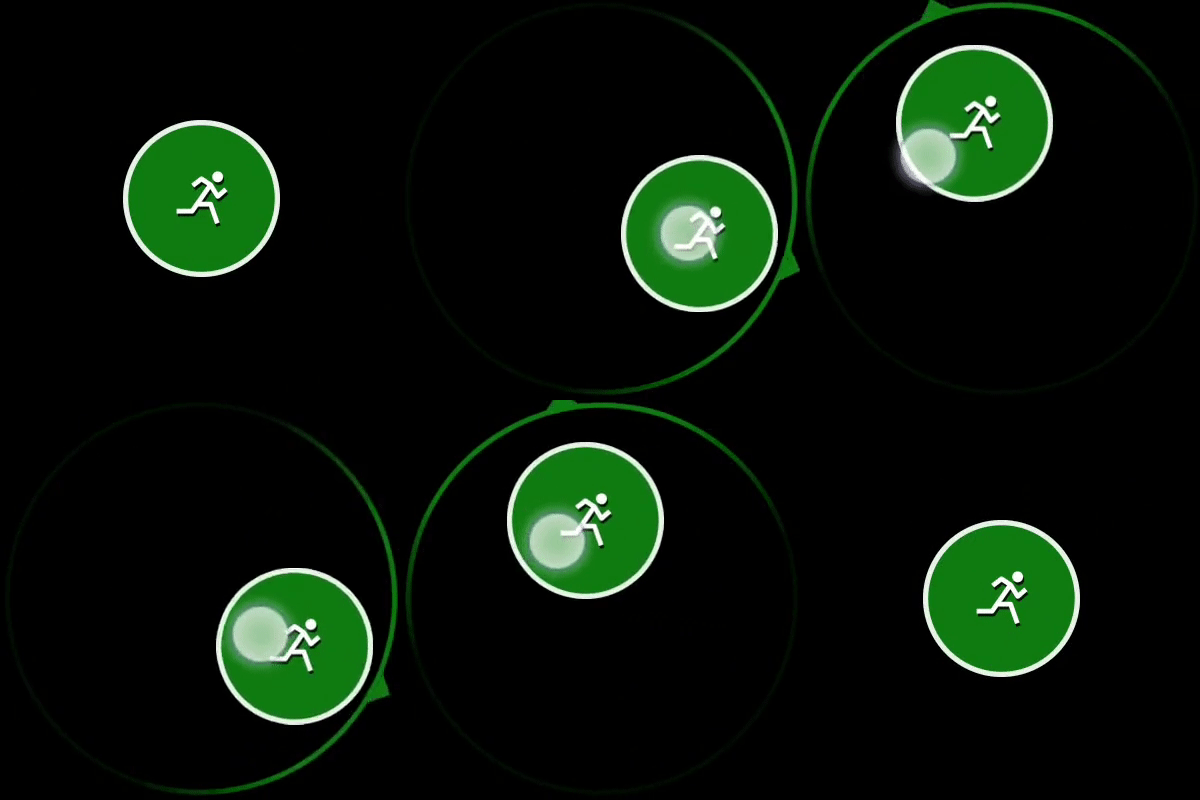
#### Example 4: Joystick with customized colors
**Figure 1. Customized Joystick Control**
```JSON theme={null}
{
"type": "joystick",
"axis": {
"input": "axisX",
"output": "leftJoystickX",
"deadzone": {
"threshold": 0.35
}
},
"relative": false,
"styles": {
"default": {
"knob": {
"faceImage": {
"type": "icon",
"value": "steering"
}
}
}
}
}
```
#### Example 4: Joystick with customized colors
**Figure 1. Customized Joystick Control**
 ```JSON theme={null}
{
"type": "joystick",
"axis": {
"input": "axisXY",
"output": "leftJoystick",
"deadzone": {
"threshold": 0.05,
"radial": true
}
},
"styles": {
"default": {
"outline" : {
"stroke" : {
"type": "solid",
"color": "#107C10"
}
}
}
}
}
```
## Requirements
**Layout Version:** 1.0+ (Styling capabilities from layout version 3.0+)
## See also
[Touch Adaptation Kit Reference](/build/core-features/common/game-streaming/game-streaming-touch-touch-adaptation-kit-overview)
## Related topics
- [A designer's guide to building touch controls](/build/core-features/common/game-streaming/building-touch-layouts/game-streaming-tak-designers-guide.md)
- [Guía del diseñador para crear controles táctiles](/es/build/core-features/common/game-streaming/building-touch-layouts/game-streaming-tak-designers-guide.md)
- [Touch Adaptation Kit](/reference/system/touchadaptationkit/touchadaptationkit-reference.md)
- [Touch Adaptation Kit (TAK) Reference](/build/core-features/common/game-streaming/game-streaming-touch-touch-adaptation-kit-overview.md)
- [High Contrast Mode](/build/core-features/common/game-streaming/building-touch-layouts/game-streaming-tak-high-contrast-mode.md)
```JSON theme={null}
{
"type": "joystick",
"axis": {
"input": "axisXY",
"output": "leftJoystick",
"deadzone": {
"threshold": 0.05,
"radial": true
}
},
"styles": {
"default": {
"outline" : {
"stroke" : {
"type": "solid",
"color": "#107C10"
}
}
}
}
}
```
## Requirements
**Layout Version:** 1.0+ (Styling capabilities from layout version 3.0+)
## See also
[Touch Adaptation Kit Reference](/build/core-features/common/game-streaming/game-streaming-touch-touch-adaptation-kit-overview)
## Related topics
- [A designer's guide to building touch controls](/build/core-features/common/game-streaming/building-touch-layouts/game-streaming-tak-designers-guide.md)
- [Guía del diseñador para crear controles táctiles](/es/build/core-features/common/game-streaming/building-touch-layouts/game-streaming-tak-designers-guide.md)
- [Touch Adaptation Kit](/reference/system/touchadaptationkit/touchadaptationkit-reference.md)
- [Touch Adaptation Kit (TAK) Reference](/build/core-features/common/game-streaming/game-streaming-touch-touch-adaptation-kit-overview.md)
- [High Contrast Mode](/build/core-features/common/game-streaming/building-touch-layouts/game-streaming-tak-high-contrast-mode.md)