> ## Documentation Index
> Fetch the complete documentation index at: https://devdocs.xbox.com/llms.txt
> Use this file to discover all available pages before exploring further.
# Migrar da entrada com o Google para o Google Play Games no Unity
> Etapas detalhadas de migração para mudar os jogadores do Unity da entrada com Conta do Google para LoginWithGooglePlayGamesServices, incluindo vinculação e verificação.
# Procedimento de migração para a API LoginWithGooglePlayGamesServices
A migração consiste em mudar para LoginWithGooglePlayGamesServices, já que o Google está incentivando os desenvolvedores a migrar para essa forma de autenticação. Após a migração dos jogadores, não haverá dependência da API LoginWithGoogleAccount, e os desenvolvedores poderão atualizar para a versão mais recente do plug-in.
Para obter mais informações, confira a [documentação oficial do Google](https://developers.google.com/games/services/android/signin#migrate_to_play_games_services_sign_in_v2).
## Etapas de alto nível
1. Escolha a versão correta do "Play Games Plugin for Unity".
2. Inicialize a Play Games Platform e autentique o usuário.
3. Faça login no PlayFab usando LoginWithGoogleAccount.
4. Vincule seu perfil do Google Play Games à conta de jogador do PlayFab.
5. Verifique se o usuário consegue fazer login usando a API LoginWithGooglePlayGamesServices.
6. (Opcional) Desvincule seu perfil da Conta do Google da conta de jogador do PlayFab.
## Etapas de migração
### Escolher a versão correta do "Play Games Plugin for Unity"
As versões mais recentes do plug-in não funcionam para a migração, pois o Google não permite mais solicitar escopos extras; portanto, a API LoginWithGoogleAccount do PlayFab não funciona mais.
Estas etapas de migração foram testadas e documentadas usando a versão 0.10.14 do "Play Games Plugin for Unity", que pode ser encontrada aqui: [playgameservices/play-games-plugin-for-unity at v10.14 (github.com)](https://github.com/playgameservices/play-games-plugin-for-unity/tree/v10.14)
Para conhecer as etapas de instalação e configuração do plug-in, consulte o [README](https://github.com/playgameservices/play-games-plugin-for-unity/blob/v10.14/README.md) do plug-in
### Inicializar a Play Games Platform e autenticar o jogador
Consulte a [seção Configuration & Initialization Play Games Services do README](https://github.com/playgameservices/play-games-plugin-for-unity/blob/v10.14/README.md#configuration--initialization-play-game-services) e solicite o escopo "profile" como parte de PlayGamesClientConfiguration.
```csharp theme={null}
PlayGamesClientConfiguration config = new PlayGamesClientConfiguration.Builder()
.AddOauthScope("profile")
.RequestServerAuthCode(false)
.Build();
PlayGamesPlatform.InitializeInstance(config);
// recommended for debugging:
PlayGamesPlatform.DebugLogEnabled = true;
// Activate the Google Play Games platform
PlayGamesPlatform.Activate();
// authenticate user:
PlayGamesPlatform.Instance.Authenticate(SignInInteractivity.CanPromptOnce, (SignInStatus result) => {
if (result == SignInStatus.Success)
{
Debug.Log("Authentication Succeeded.");
}
else
{
Debug.Log("Authentication Failed. SignInStatus: " + result);
}
});
```
### Fazer login no PlayFab usando LoginWithGoogleAccount
Faça login na conta de um jogador existente usando a API de autenticação [LoginWithGoogleAccount](https://learn.microsoft.com/en-us/rest/api/playfab/client/authentication/login-with-google-account?view=playfab-rest). Para fazer login com êxito, você precisa fornecer um Server Auth Token, que pode ser solicitado por meio do método GetServerAuthCode.
```csharp theme={null}
public void PlayFabLoginWithGoogleAccount()
{
var serverAuthCode = PlayGamesPlatform.Instance.GetServerAuthCode();
var request = new LoginWithGoogleAccountRequest
{
ServerAuthCode = serverAuthCode,
TitleId = PlayFabSettings.TitleId
};
PlayFabClientAPI.LoginWithGoogleAccount(request, OnLoginWithGoogleAccountSuccess, OnLoginWithGoogleAccountFailure);
}
private void OnLoginWithGoogleAccountSuccess(LoginResult result)
{
Debug.Log("PlayFab LoginWithGoogleAccount Success.");
}
private void OnLoginWithGoogleAccountFailure(PlayFabError error)
{
Debug.Log("PlayFab LoginWithGoogleAccount Failure: " + error.GenerateErrorReport());
}
```
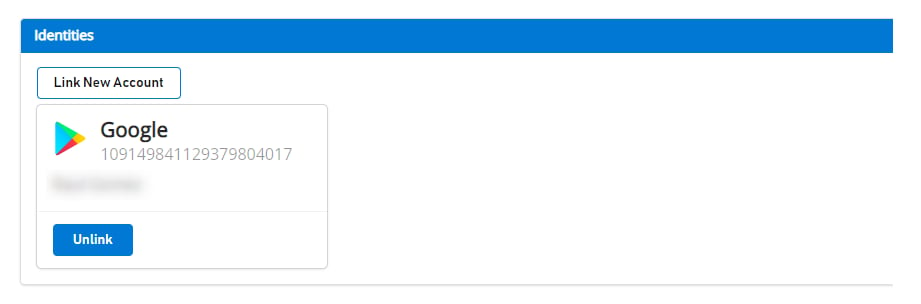
Antes de qualquer migração, um usuário vinculado à Conta do Google aparece assim no [Game Manager](https://developer.playfab.com):
 ### Vincular o perfil do Google Play Games do jogador à conta de jogador do PlayFab
Nesta etapa, você vincula a conta do Google Play Games do jogador à conta existente do PlayFab do jogador, que antes estava vinculada apenas à Conta do Google.
```csharp theme={null}
public void LinkGooglePlayGamesAccount()
{
PlayGamesPlatform.Instance.GetAnotherServerAuthCode(true, (serverAuthCode) => {
var linkRequest = new LinkGooglePlayGamesServicesAccountRequest
{
ServerAuthCode = serverAuthCode
};
PlayFabClientAPI.LinkGooglePlayGamesServicesAccount(linkRequest, OnLinkGooglePlayGamesServicesAccountSuccess, OnLinkGooglePlayGamesServicesAccountFailure);
});
}
private void OnLinkGooglePlayGamesServicesAccountSuccess(LinkGooglePlayGamesServicesAccountResult result)
{
Debug.Log("PlayFab LinkGooglePlayGamesServicesAccount Success");
}
private void OnLinkGooglePlayGamesServicesAccountFailure(PlayFabError error)
{
Debug.Log("PlayFab LinkGooglePlayGamesServicesAccount Failure: " + error.GenerateErrorReport());
}
```
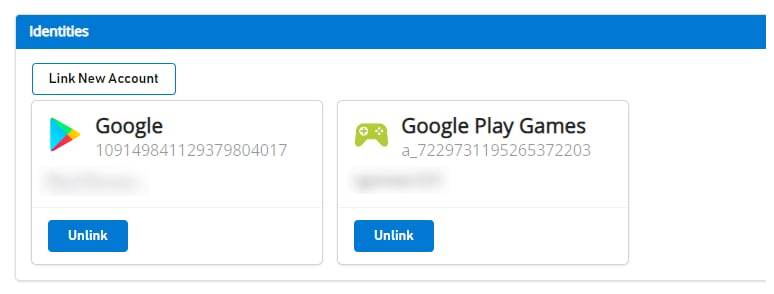
Após esta etapa, o jogador deverá ter ambos os perfis de conta associados no lado do PlayFab e poderá começar a usar a API de autenticação [LoginWithGooglePlayGamesServices](https://learn.microsoft.com/en-us/rest/api/playfab/client/authentication/login-with-google-play-games-services?view=playfab-rest) a partir de agora.
Se você navegar até o [Game Manager](https://developer.playfab.com), verá ambas as contas associadas ao jogador, conforme mostrado:
### Vincular o perfil do Google Play Games do jogador à conta de jogador do PlayFab
Nesta etapa, você vincula a conta do Google Play Games do jogador à conta existente do PlayFab do jogador, que antes estava vinculada apenas à Conta do Google.
```csharp theme={null}
public void LinkGooglePlayGamesAccount()
{
PlayGamesPlatform.Instance.GetAnotherServerAuthCode(true, (serverAuthCode) => {
var linkRequest = new LinkGooglePlayGamesServicesAccountRequest
{
ServerAuthCode = serverAuthCode
};
PlayFabClientAPI.LinkGooglePlayGamesServicesAccount(linkRequest, OnLinkGooglePlayGamesServicesAccountSuccess, OnLinkGooglePlayGamesServicesAccountFailure);
});
}
private void OnLinkGooglePlayGamesServicesAccountSuccess(LinkGooglePlayGamesServicesAccountResult result)
{
Debug.Log("PlayFab LinkGooglePlayGamesServicesAccount Success");
}
private void OnLinkGooglePlayGamesServicesAccountFailure(PlayFabError error)
{
Debug.Log("PlayFab LinkGooglePlayGamesServicesAccount Failure: " + error.GenerateErrorReport());
}
```
Após esta etapa, o jogador deverá ter ambos os perfis de conta associados no lado do PlayFab e poderá começar a usar a API de autenticação [LoginWithGooglePlayGamesServices](https://learn.microsoft.com/en-us/rest/api/playfab/client/authentication/login-with-google-play-games-services?view=playfab-rest) a partir de agora.
Se você navegar até o [Game Manager](https://developer.playfab.com), verá ambas as contas associadas ao jogador, conforme mostrado:
 ### Verificar se o jogador consegue fazer login usando a API LoginWithGooglePlayGamesServices
```csharp theme={null}
public void PFLoginWithGooglePlayGames()
{
PlayGamesPlatform.Instance.GetAnotherServerAuthCode(true, (serverAuthCode) => {
var request = new LoginWithGooglePlayGamesServicesRequest
{
ServerAuthCode = serverAuthCode,
CreateAccount = false,
TitleId = PlayFabSettings.TitleId
};
PlayFabClientAPI.LoginWithGooglePlayGamesServices(request, OnLoginWithGooglePlayGamesServicesSuccess, OnLoginWithGooglePlayGamesServicesFailure);
});
}
private void OnLoginWithGooglePlayGamesServicesSuccess(LoginResult result)
{
Debug.Log("PlayFab LoginWithGooglePlayGamesServices Success.");
}
private void OnLoginWithGooglePlayGamesServicesFailure(PlayFabError error)
{
Debug.Log("PlayFab LoginWithGooglePlayGamesServices Failure: " + error.GenerateErrorReport());
}
```
### (Opcional) Desvincular seu perfil da Conta do Google da conta de jogador do PlayFab
Esta etapa é opcional. No entanto, se você já confirmou que o perfil do Google Play Games Services está vinculado à conta do jogador e que ele consegue fazer login no PlayFab com êxito, provavelmente desejará desvincular quaisquer perfis anteriores da Conta do Google vinculados ao perfil do jogador usando a API [UnlinkGoogleAccount](https://learn.microsoft.com/en-us/rest/api/playfab/client/account-management/unlink-google-account?view=playfab-rest) e passar a usar somente a API [LoginWithGooglePlayGamesServices](https://learn.microsoft.com/en-us/rest/api/playfab/client/authentication/login-with-google-play-games-services?view=playfab-rest).
```csharp theme={null}
public void UnlinkGoogleAccountFromPlayer()
{
PlayFabClientAPI.UnlinkGoogleAccount(new UnlinkGoogleAccountRequest(), OnUnlinkGoogleAccountSuccess, OnUnlinkGoogleAccountFailure);
}
private void OnUnlinkGoogleAccountSuccess(UnlinkGoogleAccountResult result)
{
Debug.Log("PlayFab UnlinkGoogleAccount Success.");
}
private void OnUnlinkGoogleAccountFailure(PlayFabError error)
{
Debug.Log("PlayFab UnlinkGoogleAccount Failure: " + error.GenerateErrorReport());
}
```
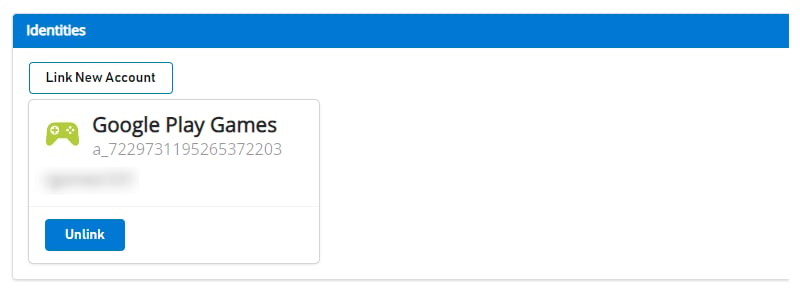
Após a desvinculação, você deverá ver apenas a identidade do Google Play Games no [Game Manager](https://developer.playfab.com) para o jogador:
### Verificar se o jogador consegue fazer login usando a API LoginWithGooglePlayGamesServices
```csharp theme={null}
public void PFLoginWithGooglePlayGames()
{
PlayGamesPlatform.Instance.GetAnotherServerAuthCode(true, (serverAuthCode) => {
var request = new LoginWithGooglePlayGamesServicesRequest
{
ServerAuthCode = serverAuthCode,
CreateAccount = false,
TitleId = PlayFabSettings.TitleId
};
PlayFabClientAPI.LoginWithGooglePlayGamesServices(request, OnLoginWithGooglePlayGamesServicesSuccess, OnLoginWithGooglePlayGamesServicesFailure);
});
}
private void OnLoginWithGooglePlayGamesServicesSuccess(LoginResult result)
{
Debug.Log("PlayFab LoginWithGooglePlayGamesServices Success.");
}
private void OnLoginWithGooglePlayGamesServicesFailure(PlayFabError error)
{
Debug.Log("PlayFab LoginWithGooglePlayGamesServices Failure: " + error.GenerateErrorReport());
}
```
### (Opcional) Desvincular seu perfil da Conta do Google da conta de jogador do PlayFab
Esta etapa é opcional. No entanto, se você já confirmou que o perfil do Google Play Games Services está vinculado à conta do jogador e que ele consegue fazer login no PlayFab com êxito, provavelmente desejará desvincular quaisquer perfis anteriores da Conta do Google vinculados ao perfil do jogador usando a API [UnlinkGoogleAccount](https://learn.microsoft.com/en-us/rest/api/playfab/client/account-management/unlink-google-account?view=playfab-rest) e passar a usar somente a API [LoginWithGooglePlayGamesServices](https://learn.microsoft.com/en-us/rest/api/playfab/client/authentication/login-with-google-play-games-services?view=playfab-rest).
```csharp theme={null}
public void UnlinkGoogleAccountFromPlayer()
{
PlayFabClientAPI.UnlinkGoogleAccount(new UnlinkGoogleAccountRequest(), OnUnlinkGoogleAccountSuccess, OnUnlinkGoogleAccountFailure);
}
private void OnUnlinkGoogleAccountSuccess(UnlinkGoogleAccountResult result)
{
Debug.Log("PlayFab UnlinkGoogleAccount Success.");
}
private void OnUnlinkGoogleAccountFailure(PlayFabError error)
{
Debug.Log("PlayFab UnlinkGoogleAccount Failure: " + error.GenerateErrorReport());
}
```
Após a desvinculação, você deverá ver apenas a identidade do Google Play Games no [Game Manager](https://developer.playfab.com) para o jogador:
 ## Related topics
- [Migrar jogos Unity para a entrada com o Google Play Games](/pt-BR/services/playfab/identity/player-identity/platform-specific-authentication/google-play-games-sign-in-migration.md)
- [Fallback da migração da entrada com o Google para a entrada com o Play Games](/pt-BR/services/playfab/identity/player-identity/platform-specific-authentication/google-play-games-sign-in-migration-fallback.md)
- [Autenticação do PlayFab com a entrada com o Google Play Games no Unity](/pt-BR/services/playfab/identity/player-identity/platform-specific-authentication/google-sign-in-unity.md)
- [Resgate com o Google Marketplace](/pt-BR/services/playfab/economy-monetization/economy-v2/marketplace/marketplace-redemption/google.md)
- [PFAccountManagementClientLinkGooglePlayGamesServicesAccountAsync](/pt-BR/services/playfab/api-references/c/pfaccountmanagement/functions/pfaccountmanagementclientlinkgoogleplaygamesservicesaccountasync.md)
## Related topics
- [Migrar jogos Unity para a entrada com o Google Play Games](/pt-BR/services/playfab/identity/player-identity/platform-specific-authentication/google-play-games-sign-in-migration.md)
- [Fallback da migração da entrada com o Google para a entrada com o Play Games](/pt-BR/services/playfab/identity/player-identity/platform-specific-authentication/google-play-games-sign-in-migration-fallback.md)
- [Autenticação do PlayFab com a entrada com o Google Play Games no Unity](/pt-BR/services/playfab/identity/player-identity/platform-specific-authentication/google-sign-in-unity.md)
- [Resgate com o Google Marketplace](/pt-BR/services/playfab/economy-monetization/economy-v2/marketplace/marketplace-redemption/google.md)
- [PFAccountManagementClientLinkGooglePlayGamesServicesAccountAsync](/pt-BR/services/playfab/api-references/c/pfaccountmanagement/functions/pfaccountmanagementclientlinkgoogleplaygamesservicesaccountasync.md)