> ## Documentation Index
> Fetch the complete documentation index at: https://devdocs.xbox.com/llms.txt
> Use this file to discover all available pages before exploring further.
# Wheel
> Wheel
# Wheel
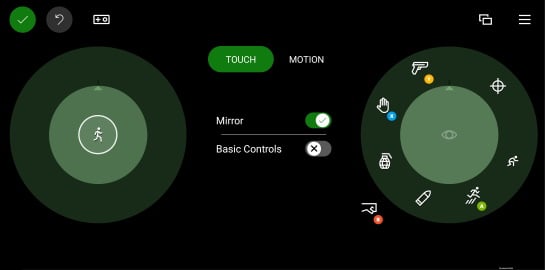
Um conjunto de controles de toque organizados em uma área circular interna e externa.
## Propriedades
[`inner`](/pt-BR/reference/system/touchadaptationkit/layout/game-streaming-touch-inner-wheel) - *object*, *opcional*. Até quatro controles organizados na parte [interna](/pt-BR/reference/system/touchadaptationkit/layout/game-streaming-touch-inner-wheel) da roda.
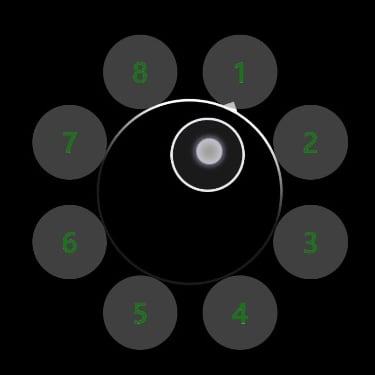
`outer` - *array*, *opcional*. Uma matriz de até 8 slots que podem ser preenchidos por controles e/ou [clusters de controles](/pt-BR/reference/system/touchadaptationkit/layout/game-streaming-touch-control-cluster-outer) posicionados ao redor da área interna da área circular representada pela `wheel`.
* O primeiro slot na área `outer` começa no topo da roda (por volta da posição de 1 hora) e continua no sentido horário.
* Um slot pode ser ignorado com `null`.
* Um [cluster de controles](/pt-BR/reference/system/touchadaptationkit/layout/game-streaming-touch-control-cluster-outer) sempre ocupará 2 dos 8 slots disponíveis: o slot em que é especificado e o seguinte.
## Comentários
O tamanho e a rotação do controle `wheel` podem ser ajustados pelo jogador. Ao personalizar de acordo com suas preferências, o jogador pode alterar tanto o tamanho quanto a rotação das rodas.
 **Dicas**
* A área [`inner`](/pt-BR/reference/system/touchadaptationkit/layout/game-streaming-touch-inner-wheel) deve ser usada para posicionar os controles que devem ser mais acessíveis ao jogador para aquela mão.
* O slot `inner` à esquerda deve ser utilizado para o controle principal de movimento do jogador.
* Os slots `outer` que exigem que o jogador mova a mão para alcançá-los devem ser usados para comandos acessados com pouca frequência.
## Exemplos
##### Exemplo 1: Um exemplo de roda com um joystick no centro e um botão personalizado em cada slot externo
**Dicas**
* A área [`inner`](/pt-BR/reference/system/touchadaptationkit/layout/game-streaming-touch-inner-wheel) deve ser usada para posicionar os controles que devem ser mais acessíveis ao jogador para aquela mão.
* O slot `inner` à esquerda deve ser utilizado para o controle principal de movimento do jogador.
* Os slots `outer` que exigem que o jogador mova a mão para alcançá-los devem ser usados para comandos acessados com pouca frequência.
## Exemplos
##### Exemplo 1: Um exemplo de roda com um joystick no centro e um botão personalizado em cada slot externo
 ```JSON theme={null}
"left": {
"inner": [
{
"type": "joystick",
"axis": {
"input": "axisXY",
"output": "leftJoystick",
"deadzone": {
"threshold": 0.05,
"radial": true
}
}
}
],
"outer" : [
{
"type": "button",
"action": "gamepadX",
"styles": {
"default" : {
"faceImage" : {
"type": "asset",
"value": "one"
},
"background" : {
"type": "color",
"value": "#80808080"
}
}
}
},
{
"type": "button",
"action": "gamepadX",
"styles": {
"default" : {
"faceImage" : {
"type": "asset",
"value": "two"
},
"background" : {
"type": "color",
"value": "#80808080"
}
}
}
},
{
"type": "button",
"action": "gamepadX",
"styles": {
"default" : {
"faceImage" : {
"type": "asset",
"value": "three"
},
"background" : {
"type": "color",
"value": "#80808080"
}
}
}
},
{
"type": "button",
"action": "gamepadX",
"styles": {
"default" : {
"faceImage" : {
"type": "asset",
"value": "four"
},
"background" : {
"type": "color",
"value": "#80808080"
}
}
}
},
{
"type": "button",
"action": "gamepadX",
"styles": {
"default" : {
"faceImage" : {
"type": "asset",
"value": "five"
},
"background" : {
"type": "color",
"value": "#80808080"
}
}
}
},
{
"type": "button",
"action": "gamepadX",
"styles": {
"default" : {
"faceImage" : {
"type": "asset",
"value": "six"
},
"background" : {
"type": "color",
"value": "#80808080"
}
}
}
},
{
"type": "button",
"action": "gamepadX",
"styles": {
"default" : {
"faceImage" : {
"type": "asset",
"value": "seven"
},
"background" : {
"type": "color",
"value": "#80808080"
}
}
}
},
{
"type": "button",
"action": "gamepadX",
"styles": {
"default" : {
"faceImage" : {
"type": "asset",
"value": "eight"
},
"background" : {
"type": "color",
"value": "#80808080"
}
}
}
}
]
}
```
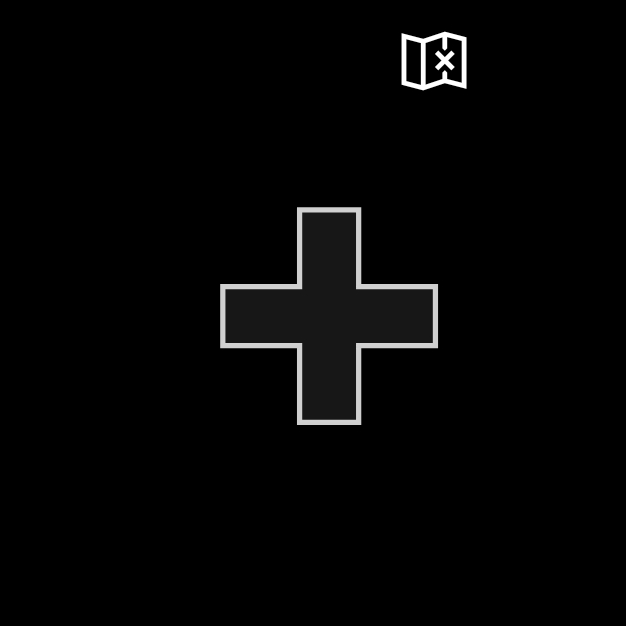
##### Exemplo 2: Um exemplo de roda esquerda com um direcional e um botão de mapa
```JSON theme={null}
"left": {
"inner": [
{
"type": "joystick",
"axis": {
"input": "axisXY",
"output": "leftJoystick",
"deadzone": {
"threshold": 0.05,
"radial": true
}
}
}
],
"outer" : [
{
"type": "button",
"action": "gamepadX",
"styles": {
"default" : {
"faceImage" : {
"type": "asset",
"value": "one"
},
"background" : {
"type": "color",
"value": "#80808080"
}
}
}
},
{
"type": "button",
"action": "gamepadX",
"styles": {
"default" : {
"faceImage" : {
"type": "asset",
"value": "two"
},
"background" : {
"type": "color",
"value": "#80808080"
}
}
}
},
{
"type": "button",
"action": "gamepadX",
"styles": {
"default" : {
"faceImage" : {
"type": "asset",
"value": "three"
},
"background" : {
"type": "color",
"value": "#80808080"
}
}
}
},
{
"type": "button",
"action": "gamepadX",
"styles": {
"default" : {
"faceImage" : {
"type": "asset",
"value": "four"
},
"background" : {
"type": "color",
"value": "#80808080"
}
}
}
},
{
"type": "button",
"action": "gamepadX",
"styles": {
"default" : {
"faceImage" : {
"type": "asset",
"value": "five"
},
"background" : {
"type": "color",
"value": "#80808080"
}
}
}
},
{
"type": "button",
"action": "gamepadX",
"styles": {
"default" : {
"faceImage" : {
"type": "asset",
"value": "six"
},
"background" : {
"type": "color",
"value": "#80808080"
}
}
}
},
{
"type": "button",
"action": "gamepadX",
"styles": {
"default" : {
"faceImage" : {
"type": "asset",
"value": "seven"
},
"background" : {
"type": "color",
"value": "#80808080"
}
}
}
},
{
"type": "button",
"action": "gamepadX",
"styles": {
"default" : {
"faceImage" : {
"type": "asset",
"value": "eight"
},
"background" : {
"type": "color",
"value": "#80808080"
}
}
}
}
]
}
```
##### Exemplo 2: Um exemplo de roda esquerda com um direcional e um botão de mapa
 ```JSON theme={null}
"left": {
"inner": [
{
"type": "directionalPad",
"scale": 1.5
}
],
"outer" : [
{
"type": "button",
"action": "leftBumper",
"styles": {
"default" : {
"faceImage" : {
"type": "icon",
"value": "map"
}
}
}
},
null,
null,
null,
null,
null,
null
]
}
```
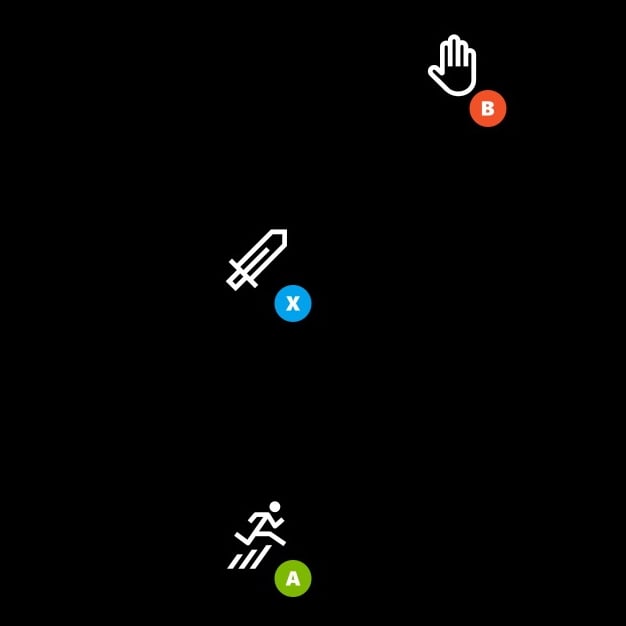
##### Exemplo 3: Um exemplo de roda direita com três botões
Os botões estão alinhados nas posições mais fáceis de alcançar com a mão direita. Os botões na área `outer` estão organizados em um cluster para ter uma área de toque maior.
```JSON theme={null}
"left": {
"inner": [
{
"type": "directionalPad",
"scale": 1.5
}
],
"outer" : [
{
"type": "button",
"action": "leftBumper",
"styles": {
"default" : {
"faceImage" : {
"type": "icon",
"value": "map"
}
}
}
},
null,
null,
null,
null,
null,
null
]
}
```
##### Exemplo 3: Um exemplo de roda direita com três botões
Os botões estão alinhados nas posições mais fáceis de alcançar com a mão direita. Os botões na área `outer` estão organizados em um cluster para ter uma área de toque maior.
 ```JSON theme={null}
"right": {
"inner": [
{
"type": "button",
"action": "gamepadX",
"styles": {
"default": {
"faceImage": {
"type": "icon",
"value": "sword"
}
}
}
}
],
"outer": [
[
{
"type": "button",
"action": "gamepadB",
"styles": {
"default": {
"faceImage": {
"type": "icon",
"value": "interact"
}
}
}
},
null
],
null,
[
{
"type": "button",
"action": "gamepadA",
"styles": {
"default": {
"faceImage": {
"type": "icon",
"value": "jump"
}
}
}
},
null
]
]
}
```
## Confira também
[Referência do Touch Adaptation Kit](/pt-BR/build/core-features/common/game-streaming/game-streaming-touch-touch-adaptation-kit-overview)\
[Layout](/pt-BR/reference/system/touchadaptationkit/layout/game-streaming-touch-layout)
## Related topics
- [GameInputRacingWheelButtons](/reference/input/gameinput/enums/gameinputracingwheelbuttons.md)
- [GameInputRacingWheelAxes](/reference/input/gameinput/enums/gameinputracingwheelaxes.md)
```JSON theme={null}
"right": {
"inner": [
{
"type": "button",
"action": "gamepadX",
"styles": {
"default": {
"faceImage": {
"type": "icon",
"value": "sword"
}
}
}
}
],
"outer": [
[
{
"type": "button",
"action": "gamepadB",
"styles": {
"default": {
"faceImage": {
"type": "icon",
"value": "interact"
}
}
}
},
null
],
null,
[
{
"type": "button",
"action": "gamepadA",
"styles": {
"default": {
"faceImage": {
"type": "icon",
"value": "jump"
}
}
}
},
null
]
]
}
```
## Confira também
[Referência do Touch Adaptation Kit](/pt-BR/build/core-features/common/game-streaming/game-streaming-touch-touch-adaptation-kit-overview)\
[Layout](/pt-BR/reference/system/touchadaptationkit/layout/game-streaming-touch-layout)
## Related topics
- [GameInputRacingWheelButtons](/reference/input/gameinput/enums/gameinputracingwheelbuttons.md)
- [GameInputRacingWheelAxes](/reference/input/gameinput/enums/gameinputracingwheelaxes.md)