> ## Documentation Index
> Fetch the complete documentation index at: https://devdocs.xbox.com/llms.txt
> Use this file to discover all available pages before exploring further.
# Performance 페이지
> Performance 페이지
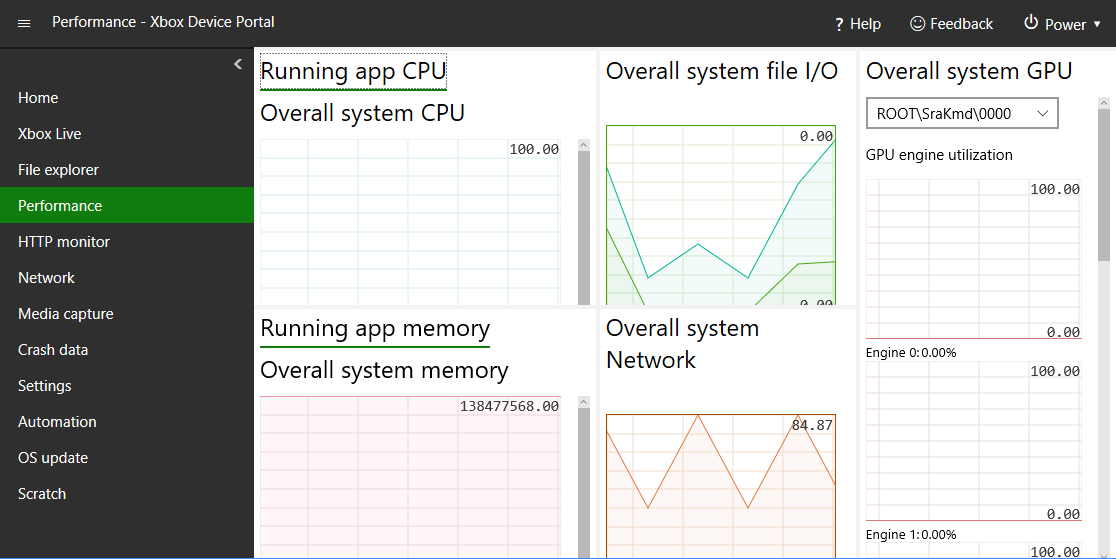
Performance 페이지를 사용하여 다음 스크린샷과 같이 콘솔의 실시간 성능 데이터를 확인할 수 있습니다.
 Performance 페이지에는 다음 창이 있습니다.
## Running app CPU 창
Running app CPU 창은 사용 가능한 전체 CPU 대비 사용률을 보여줍니다.
## Running app memory 창
Running app memory 창은 총 메모리, 사용 중, 사용 가능 커밋됨, 페이지된 메모리, 페이지되지 않은 메모리를 보여줍니다.
## Overall system GPU 창
Overall system GPU 창은 GPU 엔진 사용률과 사용 가능한 전체 GPU 대비 사용률을 보여줍니다.
## Overall system file I/O
Overall system file I/O 창은 IO 읽기 및 쓰기를 보여줍니다.
## Overall system Network 창
Overall system Network 창은 수신 및 송신 네트워크 트래픽을 보여줍니다.
## Related topics
- [XBOX Device Portal (XBOX의 Windows Device Portal)](/ko/tools/tools-console/wdp/index.md)
- [Home 페이지](/ko/tools/tools-console/wdp/windows-device-portal-on-xbox-home.md)
- [Network 페이지](/ko/tools/tools-console/wdp/windows-device-portal-on-xbox-network.md)
- [Scratch 페이지](/ko/tools/tools-console/wdp/windows-device-portal-on-xbox-scratch.md)
- [Crash data 페이지](/ko/tools/tools-console/wdp/windows-device-portal-on-xbox-crash-data.md)
Performance 페이지에는 다음 창이 있습니다.
## Running app CPU 창
Running app CPU 창은 사용 가능한 전체 CPU 대비 사용률을 보여줍니다.
## Running app memory 창
Running app memory 창은 총 메모리, 사용 중, 사용 가능 커밋됨, 페이지된 메모리, 페이지되지 않은 메모리를 보여줍니다.
## Overall system GPU 창
Overall system GPU 창은 GPU 엔진 사용률과 사용 가능한 전체 GPU 대비 사용률을 보여줍니다.
## Overall system file I/O
Overall system file I/O 창은 IO 읽기 및 쓰기를 보여줍니다.
## Overall system Network 창
Overall system Network 창은 수신 및 송신 네트워크 트래픽을 보여줍니다.
## Related topics
- [XBOX Device Portal (XBOX의 Windows Device Portal)](/ko/tools/tools-console/wdp/index.md)
- [Home 페이지](/ko/tools/tools-console/wdp/windows-device-portal-on-xbox-home.md)
- [Network 페이지](/ko/tools/tools-console/wdp/windows-device-portal-on-xbox-network.md)
- [Scratch 페이지](/ko/tools/tools-console/wdp/windows-device-portal-on-xbox-scratch.md)
- [Crash data 페이지](/ko/tools/tools-console/wdp/windows-device-portal-on-xbox-crash-data.md)