> ## Documentation Index
> Fetch the complete documentation index at: https://devdocs.xbox.com/llms.txt
> Use this file to discover all available pages before exploring further.
# File explorer 페이지
> File explorer 페이지
File explorer 페이지를 사용하여 다음 스크린샷과 같이 콘솔의 파일 시스템을 탐색할 수 있습니다.
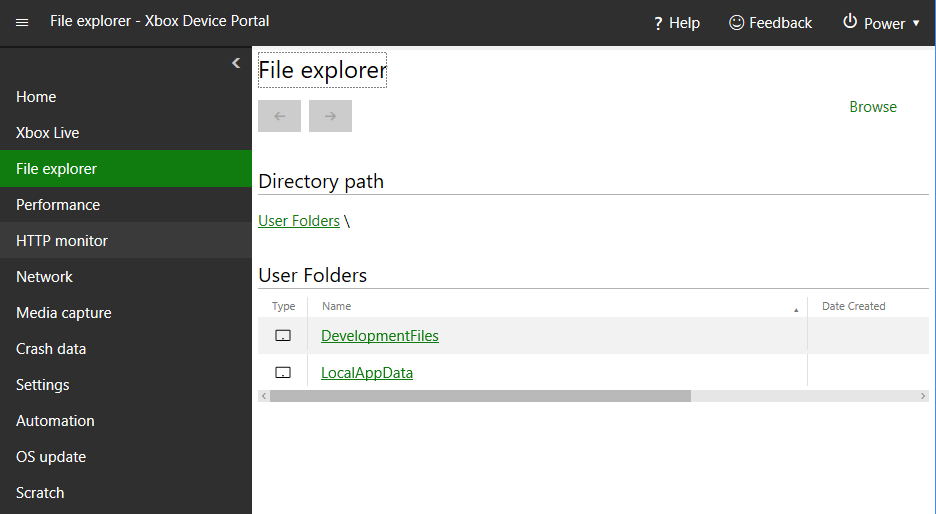 File explorer 페이지에는 다음 창이 있습니다.
## Directory path 창
Directory path 창을 사용하여 현재 보고 있는 디렉터리의 경로를 확인합니다.
## Directory contents 창
Directory contents 창을 사용하여 현재 보고 있는 디렉터리의 내용을 확인합니다.
## Upload a file to this directory 창
Upload a file to this directory 창을 사용하여 개발 PC에서 현재 보고 있는 디렉터리로 파일을 업로드합니다.
## Related topics
- [XBOX Device Portal (XBOX의 Windows Device Portal)](/ko/tools/tools-console/wdp/index.md)
- [Performance 페이지](/ko/tools/tools-console/wdp/windows-device-portal-on-xbox-performance.md)
- [XBOX Gaming Explorer](/ko/tools/tools-console/visualstudio/xbox-gaming-explorer.md)
- [Data Explorer 빠른 시작](/ko/services/playfab/data-analytics/learn-data/data-explorer/quickstart.md)
- [Home 페이지](/ko/tools/tools-console/wdp/windows-device-portal-on-xbox-home.md)
File explorer 페이지에는 다음 창이 있습니다.
## Directory path 창
Directory path 창을 사용하여 현재 보고 있는 디렉터리의 경로를 확인합니다.
## Directory contents 창
Directory contents 창을 사용하여 현재 보고 있는 디렉터리의 내용을 확인합니다.
## Upload a file to this directory 창
Upload a file to this directory 창을 사용하여 개발 PC에서 현재 보고 있는 디렉터리로 파일을 업로드합니다.
## Related topics
- [XBOX Device Portal (XBOX의 Windows Device Portal)](/ko/tools/tools-console/wdp/index.md)
- [Performance 페이지](/ko/tools/tools-console/wdp/windows-device-portal-on-xbox-performance.md)
- [XBOX Gaming Explorer](/ko/tools/tools-console/visualstudio/xbox-gaming-explorer.md)
- [Data Explorer 빠른 시작](/ko/services/playfab/data-analytics/learn-data/data-explorer/quickstart.md)
- [Home 페이지](/ko/tools/tools-console/wdp/windows-device-portal-on-xbox-home.md)