> ## Documentation Index
> Fetch the complete documentation index at: https://devdocs.xbox.com/llms.txt
> Use this file to discover all available pages before exploring further.
# 빠른 시작 - C#용 PlayFab Client 라이브러리
> PlayFabAllSDK NuGet 패키지를 설치하고 Visual Studio를 사용하여 C# .NET Core 콘솔 앱에서 첫 번째 PlayFab 클라이언트 API 호출을 수행합니다.
# 빠른 시작: C#용 PlayFab Client 라이브러리
C#용 PlayFab Client 라이브러리를 시작하세요. 패키지를 설치하고 기본 작업에 대한 예제 코드를 시도하는 단계를 따르세요.
이 빠른 시작은 C#용 Client 라이브러리를 사용하여 첫 번째 PlayFab API 호출을 수행하는 데 도움이 됩니다.
[API 참조 문서](/services/playfab/api-references)
## 요구 사항
* [PlayFab 개발자 계정](https://developer.playfab.com).
* [Visual Studio](https://visualstudio.microsoft.com/) 설치.
## CSharp 프로젝트 설정
설치
1. Visual Studio를 열고 **새 프로젝트 만들기**를 선택합니다.
2. C#의 경우 \*\*콘솔 앱 (.Net Core)\*\*을 선택합니다.
3. **PlayFabAllSDK**용 NuGet 패키지를 설치합니다.
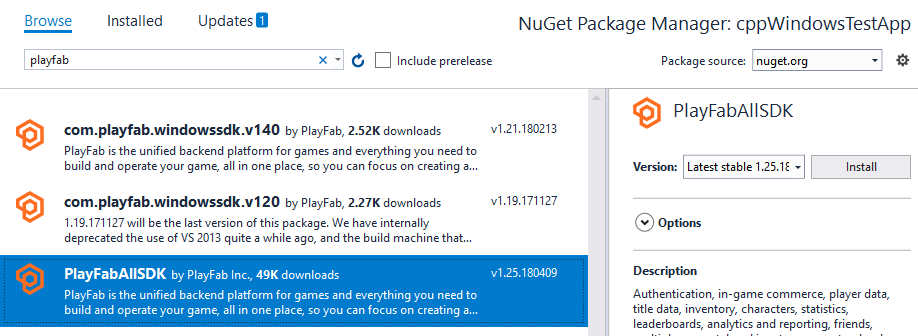 이 시점에서 프로젝트를 성공적으로 컴파일할 수 있어야 합니다. 출력 창에는 다음 예제와 같은 내용이 포함되어야 합니다.
```output theme={null}
1>------ Build started: Project: CSharpGettingStarted, Configuration: Debug Any CPU ------
1> CSharpGettingStarted -> c:\dev\CSharpGettingStarted\CSharpGettingStarted\bin\Debug\CSharpGettingStarted.exe
========== Build: 1 succeeded, 0 failed, 0 up-to-date, 0 skipped ==========
```
## 첫 번째 API 호출 설정
이 가이드는 첫 번째 PlayFab API 호출을 수행하는 데 필요한 최소 단계를 제공합니다. 확인은 콘솔 인쇄를 통해 수행됩니다.
새 프로젝트에는 Visual Studio에서 자동으로 만든 Program.cs라는 파일이 포함되어야 합니다. 해당 파일을 열고 내용을 아래에 표시된 예제의 코드로 바꿉니다(코드를 붙여넣은 후 파일을 새로 고쳐야 볼 수 있을 수 있음). API 호출의 확인은 콘솔 출력에 작성된 메시지를 사용하여 수행됩니다.
```csharp theme={null}
using System;
using System.Threading;
using System.Threading.Tasks;
using PlayFab;
using PlayFab.ClientModels;
public static class Program
{
private static bool _running = true;
static void Main(string[] args)
{
PlayFabSettings.staticSettings.TitleId = "144"; // Please change this value to your own titleId from PlayFab Game Manager
var request = new LoginWithCustomIDRequest { CustomId = "GettingStartedGuide", CreateAccount = true };
var loginTask = PlayFabClientAPI.LoginWithCustomIDAsync(request);
// If you want a synchronous result, you can call loginTask.Wait() - Note, this will halt the program until the function returns
while (_running)
{
if (loginTask.IsCompleted) // You would probably want a more sophisticated way of tracking pending async API calls in a real game
{
OnLoginComplete(loginTask);
}
// Presumably this would be your main game loop, doing other things
Thread.Sleep(1);
}
Console.WriteLine("Done! Press any key to close");
Console.ReadKey(); // This halts the program and waits for the user
}
private static void OnLoginComplete(Task> taskResult)
{
var apiError = taskResult.Result.Error;
var apiResult = taskResult.Result.Result;
if (apiError != null)
{
Console.ForegroundColor = ConsoleColor.Red; // Make the error more visible
Console.WriteLine("Something went wrong with your first API call. :(");
Console.WriteLine("Here's some debug information:");
Console.WriteLine(PlayFabUtil.GenerateErrorReport(apiError));
Console.ForegroundColor = ConsoleColor.Gray; // Reset to normal
}
else if (apiResult != null)
{
Console.WriteLine("Congratulations, you made your first successful API call!");
}
_running = false; // Because this is just an example, successful login triggers the end of the program
}
}
```
## 마무리 및 실행
이 프로그램을 실행하면 콘솔에 다음 출력이 표시됩니다
"Congratulations, you made your first successful API call! Done! Press any key to close."
* 이 시점에서 다른 API 호출을 시작하고 게임을 빌드할 수 있습니다.
* Admin 유틸리티를 빌드하려면 `{CSharpSdk}/PlayFabClientSDK/sources`에 있는 PlayFab CSharpSdk zip 파일의 대체 소스 파일을 참조하세요.
사용 가능한 모든 클라이언트 API 호출 목록 또는 기타 여러 아티클은 [PlayFab API 참조](/services/playfab/api-references)를 참조하세요.
## Related topics
- [Unity 빠른 시작](/ko/services/playfab/sdks/unity3d/quickstart.md)
- [Unreal Engine 빠른 시작](/ko/services/playfab/sdks/unreal/quickstart.md)
- [NodeJS 빠른 시작](/ko/services/playfab/sdks/nodejs/quickstart.md)
- [네이티브 및 Phaser용 JavaScript 빠른 시작](/ko/services/playfab/sdks/javascript/quickstart.md)
- [Postman용 PlayFab REST API 컬렉션 빠른 시작](/ko/services/playfab/sdks/postman/postman-quickstart.md)
이 시점에서 프로젝트를 성공적으로 컴파일할 수 있어야 합니다. 출력 창에는 다음 예제와 같은 내용이 포함되어야 합니다.
```output theme={null}
1>------ Build started: Project: CSharpGettingStarted, Configuration: Debug Any CPU ------
1> CSharpGettingStarted -> c:\dev\CSharpGettingStarted\CSharpGettingStarted\bin\Debug\CSharpGettingStarted.exe
========== Build: 1 succeeded, 0 failed, 0 up-to-date, 0 skipped ==========
```
## 첫 번째 API 호출 설정
이 가이드는 첫 번째 PlayFab API 호출을 수행하는 데 필요한 최소 단계를 제공합니다. 확인은 콘솔 인쇄를 통해 수행됩니다.
새 프로젝트에는 Visual Studio에서 자동으로 만든 Program.cs라는 파일이 포함되어야 합니다. 해당 파일을 열고 내용을 아래에 표시된 예제의 코드로 바꿉니다(코드를 붙여넣은 후 파일을 새로 고쳐야 볼 수 있을 수 있음). API 호출의 확인은 콘솔 출력에 작성된 메시지를 사용하여 수행됩니다.
```csharp theme={null}
using System;
using System.Threading;
using System.Threading.Tasks;
using PlayFab;
using PlayFab.ClientModels;
public static class Program
{
private static bool _running = true;
static void Main(string[] args)
{
PlayFabSettings.staticSettings.TitleId = "144"; // Please change this value to your own titleId from PlayFab Game Manager
var request = new LoginWithCustomIDRequest { CustomId = "GettingStartedGuide", CreateAccount = true };
var loginTask = PlayFabClientAPI.LoginWithCustomIDAsync(request);
// If you want a synchronous result, you can call loginTask.Wait() - Note, this will halt the program until the function returns
while (_running)
{
if (loginTask.IsCompleted) // You would probably want a more sophisticated way of tracking pending async API calls in a real game
{
OnLoginComplete(loginTask);
}
// Presumably this would be your main game loop, doing other things
Thread.Sleep(1);
}
Console.WriteLine("Done! Press any key to close");
Console.ReadKey(); // This halts the program and waits for the user
}
private static void OnLoginComplete(Task> taskResult)
{
var apiError = taskResult.Result.Error;
var apiResult = taskResult.Result.Result;
if (apiError != null)
{
Console.ForegroundColor = ConsoleColor.Red; // Make the error more visible
Console.WriteLine("Something went wrong with your first API call. :(");
Console.WriteLine("Here's some debug information:");
Console.WriteLine(PlayFabUtil.GenerateErrorReport(apiError));
Console.ForegroundColor = ConsoleColor.Gray; // Reset to normal
}
else if (apiResult != null)
{
Console.WriteLine("Congratulations, you made your first successful API call!");
}
_running = false; // Because this is just an example, successful login triggers the end of the program
}
}
```
## 마무리 및 실행
이 프로그램을 실행하면 콘솔에 다음 출력이 표시됩니다
"Congratulations, you made your first successful API call! Done! Press any key to close."
* 이 시점에서 다른 API 호출을 시작하고 게임을 빌드할 수 있습니다.
* Admin 유틸리티를 빌드하려면 `{CSharpSdk}/PlayFabClientSDK/sources`에 있는 PlayFab CSharpSdk zip 파일의 대체 소스 파일을 참조하세요.
사용 가능한 모든 클라이언트 API 호출 목록 또는 기타 여러 아티클은 [PlayFab API 참조](/services/playfab/api-references)를 참조하세요.
## Related topics
- [Unity 빠른 시작](/ko/services/playfab/sdks/unity3d/quickstart.md)
- [Unreal Engine 빠른 시작](/ko/services/playfab/sdks/unreal/quickstart.md)
- [NodeJS 빠른 시작](/ko/services/playfab/sdks/nodejs/quickstart.md)
- [네이티브 및 Phaser용 JavaScript 빠른 시작](/ko/services/playfab/sdks/javascript/quickstart.md)
- [Postman용 PlayFab REST API 컬렉션 빠른 시작](/ko/services/playfab/sdks/postman/postman-quickstart.md)