> ## Documentation Index
> Fetch the complete documentation index at: https://devdocs.xbox.com/llms.txt
> Use this file to discover all available pages before exploring further.
# Economy 가격 미터
> PlayFab Economy Catalog 청구 가능한 미터, 측정하는 액션, 그리고 카탈로그 사용량이 PlayFab 청구서 요금으로 어떻게 전환되는지 이해하세요.
# Catalog 가격 미터
PlayFab Economy V2 Catalog API에는 두 가지 범주의 소비 기반 미터가 있습니다 - Requests와 Storage. 이 페이지에서는 측정 및 계산 방법을 포함하여 이러한 미터의 개요와 정의를 설명합니다. PlayFab의 가격 모델에 대한 자세한 내용은 [PlayFab 가격 개요](/services/playfab/pricing/pricing-overview)를 참조하세요.
PlayFab Economy V2의 일반적인 사용은 PlayStream Events와 같은 다른 PlayFab 미터에 기여할 수 있습니다.
## Requests
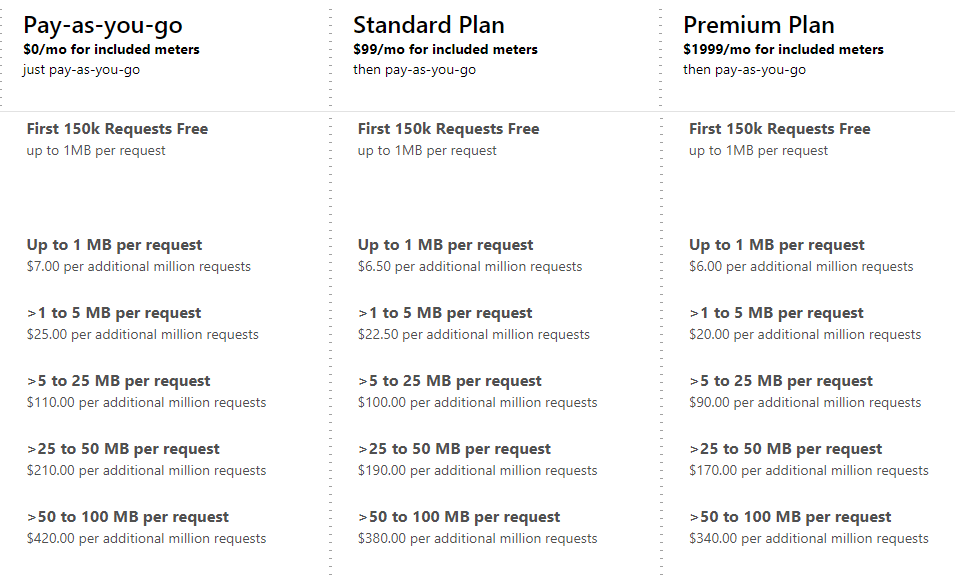
request 미터는 UGC API 호출 또는 CDN 요청의 응답 크기에 의해 결정됩니다. 세 가지 PlayFab 요금제 각각에 대해 크기에 따라 다섯 가지 다른 요율이 있습니다:
 100MB 이상의 콘텐츠를 저장할 계획이라면 저희에게 문의하세요.
## Storage
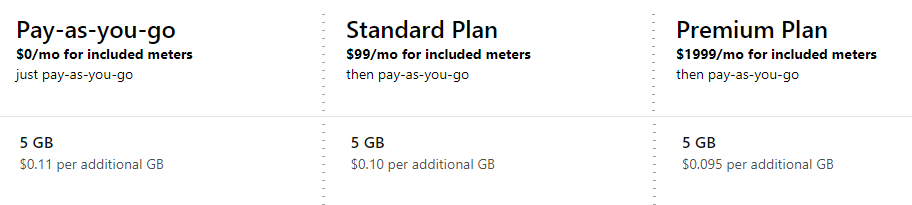
storage 미터는 모든 콘텐츠(파일과 이미지 모두)의 총 크기에 의해 결정됩니다. 모든 요금제에 5GB가 포함되어 있습니다. 더 많은 저장소를 위해서는 요금제에 따라 이 미터에 대한 세 가지 다른 요율이 있습니다.
100MB 이상의 콘텐츠를 저장할 계획이라면 저희에게 문의하세요.
## Storage
storage 미터는 모든 콘텐츠(파일과 이미지 모두)의 총 크기에 의해 결정됩니다. 모든 요금제에 5GB가 포함되어 있습니다. 더 많은 저장소를 위해서는 요금제에 따라 이 미터에 대한 세 가지 다른 요율이 있습니다.
 이 미터는 게시되지 않은 항목 및 공개 카탈로그를 통해 볼 수 없는 항목과 관련된 콘텐츠를 포함합니다. 항목을 공개 카탈로그에서 숨길 수 있는 방법에 대한 자세한 내용은 [Catalog Item Status](/services/playfab/economy-monetization/economy-v2/catalog/item-status)를 참조하세요.
## 포함된 미터
선택한 요금제와 관계없이 모든 PlayFab 고객에게 포함된 미터 세트가 있습니다:
| 미터 | 포함된 양 |
| ---------------- | :-----------: |
| 최대 1 MB Requests | 150k requests |
| Storage | 5 GB |
개발 모드의 스튜디오는 UGC를 활성화하기 전에 결제 정보를 입력해야 하며, 초과분은 설명된 요율에 따라 청구됩니다.
## 예시 청구서
예시 고객의 Catalog 사용량을 살펴보고 월별 청구서를 살펴보겠습니다. 이 예시 타이틀은 *Pay-as-you-go* 요금제에 있습니다. 단일 사용자로 시작하겠습니다. 이 사용자는 콘텐츠 검색 페이지로 이동하여 'dinosaurs'를 검색합니다. 각각 제목과 썸네일 이미지가 있는 10개의 결과가 사용자에게 표시됩니다. 사용자는 콘텐츠 하나를 선택하고, 설명, 등급, 그리고 4개의 추가 이미지를 포함한 전체 메타데이터가 표시됩니다. 사용자는 콘텐츠가 흥미로워 보인다고 판단하여 다운로드 버튼을 선택합니다.
이제 이 시나리오가 어떤 미터 소비를 유발했는지 살펴보겠습니다:
* 이 사용자는 콘텐츠 검색 페이지로 이동하여 'dinosaurs'를 검색합니다. 각각 제목과 썸네일 이미지가 있는 10개의 결과가 사용자에게 표시됩니다.
* `SearchItems` 호출은 기본 메타데이터가 있는 10개 항목을 반환하여 단일 "**최대 1 MB Request**"가 발생했습니다.
* 10개 썸네일 각각이 CDN에서 요청됩니다. 5개는 1MB보다 약간 작고 5개는 1MB보다 약간 크다고 가정해 봅시다. 이 시나리오는 5개의 "**최대 1 MB Requests**"와 4개의 "**최대 5 MB Requests**"가 됩니다.
* 사용자는 콘텐츠 하나를 선택하고, 설명, 등급, 그리고 4개의 추가 이미지를 포함한 전체 메타데이터가 표시됩니다.
* `GetItem` 호출은 전체 메타데이터가 있는 단일 항목을 반환하여 단일 **최대 1 MB Request**가 발생했습니다.
* `GetRatings` 호출은 단일 항목의 등급을 반환하여 단일 **최대 1 MB Request**가 발생했습니다.
* 4개 이미지 각각이 CDN에서 요청됩니다. 고품질 이미지로서 2개 이미지는 5MB \_미만\_이고 2개 이미지는 5MB \_초과\_입니다. 이 시나리오는 2개의 "**최대 5 MB Requests**"와 2개의 "**최대 25 MB Requests**"가 됩니다.
* 사용자는 콘텐츠가 흥미로워 보인다고 판단하여 다운로드 버튼을 선택합니다.
* CDN에서 콘텐츠가 요청됩니다. 큰 콘텐츠로서 20MB입니다. 이 시나리오는 단일 **최대 25 MB Requests**가 됩니다.
| 미터 | 요청 수 |
| --------- | ---- |
| 최대 1 MB | 8 |
| 최대 5 MB | 7 |
| 최대 25 MB | 3 |
| 최대 50 MB | 0 |
| 최대 100 MB | 0 |
다음으로, 이 타이틀에는 30일 월간(300,000회) 하루에 한 번 이 시나리오를 수행하는 10,000명의 사용자가 있습니다. 이는 단일 사용자가 평균 9초마다 한 번씩 수행하는 것과 거의 같습니다. 이 시나리오는 다음 미터 소비를 초래합니다:
| 미터 | 요청 수 |
| --------- | ---- |
| 최대 1 MB | 240만 |
| 최대 5 MB | 210만 |
| 최대 25 MB | 90만 |
| 최대 50 MB | 0 |
| 최대 100 MB | 0 |
한 타이틀이 스튜디오에서 UGC를 사용하는 유일한 타이틀이고, 타이틀이 월말에 저장된 UGC가 4GB(포함된 5GB로 완전히 커버되므로 **Storage** 미터에 요금이 발생하지 않음)라면, 최종 UGC 청구서는 다음과 같습니다:
이 미터는 게시되지 않은 항목 및 공개 카탈로그를 통해 볼 수 없는 항목과 관련된 콘텐츠를 포함합니다. 항목을 공개 카탈로그에서 숨길 수 있는 방법에 대한 자세한 내용은 [Catalog Item Status](/services/playfab/economy-monetization/economy-v2/catalog/item-status)를 참조하세요.
## 포함된 미터
선택한 요금제와 관계없이 모든 PlayFab 고객에게 포함된 미터 세트가 있습니다:
| 미터 | 포함된 양 |
| ---------------- | :-----------: |
| 최대 1 MB Requests | 150k requests |
| Storage | 5 GB |
개발 모드의 스튜디오는 UGC를 활성화하기 전에 결제 정보를 입력해야 하며, 초과분은 설명된 요율에 따라 청구됩니다.
## 예시 청구서
예시 고객의 Catalog 사용량을 살펴보고 월별 청구서를 살펴보겠습니다. 이 예시 타이틀은 *Pay-as-you-go* 요금제에 있습니다. 단일 사용자로 시작하겠습니다. 이 사용자는 콘텐츠 검색 페이지로 이동하여 'dinosaurs'를 검색합니다. 각각 제목과 썸네일 이미지가 있는 10개의 결과가 사용자에게 표시됩니다. 사용자는 콘텐츠 하나를 선택하고, 설명, 등급, 그리고 4개의 추가 이미지를 포함한 전체 메타데이터가 표시됩니다. 사용자는 콘텐츠가 흥미로워 보인다고 판단하여 다운로드 버튼을 선택합니다.
이제 이 시나리오가 어떤 미터 소비를 유발했는지 살펴보겠습니다:
* 이 사용자는 콘텐츠 검색 페이지로 이동하여 'dinosaurs'를 검색합니다. 각각 제목과 썸네일 이미지가 있는 10개의 결과가 사용자에게 표시됩니다.
* `SearchItems` 호출은 기본 메타데이터가 있는 10개 항목을 반환하여 단일 "**최대 1 MB Request**"가 발생했습니다.
* 10개 썸네일 각각이 CDN에서 요청됩니다. 5개는 1MB보다 약간 작고 5개는 1MB보다 약간 크다고 가정해 봅시다. 이 시나리오는 5개의 "**최대 1 MB Requests**"와 4개의 "**최대 5 MB Requests**"가 됩니다.
* 사용자는 콘텐츠 하나를 선택하고, 설명, 등급, 그리고 4개의 추가 이미지를 포함한 전체 메타데이터가 표시됩니다.
* `GetItem` 호출은 전체 메타데이터가 있는 단일 항목을 반환하여 단일 **최대 1 MB Request**가 발생했습니다.
* `GetRatings` 호출은 단일 항목의 등급을 반환하여 단일 **최대 1 MB Request**가 발생했습니다.
* 4개 이미지 각각이 CDN에서 요청됩니다. 고품질 이미지로서 2개 이미지는 5MB \_미만\_이고 2개 이미지는 5MB \_초과\_입니다. 이 시나리오는 2개의 "**최대 5 MB Requests**"와 2개의 "**최대 25 MB Requests**"가 됩니다.
* 사용자는 콘텐츠가 흥미로워 보인다고 판단하여 다운로드 버튼을 선택합니다.
* CDN에서 콘텐츠가 요청됩니다. 큰 콘텐츠로서 20MB입니다. 이 시나리오는 단일 **최대 25 MB Requests**가 됩니다.
| 미터 | 요청 수 |
| --------- | ---- |
| 최대 1 MB | 8 |
| 최대 5 MB | 7 |
| 최대 25 MB | 3 |
| 최대 50 MB | 0 |
| 최대 100 MB | 0 |
다음으로, 이 타이틀에는 30일 월간(300,000회) 하루에 한 번 이 시나리오를 수행하는 10,000명의 사용자가 있습니다. 이는 단일 사용자가 평균 9초마다 한 번씩 수행하는 것과 거의 같습니다. 이 시나리오는 다음 미터 소비를 초래합니다:
| 미터 | 요청 수 |
| --------- | ---- |
| 최대 1 MB | 240만 |
| 최대 5 MB | 210만 |
| 최대 25 MB | 90만 |
| 최대 50 MB | 0 |
| 최대 100 MB | 0 |
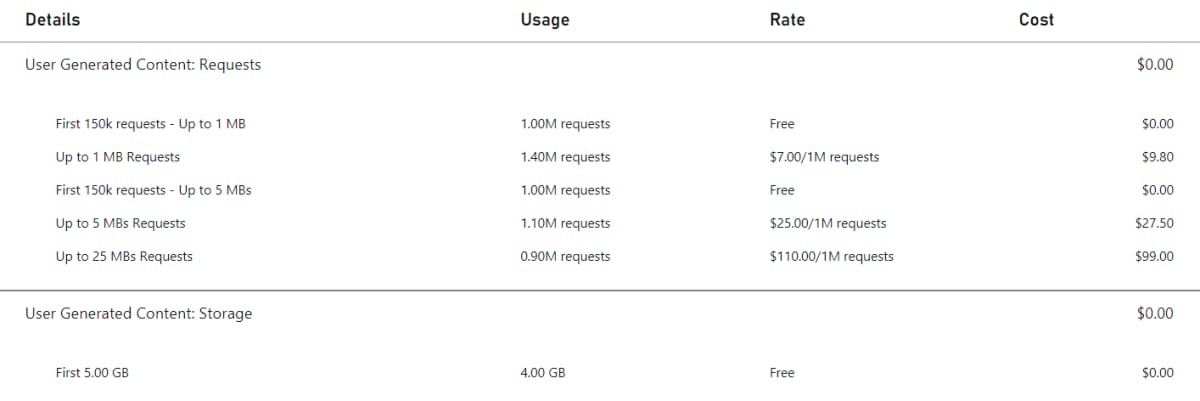
한 타이틀이 스튜디오에서 UGC를 사용하는 유일한 타이틀이고, 타이틀이 월말에 저장된 UGC가 4GB(포함된 5GB로 완전히 커버되므로 **Storage** 미터에 요금이 발생하지 않음)라면, 최종 UGC 청구서는 다음과 같습니다:
 ## 리소스
* 미터당 가장 최신 가격 뷰는 [PlayFab pricing](https://playfab.com/pricing/)을 참조하세요
* 게임에 대한 미터 사용량과 비용을 가장 낮은 비율로 유지하는 방법을 배우려면 [소비 모범 사례](/services/playfab/pricing/consumption-best-practices)를 참조하세요
## 관련 API
다음 API는 Economy Catalog 미터가 증가하도록 합니다:
* [CreateDraftItem](https://learn.microsoft.com/en-us/rest/api/services/playfab/economy/catalog/create-draft-item)
* [CreateUploadUrls](https://learn.microsoft.com/en-us/rest/api/services/playfab/economy/catalog/create-upload-urls)
* [DeleteEntityItemReviews](https://learn.microsoft.com/en-us/rest/api/services/playfab/economy/catalog/delete-entity-item-reviews)
* [DeleteItem](https://learn.microsoft.com/en-us/rest/api/services/playfab/economy/catalog/delete-item)
* [GetCatalogConfig](https://learn.microsoft.com/en-us/rest/api/services/playfab/economy/catalog/get-catalog-config)
* [GetDraftItem](https://learn.microsoft.com/en-us/rest/api/services/playfab/economy/catalog/get-draft-item)
* [GetEntityDraftItems](https://learn.microsoft.com/en-us/rest/api/services/playfab/economy/catalog/get-entity-draft-items)
* [GetEntityItemReview](https://learn.microsoft.com/en-us/rest/api/services/playfab/economy/catalog/get-entity-item-review)
* [GetItem](https://learn.microsoft.com/en-us/rest/api/services/playfab/economy/catalog/get-item)
* [GetItemModerationState](https://learn.microsoft.com/en-us/rest/api/services/playfab/economy/catalog/get-item-moderation-state)
* [GetItemPublishStatus](https://learn.microsoft.com/en-us/rest/api/services/playfab/economy/catalog/get-item-publish-status)
* [GetItemReviews](https://learn.microsoft.com/en-us/rest/api/services/playfab/economy/catalog/get-item-reviews)
* [GetItemReviewSummary](https://learn.microsoft.com/en-us/rest/api/services/playfab/economy/catalog/get-item-review-summary)
* [GetItems](https://learn.microsoft.com/en-us/rest/api/services/playfab/economy/catalog/get-items)
* [PublishDraftItem](https://learn.microsoft.com/en-us/rest/api/services/playfab/economy/catalog/publish-draft-item)
* [ReportItem](https://learn.microsoft.com/en-us/rest/api/services/playfab/economy/catalog/report-item)
* [ReportItemReview](https://learn.microsoft.com/en-us/rest/api/services/playfab/economy/catalog/report-item-review)
* [ReviewItem](https://learn.microsoft.com/en-us/rest/api/services/playfab/economy/catalog/review-item)
* [SearchItems](https://learn.microsoft.com/en-us/rest/api/services/playfab/economy/catalog/search-items)
* [SetItemModerationState](https://learn.microsoft.com/en-us/rest/api/services/playfab/economy/catalog/set-item-moderation-state)
* [SubmitItemReviewVote](https://learn.microsoft.com/en-us/rest/api/services/playfab/economy/catalog/submit-item-review-vote)
* [TakedownItemReviews](https://learn.microsoft.com/en-us/rest/api/services/playfab/economy/catalog/takedown-item-reviews)
* [UpdateCatalogConfig](https://learn.microsoft.com/en-us/rest/api/services/playfab/economy/catalog/update-catalog-config)
* [UpdateDraftItem](https://learn.microsoft.com/en-us/rest/api/services/playfab/economy/catalog/update-draft-item)
CDN에 대한 모든 호출도 Economy Catalog 미터가 증가하도록 합니다
## Related topics
- [Economy v2 실물 화폐 가격](/ko/services/playfab/economy-monetization/economy-v2/catalog/real-money-prices.md)
- [Economy v2의 실제 통화 가격 추적](/ko/services/playfab/economy-monetization/economy-v2/tutorials/real-money-price-tracking.md)
- [PlayFab Economy v2 문서](/ko/services/playfab/economy-monetization/index.md)
- [PlayFab 가격 책정 개요](/ko/services/playfab/pricing/pricing-overview.md)
- [Inventory Reads 미터 API 설명](/ko/services/playfab/pricing/meters/economy-reads.md)
## 리소스
* 미터당 가장 최신 가격 뷰는 [PlayFab pricing](https://playfab.com/pricing/)을 참조하세요
* 게임에 대한 미터 사용량과 비용을 가장 낮은 비율로 유지하는 방법을 배우려면 [소비 모범 사례](/services/playfab/pricing/consumption-best-practices)를 참조하세요
## 관련 API
다음 API는 Economy Catalog 미터가 증가하도록 합니다:
* [CreateDraftItem](https://learn.microsoft.com/en-us/rest/api/services/playfab/economy/catalog/create-draft-item)
* [CreateUploadUrls](https://learn.microsoft.com/en-us/rest/api/services/playfab/economy/catalog/create-upload-urls)
* [DeleteEntityItemReviews](https://learn.microsoft.com/en-us/rest/api/services/playfab/economy/catalog/delete-entity-item-reviews)
* [DeleteItem](https://learn.microsoft.com/en-us/rest/api/services/playfab/economy/catalog/delete-item)
* [GetCatalogConfig](https://learn.microsoft.com/en-us/rest/api/services/playfab/economy/catalog/get-catalog-config)
* [GetDraftItem](https://learn.microsoft.com/en-us/rest/api/services/playfab/economy/catalog/get-draft-item)
* [GetEntityDraftItems](https://learn.microsoft.com/en-us/rest/api/services/playfab/economy/catalog/get-entity-draft-items)
* [GetEntityItemReview](https://learn.microsoft.com/en-us/rest/api/services/playfab/economy/catalog/get-entity-item-review)
* [GetItem](https://learn.microsoft.com/en-us/rest/api/services/playfab/economy/catalog/get-item)
* [GetItemModerationState](https://learn.microsoft.com/en-us/rest/api/services/playfab/economy/catalog/get-item-moderation-state)
* [GetItemPublishStatus](https://learn.microsoft.com/en-us/rest/api/services/playfab/economy/catalog/get-item-publish-status)
* [GetItemReviews](https://learn.microsoft.com/en-us/rest/api/services/playfab/economy/catalog/get-item-reviews)
* [GetItemReviewSummary](https://learn.microsoft.com/en-us/rest/api/services/playfab/economy/catalog/get-item-review-summary)
* [GetItems](https://learn.microsoft.com/en-us/rest/api/services/playfab/economy/catalog/get-items)
* [PublishDraftItem](https://learn.microsoft.com/en-us/rest/api/services/playfab/economy/catalog/publish-draft-item)
* [ReportItem](https://learn.microsoft.com/en-us/rest/api/services/playfab/economy/catalog/report-item)
* [ReportItemReview](https://learn.microsoft.com/en-us/rest/api/services/playfab/economy/catalog/report-item-review)
* [ReviewItem](https://learn.microsoft.com/en-us/rest/api/services/playfab/economy/catalog/review-item)
* [SearchItems](https://learn.microsoft.com/en-us/rest/api/services/playfab/economy/catalog/search-items)
* [SetItemModerationState](https://learn.microsoft.com/en-us/rest/api/services/playfab/economy/catalog/set-item-moderation-state)
* [SubmitItemReviewVote](https://learn.microsoft.com/en-us/rest/api/services/playfab/economy/catalog/submit-item-review-vote)
* [TakedownItemReviews](https://learn.microsoft.com/en-us/rest/api/services/playfab/economy/catalog/takedown-item-reviews)
* [UpdateCatalogConfig](https://learn.microsoft.com/en-us/rest/api/services/playfab/economy/catalog/update-catalog-config)
* [UpdateDraftItem](https://learn.microsoft.com/en-us/rest/api/services/playfab/economy/catalog/update-draft-item)
CDN에 대한 모든 호출도 Economy Catalog 미터가 증가하도록 합니다
## Related topics
- [Economy v2 실물 화폐 가격](/ko/services/playfab/economy-monetization/economy-v2/catalog/real-money-prices.md)
- [Economy v2의 실제 통화 가격 추적](/ko/services/playfab/economy-monetization/economy-v2/tutorials/real-money-price-tracking.md)
- [PlayFab Economy v2 문서](/ko/services/playfab/economy-monetization/index.md)
- [PlayFab 가격 책정 개요](/ko/services/playfab/pricing/pricing-overview.md)
- [Inventory Reads 미터 API 설명](/ko/services/playfab/pricing/meters/economy-reads.md)