> ## Documentation Index
> Fetch the complete documentation index at: https://devdocs.xbox.com/llms.txt
> Use this file to discover all available pages before exploring further.
# Players 페이지 사용
> 일반 텍스트 조회 또는 PlayerProfile 열에 대한 KQL 복합 쿼리를 사용하여 PlayFab Game Manager Players 페이지를 검색하여 계정을 검사하고 필터링합니다.
## 플레이어 모니터링
**Players** 페이지를 사용하여 타이틀에 있는 플레이어를 검사할 수 있습니다.
* **Game Manager** 페이지로 이동합니다.
* 왼쪽 메뉴에서 **Players**를 선택합니다.
* **Players** 탭을 선택합니다.
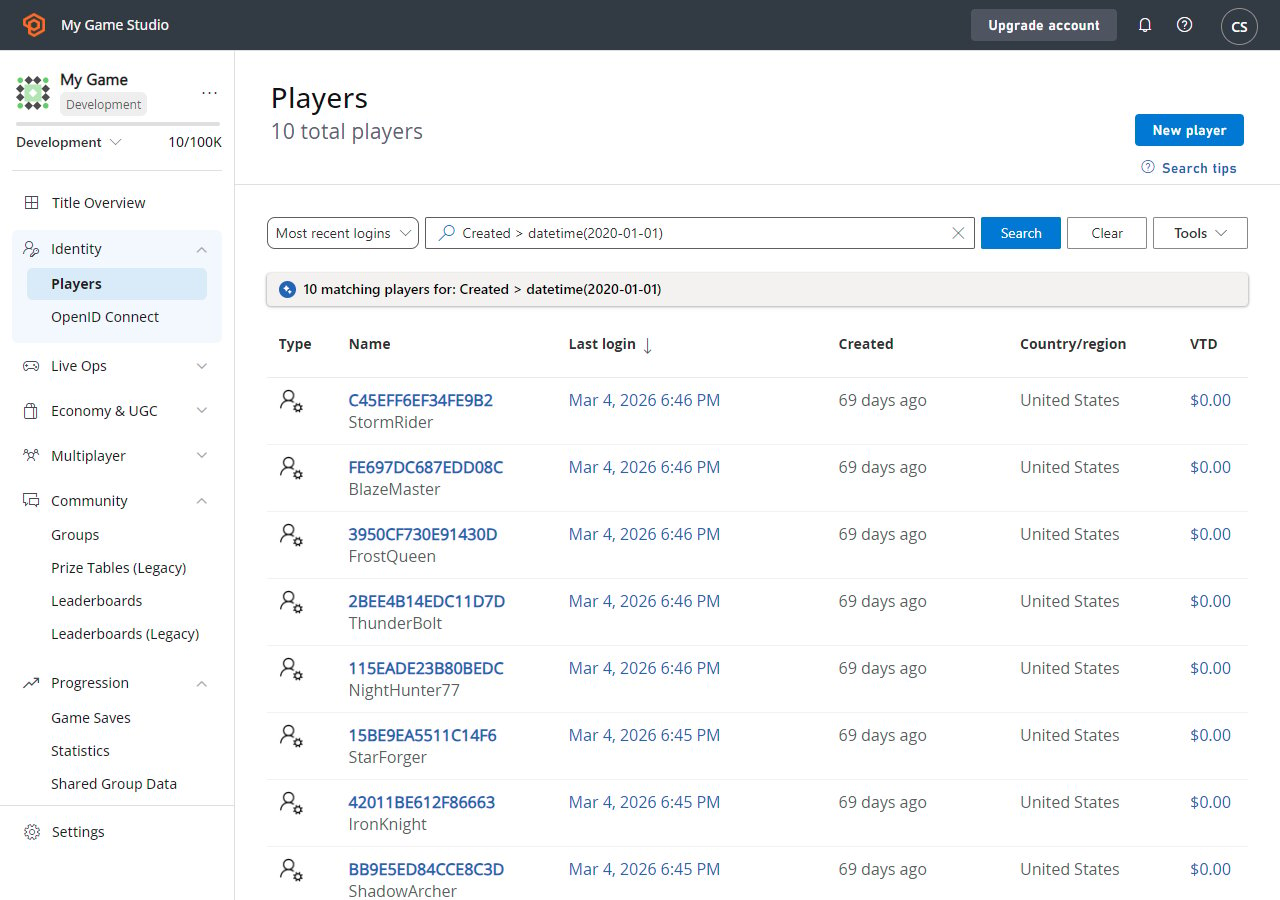 이 페이지에서 등록된 플레이어 목록을 표 형식으로 검사할 수 있습니다. 표에는 플레이어에 대한 일반적인 정보가 포함되어 있습니다.
플레이어 ID 레이블(파란색)을 선택하여 [특정 플레이어에 대한 세부 정보를 검사](/services/playfab/player-progression/player-data/player-details)할 수 있습니다. **Search Query** 필드를 사용하여 플레이어를 조회할 수도 있습니다.
## 검색 기법
**Search** 쿼리 필드는 두 가지 유형의 쿼리를 수락합니다.
1. **단순**: 검색 상자에 일반 텍스트를 입력하여 ID 열에서 리터럴 문자열 일치 항목을 반환합니다.
2. **복합**: [KQL 구문](https://learn.microsoft.com/en-us/azure/data-explorer/kusto/query/)을 사용하여 쿼리를 구성합니다.
샘플 복합 쿼리는 오른쪽 위의 **Search Tips** 단추를 통해 액세스할 수 있습니다. 샘플 쿼리를 선택하면 검색 상자가 올바른 KQL 구문으로 자동으로 채워집니다. 그런 다음 사용 사례에 맞게 쿼리를 편집할 수 있습니다.
Player Profile 표에는 많은 특성이 있으며 그 중 일부는 UI에 시각화되지 않습니다. 그러나 복합 쿼리를 사용하여 이러한 [PlayerProfile](/services/playfab/api-references/events/data-types/playerprofile) 열 중 어떤 것으로도 검색할 수 있습니다.
기억하세요 - 쿼리 매개 변수로 [검색 가능한 플레이어 필드](/services/playfab/api-references/events/data-types/playerprofile)를 사용할 수 있습니다.
## Related topics
- [Performance 페이지](/ko/tools/tools-console/wdp/windows-device-portal-on-xbox-performance.md)
- [Scratch 페이지](/ko/tools/tools-console/wdp/windows-device-portal-on-xbox-scratch.md)
- [Network 페이지](/ko/tools/tools-console/wdp/windows-device-portal-on-xbox-network.md)
- [Home 페이지](/ko/tools/tools-console/wdp/windows-device-portal-on-xbox-home.md)
- [OS update 페이지](/ko/tools/tools-console/wdp/windows-device-portal-on-xbox-os-update.md)
이 페이지에서 등록된 플레이어 목록을 표 형식으로 검사할 수 있습니다. 표에는 플레이어에 대한 일반적인 정보가 포함되어 있습니다.
플레이어 ID 레이블(파란색)을 선택하여 [특정 플레이어에 대한 세부 정보를 검사](/services/playfab/player-progression/player-data/player-details)할 수 있습니다. **Search Query** 필드를 사용하여 플레이어를 조회할 수도 있습니다.
## 검색 기법
**Search** 쿼리 필드는 두 가지 유형의 쿼리를 수락합니다.
1. **단순**: 검색 상자에 일반 텍스트를 입력하여 ID 열에서 리터럴 문자열 일치 항목을 반환합니다.
2. **복합**: [KQL 구문](https://learn.microsoft.com/en-us/azure/data-explorer/kusto/query/)을 사용하여 쿼리를 구성합니다.
샘플 복합 쿼리는 오른쪽 위의 **Search Tips** 단추를 통해 액세스할 수 있습니다. 샘플 쿼리를 선택하면 검색 상자가 올바른 KQL 구문으로 자동으로 채워집니다. 그런 다음 사용 사례에 맞게 쿼리를 편집할 수 있습니다.
Player Profile 표에는 많은 특성이 있으며 그 중 일부는 UI에 시각화되지 않습니다. 그러나 복합 쿼리를 사용하여 이러한 [PlayerProfile](/services/playfab/api-references/events/data-types/playerprofile) 열 중 어떤 것으로도 검색할 수 있습니다.
기억하세요 - 쿼리 매개 변수로 [검색 가능한 플레이어 필드](/services/playfab/api-references/events/data-types/playerprofile)를 사용할 수 있습니다.
## Related topics
- [Performance 페이지](/ko/tools/tools-console/wdp/windows-device-portal-on-xbox-performance.md)
- [Scratch 페이지](/ko/tools/tools-console/wdp/windows-device-portal-on-xbox-scratch.md)
- [Network 페이지](/ko/tools/tools-console/wdp/windows-device-portal-on-xbox-network.md)
- [Home 페이지](/ko/tools/tools-console/wdp/windows-device-portal-on-xbox-home.md)
- [OS update 페이지](/ko/tools/tools-console/wdp/windows-device-portal-on-xbox-os-update.md)