> ## Documentation Index
> Fetch the complete documentation index at: https://devdocs.xbox.com/llms.txt
> Use this file to discover all available pages before exploring further.
# 플레이어 차단 시스템
> Game Manager, ReportPlayer, 서버 API 차단 관리 호출을 사용하여 규칙 위반자의 인증 토큰을 무효화하도록 PlayFab 플레이어 차단을 적용합니다.
플레이어 차단 기능을 사용하면 규칙을 위반하는 특정 플레이어의 게임 접근을 제한할 수 있습니다. 플레이어에게 차단이 적용되면 기존 플레이어 인증 토큰은 무효화되고, 해당 플레이어가 향후 시도하는 인증 요청은 거부됩니다. 플레이어 차단은 지정된 시간 범위 동안 영구적이거나 일시적일 수 있으며, 플레이어 ID 또는 IP 주소에 적용될 수 있습니다. 차단은 타이틀 범위로 한정되며 [네임스페이스](/services/playfab/live-service-management/game-configuration/entities) 내 다른 타이틀에는 적용되지 않습니다.
새로운 통합의 경우, 플레이어 차단에 IP 주소를 지정하는 대신 전용 [IP 차단 시스템](/services/playfab/player-progression/player-data/ip-bans)을 사용하는 것을 권장합니다.
다음 자습서는 PlayFab API와 Game Manager를 사용하여 차단 시스템을 활용하는 방법을 보여줍니다.
## 식별
게임에서 치터와 규칙 위반자를 식별하는 커스텀 시스템이 있을 수 있지만, PlayFab은 플레이어 간 신고 메커니즘을 제공합니다. 본질적으로, 문제가 있는 다른 플레이어를 신고하기 위해 플레이어에 의존합니다.
클라이언트가 특정 플레이어를 신고할 수 있도록 하려면 클라이언트 코드에서 다음 스니펫을 사용하세요.
```csharp theme={null}
public void ReportPlayer(string problematicPlayerId, string reason) {
PlayFabClientAPI.ReportPlayer(new ReportPlayerClientRequest() {
ReporteeId = problematicPlayerId,
Comment = reason
}, result => {
//... Handle success
}, error => {
Debug.Log(error.GenerateErrorReport());
});
}
```
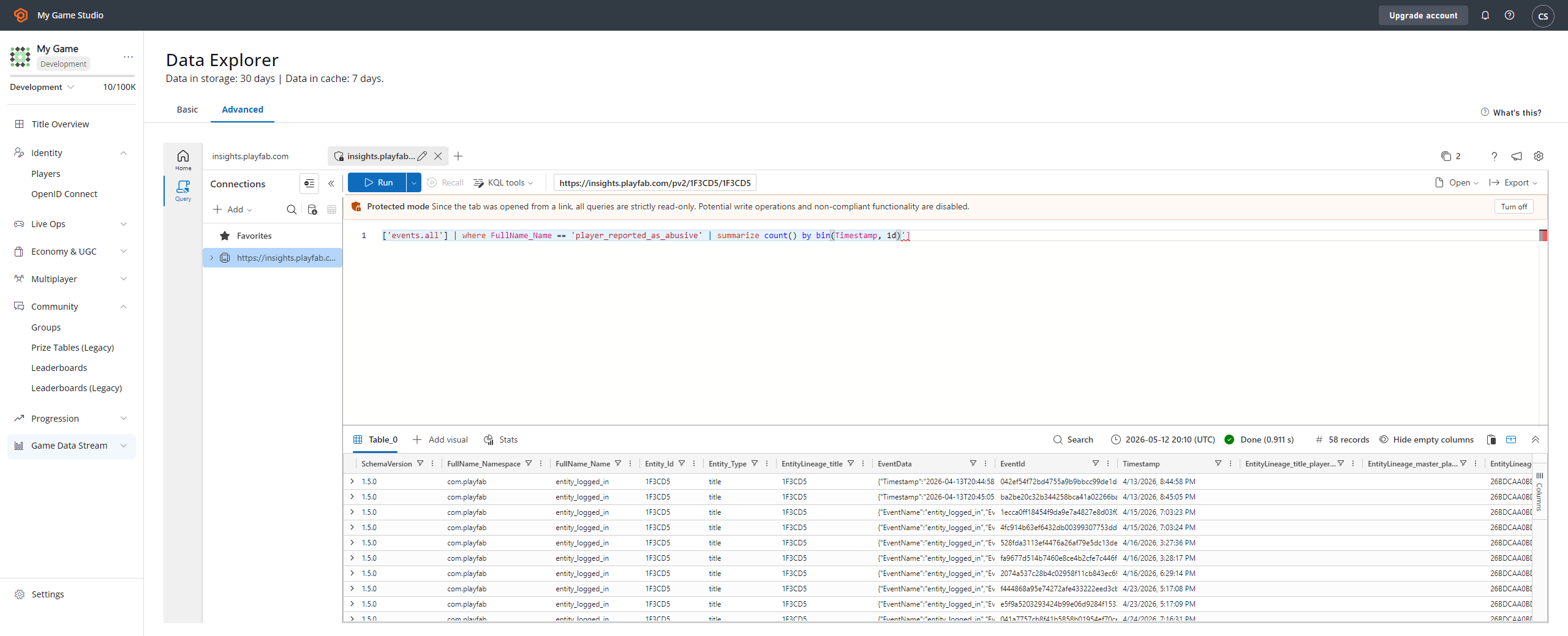
이 API 호출은 다음을 생성합니다.
* **신고 이벤트**로, **Analytics** 도구 **(1)** 를 통해 찾을 수 있습니다.
* **player\_reported\_as\_abusive** 이벤트 타입 **(2)** 을 선택하세요.
* 이는 다음을 표시합니다:
* **이벤트 이름 (3)**.
* 신고된 **플레이어 ID (4)**.
 ## 차단 적용
문제가 있는 플레이어가 식별되면 차단을 적용할 수 있습니다. 차단을 적용하는 방법은 두 가지가 있습니다. Game Manager를 통해 수동으로 하거나, 코드를 통해 프로그램적으로 하는 방법입니다.
### Game Manager에서 차단 생성
커뮤니티 관리 담당자는 Game Manager를 사용하여 차단을 적용할 수 있습니다.
1. Players 섹션으로 이동합니다.
2. 문제가 있는 플레이어를 찾아 선택합니다.
3. **Bans** 탭으로 이동합니다.
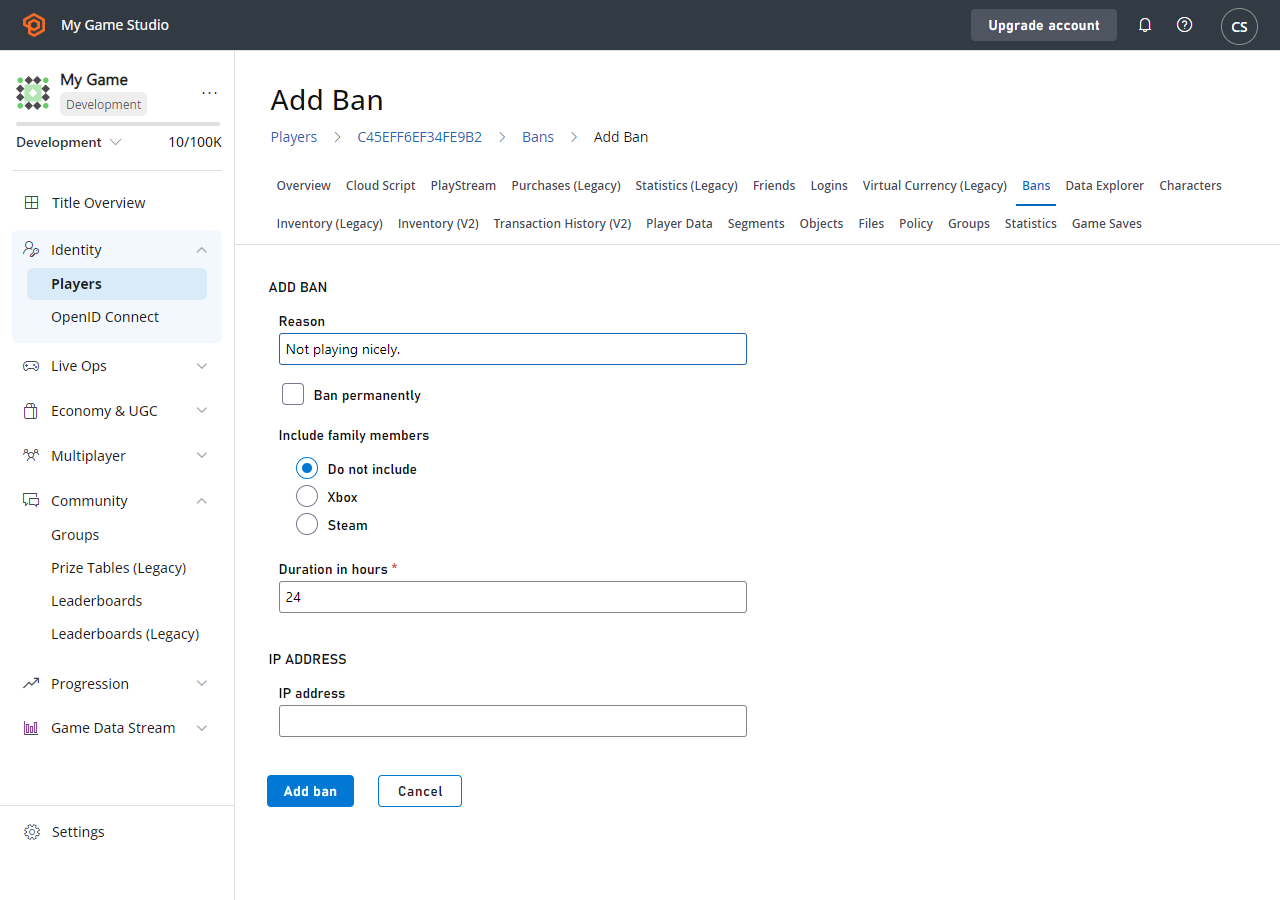
4. **Add Ban**을 선택하여 **Add Ban** 폼을 표시합니다.
5. 차단 **Reason**과 원하는 기간을 입력합니다. 선택적으로 특정 **IP ADDRESS (4)** 를 **Ban**할 수 있습니다.
6. 마지막으로 **ADD BAN** 버튼을 선택합니다.
## 차단 적용
문제가 있는 플레이어가 식별되면 차단을 적용할 수 있습니다. 차단을 적용하는 방법은 두 가지가 있습니다. Game Manager를 통해 수동으로 하거나, 코드를 통해 프로그램적으로 하는 방법입니다.
### Game Manager에서 차단 생성
커뮤니티 관리 담당자는 Game Manager를 사용하여 차단을 적용할 수 있습니다.
1. Players 섹션으로 이동합니다.
2. 문제가 있는 플레이어를 찾아 선택합니다.
3. **Bans** 탭으로 이동합니다.
4. **Add Ban**을 선택하여 **Add Ban** 폼을 표시합니다.
5. 차단 **Reason**과 원하는 기간을 입력합니다. 선택적으로 특정 **IP ADDRESS (4)** 를 **Ban**할 수 있습니다.
6. 마지막으로 **ADD BAN** 버튼을 선택합니다.
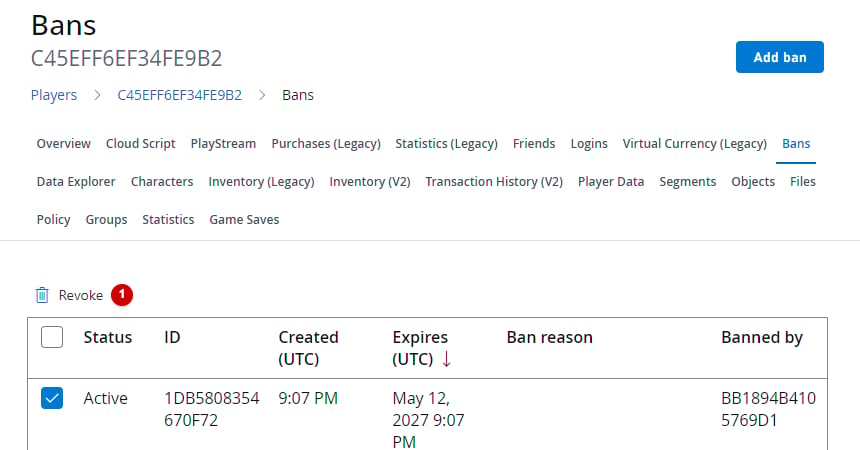
 모든 것이 올바르게 설정되면 테이블에 새로운 **Ban**이 표시됩니다. 선택적으로 **REVOKE BANS** 필드에서 선택하여 **Ban**을 수동으로 제거할 수도 있습니다.
 ### 서버 또는 서비스에서 차단 생성
또는 [Services SDK](/services/playfab/sdks/playfab-sdk-intro)를 사용하여 아래 제공된 스니펫으로 코드를 통해 차단을 적용할 수 있습니다.
```csharp theme={null}
public void AddBan(string playerId, uint hours) {
PlayFabServerAPI.BanUsers(new BanUsersRequest() {
Bans = new List() {
new BanRequest() {
DurationInHours = hours,
PlayFabId = playerId,
Reason = "Automatic ban for WH",
}
}
}, result => {
//... Handle success
}, error => {
Debug.Log(error.GenerateErrorReport());
});
}
```
코드를 통해 적용된 차단은 Game Manager의 대상 플레이어에 대한 차단 테이블에도 표시됩니다.
PlayFab 서버 SDK 메서드는 **IP** 주소 차단 등 더 많은 옵션을 제공합니다.
적용하는 각 차단에는 ID가 할당됩니다. 정확한 차단 관리를 위해 다음 서버 SDK API 메서드를 고려하세요:
* [GetUserBans](xref:titleid.playfabapi.com.server.accountmanagement.getuserbans)
* [RevokeAllBansForUser](xref:titleid.playfabapi.com.server.accountmanagement.revokeallbansforuser)
* [RevokeBans](xref:titleid.playfabapi.com.server.accountmanagement.revokebans)
* [UpdateBans](xref:titleid.playfabapi.com.server.accountmanagement.updatebans)
플레이어를 차단할 수 있는 자동화 시스템의 일부로 CloudScript 함수를 사용할 수 있습니다. CloudScript에 대해 자세히 알아보려면 자습서 [사용자 정의 CloudScript 작성](/services/playfab/live-service-management/service-gateway/automation/cloudscript/writing-custom-cloudscript)을 참조하세요.
## 참고 자료
[BanUsers](xref:titleid.playfabapi.com.server.accountmanagement.banusers)
## Related topics
- [PlayFab Party features](/ko/services/playfab/multiplayer/networking/party-features.md)
- [크로스 네트워크 멀티플레이어 구현 예시](/ko/services/xbox-services/multiplayer/concepts/live-console-xr007-multiplayer-example.md)
- [IP 차단 시스템](/ko/services/playfab/player-progression/player-data/ip-bans.md)
- [People 시스템(친구 목록) 개요](/ko/services/xbox-services/community/people-system/live-people-system-overview.md)
- [FMA: XR-045 XBOX Network 및 계정 권한](/ko/publishing/certification/fma/xr-045.md)
### 서버 또는 서비스에서 차단 생성
또는 [Services SDK](/services/playfab/sdks/playfab-sdk-intro)를 사용하여 아래 제공된 스니펫으로 코드를 통해 차단을 적용할 수 있습니다.
```csharp theme={null}
public void AddBan(string playerId, uint hours) {
PlayFabServerAPI.BanUsers(new BanUsersRequest() {
Bans = new List() {
new BanRequest() {
DurationInHours = hours,
PlayFabId = playerId,
Reason = "Automatic ban for WH",
}
}
}, result => {
//... Handle success
}, error => {
Debug.Log(error.GenerateErrorReport());
});
}
```
코드를 통해 적용된 차단은 Game Manager의 대상 플레이어에 대한 차단 테이블에도 표시됩니다.
PlayFab 서버 SDK 메서드는 **IP** 주소 차단 등 더 많은 옵션을 제공합니다.
적용하는 각 차단에는 ID가 할당됩니다. 정확한 차단 관리를 위해 다음 서버 SDK API 메서드를 고려하세요:
* [GetUserBans](xref:titleid.playfabapi.com.server.accountmanagement.getuserbans)
* [RevokeAllBansForUser](xref:titleid.playfabapi.com.server.accountmanagement.revokeallbansforuser)
* [RevokeBans](xref:titleid.playfabapi.com.server.accountmanagement.revokebans)
* [UpdateBans](xref:titleid.playfabapi.com.server.accountmanagement.updatebans)
플레이어를 차단할 수 있는 자동화 시스템의 일부로 CloudScript 함수를 사용할 수 있습니다. CloudScript에 대해 자세히 알아보려면 자습서 [사용자 정의 CloudScript 작성](/services/playfab/live-service-management/service-gateway/automation/cloudscript/writing-custom-cloudscript)을 참조하세요.
## 참고 자료
[BanUsers](xref:titleid.playfabapi.com.server.accountmanagement.banusers)
## Related topics
- [PlayFab Party features](/ko/services/playfab/multiplayer/networking/party-features.md)
- [크로스 네트워크 멀티플레이어 구현 예시](/ko/services/xbox-services/multiplayer/concepts/live-console-xr007-multiplayer-example.md)
- [IP 차단 시스템](/ko/services/playfab/player-progression/player-data/ip-bans.md)
- [People 시스템(친구 목록) 개요](/ko/services/xbox-services/community/people-system/live-people-system-overview.md)
- [FMA: XR-045 XBOX Network 및 계정 권한](/ko/publishing/certification/fma/xr-045.md)