> ## Documentation Index
> Fetch the complete documentation index at: https://devdocs.xbox.com/llms.txt
> Use this file to discover all available pages before exploring further.
# 튜토리얼 플레이어 프로필 가져오기
> Unity에서 GetPlayerProfile을 사용하여 PlayFab 플레이어 프로필 데이터를 검색하고, PlayerProfileViewConstraints를 구성하며, 생성 및 마지막 로그인 타임스탬프를 읽습니다.
# 튜토리얼: 플레이어 프로필 가져오기
이 튜토리얼에서는 다음을 배웁니다:
\[!div class="checklist"] \* 표시 이름으로 사용자 만들기 \* 플레이어 프로필 호출 만들기 \* 플레이어 생성 시간 및 마지막 로그인 시간 가져오기 \* 타이틀에 대한 플레이어 프로필 보기 제약 조건 구성 \* 로그인 작업을 통해 플레이어 프로필 가져오기
## 요구 사항
* [PlayFab 개발자 계정](https://developer.playfab.com).
* Unity Editor의 설치된 사본. Unity Hub를 통해 개인용으로 Unity를 설치하거나 전문 용도로 Unity+를 설치하려면 [Unity 다운로드](https://unity3d.com/get-unity/download)를 참조하세요.
PlayFab Unity3D SDK는 Unity Editor 버전 5.3(2015년 12월 출시) 이상을 지원합니다.
* Unity 프로젝트 \* 다음 중 하나일 수 있습니다:
* 완전히 새로운 프로젝트. 자세한 내용은 [Unity 처음 시작하기](https://docs.unity3d.com/550/Documentation/Manual/GettingStarted.html)를 참조하세요.
* 가이드 튜토리얼 프로젝트. 자세한 내용은 [Unity 시작하기](https://learn.unity.com/)를 참조하세요.
* 기존 프로젝트.
* PlayFab [Unity3D SDK](/services/playfab/sdks/unity3d).
이 튜토리얼에서는 타이틀에 대한 플레이어를 만드는 방법에 대한 기본 지식이 필요하므로, 플레이어에서 `GetPlayerProfile`을 수행할 수 있습니다.
Game Manager에 익숙하지 않은 경우 [Game Manager 빠른 시작](/services/playfab/live-service-management/gamemanager/quickstart)을 읽어 보는 것도 좋습니다. Game Manager는 프로필 제약 조건을 구성하는 곳입니다.
이 문서의 C# 샘플은 Unity SDK용으로 작성되었습니다. Unity SDK는 이벤트 기반 모델을 사용하여 비동기 작업을 처리합니다. C# SDK를 사용하여 샘플 코드를 실행하려면 async Task 모델을 사용하도록 코드를 수정해야 합니다. 수정해야 하는 메서드는 서명의 메서드 이름에 Async가 추가되어 있습니다. 예를 들어, Unity SDK의 SetObject는 C# SDK에서 SetObjectAsync가 됩니다. 자세한 내용은 [async 및 await를 사용한 비동기 프로그래밍](https://learn.microsoft.com/en-us/dotnet/csharp/programming-guide/concepts/async/)을 참조하세요.
## 표시 이름으로 사용자 만들기
첫 번째 단계는 플레이어를 만들고 사용자에게 표시 이름을 추가하는 것입니다. 이 예제에서는 표시 이름이 `UnicornTossMaster`인 새 사용자를 만듭니다.
```csharp theme={null}
void CreatePlayerAndUpdateDisplayName() {
PlayFabClientAPI.LoginWithCustomID( new LoginWithCustomIDRequest {
CustomId = "PlayFabGetPlayerProfileCustomId",
CreateAccount = true
}, result => {
Debug.Log("Successfully logged in a player with PlayFabId: " + result.PlayFabId);
UpdateDisplayName();
}, error => Debug.LogError(error.GenerateErrorReport()));
}
void UpdateDisplayName() {
PlayFabClientAPI.UpdateUserTitleDisplayName( new UpdateUserTitleDisplayNameRequest {
DisplayName = "UnicornTossMaster"
}, result => {
Debug.Log("The player's display name is now: " + result.DisplayName);
}, error => Debug.LogError(error.GenerateErrorReport()));
}
```
콘솔 출력은 다음과 같이 표시되어야 합니다:
```
Successfully logged in a player with PlayFabId: SOME_PLAYFAB_ID
The player's display name is now: UnicornTossMaster
```
## 플레이어 프로필 호출 만들기
다음 단계는 플레이어를 위한 매우 기본적인 프로필을 만드는 것입니다.
다음 예제는 기본 [GetPlayerProfile](xref:titleid.playfabapi.com.server.accountmanagement.getplayerprofile) 호출을 사용합니다.
```csharp theme={null}
void GetPlayerProfile(string playFabId) {
PlayFabClientAPI.GetPlayerProfile( new GetPlayerProfileRequest() {
PlayFabId = playFabId,
ProfileConstraints = new PlayerProfileViewConstraints() {
ShowDisplayName = true
}
},
result => Debug.Log("The player's DisplayName profile data is: " + result.PlayerProfile.DisplayName),
error => Debug.LogError(error.GenerateErrorReport()));
}
```
응답에는 플레이어의 표시 이름 `UnicornTossMaster`를 포함하는 [PlayerProfileModel](xref:titleid.playfabapi.com.server.accountmanagement.getplayerprofile#playerprofilemodel) 개체가 포함됩니다.
## 플레이어 생성 시간 및 마지막 로그인 시간 가져오기
[PlayerProfileModel](xref:titleid.playfabapi.com.server.accountmanagement.getplayerprofile#playerprofilemodel) 개체에는 플레이어에 대한 상당한 양의 데이터가 있습니다. 이전 단계에서 `GetPlayerProfile`이 발행되었으며, 받은 응답에는 표시 이름 정보만 포함되었습니다.
다음 단계는 플레이어에 대해 *더 많은* 프로필 데이터를 가져오는 것입니다. 이를 위해 [PlayerProfileViewConstraints](xref:titleid.playfabapi.com.server.accountmanagement.getplayerprofile#playerprofileviewconstraints) 요청 매개변수에서 추가 필드로 `GetPlayerProfile`을 호출하세요.
다음 **C#** 예제는 2단계의 `GetPlayerProfile` 메서드를 수정하고 [ProfileConstraints](xref:titleid.playfabapi.com.server.accountmanagement.getplayerprofile#playerprofileviewconstraints)에서 플래그를 설정하여 `Created` 및 `LastLogin` 필드를 요청하도록 `GetPlayerProfile`을 호출합니다.
**이 단계에서는 호출이 실패합니다!!!**
```csharp theme={null}
void CreatePlayerAndUpdateDisplayName(string playFabId) {
PlayFabClientAPI.GetPlayerProfile( new GetPlayerProfileRequest() {
PlayFabId = playFabId,
ProfileConstraints = new PlayerProfileViewConstraints {
ShowDisplayName = true,
ShowCreated = true,
ShowLastLogin = true
}
},
result => Debug.Log("The player's profile Created date is: " + result.PlayerProfile.Created),
error => Debug.LogError(error.GenerateErrorReport()));
}
```
이 시점에서 이 샘플 코드를 실행하면 `Error Code 1303`으로 오류가 반환됩니다. `RequestViewConstraintParamsNotAllowed`이며, 타이틀에 현재 설정된 제약 조건의 JSON 출력과 함께 `Invalid view constraints`가 있다는 오류 메시지가 표시됩니다.
이 오류는 타이틀의 프로필 제약 조건 설정에서 `Created` 및 `LastLogin`을 표시할 수 있는 기능을 아직 구성하지 않았기 때문에 발생합니다.
## 타이틀에 대한 플레이어 프로필 보기 제약 조건 구성
[GetPlayerProfile](xref:titleid.playfabapi.com.server.accountmanagement.getplayerprofile) API를 호출할 때 더 많은 데이터를 가져오려면 사용 가능하도록 데이터에 대한 제약 조건을 구성해야 합니다. 이러한 설정은 Game Manager의 타이틀 설정에 있습니다.
기본적으로 **ALLOW CLIENT ACCESS TO PROFILE PROPERTIES:** 에는 **Display name**만 활성화되어 있어 **Display Name** 값을 검색할 수 있었습니다.
타이틀에 추가 제약 조건을 구성하려면:
* [Game Manager](https://developer.playfab.com)에서 타이틀을 선택합니다.
* 왼쪽 상단의 기어 아이콘을 선택한 다음 **Title settings**을 선택합니다.
* **Client Profile Options** 탭을 선택합니다.
* [ProfileConstraints](xref:titleid.playfabapi.com.server.accountmanagement.getplayerprofile#playerprofileviewconstraints)에서 **Created**와 **LastLogin**을 모두 활성화하려면 **Creation date**와 **Last login time**을 선택한 다음 **SAVE CLIENT PROFILE OPTIONS**를 선택합니다.
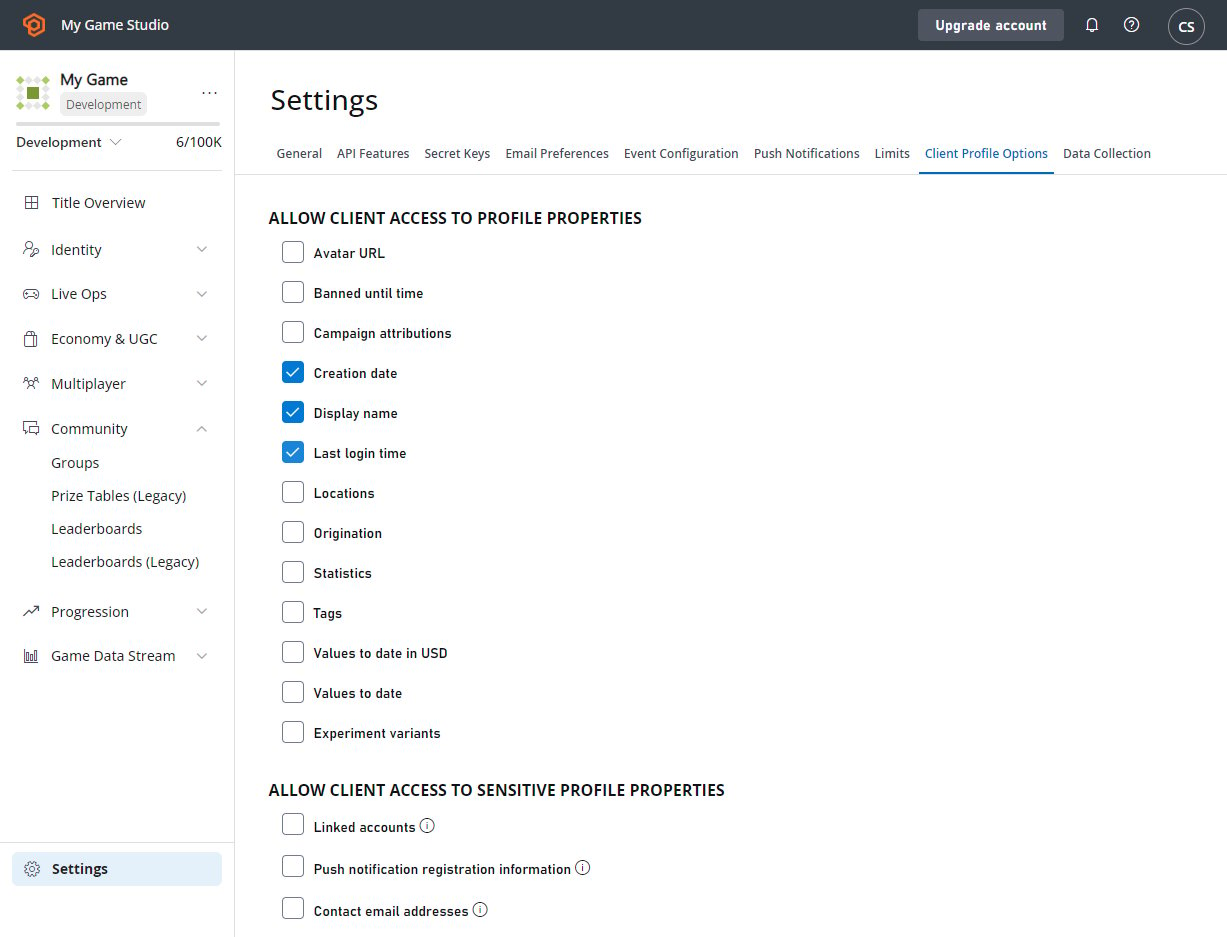 이제 1`CreatePlayerAndUpdateDisplayName`을 호출하면 사용자의 생성 시간, 마지막 로그인 및 `UnicornTossMaster`의 표시 이름에 대한 데이터가 포함된 [PlayerProfileModel](xref:titleid.playfabapi.com.server.accountmanagement.getplayerprofile#playerprofilemodel) 개체가 반환됩니다.
## 로그인 작업을 통해 플레이어 프로필 가져오기
대부분의 경우 플레이어가 로그인하는 즉시 플레이어 프로필 데이터를 검색하려고 합니다. PlayFab API를 사용하면 로그인 호출과 플레이어 프로필 검색 호출을 단일 호출로 결합할 수 있습니다.
다음 예제는 로그인 요청을 통해 프로필 정보를 얻는 방법을 보여주며, 예제로 `LoginWithCustomId`를 사용합니다.
이것은 *모든* 로그인 메커니즘에서 작동합니다.
```csharp theme={null}
void CreatePlayerAndUpdateDisplayName(string customId) {
PlayFabClientAPI.LoginWithCustomID( new LoginWithCustomIDRequest() {
CustomId = customId,
// Define info request parameters
InfoRequestParameters = new GetPlayerCombinedInfoRequestParams() {
// And make sure PlayerProfile is included
GetPlayerProfile = true,
// Define rules for PlayerProfile request
ProfileConstraints = new PlayerProfileViewConstraints() {
// And make sure that both AvatarUrl and LastLogin are included.
ShowAvatarUrl = true,
ShowLastLogin = true,
}
}
},
result =>
{
// Extract the data you have requested
var avatarUrl = result.InfoResultPayload.PlayerProfile.AvatarUrl;
},
error => Debug.LogError(error.GenerateErrorReport()));
}
```
## Related topics
- [읽기 전용 플레이어 데이터 가져오기 방법](/ko/services/playfab/player-progression/player-data/how-to-get-read-only-player-data.md)
- [Economy(레거시)에서 플레이어의 VTD(Value-to-Date) 가져오기](/ko/services/playfab/economy-monetization/economy/tutorials/getting-a-players-vtd.md)
- [타이틀 관리 리더보드 가져오기](/ko/services/xbox-services/player-data/stats-leaderboards/title-managed/how-to/live-getting-tm-leaderboard.md)
- [소스 코드 및 모범 사례 - Winter Starfall](/ko/services/playfab/demo-game/source-code-and-best-practices.md)
- [플레이어 데이터 빠른 시작](/ko/services/playfab/player-progression/player-data/quickstart.md)
이제 1`CreatePlayerAndUpdateDisplayName`을 호출하면 사용자의 생성 시간, 마지막 로그인 및 `UnicornTossMaster`의 표시 이름에 대한 데이터가 포함된 [PlayerProfileModel](xref:titleid.playfabapi.com.server.accountmanagement.getplayerprofile#playerprofilemodel) 개체가 반환됩니다.
## 로그인 작업을 통해 플레이어 프로필 가져오기
대부분의 경우 플레이어가 로그인하는 즉시 플레이어 프로필 데이터를 검색하려고 합니다. PlayFab API를 사용하면 로그인 호출과 플레이어 프로필 검색 호출을 단일 호출로 결합할 수 있습니다.
다음 예제는 로그인 요청을 통해 프로필 정보를 얻는 방법을 보여주며, 예제로 `LoginWithCustomId`를 사용합니다.
이것은 *모든* 로그인 메커니즘에서 작동합니다.
```csharp theme={null}
void CreatePlayerAndUpdateDisplayName(string customId) {
PlayFabClientAPI.LoginWithCustomID( new LoginWithCustomIDRequest() {
CustomId = customId,
// Define info request parameters
InfoRequestParameters = new GetPlayerCombinedInfoRequestParams() {
// And make sure PlayerProfile is included
GetPlayerProfile = true,
// Define rules for PlayerProfile request
ProfileConstraints = new PlayerProfileViewConstraints() {
// And make sure that both AvatarUrl and LastLogin are included.
ShowAvatarUrl = true,
ShowLastLogin = true,
}
}
},
result =>
{
// Extract the data you have requested
var avatarUrl = result.InfoResultPayload.PlayerProfile.AvatarUrl;
},
error => Debug.LogError(error.GenerateErrorReport()));
}
```
## Related topics
- [읽기 전용 플레이어 데이터 가져오기 방법](/ko/services/playfab/player-progression/player-data/how-to-get-read-only-player-data.md)
- [Economy(레거시)에서 플레이어의 VTD(Value-to-Date) 가져오기](/ko/services/playfab/economy-monetization/economy/tutorials/getting-a-players-vtd.md)
- [타이틀 관리 리더보드 가져오기](/ko/services/xbox-services/player-data/stats-leaderboards/title-managed/how-to/live-getting-tm-leaderboard.md)
- [소스 코드 및 모범 사례 - Winter Starfall](/ko/services/playfab/demo-game/source-code-and-best-practices.md)
- [플레이어 데이터 빠른 시작](/ko/services/playfab/player-progression/player-data/quickstart.md)