> ## Documentation Index
> Fetch the complete documentation index at: https://devdocs.xbox.com/llms.txt
> Use this file to discover all available pages before exploring further.
# 푸시 알림 빠른 시작
> Game Manager 또는 SetupPushNotification Admin API와 Amazon SNS 라우팅을 통해 iOS APNS 및 Android GCM 채널에 대한 PlayFab 푸시 알림을 설정합니다.
PlayFab의 푸시 알림은 세 가지 주요 시스템의 연결로 활성화됩니다.
1. 플레이어의 장치 OS(Android, iOS 등)
2. 공급업체별 채널(Google, Apple 등)
3. 크로스 플랫폼 메시지 라우팅(Amazon Simple Notification Service(SNS)를 통한 PlayFab).
이 시스템 중 하나라도 연결이 끊어지면, 클라이언트는 알림 수신을 중단합니다. 세 시스템 중 하나를 실수로 변경하여 연결이 끊어질 수 있으며, 이는 상당히 쉽게 발생합니다. 또한, 흐름의 개별 지점에서 모든 시스템이 올바르게 구성되었는지 알기는 어렵습니다.
## PlayFab 푸시 라우팅 시스템
모든 PlayFab 타이틀은 한 번에 하나의 Google(GCM) 및 하나의 Apple Push(APNS, APNS\_SANDBOX) 알림 채널을 활성화할 수 있습니다. 이는 다음 두 가지 방법 중 하나로 구성할 수 있습니다.
1. **Game Manager**의 **Settings -> Push Notifications**에 있는 UI 사용.
2. **PlayFab Admin API** 사용 - [SetupPushNotification](xref:titleid.playfabapi.com.admin.title-widedatamanagement.setuppushnotification).
더 자세한 설정 정보는 다음 자습서를 참조하세요.
* [Android용 푸시 알림](/services/playfab/live-service-management/game-configuration/title-communications/push-notifications/push-notifications-for-android)
* [iOS용 푸시 알림](/services/playfab/live-service-management/game-configuration/title-communications/push-notifications/push-notifications-for-ios)
## 인게임 푸시 메시지
푸시 메시지는 개발 엔진/플랫폼에 따라 다릅니다. 하지만 푸시 알림을 수신하는 가장 쉬운 방법은 Android의 경우 SDK와 Firebase Cloud Messaging(FCM) 플러그인이 있는 Unity 프로젝트를, iOS의 경우 Unity만 사용하는 것입니다.
* **Android에서 푸시 수신** - 플러그인이 필요합니다. 가장 잘 지원되는 플러그인은 네이티브 FCM 플러그인입니다.
* **iOS에서 푸시 수신** - 기본 푸시 메시지에는 플러그인이 필요*하지 않습니다*.
[FCM Unity 플러그인](https://firebase.google.com/docs/cloud-messaging/unity/client) 또는 [Android Studio](https://firebase.google.com/docs/cloud-messaging/android/client)에서 푸시를 설정하는 방법에 대한 지침은 FCM 문서를 참조하세요.
## 설정 테스트
타이틀과 클라이언트를 구성한 후, PlayFab 서버 API인 [SendPushNotification](xref:titleid.playfabapi.com.server.accountmanagement.sendpushnotification)을 사용하여 구성을 테스트할 수 있습니다. 이 API를 사용하면 추가 비용 없이 필요한 만큼 푸시 알림을 보낼 수 있습니다.
빠르고 안전한 서버 API 환경으로 PlayFab CloudScript 서비스를 사용할 수 있습니다. 여기에서 필요에 따라 푸시 알림을 보낼 수 있습니다.
이 방법을 사용하여 구성을 테스트하려면, 다음 예제의 코드를 타이틀의 CloudScript에 업로드하거나 추가하세요.
### 예제
다음 시나리오를 고려해 보세요.
* 타이틀의 플레이어는 순위 통계를 기반으로 리더보드에 액세스할 수 있습니다.
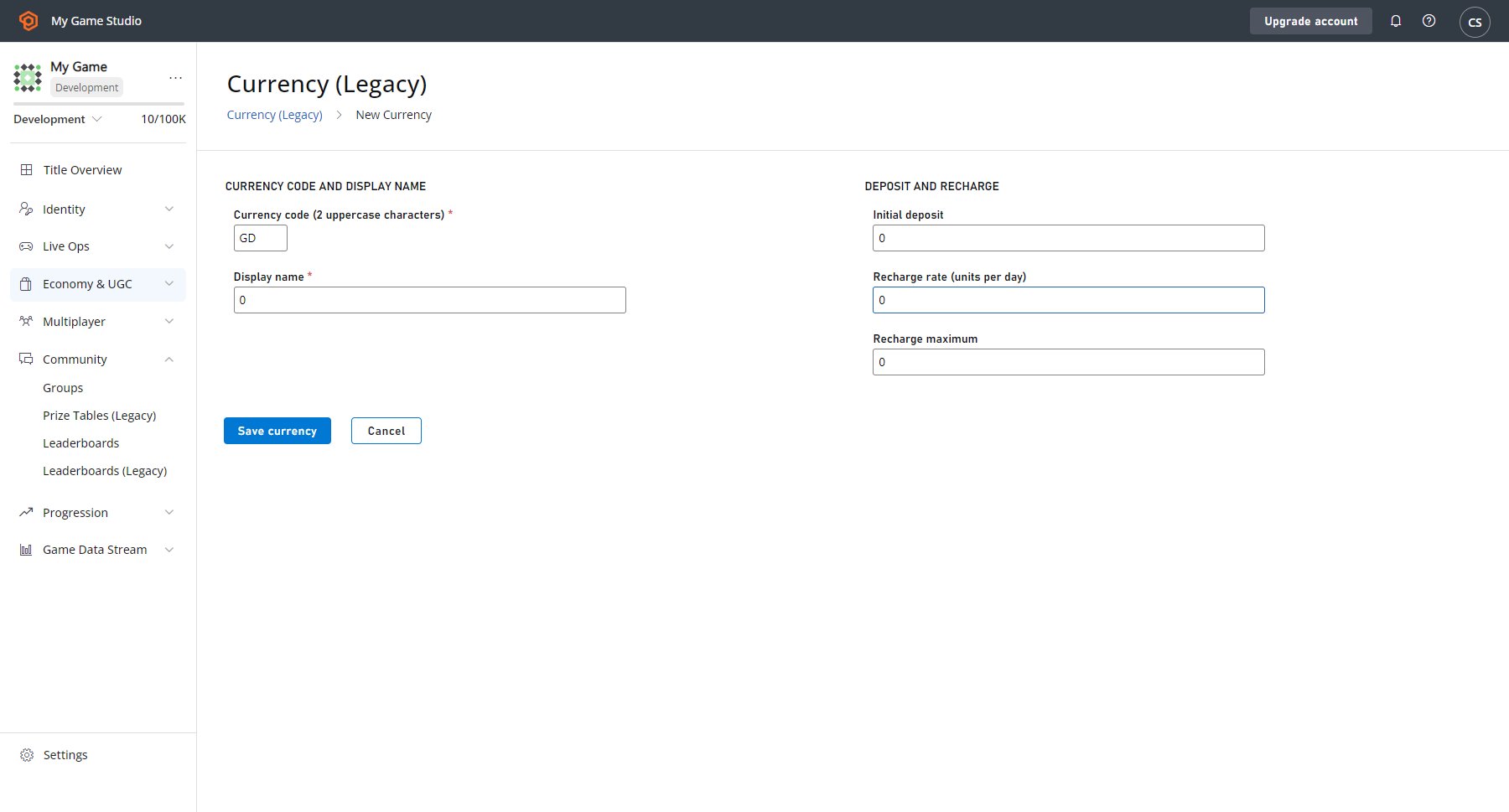
* 각 플레이어는 1 CH 통화를 지불하고, 현재 플레이어로부터 최대 5위 떨어진 다른 플레이어에게 도전할 수 있습니다.
먼저, 아래 예제 스크린샷과 같이 가상 통화를 고려합니다(가상 통화를 정의하는 방법에 대한 정보는 [Currencies](/services/playfab/economy-monetization/economy-v2/tutorials/currencies) 자습서를 참조하세요).
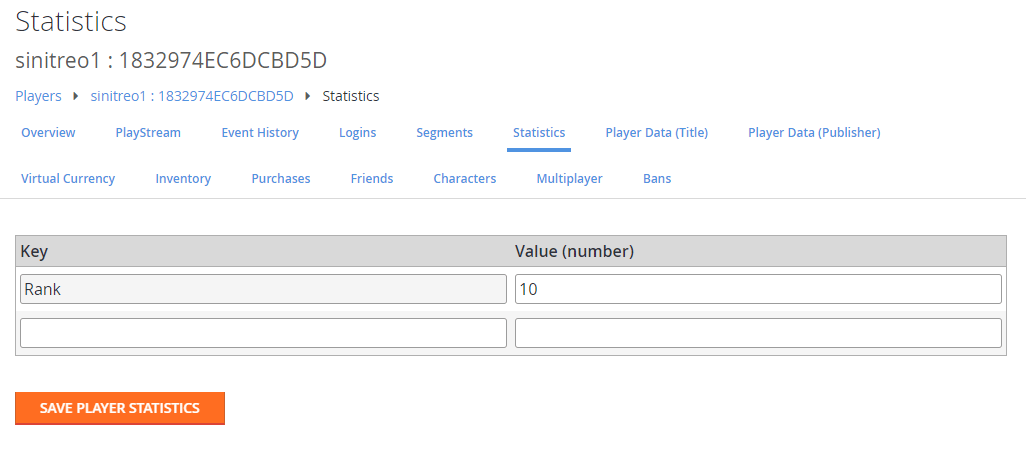
 이제 각 플레이어에 대해 정의된 다음 통계를 고려해 보세요(테스트 리더보드를 생성하는 방법에 대한 정보는 [아카이브된 토너먼트 결과에 액세스](/services/playfab/community/leaderboards/tournaments-leaderboards/accessing-archived-tournament-results) 자습서를 참조하세요).
 이러한 사전 요구 사항을 설정한 후, 푸시 알림 도전 시스템을 설정할 수 있습니다.
다음 클라이언트 코드는 CloudScript `ChallengePlayer`를 호출합니다.
```csharp theme={null}
public void ChallengeRandomClosePlayer(string currentPlayerId) {
PlayFabClientAPI.GetLeaderboardAroundPlayer(new GetLeaderboardAroundPlayerRequest() {
MaxResultsCount = 10,
StatisticName = "Rank",
PlayFabId = currentPlayerId,
}, result => OnLeaderboardLoaded(result,currentPlayerId),OnPlayFabError);
}
private void OnLeaderboardLoaded(GetLeaderboardAroundPlayerResult leaderboard, string currentPlayerId) {
var index = (int)(UnityEngine.Random.value * (leaderboard.Leaderboard.Count-1));
if (leaderboard.Leaderboard[index].PlayFabId == currentPlayerId)
index = (index + 1) % leaderboard.Leaderboard.Count;
var targetId = leaderboard.Leaderboard[index].PlayFabId;
PlayFabClientAPI.ExecuteCloudScript(new ExecuteCloudScriptRequest() {
FunctionName = "ChallengePlayer",
FunctionParameter = new Dictionary() {
{ "TargetId", targetId }
}
}, null, OnPlayFabError);
}
public void OnPlayFabError(PlayFabError obj) {
Debug.Log(obj.GenerateErrorReport());
}
```
`ChallengePlayer` CloudScript 코드는 요청을 처리하고, 리더보드 상태를 검증하며, 대상에게 도전 푸시 알림을 보냅니다.
```javascript theme={null}
handlers.ChallengePlayer = function (args) {
var targetId = args.TargetId;
var leaderboard = server.GetLeaderboardAroundUser({
MaxResultsCount : 10,
PlayFabId : currentPlayerId,
StatisticName : "Rank"
});
for(var i = 0; i < leaderboard.Leaderboard.length; i++) {
var target = leaderboard.Leaderboard[i];
if(target.PlayFabId !== targetId) continue;
// subtract virtual currency from current player
server.SubtractUserVirtualCurrency({
VirtualCurrency : "CH",
PlayFabId : currentPlayerId,
Amount : 1
});
// get current player profile
var profile = server.GetPlayerProfile({
PlayFabId : currentPlayerId
}).PlayerProfile;
// try to send push notification
try {
server.SendPushNotification({
Recipient : targetId,
Package : {
Message : `${profile.DisplayName} challenges you for a battle!`,
Title: "You have been challenged",
}
});
} catch (ex) {
// Target player has not registered for Push Notifications
}
return;
}
}
```
## 푸시 알림 사용
푸시 알림을 사용할 수 있는 능력은 대단한 힘입니다. 하지만 *남용*되면 사용자가 향후 알림을 거부하거나, 심지어 *게임을 완전히 떠나게* 될 수 있습니다.
그러나 신중하게 사용하면 푸시 알림은 게임 커뮤니티를 구축하고 유지하는 최고의 도구 중 하나가 될 수 있습니다.
푸시 알림은 전달을 보장하지 않는 *fire and forget* 메시지 프로토콜입니다.
플레이어가 메시지를 수신하거나, 열거나, 참여할 것이라는 *보장은 없다*는 점을 기억하세요. 이러한 주의 사항을 고려할 때, 메시지를 게임플레이 루프의 중요한 부분이 아닌 *보너스* 기능으로 사용하는 것이 좋습니다.
iOS 플랫폼의 경우, 앱은 OS로부터 일회성 대화 상자 프롬프트를 받아 사용자가 푸시 알림의 상태를 결정할 수 있게 합니다. 사용자가 초기 선택을 한 후에는 이 설정이 다음까지 유지됩니다.
* 앱이 업데이트되거나 재설치되는 경우.
* 사용자가 폰의 설정 메뉴에서 설정을 변경하는 경우.
Android 앱의 경우, 알림은 기본적으로 활성화되어 있으며 클라이언트에서 자유롭게 켜고 끌 수 있습니다.
세션마다 알림 리스너를 다시 초기화하는 것이 좋습니다.
## 리소스
다음 리소스는 이 빠른 시작의 주제에 대한 추가 정보를 제공합니다.
* [Firebase Unity SDK](https://firebase.google.com/docs/unity/setup): Unity를 위한 올인원 FCM 솔루션입니다. 이 SDK는 다른 모든 기능 중에서도, FCM을 통해 전송된 푸시 알림을 수신하고 처리할 수 있게 해줍니다.
* [Push It Real Good: How to Get Players to Say Yes to Push Notifications](https://blog.playfab.com/blog/push-it-real-good-how-get-players-say-yes-push-notifications/): 이 블로그 게시물은 푸시 알림 사용에 대한 추가 전략 및 기술을 자세히 설명합니다.
* [Push Notifications](https://blog.playfab.com/blog/push-sep-17): 이 블로그 게시물은 푸시 기능의 가장 최근 업그레이드와 Android용 기본 플러그인으로 FCM으로의 전환을 설명합니다.
* [Postman 빠른 시작](/services/playfab/sdks/postman/postman-quickstart): 이 빠른 시작은 Postman을 사용하여 API를 테스트하는 방법을 보여줍니다.
## Related topics
- [Android용 푸시 알림](/ko/services/playfab/live-service-management/game-configuration/title-communications/push-notifications/push-notifications-for-android.md)
- [iOS용 푸시 알림](/ko/services/playfab/live-service-management/game-configuration/title-communications/push-notifications/push-notifications-for-ios.md)
- [푸시 알림 템플릿](/ko/services/playfab/live-service-management/game-configuration/title-communications/push-notifications/push-notification-templates.md)
- [PFPlatformSpecificRegisterForIOSPushNotificationRequest](/ko/services/playfab/api-references/c/pfplatformspecifictypes/structs/pfplatformspecificregisterforiospushnotificationrequest.md)
- [PlayFab 라이브 서비스 관리 문서](/ko/services/playfab/live-service-management/index.md)
이러한 사전 요구 사항을 설정한 후, 푸시 알림 도전 시스템을 설정할 수 있습니다.
다음 클라이언트 코드는 CloudScript `ChallengePlayer`를 호출합니다.
```csharp theme={null}
public void ChallengeRandomClosePlayer(string currentPlayerId) {
PlayFabClientAPI.GetLeaderboardAroundPlayer(new GetLeaderboardAroundPlayerRequest() {
MaxResultsCount = 10,
StatisticName = "Rank",
PlayFabId = currentPlayerId,
}, result => OnLeaderboardLoaded(result,currentPlayerId),OnPlayFabError);
}
private void OnLeaderboardLoaded(GetLeaderboardAroundPlayerResult leaderboard, string currentPlayerId) {
var index = (int)(UnityEngine.Random.value * (leaderboard.Leaderboard.Count-1));
if (leaderboard.Leaderboard[index].PlayFabId == currentPlayerId)
index = (index + 1) % leaderboard.Leaderboard.Count;
var targetId = leaderboard.Leaderboard[index].PlayFabId;
PlayFabClientAPI.ExecuteCloudScript(new ExecuteCloudScriptRequest() {
FunctionName = "ChallengePlayer",
FunctionParameter = new Dictionary() {
{ "TargetId", targetId }
}
}, null, OnPlayFabError);
}
public void OnPlayFabError(PlayFabError obj) {
Debug.Log(obj.GenerateErrorReport());
}
```
`ChallengePlayer` CloudScript 코드는 요청을 처리하고, 리더보드 상태를 검증하며, 대상에게 도전 푸시 알림을 보냅니다.
```javascript theme={null}
handlers.ChallengePlayer = function (args) {
var targetId = args.TargetId;
var leaderboard = server.GetLeaderboardAroundUser({
MaxResultsCount : 10,
PlayFabId : currentPlayerId,
StatisticName : "Rank"
});
for(var i = 0; i < leaderboard.Leaderboard.length; i++) {
var target = leaderboard.Leaderboard[i];
if(target.PlayFabId !== targetId) continue;
// subtract virtual currency from current player
server.SubtractUserVirtualCurrency({
VirtualCurrency : "CH",
PlayFabId : currentPlayerId,
Amount : 1
});
// get current player profile
var profile = server.GetPlayerProfile({
PlayFabId : currentPlayerId
}).PlayerProfile;
// try to send push notification
try {
server.SendPushNotification({
Recipient : targetId,
Package : {
Message : `${profile.DisplayName} challenges you for a battle!`,
Title: "You have been challenged",
}
});
} catch (ex) {
// Target player has not registered for Push Notifications
}
return;
}
}
```
## 푸시 알림 사용
푸시 알림을 사용할 수 있는 능력은 대단한 힘입니다. 하지만 *남용*되면 사용자가 향후 알림을 거부하거나, 심지어 *게임을 완전히 떠나게* 될 수 있습니다.
그러나 신중하게 사용하면 푸시 알림은 게임 커뮤니티를 구축하고 유지하는 최고의 도구 중 하나가 될 수 있습니다.
푸시 알림은 전달을 보장하지 않는 *fire and forget* 메시지 프로토콜입니다.
플레이어가 메시지를 수신하거나, 열거나, 참여할 것이라는 *보장은 없다*는 점을 기억하세요. 이러한 주의 사항을 고려할 때, 메시지를 게임플레이 루프의 중요한 부분이 아닌 *보너스* 기능으로 사용하는 것이 좋습니다.
iOS 플랫폼의 경우, 앱은 OS로부터 일회성 대화 상자 프롬프트를 받아 사용자가 푸시 알림의 상태를 결정할 수 있게 합니다. 사용자가 초기 선택을 한 후에는 이 설정이 다음까지 유지됩니다.
* 앱이 업데이트되거나 재설치되는 경우.
* 사용자가 폰의 설정 메뉴에서 설정을 변경하는 경우.
Android 앱의 경우, 알림은 기본적으로 활성화되어 있으며 클라이언트에서 자유롭게 켜고 끌 수 있습니다.
세션마다 알림 리스너를 다시 초기화하는 것이 좋습니다.
## 리소스
다음 리소스는 이 빠른 시작의 주제에 대한 추가 정보를 제공합니다.
* [Firebase Unity SDK](https://firebase.google.com/docs/unity/setup): Unity를 위한 올인원 FCM 솔루션입니다. 이 SDK는 다른 모든 기능 중에서도, FCM을 통해 전송된 푸시 알림을 수신하고 처리할 수 있게 해줍니다.
* [Push It Real Good: How to Get Players to Say Yes to Push Notifications](https://blog.playfab.com/blog/push-it-real-good-how-get-players-say-yes-push-notifications/): 이 블로그 게시물은 푸시 알림 사용에 대한 추가 전략 및 기술을 자세히 설명합니다.
* [Push Notifications](https://blog.playfab.com/blog/push-sep-17): 이 블로그 게시물은 푸시 기능의 가장 최근 업그레이드와 Android용 기본 플러그인으로 FCM으로의 전환을 설명합니다.
* [Postman 빠른 시작](/services/playfab/sdks/postman/postman-quickstart): 이 빠른 시작은 Postman을 사용하여 API를 테스트하는 방법을 보여줍니다.
## Related topics
- [Android용 푸시 알림](/ko/services/playfab/live-service-management/game-configuration/title-communications/push-notifications/push-notifications-for-android.md)
- [iOS용 푸시 알림](/ko/services/playfab/live-service-management/game-configuration/title-communications/push-notifications/push-notifications-for-ios.md)
- [푸시 알림 템플릿](/ko/services/playfab/live-service-management/game-configuration/title-communications/push-notifications/push-notification-templates.md)
- [PFPlatformSpecificRegisterForIOSPushNotificationRequest](/ko/services/playfab/api-references/c/pfplatformspecifictypes/structs/pfplatformspecificregisterforiospushnotificationrequest.md)
- [PlayFab 라이브 서비스 관리 문서](/ko/services/playfab/live-service-management/index.md)