> ## Documentation Index
> Fetch the complete documentation index at: https://devdocs.xbox.com/llms.txt
> Use this file to discover all available pages before exploring further.
# iOS용 푸시 알림
> APNS 인증서를 만들고 .p12로 내보낸 다음 Game Manager에 업로드하여 전송함으로써 iOS용 PlayFab 푸시 알림을 구성합니다.
# iOS용 푸시 알림
## 사전 요구 사항
이 자습서에서는 [푸시 알림 빠른 시작](/services/playfab/live-service-management/game-configuration/title-communications/push-notifications/quickstart)에서 다루는 개념에 익숙하다고 가정합니다.
## Apple 알림 채널 구성
1. 활성 iOS 개발(APNS\_SANDBOX) 또는 프로덕션(APNS) 인증서가 있는지 확인합니다. 없다면 **Apple Developer Portal**의 **Certificates, Identities and Profiles**에서 만듭니다.
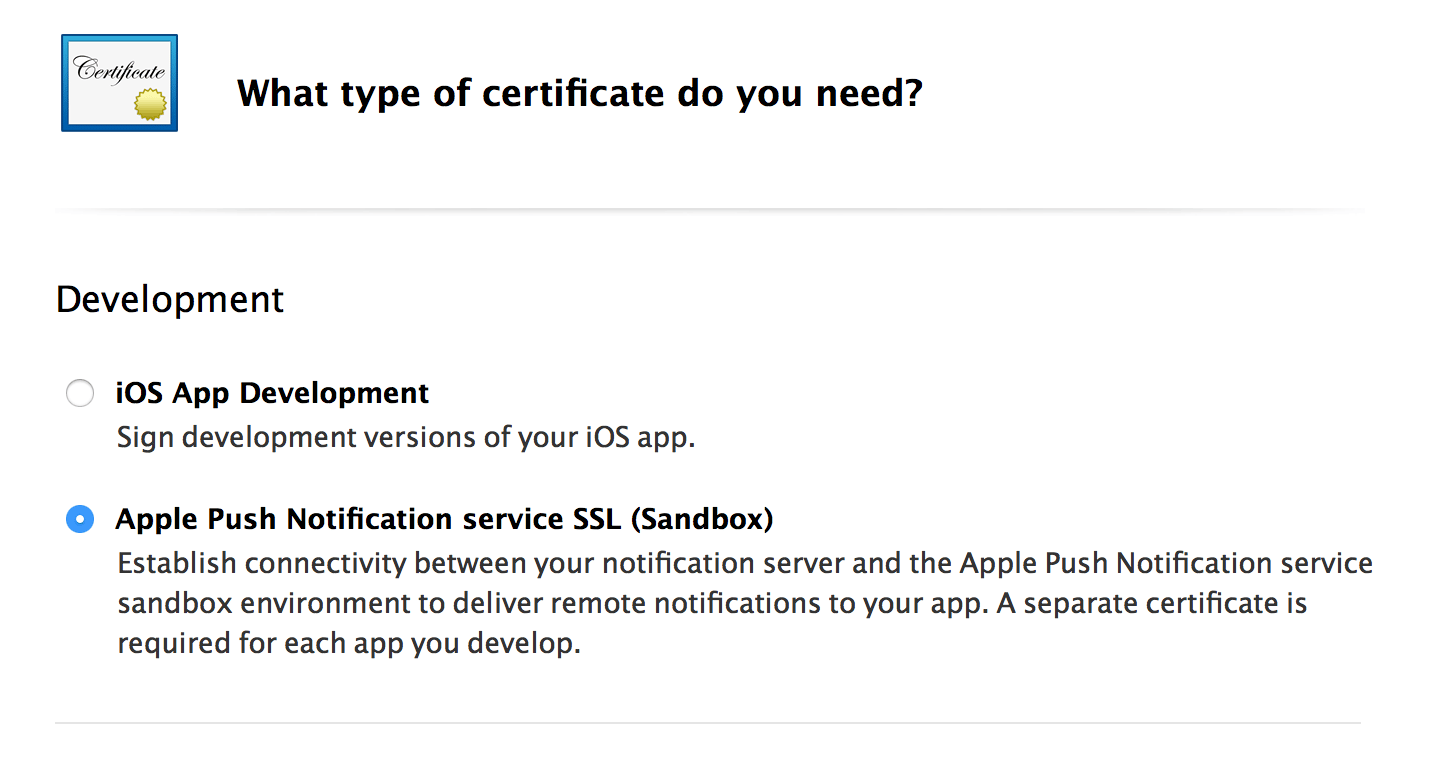 2. 선택한 인증서(개발 또는 프로덕션)를 내보냅니다.
* **Apple Developer Portal**의 **Certificates, Identities and Profiles**에서 인증서 사본을 다운로드하는 것으로 시작합니다. 이렇게 하면 **.cer** 파일이 생성됩니다.
* **Keychain Access**에서 인증서를 열고 설치합니다.
* **Certificates** 하위 범주에서 설치된 인증서를 봅니다.
* **Keychain Access Certificate**를 **.p12** 형식으로 내보냅니다.
2. 선택한 인증서(개발 또는 프로덕션)를 내보냅니다.
* **Apple Developer Portal**의 **Certificates, Identities and Profiles**에서 인증서 사본을 다운로드하는 것으로 시작합니다. 이렇게 하면 **.cer** 파일이 생성됩니다.
* **Keychain Access**에서 인증서를 열고 설치합니다.
* **Certificates** 하위 범주에서 설치된 인증서를 봅니다.
* **Keychain Access Certificate**를 **.p12** 형식으로 내보냅니다.
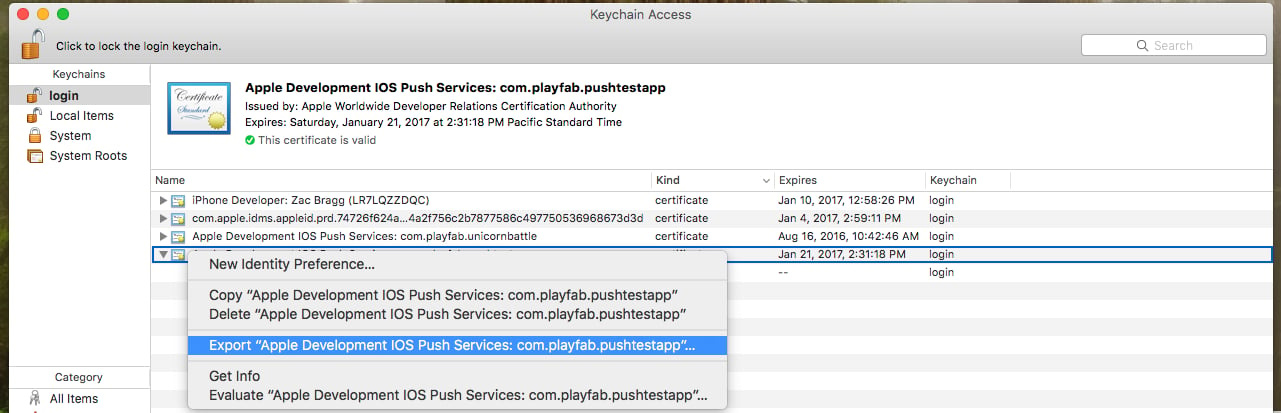 * 다음 콘솔 명령을 사용하여 **.p12 파일**을 **.pem 파일**로 변환합니다.
* `openssl pkcs12 -in apns-dev-cert.p12 -out apns-dev-cert.pem -nodes -clcerts`
* **.pem 파일**이 준비되면, PlayFab **Game Manager**의 **Title's settings** > **Push Notifications**에서 직접 업로드할 수 있습니다.
* 또는 아래 생성기를 사용하여 `SetupPushNotification`을 위한 JSON 요청을 만듭니다.
### SetupPushNotification용 JSON 요청 생성기
요청 생성기는 다음 정보를 사용하여 JSON 요청을 생성합니다.
* **Platform** - 다음 값 중 하나를 사용합니다: APNS (iOS), APNS\_SANDBOX (iOS), GCM (Android)
* **Application Name** - 메시지를 보내는 애플리케이션의 이름을 입력합니다.
애플리케이션 이름은 대문자 및 소문자 ASCII 문자, 숫자, 밑줄, 하이픈 및 마침표로만 구성되어야 하며 길이는 1자에서 256자 사이여야 합니다. 또한 반드시 *고유*해야 합니다.
* **PEM Certificate / API Key** - iOS(APNS 또는 APNS\_SANDBOX)의 경우, PEM 파일의 전체 내용을 사용합니다.
JSON이 생성되면, 이를 사용하여 `SetupPushNotification` 호출을 실행합니다. 응답은 다음 예제와 같아야 합니다.
```json theme={null}
{
“code” : 200,
“status” : “OK”,
“data” :
{
“ARN” : “arn:*******/GCM/your_game_name”
}
}
```
축하합니다! 이제 타이틀의 iOS 메시징 채널이 구성되었습니다.
## 푸시용 iOS 클라이언트 등록
iOS의 경우, PlayFab이 현재 Unity에서 네이티브 구현을 제공하지 않으므로 iOS가 푸시 알림을 처리하는 기본 동작에 의존해야 합니다.
기본적으로, 게임이 백그라운드에 있는 동안 수신된 알림은 **Notification** 영역으로 라우팅됩니다.
또는, 게임이 활성 앱인 동안 수신된 알림은 조용히 수신되며 **Notification** 영역에 표시되지 않습니다.
* 샘플의 다음 코드는 `client Start()`에서 실행됩니다.
```csharp theme={null}
// must be called before trying to obtain the push token
// an asynchronous call with no callback into native iOS code that takes a moment or two before
// the token is available. (so spin and wait, or call this one early on)
// this will always return null if your app is not signed
UnityEngine.iOS.NotificationServices.RegisterForNotifications(UnityEngine.iOS.NotificationType.Alert | UnityEngine.iOS.NotificationType.Badge | UnityEngine.iOS.NotificationType.Sound, true);
```
* 이 시점에서 사용자가 알림 수신에 동의한 경우, PlayFab API [RegisterForIOSPushNotification](xref:titleid.playfabapi.com.client.platformspecificmethods.registerforiospushnotification)을 호출할 수 있습니다.
```csharp theme={null}
byte[] token = UnityEngine.iOS.NotificationServices.deviceToken;
if(token != null)
{
RegisterForIOSPushNotificationRequest request = new RegisterForIOSPushNotificationRequest();
request.DeviceToken = System.BitConverter.ToString(token).Replace("-", "").ToLower();
PlayFabClientAPI.RegisterForIOSPushNotification(request, (RegisterForIOSPushNotificationResult result) =>
{
Debug.Log("Push Registration Successful");
}, OnPlayFabError);
}
else
{
Debug.Log("Push Token was null!");
}
```
* 오류가 발생하지 않았다면 축하합니다! iOS 클라이언트가 타이틀의 Apple Notification 채널에 성공적으로 연결되었습니다.
## iOS 문제 해결
* [유효한 .pem 파일이 있는지 확인합니다](https://docs.aws.amazon.com/sns/latest/dg/mobile-push-apns.html).
* `SetupPushNotification`에 사용된 것과 동일한 인증서가 XCode에서 앱에 서명하는 데 사용되고 있는지 확인합니다.
* XCode에서 빌드에 대해 Push Notification API가 활성화되어 있는지 확인합니다.
* 서명 인증서가 PlayFab 플랫폼과 일치하는지 확인합니다. **[SetupPushNotification](xref:titleid.playfabapi.com.admin.title-widedatamanagement.setuppushnotification)** 을 실행할 때 `OverwriteOldARN = true`를 사용하여 채널을 새 플랫폼에 다시 바인딩합니다. 타이틀에서는 한 번에 *하나*의 iOS 환경(APNS 또는 APNS\_SANDBOX)만 활성화할 수 있습니다.
## 추가 지원
도움말, 예제 버그 및 관련 질문은 [포럼](https://community.playfab.com/index.html)에 메시지를 남겨주세요.
현재 이 문서에 설명된 표준 흐름에 대해서만 서비스를 지원합니다. 다른 일반적인 푸시 서비스 또는 플러그인에 대한 추가 기능을 팀에서 찾고 있다면 알려주세요! 개발자 커뮤니티로부터 피드백을 받는 것을 즐깁니다.
## Related topics
- [푸시 알림 빠른 시작](/ko/services/playfab/live-service-management/game-configuration/title-communications/push-notifications/quickstart.md)
- [Android용 푸시 알림](/ko/services/playfab/live-service-management/game-configuration/title-communications/push-notifications/push-notifications-for-android.md)
- [푸시 알림](/ko/services/playfab/live-service-management/game-configuration/title-communications/push-notifications/index.md)
- [푸시 알림 템플릿](/ko/services/playfab/live-service-management/game-configuration/title-communications/push-notifications/push-notification-templates.md)
- [Services C API 개요 - PFPushNotifications.h](/ko/services/playfab/api-references/c/pfpushnotifications/pfpushnotifications_members.md)
* 다음 콘솔 명령을 사용하여 **.p12 파일**을 **.pem 파일**로 변환합니다.
* `openssl pkcs12 -in apns-dev-cert.p12 -out apns-dev-cert.pem -nodes -clcerts`
* **.pem 파일**이 준비되면, PlayFab **Game Manager**의 **Title's settings** > **Push Notifications**에서 직접 업로드할 수 있습니다.
* 또는 아래 생성기를 사용하여 `SetupPushNotification`을 위한 JSON 요청을 만듭니다.
### SetupPushNotification용 JSON 요청 생성기
요청 생성기는 다음 정보를 사용하여 JSON 요청을 생성합니다.
* **Platform** - 다음 값 중 하나를 사용합니다: APNS (iOS), APNS\_SANDBOX (iOS), GCM (Android)
* **Application Name** - 메시지를 보내는 애플리케이션의 이름을 입력합니다.
애플리케이션 이름은 대문자 및 소문자 ASCII 문자, 숫자, 밑줄, 하이픈 및 마침표로만 구성되어야 하며 길이는 1자에서 256자 사이여야 합니다. 또한 반드시 *고유*해야 합니다.
* **PEM Certificate / API Key** - iOS(APNS 또는 APNS\_SANDBOX)의 경우, PEM 파일의 전체 내용을 사용합니다.
JSON이 생성되면, 이를 사용하여 `SetupPushNotification` 호출을 실행합니다. 응답은 다음 예제와 같아야 합니다.
```json theme={null}
{
“code” : 200,
“status” : “OK”,
“data” :
{
“ARN” : “arn:*******/GCM/your_game_name”
}
}
```
축하합니다! 이제 타이틀의 iOS 메시징 채널이 구성되었습니다.
## 푸시용 iOS 클라이언트 등록
iOS의 경우, PlayFab이 현재 Unity에서 네이티브 구현을 제공하지 않으므로 iOS가 푸시 알림을 처리하는 기본 동작에 의존해야 합니다.
기본적으로, 게임이 백그라운드에 있는 동안 수신된 알림은 **Notification** 영역으로 라우팅됩니다.
또는, 게임이 활성 앱인 동안 수신된 알림은 조용히 수신되며 **Notification** 영역에 표시되지 않습니다.
* 샘플의 다음 코드는 `client Start()`에서 실행됩니다.
```csharp theme={null}
// must be called before trying to obtain the push token
// an asynchronous call with no callback into native iOS code that takes a moment or two before
// the token is available. (so spin and wait, or call this one early on)
// this will always return null if your app is not signed
UnityEngine.iOS.NotificationServices.RegisterForNotifications(UnityEngine.iOS.NotificationType.Alert | UnityEngine.iOS.NotificationType.Badge | UnityEngine.iOS.NotificationType.Sound, true);
```
* 이 시점에서 사용자가 알림 수신에 동의한 경우, PlayFab API [RegisterForIOSPushNotification](xref:titleid.playfabapi.com.client.platformspecificmethods.registerforiospushnotification)을 호출할 수 있습니다.
```csharp theme={null}
byte[] token = UnityEngine.iOS.NotificationServices.deviceToken;
if(token != null)
{
RegisterForIOSPushNotificationRequest request = new RegisterForIOSPushNotificationRequest();
request.DeviceToken = System.BitConverter.ToString(token).Replace("-", "").ToLower();
PlayFabClientAPI.RegisterForIOSPushNotification(request, (RegisterForIOSPushNotificationResult result) =>
{
Debug.Log("Push Registration Successful");
}, OnPlayFabError);
}
else
{
Debug.Log("Push Token was null!");
}
```
* 오류가 발생하지 않았다면 축하합니다! iOS 클라이언트가 타이틀의 Apple Notification 채널에 성공적으로 연결되었습니다.
## iOS 문제 해결
* [유효한 .pem 파일이 있는지 확인합니다](https://docs.aws.amazon.com/sns/latest/dg/mobile-push-apns.html).
* `SetupPushNotification`에 사용된 것과 동일한 인증서가 XCode에서 앱에 서명하는 데 사용되고 있는지 확인합니다.
* XCode에서 빌드에 대해 Push Notification API가 활성화되어 있는지 확인합니다.
* 서명 인증서가 PlayFab 플랫폼과 일치하는지 확인합니다. **[SetupPushNotification](xref:titleid.playfabapi.com.admin.title-widedatamanagement.setuppushnotification)** 을 실행할 때 `OverwriteOldARN = true`를 사용하여 채널을 새 플랫폼에 다시 바인딩합니다. 타이틀에서는 한 번에 *하나*의 iOS 환경(APNS 또는 APNS\_SANDBOX)만 활성화할 수 있습니다.
## 추가 지원
도움말, 예제 버그 및 관련 질문은 [포럼](https://community.playfab.com/index.html)에 메시지를 남겨주세요.
현재 이 문서에 설명된 표준 흐름에 대해서만 서비스를 지원합니다. 다른 일반적인 푸시 서비스 또는 플러그인에 대한 추가 기능을 팀에서 찾고 있다면 알려주세요! 개발자 커뮤니티로부터 피드백을 받는 것을 즐깁니다.
## Related topics
- [푸시 알림 빠른 시작](/ko/services/playfab/live-service-management/game-configuration/title-communications/push-notifications/quickstart.md)
- [Android용 푸시 알림](/ko/services/playfab/live-service-management/game-configuration/title-communications/push-notifications/push-notifications-for-android.md)
- [푸시 알림](/ko/services/playfab/live-service-management/game-configuration/title-communications/push-notifications/index.md)
- [푸시 알림 템플릿](/ko/services/playfab/live-service-management/game-configuration/title-communications/push-notifications/push-notification-templates.md)
- [Services C API 개요 - PFPushNotifications.h](/ko/services/playfab/api-references/c/pfpushnotifications/pfpushnotifications_members.md)