> ## Documentation Index
> Fetch the complete documentation index at: https://devdocs.xbox.com/llms.txt
> Use this file to discover all available pages before exploring further.
# Title News quickstart
> Create and publish localized PlayFab Title News posts with title, body, date, status, and language fields to share patch notes and event updates with players.
Title News는 게임에서 진행하는 패치 노트나 큰 이벤트에 대해 플레이어와 소통하기 위한 메커니즘입니다. 몇 가지 기본 요소로 구성됩니다.
* **Date**
* **Status**
* **Title**
* **Body**
* **Language(s)**
Body 요소는 원문 텍스트 또는 JSON을 포함할 수 있는 문자열입니다.
## 요구 사항
이 빠른 시작 가이드는 다른 주제에서 소개된 정보에 기반합니다. 궁금한 점이 있다면 아래 주제 링크를 참고하세요.
* PlayFab [Game Manager](/services/playfab/live-service-management/gamemanager/quickstart)에 익숙해야 합니다.
로컬라이즈된 title news를 계속 사용하려면 **title default language**가 이미 설정되어 있어야 합니다.
* 이제 title news를 로컬라이즈할 수 있습니다. 타이틀의 기본 언어 및 플레이어의 선호 언어를 다루는 방법에 대한 자세한 내용은 [기본 언어 설정](/services/playfab/live-service-management/game-configuration/title-communications/news/setting-default-languages) 튜토리얼을 참고하세요. 기억하세요 - 로컬라이즈된 title news를 계속 사용하려면 **title default language**를 그에 맞게 설정해야 합니다.
PlayFab은 title news 항목에 대해 title 및 body를 특정 언어에 연결함으로써 게임 개발자를 대신하여 로컬라이즈된 문자열을 저장하는 기능을 지원합니다.
플레이어가 선호하는 언어로 올바른 문자열을 제공하기 위한 필수 로직을 추가했습니다. 클라이언트가 title news를 조회할 때 플레이어의 선호 언어에 따라 서로 다른 버전의 title news를 받게 됩니다. 하나의 title news 항목에 여러 개의 번역된 버전을 추가할 수 있습니다.
## Title News 항목 생성
Title News 항목을 생성하는 방법은 두 가지가 있습니다.
1. Game Manager를 통한 방법.
2. Admin API 메서드 [AddNews](xref:titleid.playfabapi.com.admin.title-widedatamanagement.addnews)를 사용하는 방법.
### Game Manager로 title news 생성
**Game Manager**로 title news 항목을 생성하려면:
다음 이미지와 같이 타이틀 -> **Content** -> **Title News** -> **New Title News**로 이동합니다.
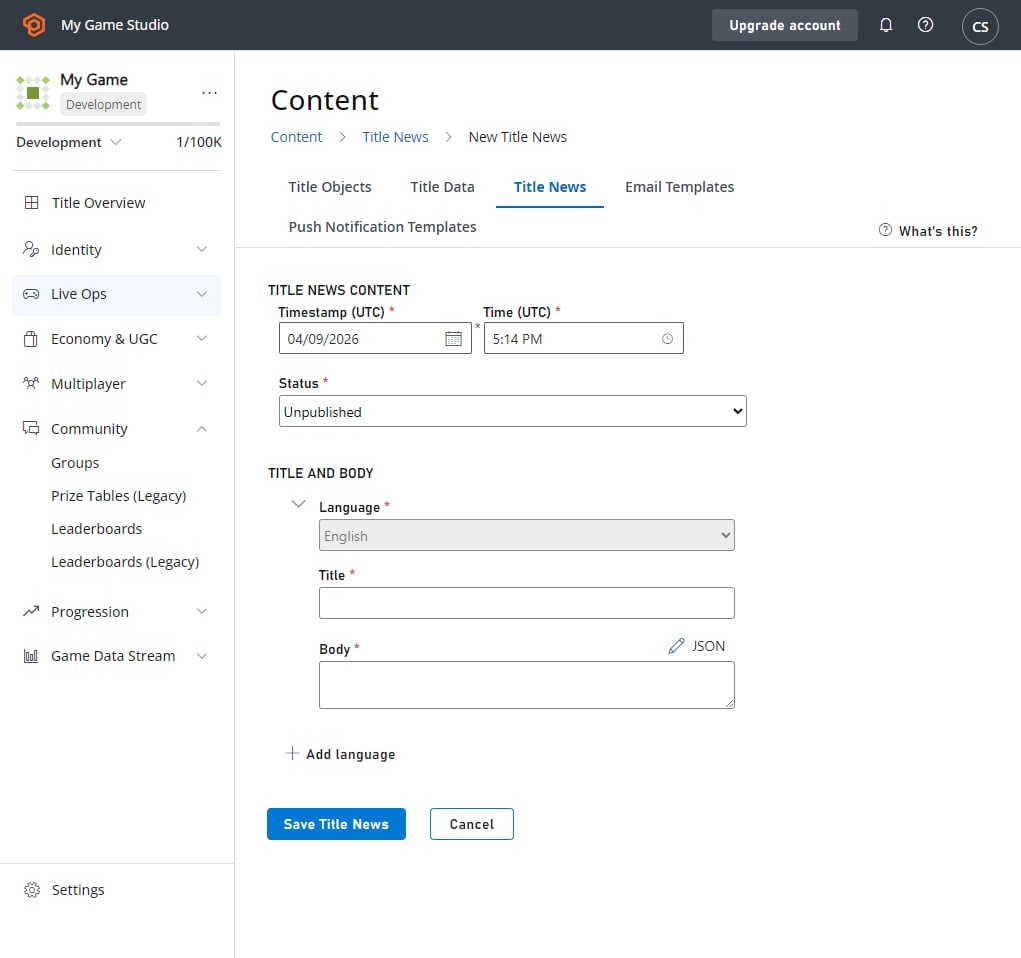 이 튜토리얼에서는 타이틀의 기본 언어가 영어라고 가정합니다. 즉, title news를 저장하려면 기본 언어로 된 문자열을 먼저 추가해야 합니다.
언어를 추가하는 방법은 간단합니다. **ADD LANGUAGE**를 클릭하고 추가할 언어를 선택한 후 로컬라이즈된 문자열을 입력하면 됩니다. **Save Title News** 버튼을 선택하면 항목이 생성됩니다.
타임스탬프는 플레이어가 title news 옆에서 보게 될 시각입니다. 타임스탬프는 **Save Title News** 버튼을 선택한 순간의 시스템 날짜로 자동 설정되지만, 수동으로도 설정할 수 있습니다. title news 페이지를 저장하면 title news 항목 목록이 있는 페이지로 다시 리디렉션됩니다.
### PlayFab Admin API를 사용한 title news 생성
[AddNews](xref:titleid.playfabapi.com.admin.title-widedatamanagement.addnews) 메서드를 호출하여 title news를 생성할 수 있습니다. 이 Admin API를 사용하면 사용자 정의 타임스탬프를 지정할 수 있습니다. 이 방식으로 추가된 뉴스는 *즉시* 게시됩니다. 그런 다음 `AddNews` 메서드에서 반환된 뉴스 ID를 사용해 [AddLocalizedNews](xref:titleid.playfabapi.com.admin.title-widedatamanagement.addlocalizednews)를 호출하여 방금 생성한 항목에 로컬라이즈된 콘텐츠를 추가할 수 있습니다.
아래 코드 예제는 이를 보여줍니다.
```csharp theme={null}
void CreateNews() {
PlayFabAdminAPI.AddNews(new AddNewsRequest {
Timestamp = new DateTime(2014, 1, 8, 12, 0, 0), // Any date - This one is the founding of PlayFab
Title = "My Second News",
Body = "This is my second news post."
},
result => Debug.Log("News post added!"),
error => Debug.LogError(error.GenerateErrorReport()));
}
void CreateNews() {
PlayFabAdminAPI.AddLocalizedNewsRequest(new AddLocalizedNewsRequest{
NewsId = "74623b12-6c80-ee4b-7c3b-58e638aa62bd",
Language = "de"
Title = " Meine zweite Nachricht",
Body = " Dies ist meine zweite Nachricht."
},
result => Debug.Log("Localized news post added!"),
error => Debug.LogError(error.GenerateErrorReport()));
}
```
## Title news 읽기
`GetTitleNews` 메서드를 사용하면 title news를 매우 간단하게 읽을 수 있습니다. 이 메서드는 게시된 모든 title news 항목을 반환하며, 보관되었거나 게시되지 않은 항목은 반환하지 않습니다.
* 클라이언트 API에서 [GetTitleNews](xref:titleid.playfabapi.com.client.title-widedatamanagement.gettitlenews)를 호출하면, title news 항목에 해당 언어의 로컬라이즈된 콘텐츠가 추가되어 있는 경우 플레이어의 선호 언어로, 그렇지 않으면 타이틀의 기본 언어로 뉴스 항목을 반환합니다.
* 서버 API에서 [GetTitleNews](xref:titleid.playfabapi.com.server.title-widedatamanagement.gettitlenews)를 호출하면, 타이틀의 기본 언어로 뉴스 항목을 반환합니다.
```csharp theme={null}
// Using the Client API method
void ReadTitleNews() {
PlayFabClientAPI.GetTitleNews(new GetTitleNewsRequest(), result => {
Debug.Log("Got latest news!");
// Process news using result.News
}, error => Debug.LogError(error.GenerateErrorReport()));
}
// Using the Server API method
void ReadTitleNews() {
PlayFabServerAPI.GetTitleNews(new GetTitleNewsRequest(), result => {
Debug.Log("Got latest news!");
// Process news using result.News
}, error => Debug.LogError(error.GenerateErrorReport()));
}
```
## 기존 title news 항목 업데이트
title news 항목의 콘텐츠는 Game Manager에서만 수정할 수 있습니다.
**Game Manager**에서 수정할 항목을 찾아 선택하려면:
* 왼쪽 메뉴에서 **Content**를 선택합니다.
* **Title News** 탭으로 이동합니다.
* **Existing Entry**를 선택합니다.
업데이트하고 저장한 후 필요한 경우 로컬라이즈된 버전을 추가하려면:
* 항목의 **Title**, **Status** 또는 **Data**를 업데이트합니다.
* **Save Title News** 버튼을 선택합니다.
* 단일 언어의 title과 body만 있는 title news 항목을 업데이트하는 경우, **Add Language**를 선택하여 이 title news의 로컬라이즈된 버전을 추가할 수 있습니다.
향후 릴리스를 위해 게시되지 않은 항목을 준비해 두려는 경우, 이러한 방식으로 published 및 archived 상태를 오가며 전환하게 됩니다. title news 업데이트로 오타 수정도 가능합니다.
## title news 삭제
항목이 더 이상 필요하지 않게 되면 **Game Manager**에서 삭제할 수 있습니다.
수정하려는 항목을 찾은 다음:
* **Title**로 이동합니다.
* 왼쪽 메뉴에서 **Content**를 선택합니다.
* **Title News**로 이동합니다.
* **Existing Entry**의 체크박스에 체크합니다.
* 삭제하려는 **Title News** 항목을 선택하고 **X Delete Title News**를 선택합니다.
## Related topics
- [title_news_updated](/ko/services/playfab/api-references/events/TitleData/title-news-updated.md)
- [PFTitleDataManagementTitleNewsItem](/ko/services/playfab/api-references/c/pftitledatamanagementtypes/structs/pftitledatamanagementtitlenewsitem.md)
- [PFTitleDataManagementGetTitleNewsResult](/ko/services/playfab/api-references/c/pftitledatamanagementtypes/structs/pftitledatamanagementgettitlenewsresult.md)
- [PFTitleDataManagementGetTitleNewsRequest](/ko/services/playfab/api-references/c/pftitledatamanagementtypes/structs/pftitledatamanagementgettitlenewsrequest.md)
- [PFTitleDataManagementClientGetTitleNewsAsync](/ko/services/playfab/api-references/c/pftitledatamanagement/functions/pftitledatamanagementclientgettitlenewsasync.md)
이 튜토리얼에서는 타이틀의 기본 언어가 영어라고 가정합니다. 즉, title news를 저장하려면 기본 언어로 된 문자열을 먼저 추가해야 합니다.
언어를 추가하는 방법은 간단합니다. **ADD LANGUAGE**를 클릭하고 추가할 언어를 선택한 후 로컬라이즈된 문자열을 입력하면 됩니다. **Save Title News** 버튼을 선택하면 항목이 생성됩니다.
타임스탬프는 플레이어가 title news 옆에서 보게 될 시각입니다. 타임스탬프는 **Save Title News** 버튼을 선택한 순간의 시스템 날짜로 자동 설정되지만, 수동으로도 설정할 수 있습니다. title news 페이지를 저장하면 title news 항목 목록이 있는 페이지로 다시 리디렉션됩니다.
### PlayFab Admin API를 사용한 title news 생성
[AddNews](xref:titleid.playfabapi.com.admin.title-widedatamanagement.addnews) 메서드를 호출하여 title news를 생성할 수 있습니다. 이 Admin API를 사용하면 사용자 정의 타임스탬프를 지정할 수 있습니다. 이 방식으로 추가된 뉴스는 *즉시* 게시됩니다. 그런 다음 `AddNews` 메서드에서 반환된 뉴스 ID를 사용해 [AddLocalizedNews](xref:titleid.playfabapi.com.admin.title-widedatamanagement.addlocalizednews)를 호출하여 방금 생성한 항목에 로컬라이즈된 콘텐츠를 추가할 수 있습니다.
아래 코드 예제는 이를 보여줍니다.
```csharp theme={null}
void CreateNews() {
PlayFabAdminAPI.AddNews(new AddNewsRequest {
Timestamp = new DateTime(2014, 1, 8, 12, 0, 0), // Any date - This one is the founding of PlayFab
Title = "My Second News",
Body = "This is my second news post."
},
result => Debug.Log("News post added!"),
error => Debug.LogError(error.GenerateErrorReport()));
}
void CreateNews() {
PlayFabAdminAPI.AddLocalizedNewsRequest(new AddLocalizedNewsRequest{
NewsId = "74623b12-6c80-ee4b-7c3b-58e638aa62bd",
Language = "de"
Title = " Meine zweite Nachricht",
Body = " Dies ist meine zweite Nachricht."
},
result => Debug.Log("Localized news post added!"),
error => Debug.LogError(error.GenerateErrorReport()));
}
```
## Title news 읽기
`GetTitleNews` 메서드를 사용하면 title news를 매우 간단하게 읽을 수 있습니다. 이 메서드는 게시된 모든 title news 항목을 반환하며, 보관되었거나 게시되지 않은 항목은 반환하지 않습니다.
* 클라이언트 API에서 [GetTitleNews](xref:titleid.playfabapi.com.client.title-widedatamanagement.gettitlenews)를 호출하면, title news 항목에 해당 언어의 로컬라이즈된 콘텐츠가 추가되어 있는 경우 플레이어의 선호 언어로, 그렇지 않으면 타이틀의 기본 언어로 뉴스 항목을 반환합니다.
* 서버 API에서 [GetTitleNews](xref:titleid.playfabapi.com.server.title-widedatamanagement.gettitlenews)를 호출하면, 타이틀의 기본 언어로 뉴스 항목을 반환합니다.
```csharp theme={null}
// Using the Client API method
void ReadTitleNews() {
PlayFabClientAPI.GetTitleNews(new GetTitleNewsRequest(), result => {
Debug.Log("Got latest news!");
// Process news using result.News
}, error => Debug.LogError(error.GenerateErrorReport()));
}
// Using the Server API method
void ReadTitleNews() {
PlayFabServerAPI.GetTitleNews(new GetTitleNewsRequest(), result => {
Debug.Log("Got latest news!");
// Process news using result.News
}, error => Debug.LogError(error.GenerateErrorReport()));
}
```
## 기존 title news 항목 업데이트
title news 항목의 콘텐츠는 Game Manager에서만 수정할 수 있습니다.
**Game Manager**에서 수정할 항목을 찾아 선택하려면:
* 왼쪽 메뉴에서 **Content**를 선택합니다.
* **Title News** 탭으로 이동합니다.
* **Existing Entry**를 선택합니다.
업데이트하고 저장한 후 필요한 경우 로컬라이즈된 버전을 추가하려면:
* 항목의 **Title**, **Status** 또는 **Data**를 업데이트합니다.
* **Save Title News** 버튼을 선택합니다.
* 단일 언어의 title과 body만 있는 title news 항목을 업데이트하는 경우, **Add Language**를 선택하여 이 title news의 로컬라이즈된 버전을 추가할 수 있습니다.
향후 릴리스를 위해 게시되지 않은 항목을 준비해 두려는 경우, 이러한 방식으로 published 및 archived 상태를 오가며 전환하게 됩니다. title news 업데이트로 오타 수정도 가능합니다.
## title news 삭제
항목이 더 이상 필요하지 않게 되면 **Game Manager**에서 삭제할 수 있습니다.
수정하려는 항목을 찾은 다음:
* **Title**로 이동합니다.
* 왼쪽 메뉴에서 **Content**를 선택합니다.
* **Title News**로 이동합니다.
* **Existing Entry**의 체크박스에 체크합니다.
* 삭제하려는 **Title News** 항목을 선택하고 **X Delete Title News**를 선택합니다.
## Related topics
- [title_news_updated](/ko/services/playfab/api-references/events/TitleData/title-news-updated.md)
- [PFTitleDataManagementTitleNewsItem](/ko/services/playfab/api-references/c/pftitledatamanagementtypes/structs/pftitledatamanagementtitlenewsitem.md)
- [PFTitleDataManagementGetTitleNewsResult](/ko/services/playfab/api-references/c/pftitledatamanagementtypes/structs/pftitledatamanagementgettitlenewsresult.md)
- [PFTitleDataManagementGetTitleNewsRequest](/ko/services/playfab/api-references/c/pftitledatamanagementtypes/structs/pftitledatamanagementgettitlenewsrequest.md)
- [PFTitleDataManagementClientGetTitleNewsAsync](/ko/services/playfab/api-references/c/pftitledatamanagement/functions/pftitledatamanagementclientgettitlenewsasync.md)